How to Fix “Failed to connect to Windows service” Error?

When encountering the Failed to connect to Windows service error, the system usually displays a message indicating that Windows could not connect to the Group Policy Client service or the System Event Notification Service. This error means that the operating system is unable to start or communicate with important background services necessary for normal operation.

The most common cause of this issue is the failure of the Group Policy Client service to start properly. Other causes include corrupted system files, improper configuration of Windows services, or issues with the Windows Registry​.

Additionally, this error can prevent standard users from logging into the system, leaving only administrative accounts accessible for troubleshooting

1. Use the Registry Editor

If these settings are incorrect or missing due to system errors or malfunctions during updates, it can result in the inability of your system to connect to the Group Policy Client service, thus preventing user logins.

By following the outlined registry modifications, you’ll be realigning the necessary configurations, which can help restore normal service operation and resolve the login issues.

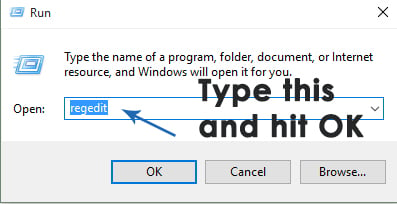
  1. Press the Windows Logo key + R to open a Run dialog, type regedit, and click OK. This will open the Registry Editor.Failed to connect to Windows service1
  2. In the Registry Editor left pane, navigate to the following path and verify the presence of a folder named gpsvc. This folder is central to service configuration and parameters. Usually, it is present here:
     HKEY_LOCAL_MACHINE > SYSTEM > CurrentControlSet > Services
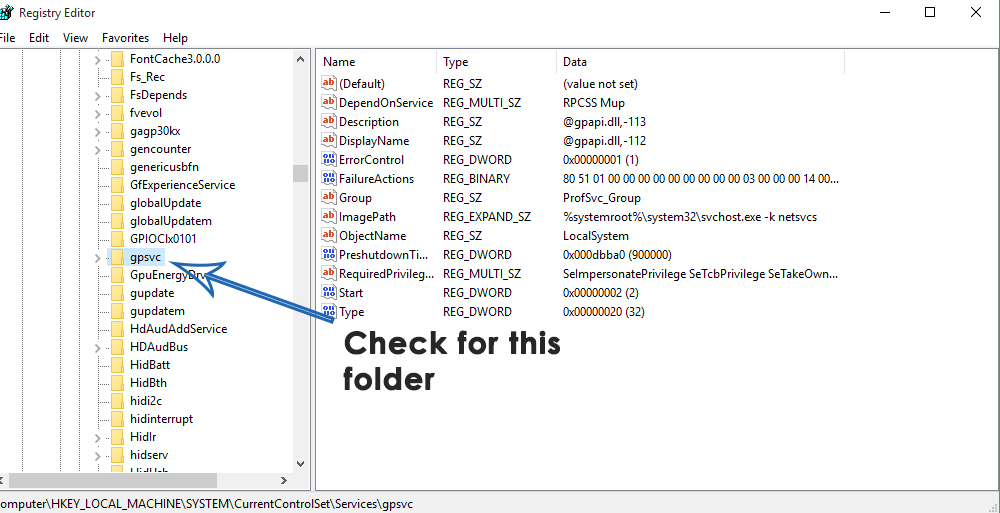
    Failed to connect to Windows service2

  3. If gpsvc exists, navigate to the following key within the left pane of the Registry Editor. This path is crucial and sensitive, so be cautious not to change anything else.
    HKEY_LOCAL_MACHINE > SOFTWARE > Microsoft > Windows NT > CurrentVersion > SvcHost
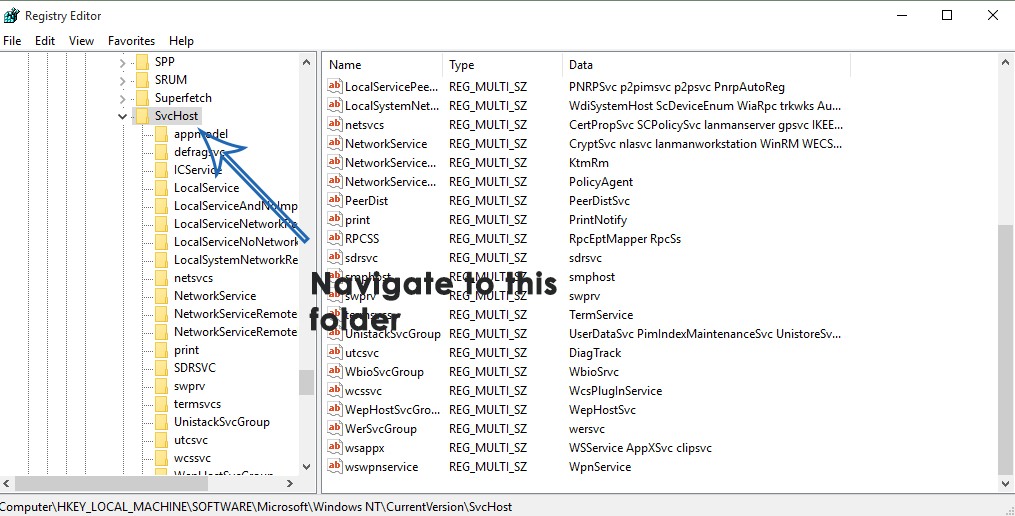
    Failed to connect to Windows service3

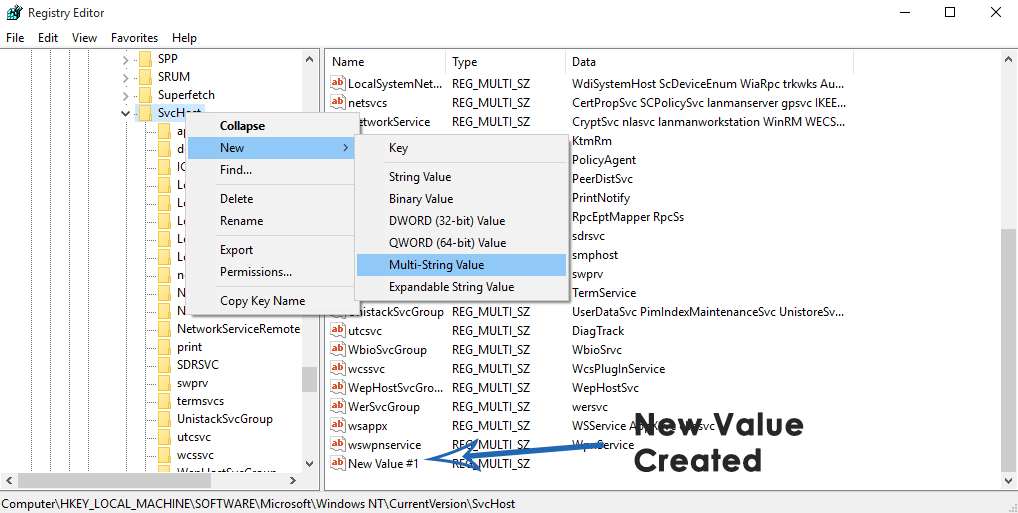
  4. Within the SvcHost folder, look for keys and values required for this process. Check for the existence of a multi-string value named GPSvcGroup. If it’s not there, you’ll need to create it. Right-click on SvcHost, go to New, and select Multi-String Value.Failed to connect to Windows service4
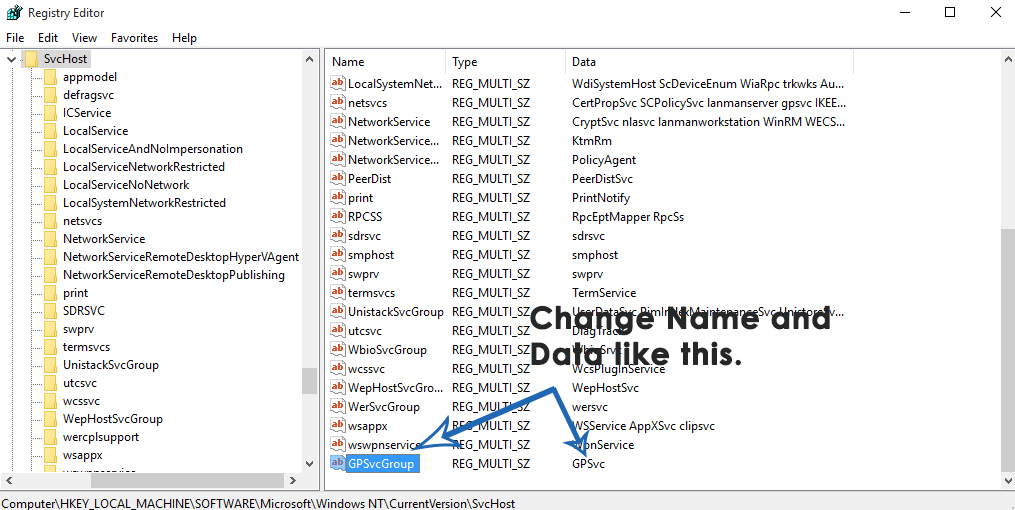
  5. A new registry value will appear in the right pane. Rename it to GPSvcGroup via right-click and Rename, then typing GPSvcGroup and hitting Enter. Double-click GPSvcGroup to modify it, replace any content in the Value data field with GPSvc, and click OK.Failed to connect to Windows service5
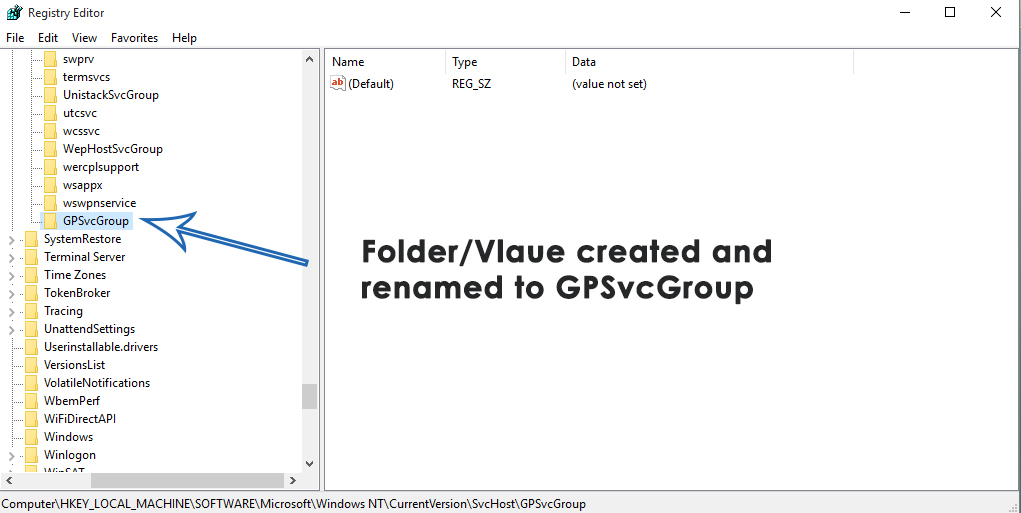
  6. Next, you may need to create a new key within SvcHost. Right-click on SvcHost, hover over New, and click Key. Rename the new key to GPSvcGroup.Failed to connect to Windows service6
  7. In GPSvcGroup, create two new DWORD (32-bit) values. Right-click in an empty space, go to New, and select DWORD (32-bit) Value. This step should be repeated for a total of two new values.
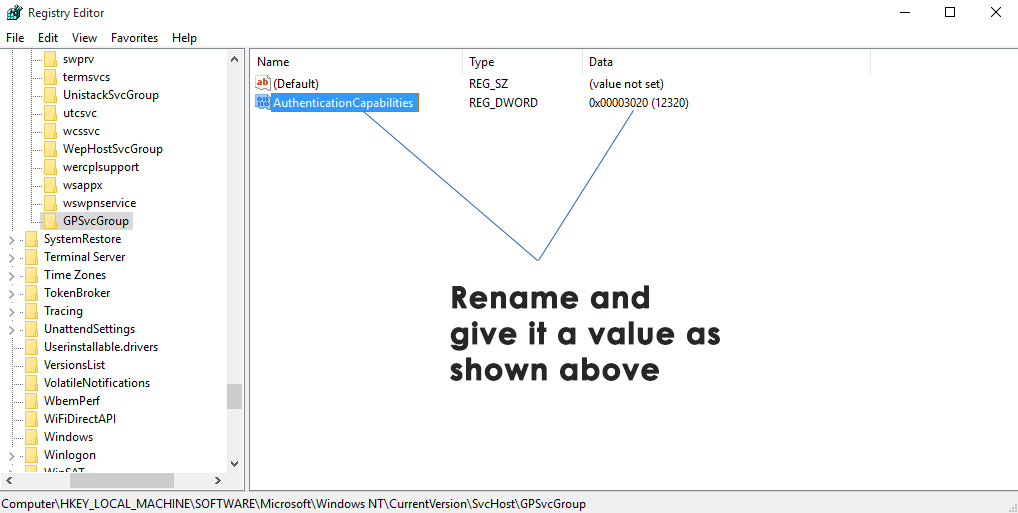
  8. Rename the first value to AuthenticationCapabilities, setting its Value data to 12320 and using Decimal as its base.Failed to connect to Windows service7
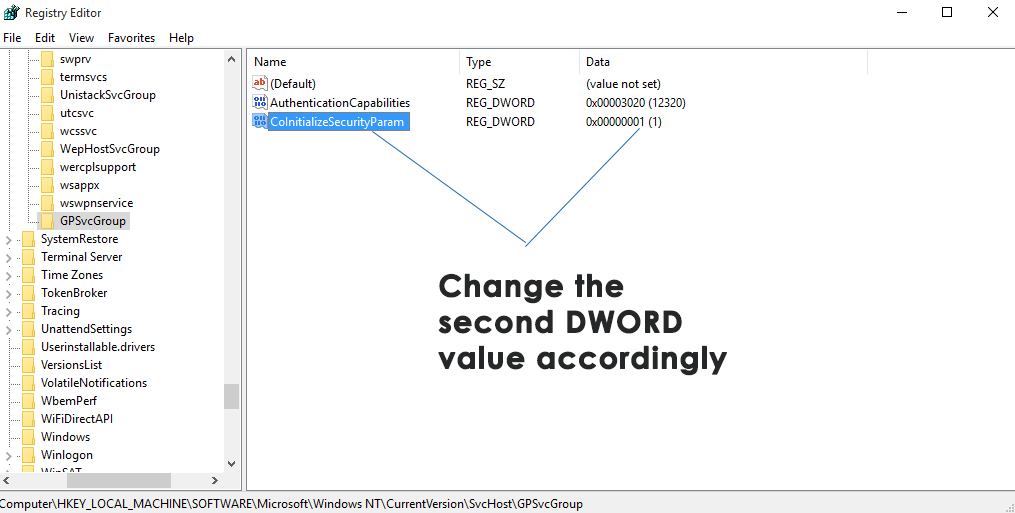
  9. Rename the second value to CoInitializeSecurityParam with a Value data of 1 and using Decimal as its base.Failed to connect to Windows service8
  10. Close the Registry Editor and restart the computer to see if the problem persists.

2. Perform a Clean Boot

This troubleshooting approach can figure out whether a third-party software is disrupting the Group Policy Client service. By starting with a minimal set of drivers and startup programs, you effectively remove any interference from non-critical applications, which can solve this connection issue.

If this fix works and the error message disappears, you’ll know that the reason was a background application, and you can then proceed to pinpoint the exact source by re-enabling services and programs one by one.

  1. Press the Windows Logo key + R, type msconfig, and click OK.
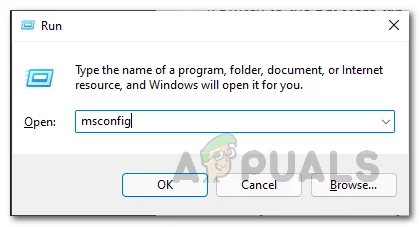
  2. Open the Services tab, check the Hide all Microsoft services option, then click Disable all.
  3. Switch to the Startup tab and click on Open Task Manager, under the Startup tab and disable each application by right-clicking and selecting Disable. You can re-enable necessary applications later in the same way.
  4. Restart your PC to check if the issue remains upon booting.

3. Reset the Winsock Catalog

This essential Windows component is responsible for handling network input and output requests for programs that access the internet. Corruption or misconfiguration within Winsock can disrupt the communication between your system services and the network, possibly causing the error.

By resetting it, you return these settings to their default state, potentially fixing any glitches that prevent services like the Group Policy Client from functioning correctly.

  1. Open the Start Menu.
  2. Search for cmd.
  3. Right-click on the search result titled cmd and choose Run as Administrator to open an elevated Command Prompt.
  4. Type the following into the elevated Command Prompt and press Enter:
    netsh winsock reset

  1. Once the command is executed, close the elevated Command Prompt.
  2. Restart the computer and check if resetting the Winsock catalog has resolved the issue.

4. Turn off Fast Startup (For Windows 10 Only)

Fast startup can sometimes interfere with system services and cause errors, such as the one with the Group Policy Client service. By disabling Fast Startup, the system undergoes a more complete shutdown process, potentially resolving service-related issues that occur during the boot sequence. This step makes sure that all services start from scratch, thus potentially fixing errors caused by incomplete or corrupted initializations.

  1. Right-click on the Start Menu button to open the WinX Menu.
  2. Select Power Options.
  3. Click on Additional power settings in the right-pane.
  4. Click on Choose what the power buttons do in the left-pane.
  5. Click on Change settings that are currently unavailable.
  6. Uncheck the Turn on Fast Startup (recommended) option.
  7. Click on Save Changes and restart your PC.

5. Manually Create Registry Keys and Values

Manually creating registry keys and values makes sure that all necessary registry entries for the Group Policy Client service are correctly configured. This service relies on specific registry keys to run properly; if these keys are missing or corrupted, the service may fail to start. This can restore the service’s functionality, allowing your system to once again support group policies effectively.

Note: Before making any registry changes, it’s important to back up the registry database. So it can be reverted to the previous functioning state in case of errors.

  1. Hold the Windows logo key, type regedit, and right-click on the result, choosing Run as administrator.
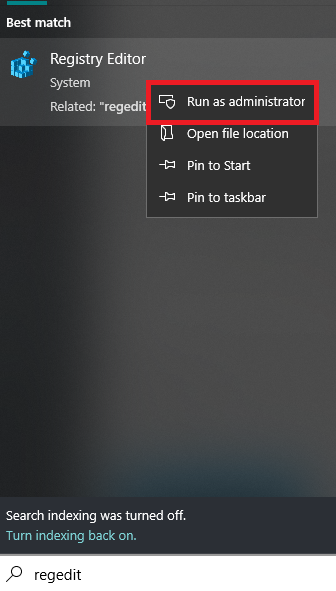
  2. Confirm running Regedit as an administrator by clicking Yes.
  3. Navigate to the following path in the Registry Editor:
    HKEY_LOCAL_MACHINE\SOFTWARE\Microsoft\Windows NT\CurrentVersion\Svchost
  4. Find the netsvcs value data on the right side and select it.
  5. Right-click on netsvcs and choose Modify.
  6. In the new window, notice that gpsvc is missing. Add it at the end of a value data line, pressing Enter afterward, as shown below.
  7. Click OK after entering the value.
  8. Now, right-click on Svchost, choose New, then select Key and name it netsvcs.
  9. Within the netsvcs key, right-click on the blank area, select New, then choose DWORD (32-bit) Value, even if your operating system is 64-bit.
  10. Create a DWORD value named CoInitializeSecurityParam and set its value to 1.
  11. In the same way, create another DWORD named CoInitializeSecurityAllowLowBox and set its value to 1.
  12. Continue and create a third DWORD called AuthenticationCapabilities and set its value to 3020.
  13. Restart your computer.
  14. Once restarted, press the Windows logo key + R.
  15. Type services.msc and hit Enter.
  16. Find the Group Policy Client service and confirm it’s running. If it is, your issue should now be resolved.

6. Start the System Event Notification Service

This service manages event notifications for system events, covering various components crucial to group policies. If accidental changes or updates turn this service off, restoring it to Automatic and activating it could repair communication pathways, making sure that group policy-related services and tasks operate smoothly once more.

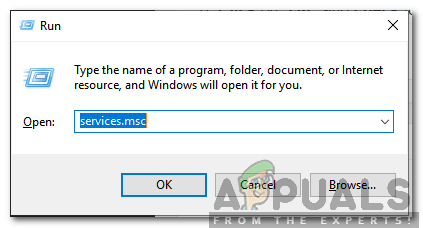
  1. Simultaneously press Windows + R keys to open the Run prompt.
  2. Type services.msc and hit Enter.
    Entering services.msc in Run
    Typing in services.msc and pressing Enter
  3. Locate and double-click on the System Event Notification Service.
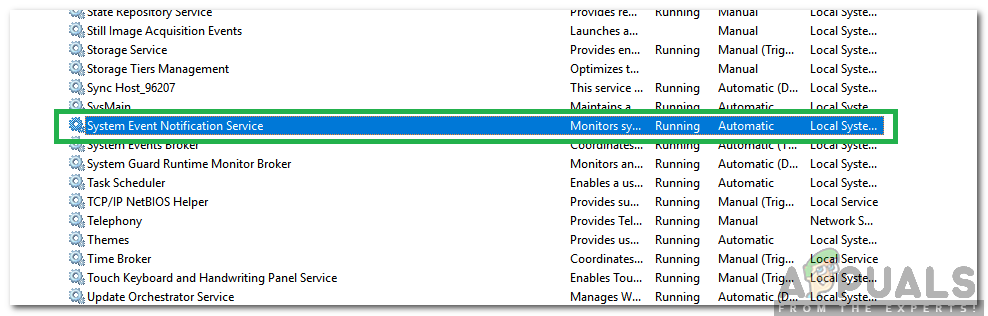
    System Event Notification Service
    Double-clicking on the System Event Notification Service
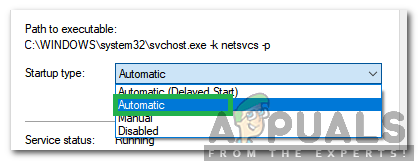
  4. Set the Startup Type to Automatic.
    Setting Startup Type to Automatic
    Selecting Automatic
  5. Click the Start button, then hit Apply.
  6. Click OK and verify that the error no longer occurs.
ABOUT THE AUTHOR

Kamil Anwar


Kamil is a certified MCITP, CCNA (W), CCNA (S) and a former British Computer Society Member with over 9 years of experience Configuring, Deploying and Managing Switches, Firewalls and Domain Controllers also an old-school still active on FreeNode.

Comments

154
    SH
    Susan Hdez Oct 20, 2015

    I did it but do not work, still Failed to connect to a window service WINDOWS 10

      KA
      K. Arrows Author Oct 20, 2015

      What is the exact error?

        SH
        Susan Hdez Oct 20, 2015

        Failed to connect to a Windows service. Windows couldn’t connect to the Groups Policy Client service. This problem prevents standard users from signing in

          KA
          K. Arrows Author Oct 20, 2015

          Are you logged in as the administrator? Go to Control Panel -> User Account and see what does it says for your Account “Standard” or “Administrator” ?

          SH
          Susan Hdez Oct 20, 2015

          Administrator, I am the unique user, when this happen I can not do everything on windows explorer
          1 week ago was the same and I enter on netsh and winsock reset and solved but every week this is happening on windows 8 and now windows 10 too

          KA
          K. Arrows Author Oct 21, 2015

          This is strange. Unfortunately; it will be too difficult for me to troubleshoot the issue here. Please e-mail me on kevinarrows@appuals.com.

          SH
          Susan Hdez Dec 8, 2015

          Hi, remember me, this happens again today

          KA
          K. Arrows Author Dec 9, 2015

          This was resolved yesterday.

    HA
    Haroni Oct 25, 2015

    Thank you, it works good. I think the problem is solved. If it happens again I will come back to your site. Thank you

    VE
    Vespertilio Nov 26, 2015

    Worked like a charm. Thanks yo!

    JP
    J Pearce Dec 1, 2015

    Doesn’t work for my new ASUS laptop, taking it back to PC World

      KA
      K. Arrows Author Dec 1, 2015

      You can take it back, but it’s not a hardware issue.

    JA
    Jack Dec 6, 2015

    Hi,
    “Failed to connect to Windows Service” is an ongoing problem with HP laptop bought new last march. It initially came with Windows 8 64 bit and I subsequently updated to Win 10. After too many problems with speed and mysterious freezing I returned it to the Harvey Norman store where they wiped it completely and re-installed Win 10. All problems fixed, yippee. Three days ago the laptop did an unusually long update lasting about one hour ( I have fast broadband) and my problems are starting all over again. I’m not a techie and don’t think I should need to be one to use modern software/laptops. Often times when looking for “My Documents” I find the folder is empty after the File Explorer spent 15 minutes opening the file and at other times it refuses to open the Google Chrome browser. I only wish I could go back to Windows 7 Ultimate where I never had any issues.

      KA
      K. Arrows Author Dec 6, 2015

      I hope you won’t mind me saying this, but it seems like windows 10/8 is a difficult digest for you. Since everything has been changed in the 8/10; many users find it extremely difficult to continue with their basic use. If you want, i can do a personal remote session with you to change start menu and set it to be like Windows 7, create short cuts, etc. If you’re interested, email me on kevinarrows@appuals.com. There are no charges for this, it’s free.

    BA
    Babs Dec 15, 2015

    Please, I have everything you mentioned present in my Registry already. Am I still supposed to create those new folders (GPSvcGroup) too?

      KA
      K. Arrows Author Dec 15, 2015

      I have just updated the guide with an additional solution. Please try solution 2 and let me know the results.

    JE
    Jennifer Dec 17, 2015

    Kevin,
    I went with the first option. Reboot was slow but it worked. After everything was up and running, a message from Windows came in to let me know that “Updates had failed to complete installation”.
    I am bookmarking your site and saving your email address for future reference.
    Thank you,
    Jennifer
    For others seeking information for their use:
    I am running Windows 10 on an ENVY I bought one year ago. I am the Admin and there are 3 other user accounts set up on this machine.

      KA
      K. Arrows Author Dec 17, 2015

      Are you able to logon to Windows?

        JE
        Jennifer Dec 18, 2015

        Yes. It took a very long time to complete the updates to Windows. Apparently the updates include “oh so much more” than I will ever need. ):/ At long last, they were complete and all seems to be working fine now. I did have to go in and reset Kaspersky so that it would continue to run as the firewall from boot up to complete shut down.
        Other than that, I haven’t come across any other gremlins. I will keep you posted.

          KA
          K. Arrows Author Dec 18, 2015

          Thanks.

    BE
    Ben Dec 24, 2015

    HI Kevin, I am the unique user on my PC and use Windows 10. I have followed both solution options and the error message still occurs “Failed to connect to a Windows service. Windows couldn’t connect to the Groups Policy Client service. This problem prevents standard users from signing in”…. Do you have any further advice ?

      KA
      K. Arrows Author Dec 24, 2015

      Please post this as a new question on eQuestions.net/ask – I’ll help you troubleshoot it remotely.

    SR
    SP Rounds Dec 25, 2015

    I have a recent Asus laptop running Windows 8. Will the upgrade to Windows 10 fix this problem so I don’t have to go into the registry? (I am a very non-tech).

      KA
      K. Arrows Author Dec 25, 2015

      Windows 10 has more issues then Windows 8. What if it carries the problem over to 10 and brings new issues?

    BR
    Brett Dec 27, 2015

    You, kind sir, are a lifesaver. My daughter got a new Asus for Christmas. Set it up, let it acquire the updates, and sure enough got this error. Solution #1 above seems to have done the trick so far. Your step-by-step instructions and screen shots were very well done and helpful. Problem solved (permanently, I hope). Thanks VERY MUCH for your expertise and for having taken the time to put this out there.

      KA
      K. Arrows Author Dec 27, 2015

      You’re Welcome. Your feedback gives me the motivation i need.

    JI
    jimmimcsandy Dec 30, 2015

    HEY.. I need help.. im pretty tech saavy.. but this has me stumped.. helping a friend.. Acer Laptop Win 7 Home Premium.. was getting.. “The group policy client service failed the logon. Access is Denied” .. tried a few procedures..via SAFE MODE.. FIRST was to load a restore point.. but NONE were available.. zip.. nada.. – so.. after a bit of internet research.. i foulnd this one.. very similar to yours outlined at this youtube site.. which more or less added AuthenticationCapabilities (3020Hex), CoinitializeSecurityParam (1) and CoinitializeSercurityAllowLowBox (1) -however I used a capital “I” in CoInitialize 🙁 it didn’t work.. then I read further into it.. fixed it to lower case “i” ..that didn’t resolve.. was able to run MBAM in safe mode.. found a couple hits but nothing major.. and it still didn’t resolve the error.. – another video suggested going into the registry .. finding the s-1-5-18-xyz.BAK and renaming it.. or its duplicate.. blah blah.. but i didn’t have any duplicates.. nor any .baks SO i took it upon myself to create a NEW ADMIN USER..and boot from there.. – GONE was the Group policy client service failed the logon …access is denied error message.. – HOWEVER.. NEW ADMIN USER got.. 2 messages.. 1) centre of screen.. System Restore Completed Successfully blah blah blah ..and I HAD NOOOO Idea my friend had attempted a restore.. (especially after personally discovering there were no other retore points available) – the 2nd message.. in lower right corner above the clock.. “Failed to connect to a windows service Windows could not connect to the system notification Service service. This problem prevents standard users from logging on to the system. As an administrative user, you can review the system event log for details about why the service didn’t respond.

      KA
      K. Arrows Author Dec 30, 2015

      Because there is too much complications in this issue you’ve stated; i’d go for the simplest method is to reinstall Windows.

    KI
    Kim Dec 31, 2015

    I still have the problem. Would you please help me fix this?

      KA
      K. Arrows Author Dec 31, 2015

      Yes. I can take a look at it remotely. Please submit a question through eQuestions.net/ask

    JT
    JT Jan 5, 2016

    My Windows 10 laptop started giving me this error along with other complications today, such as Chrome not launching and not being able to check for updates. I followed your Solution 1 and everything seems to be running fine now. Thank you for your help!

      KA
      K. Arrows Author Jan 5, 2016

      You’re Welcome 🙂

    GL
    Graham Lewis Jan 7, 2016

    Thank you. Very easy instructions to follow. Fixed the issue.

    CL
    cloiebuggeater Jan 8, 2016

    THANK YOU for this very clear step by step! After 2+ hours of trouble shooting headaches, my daughter’s computer is working again. I followed solution 1, prayed I hadn’t messed anything up (I’m basic tech competent. These aren’t areas of my computer I usually go into.), and rebooted. Error has gone away and weird software issues are gone. Chrome now openes when I click on the icon, instead of 10+ minutes later!

    JF
    Jennifer Foster Jan 8, 2016

    wow, thank you so much! I tried 2nd option first as it seemed easier, but it didn’t work.
    Then tried 1st option, and it seems to have worked, fingers crossed!
    (This problem started for me after an incredibly long Windows 10 update)

    L
    Luca D. Jan 11, 2016

    I have the same issue however I cannot do any commands that need admin permission even if I logged as admin for example cmd.exe, services.msc or regedit, nor advanced options can be launched. Which procedure could I use?
    Thanks in advance

    L
    Luca D. Jan 11, 2016

    I have the same issue however I cannot do any commands that need admin permission even if I logged as admin for example cmd.exe, services.msc or regedit, nor advanced options can be launched. Which procedure could I use?
    Thanks in advance

      KA
      K. Arrows Author Jan 12, 2016

      Do you have any data on this system?

    DH
    Dan Hintze Jan 12, 2016

    Solution One worked thank you for all the useful information

    MD
    mdessi Jan 15, 2016

    Hi there I get the same problem with Windows 10 pro Group Policy Client Service and it does appear to be related to update, I have enabled system restore and have to conduct one to remove the problem.
    My last computer that recently died also had Win 10 pro and had exactly the same fault.
    When I try your fix I can find GPSVC OK but not SVCHOST.
    I can only navigate to “Current Version” and if I click it there are no folders available only files, could it be that Win 10 pro is different?
    Any help would be most appreciated.

      KA
      K. Arrows Author Jan 16, 2016

      If those keys and values dont exist, create them and do a registry back up before creating them.

        MD
        mdessi Jan 16, 2016

        Hi there many thanks for the reply, a normal system restore point will back up the current registry right?

          KA
          K. Arrows Author Jan 18, 2016

          Yes, it will.

          MD
          mdessi Jan 24, 2016

          Ok I’m afraid it doesn’t work for me, I have a brand new HP EliteOne 800 with 23″ touchscreen.
          I managed to locate gpsvc and when opened every line of code was identical to the instructions published here.
          I then went through the procedure to create the 2 DWORD.
          After reboot I found that within 45 minutes or so Chrome gets erratic and if I close it down it won’t reopen for several minutes, I also notice that if I click Allsettings>Update & Security the update page only displays the headings on the left Windows Update, Windows Defender, Backup etc but the Windows Update part to the right is completely blank.
          If I switch the Computer off it gets to the black screen in the normal time then takes several minutes to shut down completely.
          When I switch it back on the Group Policy Client message appears and chrome takes several minutes to load and the Update & Security issue exists.
          All subsequent shut downs seem to result in the Group Policy Client message but a reboot which also takes several minutes to conduct seems to reset the problem for another 30 or 40 minutes when it happens again.
          I conducted part 2 of your fix but it also had little affect.
          I have very carefully gone back through both procedures to make sure I didn’t make any mistakes but it is exactly as it should be.
          Incidentally no Windows updates occurred during the procedure or so far subsequently.
          Incidentally Firefox and IE continue to work fine when Chrome becomes unresponsive, I did also try updating Chrome to 64bit from 32.
          Many Thanks, Mike

          KA
          K. Arrows Author Jan 25, 2016

          I would suggest that you submit this as a new question on eQuestions. Troubleshooting, all of these issues in comments is not suitable.

          MD
          mdessi Jan 29, 2016

          Hi there I’m going through the complete process again to be certain I didn’t make a mistake, the second DWORD (CoInitializeSecurityParam) is the value data of 1 also decimal as the first one only it isn’t stated.
          Many thanks

          DC
          Dave Carsley Aug 26, 2016

          I have the same exact question, and I see that yours was never answered. Do you remember if you used decimal for the second Dword? Thank you!

          KA
          K. Arrows Author Aug 26, 2016

          It should be decimal.

    RA
    randolphsj Jan 18, 2016

    Thank you! Issues occurred after a Windows 10 update.Solution 1 worked like a charm.

    JM
    Jane Macklin Jan 20, 2016

    Hello, am writing to say a HUGE thank you for your easy to understand, exceptionally clear and super-successful article! I’ve had this problem for a while, but have been dubious of following many of the posts (too techno). Your style of writing and explanation is really great. Solved my problem easily (even with my 4 yr old climbing all over the laptop!) 🙂 Thank you, thank you, may you keep on posting 🙂

    BY
    bypasser Jan 20, 2016

    Thank you! 🙂

    TH
    Theresa Jan 21, 2016

    I tried both solution. Just hope the message doesn’t come up again. ‘Cause that message pops up for me for the last 3 days. If it does, is there a way to not have that message pop up ever again?

    TH
    Theresa Jan 22, 2016

    So… Yesterday I tried both and well… Today I didn’t get that message. Just hope it will never happen again in the near future. If it does, then I’ll come back to this site and follow the steps again. Thanks for writing this article. 🙂

      KA
      K. Arrows Author Jan 22, 2016

      Welcome 🙂

    CA
    Catherine Jan 24, 2016

    Hi. I’ve been struggling with this problem for awhile. About a week ago I found your post. I tried Solution 1 and found that I was missing the GPSvcGroup. Followed your instrux and problem was solved. Everything seemed to be working properly again. Then yesterday all my issues came back! Including the “failed to connect to windows service…” pop-up. So I came back to your instrux and checked to see if the GPSvcGroup I had created was still there. It was. So I did Solution 2: Clean Boot. and that seems to have gotten everything working properly again.
    I went back into the registry editor to look more closely at what I had done initially and did notice that in SvcHost, the new value I created was named GPSvc, not GPSvcGroup. And the data field was blank. I wondered if I had missed that step of changing the value data to GPSvc. So I did that just now. Hope that wasn’t a mistake.

    Any idea why the fix didn’t stick? There doesn’t seem to have been any Windows Updates. One of the things that happens when I’m experiencing the problems is that the Win.Update page is blank and frozen, so I’m not sure what’s going on there. Now that things are working again, I checked the history and only see the last successful update on the 18th, which I believe happened right after the initial fix. And the computer was fine for several days after that.
    Thanks a lot for your help on this.

      KA
      K. Arrows Author Jan 25, 2016

      Do a system restore to the time when it was working.

        CA
        Catherine Jan 25, 2016

        oh dear. I’ve been having problems, initially with windows updates, since soon after I bought my Asus Zen notebook in July. It had Win8 when I bought it and the free upgrade would’t install successfully. And other updates were downloading and installing multiple times, some failing. Seems like it was often Asus updates that failed. Finally took it to a place that downloaded Win10 from somewhere else. It was sometime after that that I started having symptoms described in you post.
        So what I’m saying is, I’m not sure when I would restore to.

          KA
          K. Arrows Author Jan 25, 2016

          Then the best option is to do a factory reset on Windows 10. I would suggest you submit this as a new question on http://equestions.net/ask so i can assist you there individually.

          CA
          Catherine Jan 25, 2016

          Okay, thanks, I’ll do that

    BA
    b a Jan 27, 2016

    I did the second method and it worked! Microsoft one drive is still disabled. I don’t use it anyway. Thank you.

    DM
    David Michaels Jan 30, 2016

    6. Now, click over the GPSvcGroup from the left and create 2 new DWORD For this purpose, right click on the empty space on the right and select New > DWORD (32-bit).

    Good day!
    My laptop is 64 bit, how should I change the New – DWORD (32bit)?, would this still do or I have to do something else? not that savvy. Thanks!

      KA
      K. Arrows Author Jan 30, 2016

      This will do, works on both 64 and 32 bits. Just follow the instructions.

    VI
    Vic Jan 30, 2016

    This works. The only solution that fixed the problem after trying too many others after spending 2 days effort. Thanks. Greatly appreciate the help!!

    IO
    iora16 Jan 31, 2016

    Thank you, Kevin! You just gained another fan!

      KA
      K. Arrows Author Jan 31, 2016

      🙂 Thanks

    JB
    Jo Brown Feb 2, 2016

    Brilliant! Worked first time. Easy to follow, clear instructions. Thanks so much!

    KJ
    Kenneth Jennings Feb 2, 2016

    Just wanted to say THANKS for an easy to follow guide that sorted the GPC service problem. Usually if it involves the Registry it is a “Oh Oh I’m going nowhere near that” but you made it very easy. Have now got this page saved to favourites in case it is needed again.

      KA
      K. Arrows Author Feb 2, 2016

      Thanks

    DO
    Daniel O'Donnell Feb 4, 2016

    For me, windows 10 has been a new problem every other day – I do not recommend the ‘free’ upgrade to any of my friends. Earlier today, my wife came to me and said she could no longer logon with her user account (that has worked for the past 4 months). I searched for an answer and came across your solution. I have never added anything to the registry before and I’m not sure what your instructions did but it worked with the first reboot! Many thanks for posting this resolution as it is far superior to anything I could find on the Microsoft site. Your detailed instruction was clear and well done. I hope you win big in the lottery! Thanks again.

    BR
    bristan Feb 6, 2016

    I have been experiencing this problem somewhat at random with it happening sometimes and at other times a normal boot up. When the problem occurs the computer wont shut down and I have to remove the power to shut it down. Strangely this seems to fix the problem temporarily, and the next boot is ok. Nevertheless I have applied your fix (thanks for your info) and have tried a couple of boots which seem ok. hopefully that has fixed the problem.
    Regards
    B

      KA
      K. Arrows Author Feb 6, 2016

      thanks

    PE
    Perk1 Feb 8, 2016

    Thanks! This is help me

    JA
    Jane Feb 8, 2016

    Thank you …. Following your instructions above means i know have a laptop that works again 🙂

    PR
    Partha Roy Feb 10, 2016

    Thank you so much for such a nice and clear explanation. Issue resolved.

    JA
    Jack Feb 12, 2016

    Or you could just go in the cmd window and type “netsh” then….”winsock reset”…. then restart. That simple!

      AN
      Anna Apr 7, 2016

      I’ve done that before, worked only for a few days… hopefully this solution will be more permanent.

    F8
    Fire Show 840 Feb 18, 2016

    THANK YOU!!! I followed your very clear steps even though I didn’t understand any of it, and voila! Restarted and everything is back to normal.

    ST
    Steve Feb 21, 2016

    You my friend are a lifesaver! THANK YOU!

    PE
    Per Feb 23, 2016

    This fixed it for me, running windows 10 64b. Thanks alot Kevin =)

    KI
    Kid Mar 4, 2016

    THANK YOUUUU!!!!! You just saved my uni grades 😉
    So simple and easy to follow yet would never know how to do this in my life, I applaud you and your beautiful mind!!!

    MI
    Mira Mar 5, 2016

    Hello kevin. Thankyou for your good explaination but unfortunately after tried both of the method, i still failed to solve this problem. There is another solution for me? I’m using Asus Ultrabook Windows 8.

      KA
      K. Arrows Author Mar 7, 2016

      Can you re-do the steps and make sure you’re following them to bits?

    DJ
    DJ Mar 5, 2016

    I too would like to thank you for this very easy to follow fix, worked a treat

    GA
    gansvv Mar 13, 2016

    I got the “cannot connect to Group Policy Client Service” error and it wouldn’t get fixed even after trying a good number of cleanups, reboots, and user account adds and changes. Cmd could not open in administrator mode, regedit would not open, and I could not open any right-click menu, task manager, or power options (to disable fast-reboot etc).
    Finally I put the machine in “High Performance power mode” then physically unplugged the machine, waited for 20s and restarted. Everything was back to normal. Odd, but only this solution worked for me.

    Reply
      KA
      K. Arrows Author Mar 14, 2016

      Thanks for adding your valuable suggestion.

    RL
    Richard Lulin Mar 22, 2016

    I had this error after I updated windows 7 Ultimate X-64 on an Acer netbook (with 1GB memory).
    After downloading the march 20 updates, the laptop was disconnected from Internet, and left

    alone to finish the update. No crash.
    On the logon screen, after boot-up and the usual (30%-100%) setup, I logged in an admin
    account and got that message.
    I rebooted, logged back as an admin and the warning was gone. Logging as a standard user was OK (somewhat slow, but what can you do with 1GB SDRAM ;).

    SK
    Sunil Kumar Mar 27, 2016

    Thank you very very much for the solution provided. It was quite successful and very easy to execute. I am checking other relevant problems like no progress in Win Updates downloads and WinDefender not being updated. I guess the problems were related to this bug ! Thanks once again

    NA
    nation509 Mar 30, 2016

    wow great help
    it worked for me

    MT
    Margarita Todorova Apr 15, 2016

    Thank you! Thank you, incredibly helpful, It worked!!! You are amazing, great at what you do, clear, detailed and precise at every little step! God bless you! Thank you for posting it 🙂

    RA
    Raine Apr 16, 2016

    thanks so much…..from someone whose computer skills are non existent I could easily follow the directions and fix the problem..amazing

    KE
    Kevin May 2, 2016

    Thanks a lot. For me especially the last hint worked out. I created everything in the regestry as foreseen but I still had the same problem. After disabling the services in the task manager and reboot, the client policy manager status changed to running. Until now it stays running.

    DW
    Dennis Whitworth May 7, 2016

    I had this windows update issue a couple of weeks ago and your registry resolved it. Now it is back. I went back through and checked everything and the registry has all the settings that are shown here now. This is really aggravating. There seems to be some bugs that Microsoft needs to resolve. My system also won’t let me create a restore point which I have used on another computer to correct this same issue. They want to FORCE updates on us but they don’t seem to have everything right when they do

      KA
      K. Arrows Author May 7, 2016

      You can disable updates, and until they are disabled and MS releases a fix, you can use a solid antivirus such as avast.
      http://appuals.com/disable-updates-on-windows-10/

    AM
    amba2 May 13, 2016

    Your solution didn’t work for me. I ended up creating a new profile and moving everything except for files directly under the user folder and files on :UsersAppDataLocalMicrosoftWindows (windows 7). Problem solved.

      KA
      K. Arrows Author May 13, 2016

      Thanks for letting me know.

    CA
    Caribwoy May 19, 2016

    WOW…THANKS SO MUCH!.. Brainlessly easy fix!

    PJ
    Pradeep Jinadasa May 21, 2016

    Hey Kevin, after all these years of using PCs this was my first at doing a ‘regedit’. I did this with much hesitation because I couldn’t find a Window upgrade and I needed this fixed ASAP. I did have a level of irritation with Windows for not providing an update to fix this. I have no idea how many others would fix this themselves.
    Your perfectly instructed steps for fixing the ‘Windows Client Service’ issue worked for me. This has given much happiness to the household.

    Many thanks for this Kevin.

    Best Regards
    Pradeep J (Australia)

    RE
    RememberSekhmet May 27, 2016

    Thank you so much! You just saved me a re-image on a train wreck of a netbook. Please update for the placement of many of these keys under Windows 8 and 10!

    CG
    Clayton Gonsalves Jul 19, 2016

    I did Solution 1 last week while following directions from a different person. The instructions were the same, and it seemed that the issue had resolved. Yesterday, I got back on my laptop and the message shows up again and I’m back in the same situation as last week. I just bought this laptop two months ago. What do you suggest I do?

      KA
      K. Arrows Author Jul 19, 2016

      There must be a program or a security software that is continuously reverting the changes you make.

    PR
    Prashant Aug 21, 2016

    thanks a lot. worked for me.
    My Google Chrome was not working and updates were stuck. Reached step 7. Restarted the PC, it worked. no errors. updates and chrome are running smooth.
    I was also running a SFC /scannow from command prompt as an administrator simultaneously. Waited for the test to finish which found no integrity violations. PC stopped responding after that. Resumed to normal after few minutes. Restarted and Done.
    Thank You.

      KA
      K. Arrows Author Aug 21, 2016

      Welcome.

    JD
    Jay Doyharzabal Aug 22, 2016

    I have been having a problem with my Acer desktop computer. It give the the message failed to connect with Group policy client every time I restart the computer. I was following Eugene Robertus’s video on how to fix this problem, but mine seems to have a bit more to it I think.

    I followed his instructions for the video which shows the problem is with Netsvcs. I followed his video step by step, but in the end still the same issue. Also some other services such as Windows Firewall and Windows defender seem to be affected by this problem as well.

    I went to Regedit, then HKEY Local Machine. After that went to Software, Microsoft, Windows NT, Current Version, Svchost, Then we went to Netsvc and created the folder Netsvcs with Authentication, Coinitializeparam, CoinitializeAllowLowBox, setting the parameters to hex 3020, 1 and 1. I restarted my computer, but on restart same issue. I then went back and looked at another video, which said I needed the GPsvcGroup folder along with another multistring file in details box on the right, so I created that again with Authentication Capabilities Hex 3020 and CoinitializeSecurityParam Hex 1. It did not specify for the third folder which we created in Netsvcs, which was CoinitializeAllowLowBox Hex 1, so I did not create this param. Do I need that 3rd Param as well?

    Is there something else that might be causing this problem or have I just missed something along the way? I appreciate any assistance you might be able to provide me in correcting this issue as it has been so irritating to see this everyday and not being able to do anything about it.

    I am an amatuer as far as computers go, but giving it my best o try to fix this.

    Thank you for your help.

      KA
      K. Arrows Author Aug 22, 2016

      can you restore your system to an earlier date, and then make a backup of your registry hive first. once done, then follow the exact steps in this guide and let me know the results.

        JD
        Jay Doyharzabal Aug 22, 2016

        Before I get started. I would like to let you know that I am running Windows 7. Previously my system restore was not running. I just got that part fixed yesterday and created a new restore point from yesterday. The problem I have with Group Poiicy Client has been going on for about 2 years, if you can believe it. Sad but true. I do not have any clue of what a registry hive is, sorry for that. As for following the exact steps in this guide. I do not see any guide, again I apologize for my ignorance. I am a total amateur with computers, although I believe I have made great progress lately in learning quite a bit of new stuff. I must that Eugene Robertus videos for that.

        If you might direct me to the guide and explain a little further in detail how to back up the registry hive. I am sure I can get it all done???

        Thank you for your prompt reply. I do sincerely appreciate you assistance in this matter.

          KA
          K. Arrows Author Aug 22, 2016

          Would you mind if i remotely connect to your computer and troubleshoot the issue directly? (only if you feel safe).

          JD
          Jay Doyharzabal Aug 22, 2016

          no problem nothing classified on my computer. I would welcome your help. What do I need to do?

          KA
          K. Arrows Author Aug 22, 2016

          An email has been sent from LogMeIn Rescue containing a link. Click the link and run/open the downloaded program called Support-LogMeInRescue.exe. After the program runs, choose Yes/Allow/OK. I will then be connected, and a further prompt will appear with DISCLAIMER, agree to it.

          JD
          Jay Doyharzabal Aug 22, 2016

          just out of curiosity. Will this link remain permanently?

          KA
          K. Arrows Author Aug 22, 2016

          No, it is for this session only. The code will expire anyway if it isn’t ran within 5 minutes.

          JD
          Jay Doyharzabal Aug 22, 2016

          it is up and running

          JD
          Jay Doyharzabal Aug 31, 2016

          Hi K Arrows. I have a small problem since you repaired my computer Group Policy Client. I have been reluctant to bother you because you already helped me so much already. M computer seems to have problems connecting sometimes and a friend told me the IP address and gateway address might be the same and slowing it down? When I go to run command and type in ipconfig. The black box opens and closes immediately, so I cannot see anything. Do you have any suggestions or thoughts as to what might be causing this problem? When I download and upload with BitComet. I always seem to have a problem with the Listen port being blocked and my upload download speed are affected. Never had any issues with this before.

          KA
          K. Arrows Author Sep 1, 2016

          You need to open cmd first, and then type those commands, it wont close then.

          JD
          Jay Doyharzabal Sep 1, 2016

          Thank you. That did the trick. Another thing, not that I am planning to make any changes anytime soon, but the Group Policy client feature in the services menu is still grey and inaccessible. Although working, it is not available.

          Another question if you don’t mind? The IP address in the ipconfig is the same, except for the IPv4 has a 03 added on at the end. Gateway is 192.168.1.1, but IPv4 is 192.168.1.103. Is this normal?

          KA
          K. Arrows Author Sep 1, 2016

          Don’t worry about the service, and yes the ip conf configuration is normal.

          JD
          Jay Doyharzabal Sep 1, 2016

          Thank you very much. Have a great day!

          JD
          Jay Doyharzabal Sep 17, 2016

          Hi Kevin, I just wanted to let you know that I solved the problem.

          I previously had uninstalled Google and reloaded it after trying to re-download Shockwave with no success. When installed Google again same problem, because it had all the old files in my computer, so it went right back to the same problem.

          I went in to computer, Local, App data, google, and deleted everything related to Google. After that I reloaded Google again and it worked perfect, so far anyway…

          Since I had all my google info backed up in my google account. It reloaded everything exactly as it was before after I signed in and synced everything.

          If anything else goes awry I will let you know, but for now all looks great!

          Have a great day!

          JD
          Jay Doyharzabal Sep 17, 2016

          Hi Kevin, I am having another issue and I praying you can help me? I have a Streaming app for the stock market which I have been using for the last 10 years with no problem. About a week ago, I installed a VPN program on the computer, but it was slowing my computer down terribly, so I uninstalled it. I used the streaming while I had it installed, not sure if this has anything to do with the problem or not? Anyway, all my other sites are working normally, except Set Streaming. I have been trying to fix itmyself for about 4-5 days now with no success. I think I have complicated the problem by going to Google forum and following their advice. They suggested going to google folder and changing the name of the Default folder to Backup Default. Now I have lost some of my favorits sites which were on my Bookmark bar. The problem is when I load the streaming app, it gives me the message “couldn’t load plugin” If I go to chrome:plugins and disable the Shockwave flash. It then tells me to load Shcowave flash. If I download it, still the same problem. So I enable it again and still cannot load the plugin. Do you have any suggesttions to solve this issue?

          KA
          K. Arrows Author Sep 18, 2016

          Well, first of all you can close chrome go back to %LOCALAPPDATA%GoogleChromeUser Data delete the new default folder, and rename the one you renamed earlier to Default (this will restore) previous settings. 2ndly, it is unclear as to what plugin is needed for this app to run? Can you send me the link to the app?

          JD
          Jay Doyharzabal Sep 19, 2016

          Hi Kevin,

          I am guessing you didn’t see my other message. I already solved the problem by going to the folder you suggested and deleting all the old google files completely. Then I reloaded Google Chrome and logged into my Google account and synced everything and it was just as it was before, Took me a week to figure out, but I got it done. Sorry to bother you.

          Thank you for your reply. I really appreciate your time.

          Have a Great Day!

          KA
          K. Arrows Author Sep 19, 2016

          Thank you for letting me know.

          JD
          Jay Doyharzabal Sep 19, 2016

          I am trying to find a decent Free Vpn that won’t slow down my computer. I tried Softether VPN and Betternet Vpn, both slowed my upload / Download speed considerably. Actually the problem I had with my computer resulted from my downloading Softether VPN. After I uninstalled it from my computer. It changed many of my settings especially Google setting.

          Since that is solved. Last night I tried to install Betternet VPN and my computer was so slow, not to mention my BitComet program barely worked at all. So again I am turning to your expertise to see if you can suggest a Free VPN that might work for me? I have read online about VPN Apps that actually have improved peoples Upload/Download speed, true or not, you know better?

          Appreciate any suggestions you may have that might help put me in the right direction.

          JD
          Jay Doyharzabal Oct 29, 2016

          Hi Kevin,

          I have sent you messages a few times, but received no reply. I am ot sure if I am looking in the wrong place for them? My computer has been using 100% of my CPU and the Memory processor as well. Can you help me please? I cannot figure out why it is doing this. It normally runs at about 4% – 20 %. Now my screen flashes sometimes and loads everything very slow when opening Apps or programs.

          KA
          K. Arrows Author Oct 30, 2016

          I’ve responded to your message.

          JD
          Jay Doyharzabal Sep 17, 2016

          I forgot to mention this which is probably pretty important for you to know. This problem only exists when I open the app with google. If I use IE it opens normally. The thing is I really don’t use IE to much. My preference is Google. I tried to attach a screenshot of the app when I enable and disable the plugin, but apparently I am not able to.

          KA
          K. Arrows Author Sep 18, 2016

          Please see my response to your previous question.

          JD
          Jay Doyharzabal Aug 31, 2016

          My comment seems to have been deleted. I am not sure if I posted something in the wrong location or what I may have done wrong? Is it possible you might contact me at my email address? Thank you.

          JD
          Jay Doyharzabal Aug 22, 2016

          I just wanted to share my experience with everyone who reads this page. K Arrows is absolutely AWESOME!!! Fixed my computer which has had this problem for about 2 years, in less than 1 hour. I have been going at this for several days watching videos and reading all kinds of material, but no luck getting the problem solved.

          He/She asked me if he could connect to my computer remotely and since I had nothing of any importance on this computer. I said yes and gave it a try. Great experience and got to watch what they did along the way, so maybe I may have learned something as well.

          Thank you K Arrows. I cannot thank you enough. You are the greatest. Cheers!

          SK
          Skesh Sep 6, 2016

          Hi there! I really need your help. U was goig through your site because i got that same mesaage regarding windows client couldnt start. Hiwever before that, i am getti g this ‘dll’ error which says ‘overs non representational.dill’ couldnt not be started. Alsi, few days back, i got a bad pool header error. M tellung so that it would help to look into this better if all of this is related.
          Thanks a ton!
          – Sarah keshvani

          KA
          K. Arrows Author Sep 6, 2016

          are you getting the blue screen with bad pool header?

          SK
          Skesh Sep 6, 2016

          I got it back then but it didn’t happen for the second time.

      MA
      Matthew Mar 13, 2019

      Where can you download the default configuration of the gpsvc registry key for win 7 64bit?

    LW
    Luke Williams Aug 26, 2016

    The following steps resolved the issue for me:

    – click on Search (Magnifying glass next to Windows start icon)

    – enter cmd

    – right click and choose Run as Administrator

    – type: netsh then type: winsock reset

    You will then be asked to restart your computer, after which the issue is hopefully resolved.

      KA
      K. Arrows Author Aug 26, 2016

      This guide will be updated shortly with two more methods. One of which is the netsh winsock reset.

    L
    Lois M. Sep 1, 2016

    Well, just throwing my two cents out there…. so far it seems like it was the system restore that helped me out. I did the first one listed, nothing. I did not do the second solution because I just was too unsure about it to try it. I looked at the comments and tried the winsock reset, but it seems like it’s the system restore.

    My story is two days ago I was using Chrome like I have been for forever, but then (I forget exactly how) it stopped working. I also had another browser open, and it was still doing its thing, so I figured (even though not very logical) there was a problem on google’s end. Even tried to reinstall it, but that didn’t act like it really should have. I restarted and then I saw the bubble with that message for the first time. Started looking around, found this site. And like I said, tried the stuff listed here. But last night and this morning, still with the message, I had the added bonus of Windows explorer acting very screwy – freezing up, taking forever for a folder with pictures to show up if it even shows all the pictures, and earlier the icons on the desktop didn’t show up until much later. So something was getting worse. I tried everything again, but this time did the system restore, and so far, so good. I think I have to reinstall chrome because that did not come up, but the similar dragon browser did….

    So, that is my story, but I do have this bookmarked just in case. I don’t know what caused it because I haven’t seen any updates for perhaps two weeks at least, and I have it set so they aren’t automatic but downloaded and I’ll do it when I want. Probably should check to make sure it still is that. But anyway, thanks for the help – and hope I won’t be back. 🙂

    JD
    Jay Doyharzabal Oct 24, 2016

    I am running windows 7, but my computer seems to be trying to run some or all programs in windows XP compatibility mode. I am not sure why this has happened, but since I have noticed this problem. My computer has been running slower and takes a lot longer to connect to my wireless router as well. When loading it takes quite a while to complete everything before it is ready to let me proceed with anything such as opening my browser or Bitcomet. I have not been able to sign in to Bitcomet either.

    I thought maybe the problem was being caused by AVG PC Tune up, because I could not open the program, so I uninstalled the AVG PC Tune up program. That did not help. My yahoo mail is slower then ever loading and opening any mail in my inbox or switching to sent emails. I cannot figure out why all this is happening at the same time???

    JD
    Jay Doyharzabal Oct 28, 2016

    Hi Kevin,

    I have submitted a couple of request for help, but received no reply. My computer CPU Usage is at 100%, memory is running at 1.3 GB. I can’t figure out why. Everything is running so slow. It takes 45 minutes or more too download a file or program. Can you help me out? Thank you in advance for you assistance. I hope to hear from you soon.

      KA
      K. Arrows Author Oct 30, 2016

      Please post screen shot of task manager.

        JD
        Jay Doyharzabal Oct 31, 2016

        https://uploads.disquscdn.com/images/7c531d0a43d9af7628c993cdd278edcd784079b76a27af4db3f9e5e3d33d7244.jpg

        Good Morning. I have attached a copy of the Screenshot as you requested. Thought maybe I should add this here instead of posting it on another screen .
        Hi Kevin,

        That did not work. I am not getting the snap error you are referring to, but thought I would try it anyway just to see. I did notice something though. I have ran Malwarebytes and Avira free as I told you before. So I decided to uninstall the 2 programs temporarily. Avira free and Avira launcher uninstalled fine, but when I went to uninstall Malwarebytes, it was not in my programs and features section of the control panel. I then thought maybe I could delete the program from program files, but it would not let me do that. It says the program is running in another program, but I am not using it and cannot find it anywhere. ??? After uninstalling I did notice the physical memory use went down just a little bit but still about 1.30 GB CPU still running at max

          KA
          K. Arrows Author Oct 31, 2016

          Please provide screen shot of the processes tab.

          KA
          K. Arrows Author Nov 1, 2016
          JD
          Jay Doyharzabal Nov 1, 2016

          I have run malwarebytes free version, which is all I have for Malware. I have also run Avira Anti Virus free version, but everything comes up clean

          KA
          K. Arrows Author Nov 1, 2016
    JD
    Jay Doyharzabal Oct 29, 2016

    Hi, Is there anybody out there who can help me with a problem? My computer CPU is running at 100% for no reason and the physical memory is also at 95+% for no reason. I just started having this problem about 7-10 days ago. I have googled it, but I am not really technical and not sure what I need to do. I am worried it I mess around with it unassisted, I may make the problem worse. I have posted many times now, but have not gotten any replies from Kevin or anybody else for that matter. My computer is tortoise slow when loading apps or anything else for that matter.

      KA
      K. Arrows Author Oct 30, 2016

      Can you go to Task Manager, and look at the process which is consuming the CPU/MEM? It will help me understand issue in detail if you can post a screen shot here.

    ES
    Eko Budi Santoso Mar 27, 2017

    Hi Kevin. Thank you for your help through this article. For some reason, I had this problem on my Windows 7 machine. I followed your first suggestion (registry modification) and it works for me. Thank you.

      KA
      K. Arrows Author Mar 27, 2017

      Welcome.

    BE
    Beata Sep 26, 2017

    Hi Kevin,
    Thank you so much for this very clear and easy to follow article, you’ve saved my sanity! I have Win8.1 on my laptop, got that dreaded ‘failed to connect to Windows service’ message and what’s worse, it made my MSOffice crash every single time, too, rendering my laptop completely useless… I followed your Solution 1 step by step but it didn’t work, so moved on to your Solution 2 ‘Try clean booting the affected computer’ and it did the trick. THANK YOU! Do I now need to undo all the changes I put in for Solution 1 or is it OK to leave it all there?

      KA
      K. Arrows Author Sep 29, 2017

      It’s fine to leave them as is.

    J
    J Dec 18, 2018

    win 7…………. much TY 1st method worked

    AA
    Ahmed Aly Jun 23, 2021

    The first one worked with me its now fixed thanks so much for your help