How to Fix ‘ERR_NAME_NOT_RESOLVED’ Error on Google Chrome?

ERR_NAME_NOT_RESOLVED indicates that the domain name cannot be resolved. The DNS (Domain Name System) is tasked with resolving domain names, and every domain on the internet is connected to a name server, enabling DNS resolution. This particular error in Google Chrome conveys that the domain name couldn’t be resolved. Understanding this issue more thoroughly can help you pinpoint and resolve the problem.
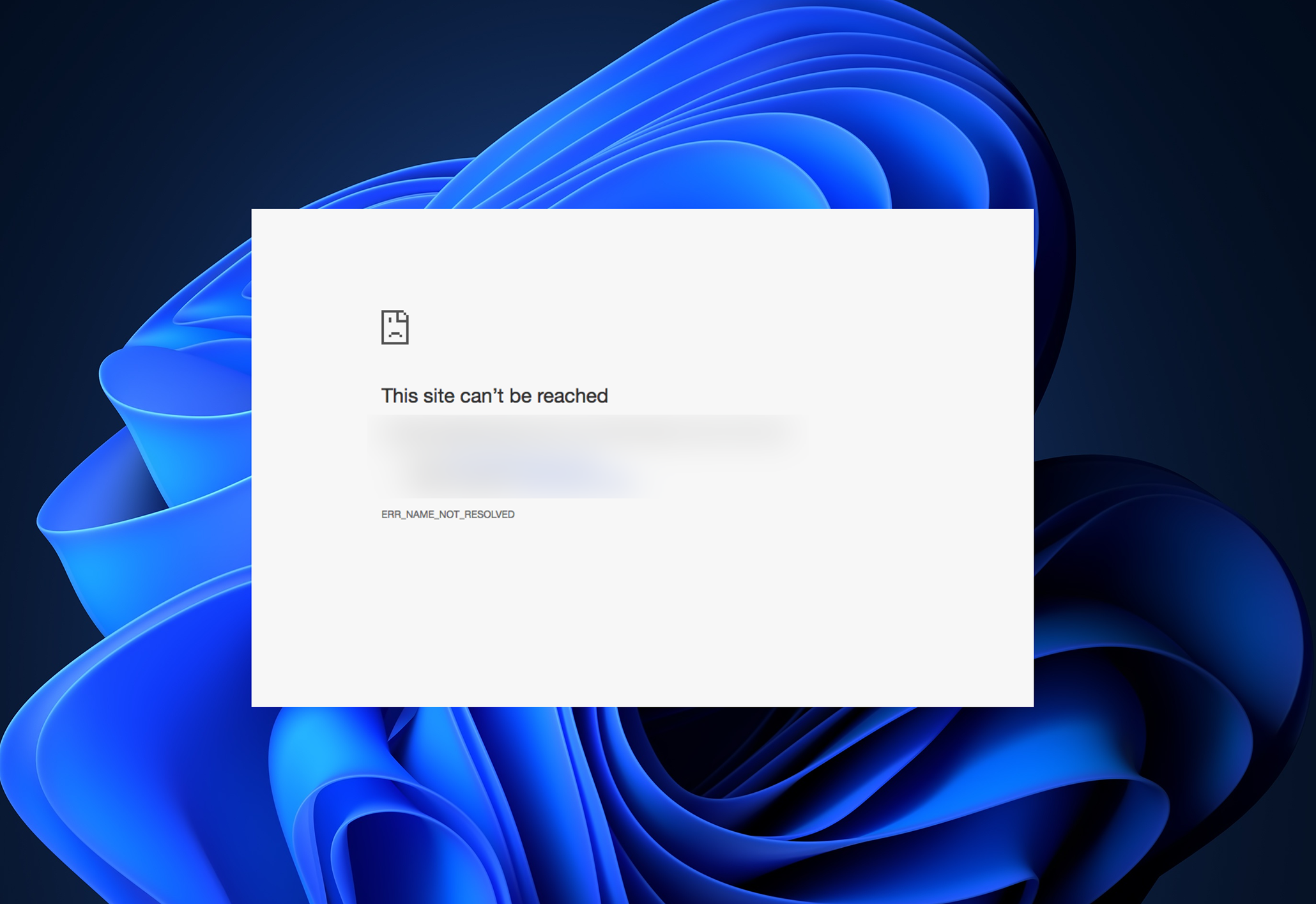
This error typically appears when a website fails to load. It signifies that the domain name cannot be resolved due to various potential causes; it may come from misconfigurations on your computer or router, or it could be related to an issue with the website itself, possibly being offline.

There are two primary scenarios: the problem might originate from the website’s DNS, or it could be an issue with your network. Determine which scenario applies to you and proceed with the corresponding steps.

1. Check if the website is Working

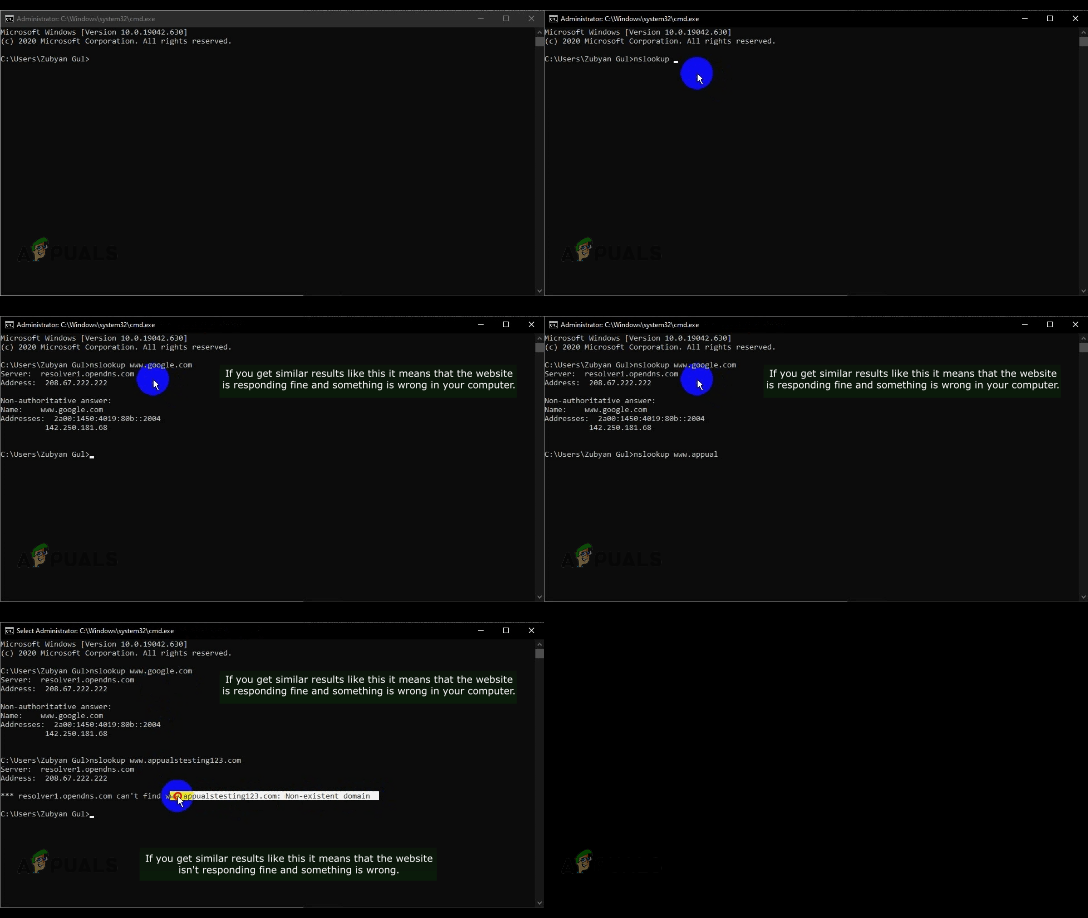
By performing a quick nslookup command, you essentially ask your system to find the IP address associated with the site’s domain name, which indicates whether its servers are reachable from your end. If the lookup provide a positive result, it assures you that the website is functioning, and the problem may reside within your local network settings.

On the other hand, a failed lookup can hint that there might be issues on the website’s side, guiding you towards the next relevant steps.

  1. Hold the Windows Key and Press X. Select Command Prompt (Admin) or PowerShell (Admin).
  2. Type nslookup followed by the URL of the website you’re attempting to access.
    Checking Website

If you do not receive a Valid IP Address, or if you’re told the domain doesn’t exist among other potential errors, it’s likely an issue with the website. If you own the website, you must contact your host for a resolution. However, if you are merely visiting the website, it’s advisable to wait and retry later to see if the problem has been fixed. 

2. Change your DNS Server

Your DNS server is similar to a directory assistant for the internet, guiding your computer to the correct addresses upon request. Occasionally, this assistant can stumble upon inaccuracies or become outdated.

By switching to a reliable public DNS—like those offered by Google or Cloudflare—you’re effectively opting for a more updated and sometimes faster directory service, one that might not be experiencing the same issues as your previous server. This switch can result in successfully reaching the desired website without encountering frustrating errors.

  1. Press and hold the Windows Key and Press I to open the Windows Settings app.
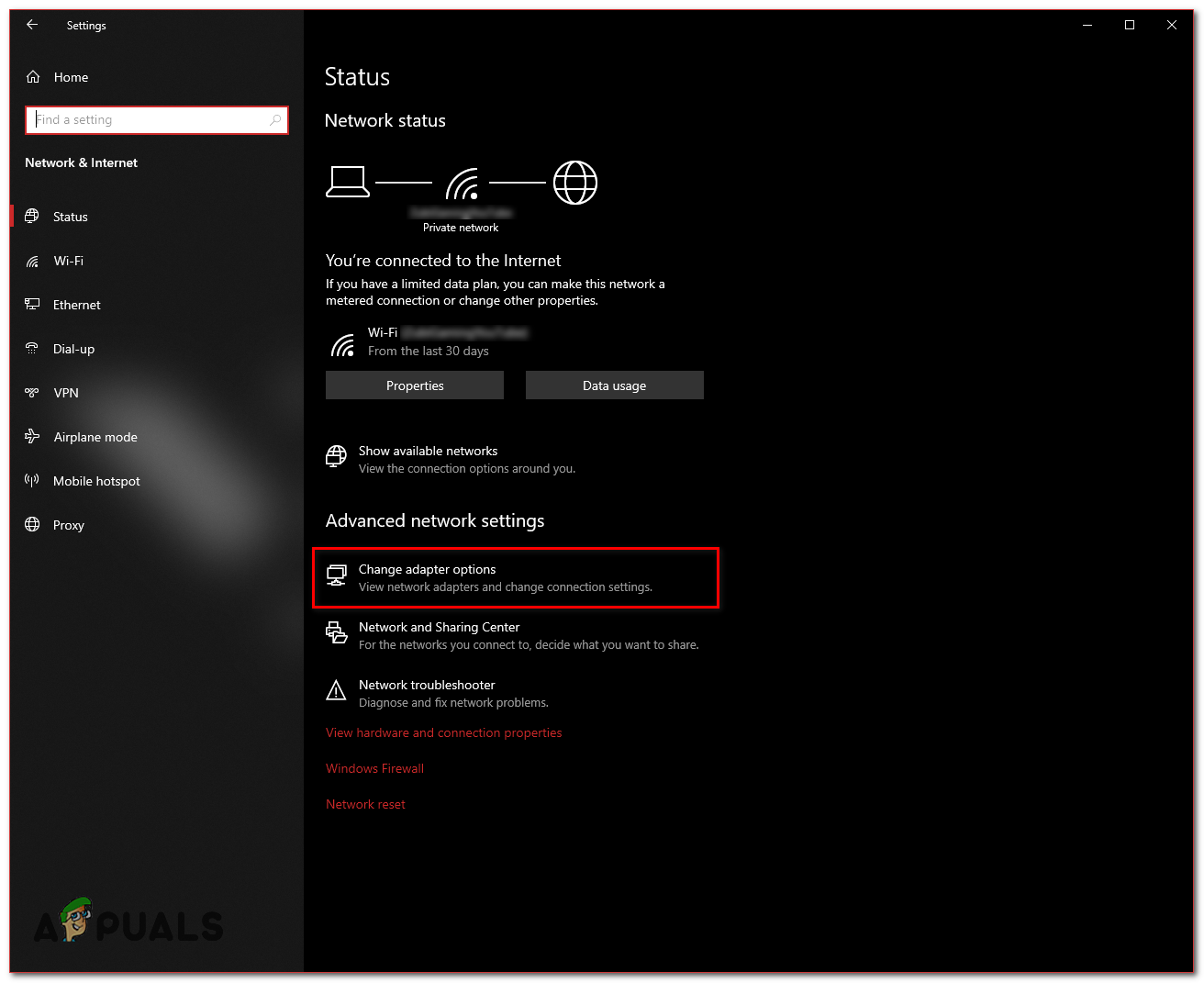
  2. Navigate to Network & Internet.
  3. Select Change Adaptor Settings.
    Internet Settings
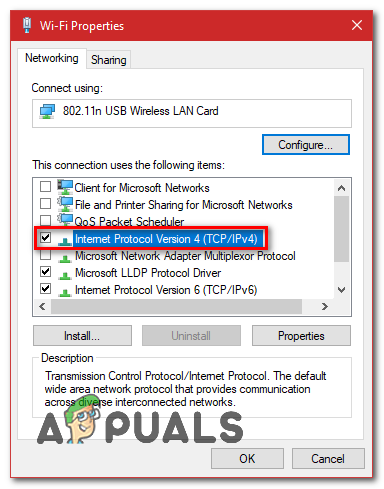
  4. Right-click on your Network Adaptor and select Properties.
  5. Double-click Internet Protocol Version 4 (TCP/IPv4).
    Changing IPv4 DNS
  6. Choose Use the following DNS server addresses.
  7. Enter “8.8.8.8” in the preferred DNS server field and “8.8.4.4” in the alternate DNS server.
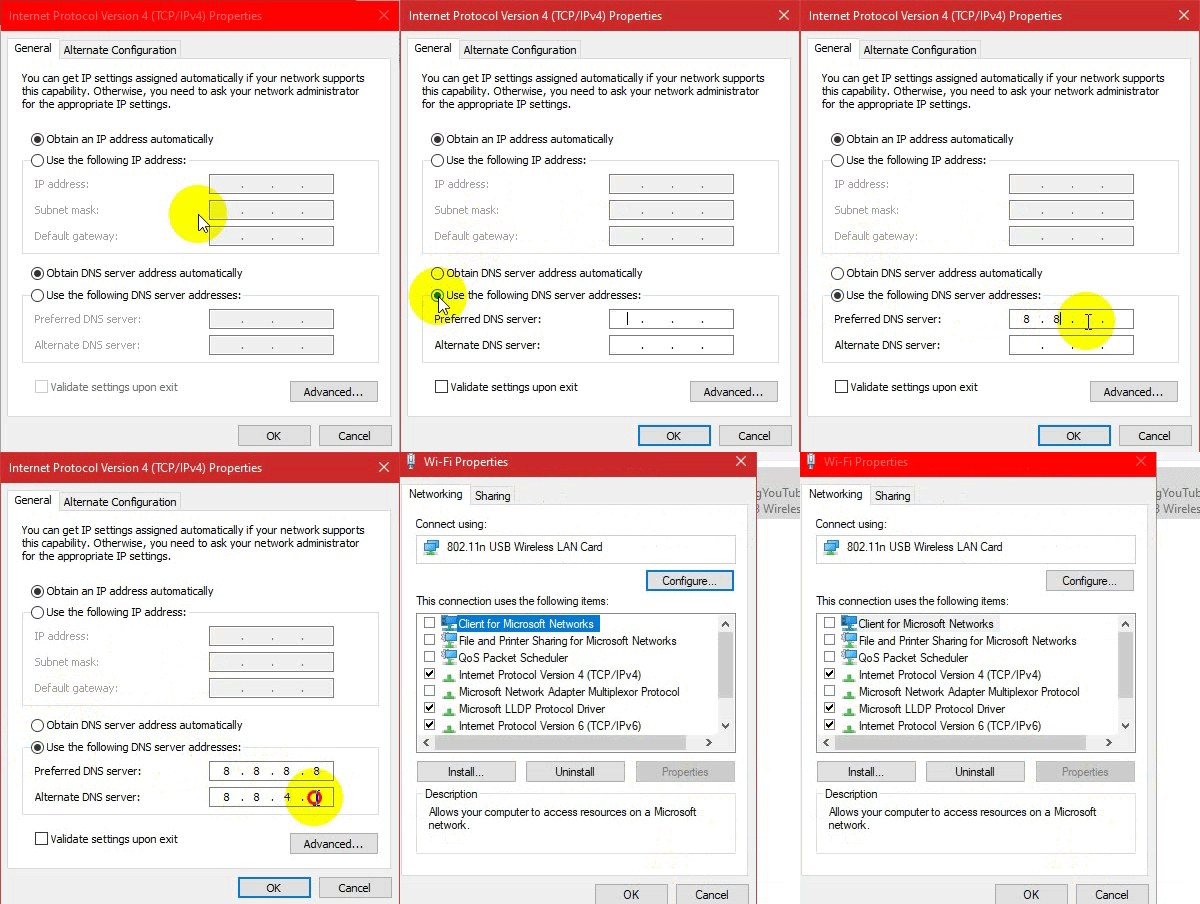
    Changing the DNS server
  8. Press the Windows Key and Press X again. Choose Command Prompt (Admin) or PowerShell (Admin).

Enter the following commands to refresh the DNS settings on your computer:

ipconfig /flushdns
ipconfig /renew
ipconfig /registerdns

Change your DNS (MacOS)

If you are using a Mac, you can change the DNS with the following instructions:

  1. Click the Apple icon in the top left corner and select System Preferences.
  2. Click the Network icon.
  3. Select your active adapter (ethernet or wireless) then click Advanced.
  4. Go to the DNS tab.
  5. In the IPv4/IPv6 Section, click the ‘+’ button.
  6. Add “8.8.8.8” and “8.8.4.4” to the DNS entries and remove any existing entries.
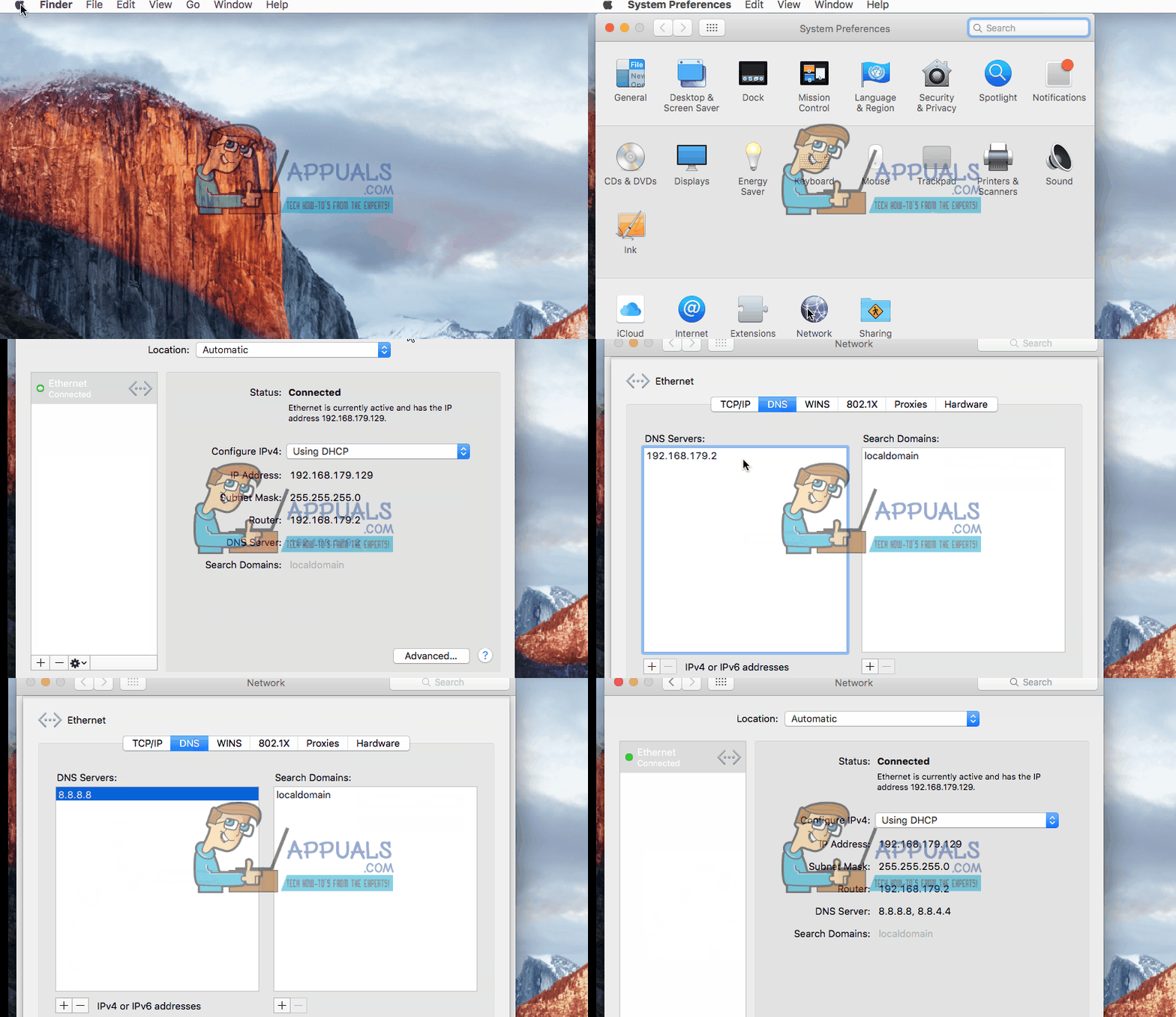
    Changing your DNS on a Mac

3. Clear Chrome’s Host Cache

When you clear the cache, Chrome discards the stored address information of previously visited websites, which might be outdated or incorrect. By doing so, your browser will seek to fetch the most recent and accurate address details when you visit sites again, potentially resolving the error by eliminating any stored data that could be causing the issue.

This step is a digital reset button that can help in establishing a smooth sailing online experience, free from the obstacles of outdated information.

  1. Launch Google Chrome.
  2. Type the following URL in the address bar and press Enter:
    chrome://net-internals/#dns
  3. Chrome’s Host resolver cache page should open. Click Clear Host Cache.
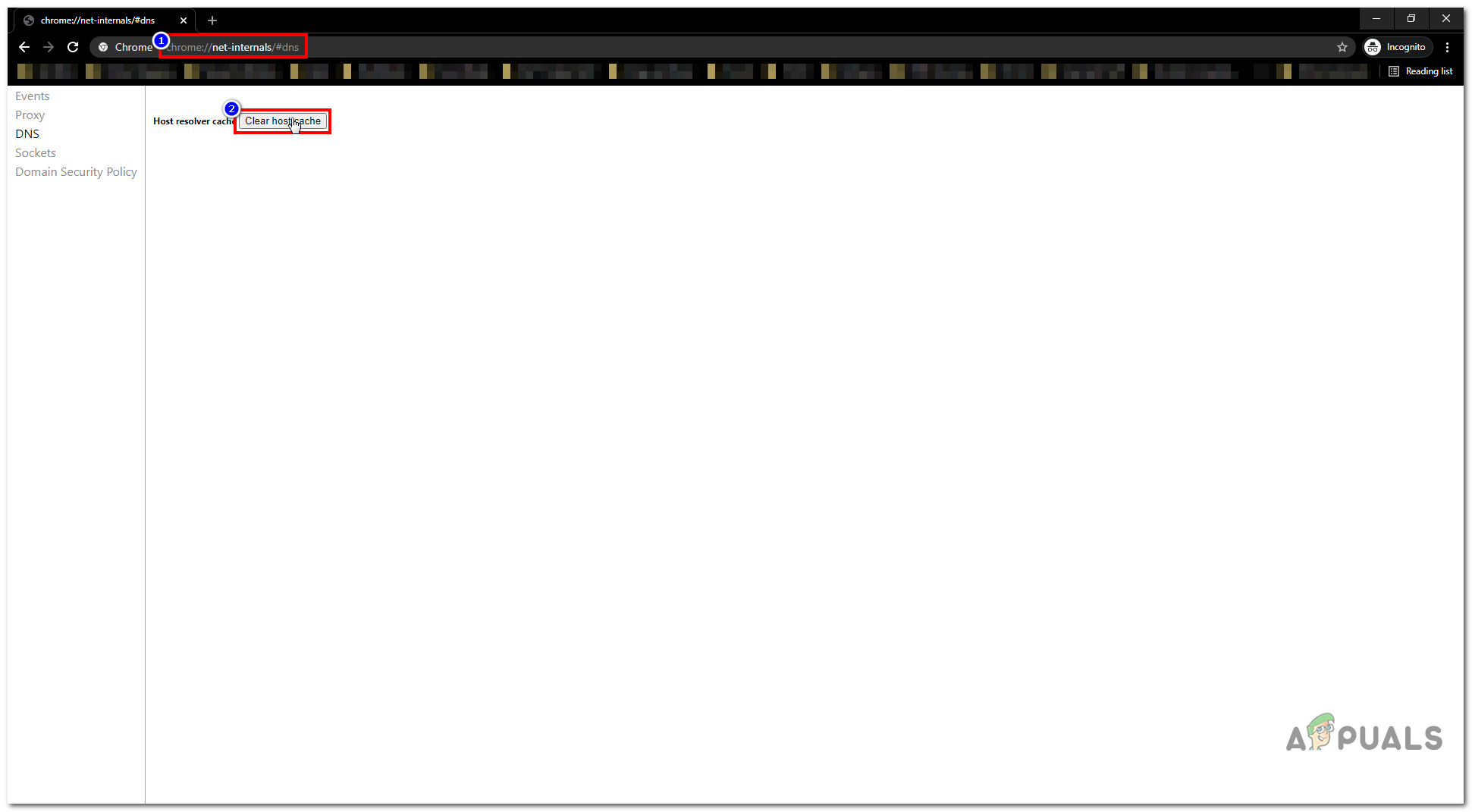
    Clearing Host cache
  4. Restart Google Chrome and check if you can access the website.

4. Disable the Preload Pages Option

This feature is similar to Chrome’s host cache but maintains a record of DNS entries for preload purposes. While the previous method clears the cache, it doesn’t prevent websites from recaching. Disabling Preload Pages stops the storing of DNS cache to avoid errors but may cause websites to load slower initially.

  1. Open Google Chrome.
  2. Enter the following URL in the address bar and press Enter:
    chrome://settings/cookies
  3. Locate the option named “Preload pages for faster browsing and searching”.
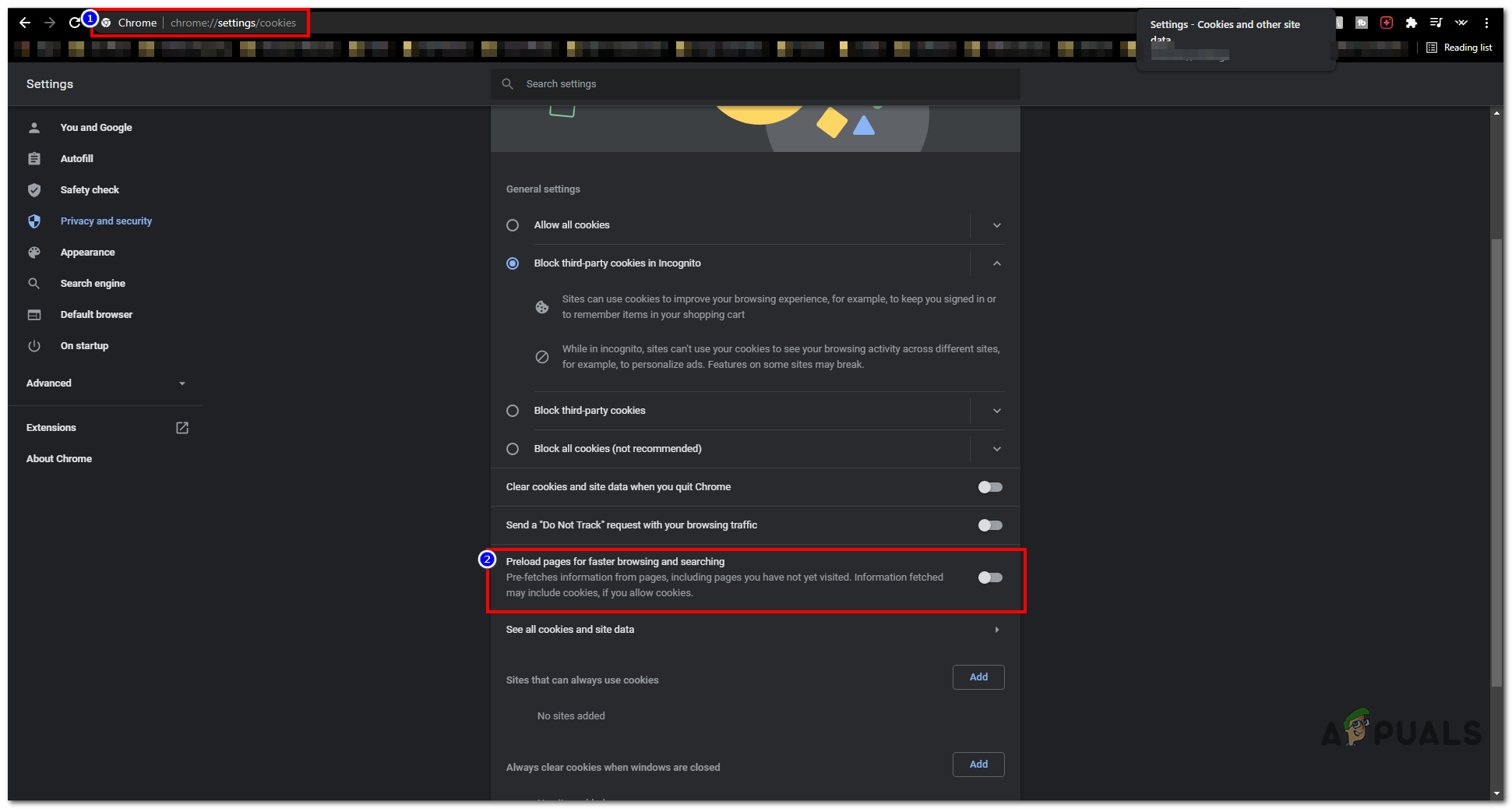
    Disabling Pre-load Pages Option
  4. Make sure it’s unchecked.
  5. Restart Chrome and check if the problem continues.

5. Reset your Network Configuration

Resetting your network settings reverts all network information to its default state, removing any improper configurations that may have gotten in due to third-party applications or manual changes. By clearing out the old data and starting anew, this process makes sure your system requests fresh network information, which often resolves persistent connectivity issues like this error.

  1. Hold the Windows Key and Press X. Choose Command Prompt (Admin) or PowerShell (Admin).
  2. Type the following commands one after the other to reset your network settings:
    netsh winsock reset
    netsh int ip reset
    ipconfig /release
    ipconfig /renew
    netsh interface ipv4 reset
    netsh interface ipv6 reset
    ipconfig /flushdns
  3. Restart your computer and check if the issue has been resolved.

Other Workarounds

If none of the methods above were effective, consider using a different browser to determine if the website is accessible there. Should the website function properly on another browser, try uninstalling and then reinstalling Google Chrome. If the website also fails to load on the alternative browser, reaching out to your ISP for assistance would be advisable. Additionally, you can experiment with using a VPN. If a VPN resolves your access issue, your IP address might have been blocked.

ABOUT THE AUTHOR

Kevin Arrows


Kevin Arrows is a highly experienced and knowledgeable technology specialist with over a decade of industry experience. He holds a Microsoft Certified Technology Specialist (MCTS) certification and has a deep passion for staying up-to-date on the latest tech developments. Kevin has written extensively on a wide range of tech-related topics, showcasing his expertise and knowledge in areas such as software development, cybersecurity, and cloud computing. His contributions to the tech field have been widely recognized and respected by his peers, and he is highly regarded for his ability to explain complex technical concepts in a clear and concise manner.

Comments

81
    BU
    buddyon9 Aug 25, 2015

    The problem happen not only in Chrome but at all browser. But when i access through my phone, the site can be access.

      AG
      Agata Sep 24, 2015

      I have the same problem now. Did you solve it? how? please help!

    BU
    buddyon9 Aug 27, 2015

    i already applied your solution but nothing happen. can u help me?

      KA
      K. Arrows Author Aug 27, 2015

      Did you update your dns settings?

        BU
        buddyon9 Aug 27, 2015

        yup. I change it to the DNS u shown above

      KA
      K. Arrows Author Aug 27, 2015

      Please e-mail me on kevinarrows@appuals.com

    AG
    Agata Sep 24, 2015

    Hi, i have the same problem, i can’t open anything but Facebook and Google, evreywhere else err_name_not_resolved… but internet work in my phone… please help!

      KA
      K. Arrows Author Sep 24, 2015

      Did you follow the steps i have listed above (i.e changing dns to the ones suggested above)?

        AG
        Agata Sep 24, 2015

        Yes i did, nothing change 🙁

          KA
          K. Arrows Author Sep 26, 2015

          Please e-mail me on kevinarrows@appuals.com

          DE
          Debbie Oct 4, 2015

          Did you manage to resolve the issue as Im having the same problem including an other error saying error connection refused

          in climbing the walls as I need to resolve these issues as use one of these for my business 🙁

          KA
          K. Arrows Author Oct 4, 2015

          What does the ping says when you ping 4.2.2.2

    OS
    Ole-Rasmus Uthaug Sørås Dec 4, 2015

    Didn’t work. Only site that works is youtube

      KA
      K. Arrows Author Dec 5, 2015

      Have you tried resetting your web browsers?

        OS
        Ole-Rasmus Uthaug Sørås Dec 5, 2015

        Tried to reset, but chrome didn’t. After a restart of the computer, and a update of the computer, Chrome seems to be fine now. Weird since I tried a restart yesterday and that did nothing.

          KA
          K. Arrows Author Dec 5, 2015

          Glad to know that it’s resolved.

    NI
    nintendoing Dec 24, 2015

    Im having the same problem – The strange thing is that it only started happening after I let someone connect to my router with their iPhone – I don’t know what has happened but it’s probably changed some kind of settings – Can anyone help?

      KA
      K. Arrows Author Dec 24, 2015

      Have you rebooted your router and your modem?

    LT
    Lalaking Tomboy Dec 27, 2015

    Hi, I’m from Philippines…I have the same problem…i am hesitate to follow the steps solutions because Im not sure if this is applicable in any area especially in updating DNS settings.

      KA
      K. Arrows Author Dec 27, 2015

      Why are you hesitant? You should try the steps and then update with results.

    AF
    Anna Faye Dec 29, 2015

    Worked 4 me. Thanks!

    IN
    inosai Jan 2, 2016

    It worked!!!Thanks a lot!!

    SP
    Satwik Pattanayak Jan 11, 2016

    How do I do this on MacBook Pro…

      KA
      K. Arrows Author Jan 11, 2016
    SN
    Shabbarali Naqvi Jan 17, 2016

    this solution is good but depends on various service provider’s . go check online for your active dns from you service provider, note that down then follow this step. let ip be anything first put your DNS then select automatic Ip assign . its means your IP,Subnet and defolt gatway is automatic and dns&alternate dns is manual ,then ally the changes .

    Reply
      KA
      K. Arrows Author Jan 18, 2016

      Using PUBLIC dns is better then the ISPs DNS.

    AJ
    Aloysius Jenkins Jan 17, 2016

    No luck for me, losing web forums to this error every day. Nothing on my router will access these forums, but I can get them via the cellular network and from work. Restarted the router, flushed the DNS, changed the settings to the 8s and 4s, no change at all. Can’t access from Windows 10, Vista, or Android.

    Tried Firefox and IE, same errors. Between this and BSOD, how do I completely rid my computers of all things Google?

      KA
      K. Arrows Author Jan 18, 2016

      Have you tried a power cycle on your modem and routers? (Turning them off and back on)?

        AJ
        Aloysius Jenkins Feb 8, 2016

        Yes sir, powered the whole setup down and restarted. Turned out both of the forums I’d lost were having DNS issues, but one of them refused to admit that was the problem until after it was repaired, so all seems well for now. Google is still the devil though, that’s a fact.

    RS
    R.Sarkar Jan 28, 2016

    it worked like a magic 😀 thanks a lot.

    AP
    Alsea Pulchra Feb 24, 2016

    Hi, I used your method with my pc and it worked, but I still have this problem with my android phone and every pc/phone connected to my lan and wlan. I think the problem could be on my router. Do you know any way to fix it (I cleaned the powercycle)? Do you suggest to reset the router?

      KA
      K. Arrows Author Feb 26, 2016

      I would suggest that you reset the router.

    SP
    shane phillips Mar 22, 2016

    HI,

    its about golfgamebook[com]

    Several of us use this a lot in Saudi Arabia but it hasnt been working for the last 48 hours on any apple device, laptop or desktops.
    Could it be banned?

      KA
      K. Arrows Author Mar 23, 2016

      This site seems to be down.

    DA
    David Apr 4, 2016

    Hi I seem to have the exact error on my iphone. what do you suggest I try?

      KA
      K. Arrows Author Apr 7, 2016

      Try connecting it to a different network to see if that works?

    DI
    Diego Apr 7, 2016

    Thanks. It helps a lot.

    AA
    Alexia Aslanidis Apr 18, 2016

    Hi I have been trying to access my site [sitename] but I cannot see it on multiple devices with different network connections! Could you please help me?

      KA
      K. Arrows Author Apr 18, 2016

      I tried to access it, and it worked.

      KA
      K. Arrows Author Apr 18, 2016

      Try clearing your cookies and cache.

    PS
    prakhar singh May 7, 2016

    **EDITED**
    showing this error
    err_name_not_resolved

      KA
      K. Arrows Author May 7, 2016

      You need to login to your domain registrar and point the name servers to the hosting provider.

      Reply
    BW
    Ben Walker May 16, 2016

    HELP! I changed my nameservers to my registrar last night after purchasing hosting and after several flushes, restarts, cache-deleting, dns switching, it WON’T LOAD! It keeps showing this error and when I ask my friends to check the site they can get onto it no problem! But for me it just won’t work! Could you please help? The website is here: http://sparkware.co.uk/

      KA
      K. Arrows Author May 16, 2016

      If this is what it is supposed to show “It works!

      This is the server’s temporary default web page.
      The web server software is running but no content has been added yet.”

      then, you need to reboot your router, and flush your local cache.

      temporary workaround until cache clears itself:

      Click Start -> type notepad, right click notepad and choose run as administrator. Notepad will open as administrator. Once the notepad opens up, click File -> Open and go to c:windowssystem32driversetc, click or double click the hosts file. At the end of the host file, type the following line

      sparkware.co.uk 217.70.184.38
      http://www.sparkware.co.uk 217.70.184.38

      currently the dns settings for this domain are as follow:
      a.dns.gandi.net. [‘173.246.98.1’] (NO GLUE) [TTL=172800]
      c.dns.gandi.net. [‘217.70.179.1’] (NO GLUE) [TTL=172800]
      b.dns.gandi.net. [‘213.167.229.1’] (NO GLUE) [TTL=172800]

      http://appuals.com/hosts-file-on-windows-78-and-10/

      Reply
        BW
        Ben Walker May 16, 2016

        Thanks for replying so fast, but neither of these worked. Yes, I restarted my computer after doing these steps and it still won’t load.

          KA
          K. Arrows Author May 16, 2016

          what do you see when you go to the site?

          BW
          Ben Walker May 16, 2016

          [link edited]

          KA
          K. Arrows Author May 16, 2016

          send me screen shot of the hosts file: C:windowssystem32driversetc

          BW
          Ben Walker May 16, 2016

          Here is my hosts file:

          KA
          K. Arrows Author May 16, 2016

          Yes, there is an space which is the problem.

          BW
          Ben Walker May 16, 2016

          I restarted the PC after editing the file AND IT STILL SHOWS THE ERROR!

          KA
          K. Arrows Author May 16, 2016

          check email please.

          BW
          Ben Walker May 16, 2016

          I found out the problem! There was a space in the IP and the format was backwards. Let me fix it and restart my pc.

          BW
          Ben Walker May 16, 2016

          This site can’t be reached
          [masked] server DNS address could not be found.

          Try:

          Reloading the page

          Checking the connection

          Checking the proxy, firewall, and DNS configuration

          ERR_NAME_NOT_RESOLVED

    DH
    Dian Hardianty Jul 8, 2016

    Hello , can you help me with this net::ERR_NAME_NOT_RESOLVED

    My site is *
    Thank you

      KA
      K. Arrows Author Jul 9, 2016

      You need to correctly configure and point your name servers to the ones provided by your hosting provider.

    FS
    Florencia Caro Sachetti Jul 19, 2016

    There is one website that I tried to access through different browsers and I always get this error. I tried this but didn’t work 🙁 any suggestions?
    It’s a website somebody from the World Bank sent to me, may it be the case that access to the server is private or something?

      KA
      K. Arrows Author Jul 19, 2016

      whats the site address?
      i can check it for you.

        FS
        Florencia Caro Sachetti Jul 19, 2016
          KA
          K. Arrows Author Jul 19, 2016

          That link is incorrect.
          This is the correct link: http://www.worldbank.org/en/topic/poverty

    PG
    Pickles Grice Aug 9, 2016

    I followed these instruction on 2 laptops and 1 desktop computer, all of them already have these settings. I wonder if the oft repeated recommendation to download reimage isn’t the whole purpose of this page. What do you think?

      KA
      K. Arrows Author Aug 9, 2016

      Reimage is recommended, but not necessary. You still have the issue after following those steps?

    PG
    Pickles Grice Aug 10, 2016

    yes I still have the issue. I’m trying to use my android tv box as a sort of mini pc such as browsing answering emails etc. But every time I try to go on the internet I have the err notification.

      KA
      K. Arrows Author Aug 11, 2016

      Have you tried updating DNS?

    RD
    Reden Dollente Aug 12, 2016

    Im experiencing this. I already contacted the ISP and still waiting for reply, i’ts like 20 hours now since my internet goes down. I’m already sure the flushing DNS works because i tried it before, but my problem is i have no laptop, it’s broke right now. I only have an Ipad. Please someone tell me what to do.

      KA
      K. Arrows Author Aug 12, 2016

      Update the DNS on your iPad to 8.8.8.8 and 8.8.4.4 and see if you can access Google.

    BK
    Ben-Li van der Kruk Aug 13, 2016

    I had this problem with one domain that points at my server. All other domains work. I Tried many things untill I found out I had to confirm my domain ICANN through an email I received. When getting a new .com domain it works in the beginning but stops working after a while untill you click the link in the previously mentioned email. I hope this helps.

    Reply
    FM
    Fajar Muhammad Jun 19, 2017

    Just using DNS Server
    8.8.8.8
    8.8.4.4
    It worked!! Fixed!! Thank you so much 🙂

    PW
    Philip Whealey Aug 9, 2017

    Hi Kevin, just got Now TV installed and suddenly I’m getting random Chrome tabs greyed out and reporting the above error messages. I’ve tried everything on your article but I still can’t get access to these sites (sites like Ebay and Uswitch and some other random sites too). My gmail access is fine as are many other sites, but when I do random searches (like for instance how to troubleshoot this issue) I get this error on some results and not others.
    >
    > I did have fixed IP address and DNS set but have tried putting these to auto and also to the 8 8 8 8, etc you recommend.
    >
    > I’ve flushed the cache, cleared all the cookies, etc, restarted router and pc’s, gone into cmd and “released” and “renewed” (but on this one I get 2 errors that say, “”an error occurred whil renewing interface Local Area Connection: unable to contact your DHCP server. Request timed out” and also “an error occurred while releasing interface Loopback Pseudo-Interface 1: The system cannot find the file specified”.
    >
    > Can you help me? Thank you so much

      IN
      Ibraheem Muhammad Nadeem Aug 9, 2017

      And also please check if your DHCP service is enabled. You can also try resetting your TCP/IP

      IN
      Ibraheem Muhammad Nadeem Aug 9, 2017

      Hello, did you try checking if there is the same problem with other devices connected to your network?
      And have you tried refreshing your TCP/IP?

    KK
    Karen Krall Aug 23, 2017

    Facebook appears to be down for many users in the UK and beyond.

    This morning, an outage was reported at roughly 10am BST, leaving many users unable to access their account on the social media platform at all, let alone post or check their news feed.

    According to Down Detector, access problems have been reported worldwide, however, the bulk of the issue seems to be concentrated in the United Kingdom.

    screen-shot-2017-08-23-at-10-59-48.jpg
    Down Detector
    A total Facebook blackout has been the most common complaint so far, although app usage and logging in also appear to be problematic for some users.

    With users taking to other social media platforms including Twitter instead, some have proposed ways to get around the issue.

    It appears that using the Google Chrome browser will result in a “This site cannot be reached error.” However, if you use Incognito mode in Chrome, there does not appear to be any problems.

    There have been no reports of the outage impacting Facebook when visiting through the Internet Explorer or Safari browsers.

    Many Facebook account holders are saying that accessing Facebook from your mobile device also does not result in any errors.

    In addition, a hard refresh, which clears the cache for a webpage, appears to be working for some users. In Windows, this is CTRL+F5, while Mac users should use Cmd+Shift+R.

    If any of these workarounds have proven successful for you, let us know in the comments.

    More on this story as it develops.

    ZDNet has reached out to Facebook and will update if we hear back.

    RS
    Radhe Shyam Nov 1, 2017

    Hi Kevin,

    I had this error whenever I try to login to admin panel of my wordpress website using hotspot from from my phone. But, it worked perfectly when I am on WiFi.
    After trying everything else, changing the DNS to 8.8.8.8 & 8.8.4.4 worked like a charm.

    Thank you so much.

    FF
    Flor Flor Dec 14, 2017

    my website gives me this error. It does not work with IOS or windows, or Android when using our WiFi.
    But when using VPN or 3g/4g, it works.
    I have already tried every suggestion, DNS is change to 8.8.8.8 & 8.8.4.4 but it persists in giving this error.
    What else do I need to try?

      KA
      K. Arrows Author Mar 7, 2018

      seems like your isp is blocking it for some reason.

    AN
    ant Feb 2, 2018

    Thanks Kevin!!!

    FM
    Fares Mg May 25, 2018

    work 100% is ipconfig/release & ipconfig/renew inside cmd with admin promtion if u get me !! i use it and get fine

    Reply
    MZ
    Md Zabed Jul 12, 2018

    Hi I just try to go through a site by using different devices but every one showing like that ‘net::ERR_NAME_NOT_RESOLVED”
    But other sites okay only specific one..could you please help me, thanks in advance.

      KA
      Kamil Anwar Aug 6, 2018

      The site is down, or dns misconfigured. Nothing you can do.

    AJ
    Amit Jain Mar 5, 2019

    I am looking for a solution to this. Chrome breaks while browsing a working site.

      SW
      Shane Warren Author Sep 18, 2019