FIX: NSIS error “Error launching installer”

An NSIS (Nullsoft Scriptable Install System) error is an error that appears when you’re trying to install something, but the setup file is in some way corrupt or incomplete or if it doesn’t match the settings on your system. The message NSIS error – Error launching installer means that the installer has failed the self-check because it has been modified from its original form. If the installation continues, the software will be broken and won’t function properly.

To prevent this, the installer prevents itself from continuing.

There are a few situations where you might encounter such an error:

  1. The files for the software you have downloaded from the internet aren’t complete
  2. The physical media (CD/DVD) you’re installing from is damaged
  3. The downloaded files have been modified and are different from the original
  4. Required hardware, such as the CD or DVD drive, is not working
  5. You have a virus on your computer

There are a few simple things that you can try to solve this issue. All of them are simple, and you can try installing the software again after you’ve tried each of the solutions.

Method 1: Rename the installer

This is extremely simple, and unlikely to trigger the NSIS error, but you can try it as it has been known to help. Locate the setup file, and Right-click it, and select Rename from the list.

Click it, and press F2 on your keyboard.

Change the name to something simple which only has one word. For example, change it to Softwarenamesetup.exe. Try running the setup again and see if it works.

Method 2: Download the setup from another source

The installer file you have downloaded may be corrupted, which will give you the NSIS error. If this is the case, try looking for the setup elsewhere, as maybe some other place has a fully working, non-corrupted installer. Try doing this with a few installers if the second one doesn’t work.

Method 3: Install the software using the Command Prompt

The Command Prompt is a powerful tool, and you can use that to your advantage here. Click Start and type cmd and choose Run as administrator.
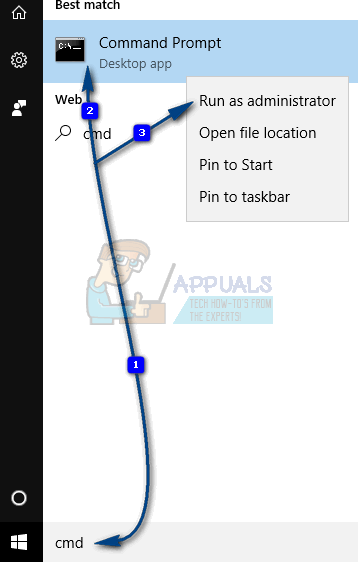
nsis error - 1

When it opens, drag the installer inside the window. You will see that the path to the installer will show up on the Command Prompt screen. Don’t press Enter yet. Press Spacebar, and type /NCRC after the setup path.

If for some reason, the path to the executable file doesn’t show up when you drag it into the Command Prompt (Window) then manually type and browse to the location.
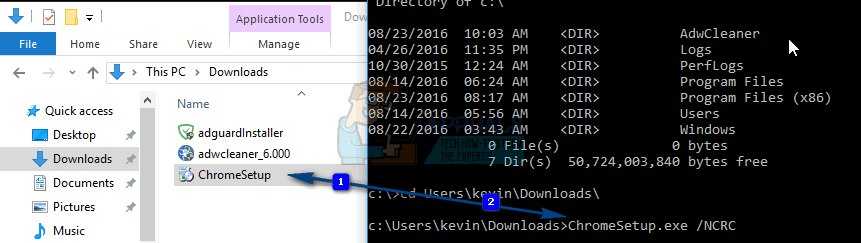
nsis error 2

Then press Enter and the setup should start. The /NCRC command will make the installer skip the corruption test, and it will continue running even if there is an error with it. Keep in mind though, that this will install your software, but if there is a serious error, it might not work.

Method 4: Check System Language

Hold the Windows Key and Press X and choose Control Panel.

In Control Panel type Language

From the Language pane, choose Change date, time or number formats from the left pane and then go to the Administrative tab.

Choose Change System Locale to your country’s language. If the software is in a different language, then you can change the Language but that will also change Language and Keyboard layout.
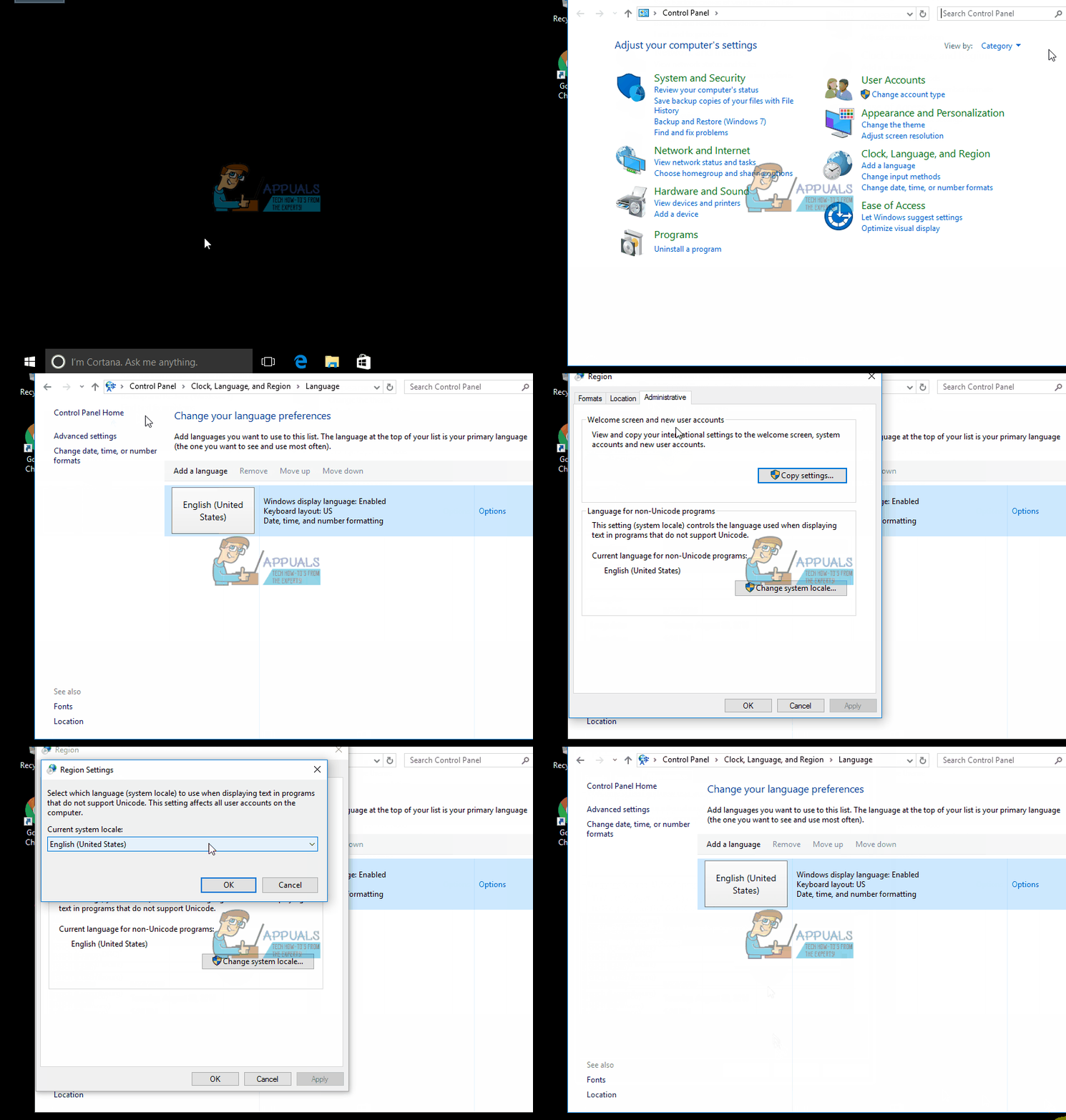
nsis error

Method 5: Move Installer to Another Drive

In some cases, the installer can’t be installed from a setup if it is in a specific disk. Therefore, if you have multiple partitions on your computer you can move the setup to another partition. For that:

  1. Rightclick on the “(installer name)setup.exe” and select “Copy“.
  2. Open the partition and select “Paste“.
  3. Double click on the executable and check to see if the issue persists.

Method 6: Scan your computer for viruses

If all of the aforementioned methods fail, your computer may be infected with a virus that prevents it from installing software, and until you clean it, you won’t be able to do much. You can do this with an antivirus of your choice, but be sure to run a full, thorough scan, and not a quick one, as the quick one skips a lot of files and folders which may potentially contain the problematic file which is infected with a virus.

The NSIS error may be the result of a seriously corrupt setup file, or a false error message due to a bug in the operating system, but whichever it is, one of the methods above will help you deal with the issue.

ABOUT THE AUTHOR

Kamil Anwar


Kamil is a certified MCITP, CCNA (W), CCNA (S) and a former British Computer Society Member with over 9 years of experience Configuring, Deploying and Managing Switches, Firewalls and Domain Controllers also an old-school still active on FreeNode.

Comments

31
    GU
    Guest Nov 30, 2017

    and of course, none of that worked 🙂

      TN
      TNO Jun 30, 2018

      thanks for saving my time. You the real MVP

    DA
    Daist Jul 31, 2018

    The only thing I did to make it work was move it to another folder. Then I figured it out – the path to the installer must contain only latin letters, no non-English symbols.

    Reply
      LM
      Linara MP Aug 6, 2018

      YOU REALLY SAVE MY LIFE. THANKS SO MUCH♥

        DA
        Daist Aug 6, 2018

        You’re welcome, wish they added the solution that actually works.

          KA
          Kamil Anwar Aug 6, 2018

          Did this not work for you?

          DA
          Daist Aug 6, 2018

          The solutions that were listed in the article did not work. The only thing that worked was renaming the folder (to a name that only contains English letters) from where the installer was started.
          • I’m not changing my system locale for one random installer that won’t start;
          • scanning for viruses is generic crap;
          • renaming the file doesn’t work (it was in English);
          • Edge has nothing to do with that installer;
          • d/l from another source is stupid, I downloaded the installer from the dev’s website;
          • installing via the command prompt wouldn’t have worked as the path would still contain non-English chars (which was the main reason for the installer to fail to start).

          KA
          K. Arrows Author Aug 6, 2018

          Can you send me the link to the installer?

          DA
          Daist Aug 6, 2018

          Sure. Direct link: ******

          DA
          Daist Aug 7, 2018

          I can see that the mods censored the link. Fine, it’s the full installer for ***

          KA
          K. Arrows Author Aug 7, 2018

          TeamViewer i am sure is properly compiled, would be very difficult to assist you with this program so i would suggest doing a repair install.

          DA
          Daist Aug 7, 2018

          I found my own solution which was to move the installer to a different folder.

      SI
      SimpleName Nov 17, 2018

      Thank you SO SO SO SO MUCH. I really cant thank you enough!!!!

      DR
      drkucalo Dec 16, 2018

      DUDE THIS WORKED FOR ME, THANK YOU!

      ZE
      Zetsuei Apr 11, 2019

      I too give you my thanks. Its been driving me insane and this simple fix worked.

      Lászlo Dec 14, 2020

      what the hell man, you are a genius, and microsoft is a pathetic retard as always

      VI
      Vitalii Nov 27, 2021

      thank you

    JB
    jewel_bg Oct 18, 2018

    Thanks !!!

    Ан
    Андрій Jan 20, 2019

    5th method was helpfull

    IN
    Inacio May 1, 2019

    Funcionou pra mi tambem
    It worked for me too

    SH
    Shaico14 Nov 3, 2019

    I want to tell you THANK YOU SO MUCH!

    SH
    shubhangi Mar 24, 2020

    still i could not solve this error .

      SW
      Shane Warren Author Mar 28, 2020

      Try this:
      The only thing I did to make it work was move it to another folder. Then I figured it out – the path to the installer must contain only latin letters, no non-English symbols.

    SH
    sawrav h Jun 6, 2020

    thank you

    ВР
    ВЛАД РАСТОРГУЕВ Jun 10, 2020

    Thank u, it really work!

    SW
    Shane Warren Author Jul 31, 2020

    Copy and paste this folder onto a USB and then try to install it from there or copy it from the USB onto another folder and try again.

    MC
    Mihai Chindriş Dec 10, 2020

    the 6th method worked for me. thank you!!

    AL
    Alfredo Larracuente Jul 14, 2021

    In my case, the path contained a weird character as the directory was copied from a manufacturer-supplied SD card that came with my 3d printer. I just renamed the path to delete the weird character and the setup ran just fine.

    Reply
    WE
    Welly Aug 13, 2022

    Since my computer name is long and the system cutted it with symbol ” ~ “, I had to move the setup from Downloads to some directory other than my user folder. Worked.

    Reply
    BO
    Bobby Oct 7, 2022

    Move Installer to Another Drive worked for me just nice! Thank you!

    JE
    Jerry Nov 29, 2022

    Method one works. Thank you.