How to Fix Error Code “DNS_PROBE_FINISHED_NXDOMAIN”?

When encountering the DNS_PROBE_FINISHED_NXDOMAIN error, your browser fails to find the domain you’re trying to access, displaying a message indicating that the site can’t be reached (essentially, it means the website address could not be found).
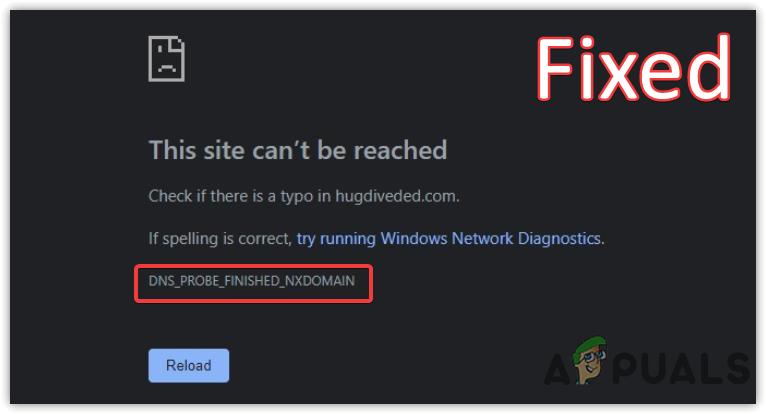
This error means that the DNS (Domain Name System, which translates website names into IP addresses) lookup failed, and the domain name does not exist in the DNS records.

The most common cause of this issue is incorrect DNS configuration, either on the client side (your device) or the server side (the website’s server settings), but it can also be triggered by network issues or DNS server problems.

Basic Troubleshooting

  • First, verify the domain name or website URL to ensure accuracy. Attempt to access the website on another device. If successful on a different device, this indicates a misconfiguration on your main device, and you should proceed with the solutions below.
  • If the website is not accessible on any device, it could either be that the website has restricted access from your ISP/Country or the website is down, potentially due to issues on the webmaster’s end. In such scenarios, you can only wait until the problem is resolved.

As a webmaster, check the website’s DNS settings to ensure correct configuration. If the DNS settings are not at fault, troubleshoot your hosting to solve the issue.

1. Power Cycle Your Router

For example, I encountered this error when attempting to access my router’s admin panel after prolonged router usage without a restart. Restarting the device immediately resolved the error.

  1. Unplug the adapter from the modem/router and the electrical outlet.
  2. Wait for 2 to 3 minutes before plugging the power cables back in.
  3. Wait for the indicator lights to illuminate.
  4. Once complete, verify if the error is resolved.

2. Switch to a Public DNS

Normal DNS services map user-friendly domain names to IP addresses so browsers can understand and load the website requested. Automatic DNS servers can be unreliable; hence, we recommend using Google’s Public DNS for stability.

Switch to Google DNS using the following instructions if the automatic DNS provided by your ISP is problematic.

  1. Click the Start Menu and type Control Panel.
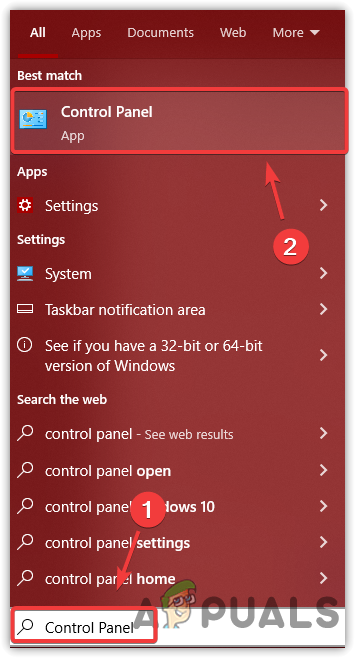
  2. Open Control Panel and navigate to:
    Control Panel\Network and Internet\Network and Sharing Center
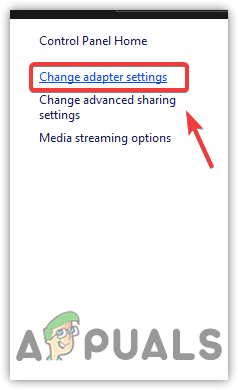
  3. Select Change Adapter Settings from the left pane.
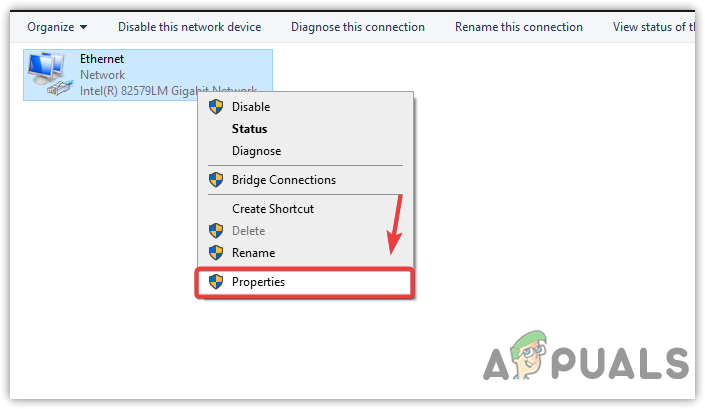
  4. Right-click on your Ethernet or Wi-Fi connection and choose Properties.
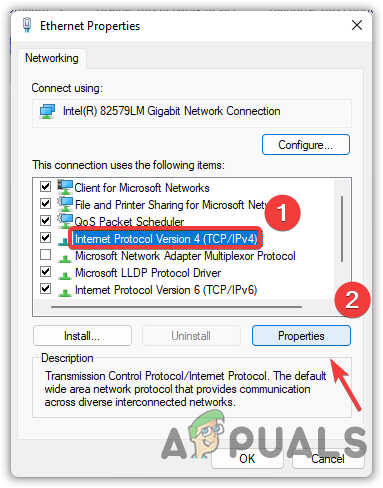
  5. Locate and select Internet Protocol Version 4 (TCP/IPv4) and then click Properties.
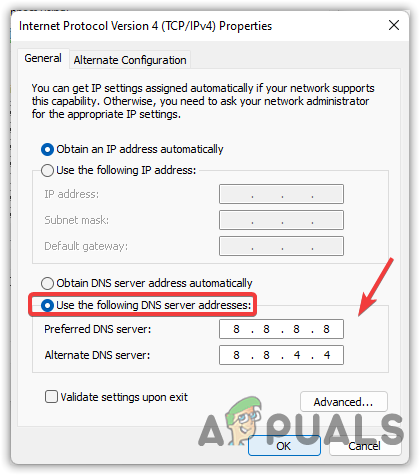
  6. Choose Use The Following DNS Server Addresses and enter Google’s DNS:
    Preferred DNS Server
    8.8.8.8
    Alternate DNS Server
    8.8.4.4
  7. Click OK to apply the changes.
  8. Alternatively, to revert to automatic DNS, select Obtain DNS Server Address Automatically and click OK.
  9. Type command prompt in the search box.
  10. Right-click on Command Prompt and select Run As Administrator.
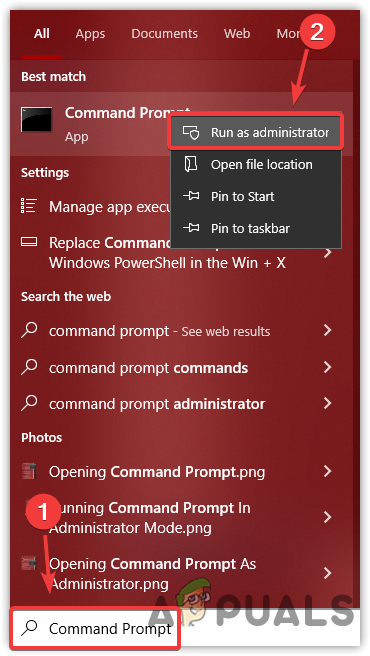
  11. Execute the following commands to refresh your DNS:
    ipconfig /flushdns
    ipconfig /registerdns
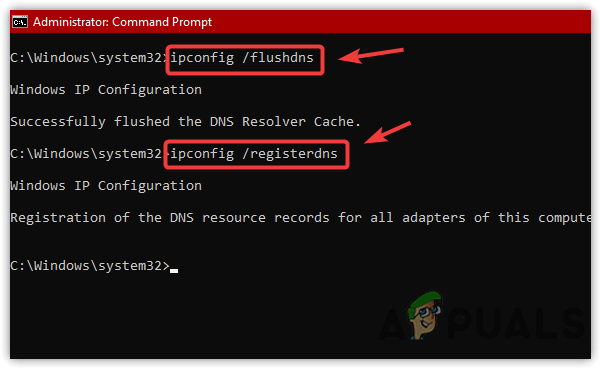
  12. After completing these steps, check whether the error has been resolved.

3. Assign Automatic IP Address

When you choose Assign Automatic IP Address, your device reaches out to the DHCP (Dynamic Host Configuration Protocol) server in your network. This server automatically assigns an IP address to your device that’s in accordance with your current network settings.

By doing this, you avoid potential IP conflicts or misconfigurations that might disrupt the connection between your device and the DNS server, as a result helping to resolve the error.

  1. Open Settings from the Start Menu.
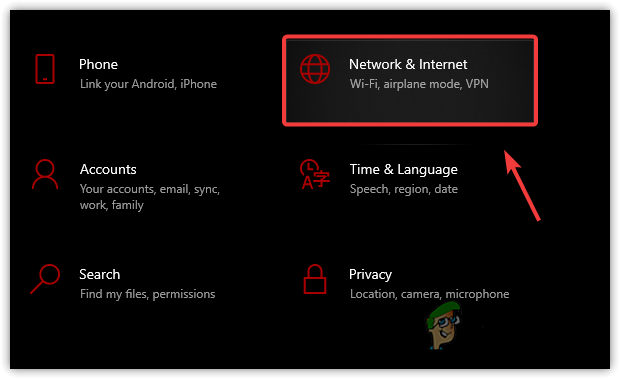
  2. Go to Network & Internet.
  3. Click on your Ethernet or Wi-Fi connection.
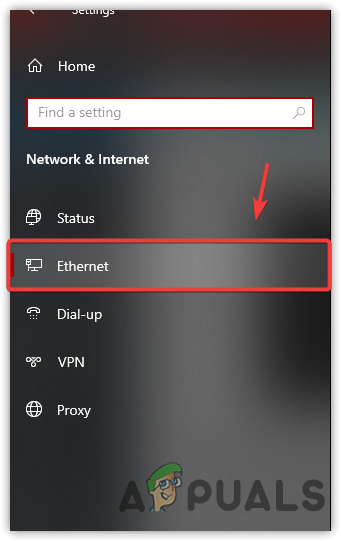
  4. At the bottom of the settings page, click on the Edit button under IP Settings.
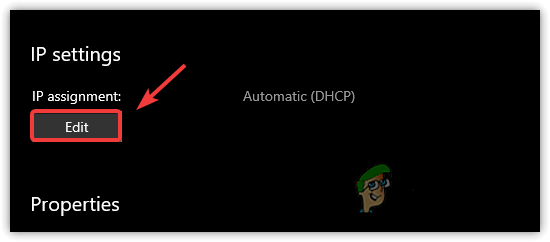
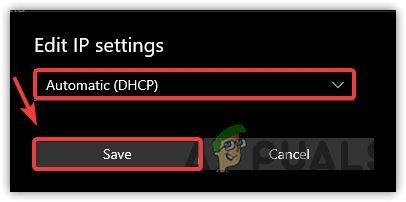
  5. Select Automatic (DHCP) and hit Save.
  6. Afterwards, verify if the error still exists.

4. Disable Ad Blocker

Ad blockers work by blocking certain domains known for ads and unwanted content, which could sometimes result in the blocking of legitimate domains.

Disabling the ad blocker allows your DNS queries to proceed unrestrained, potentially resolving the issue and restoring access to the web page you’re trying to visit.

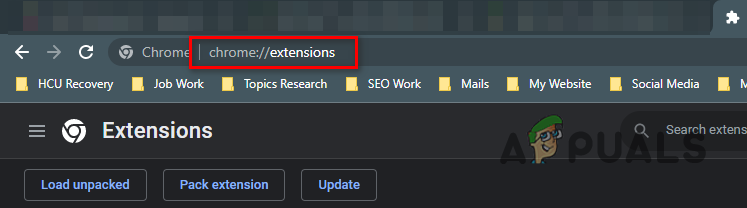
  1. In your Chrome browser, go to chrome://extensions/.
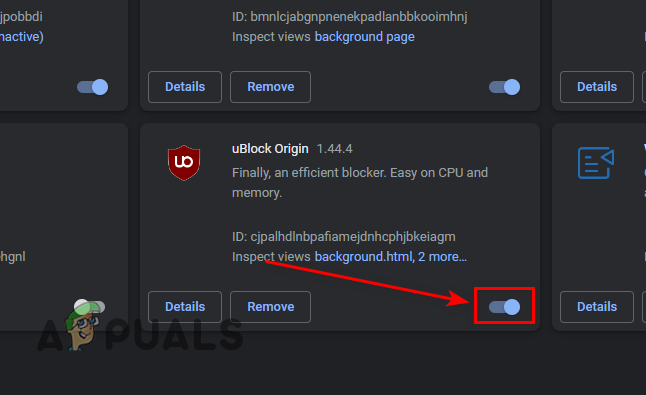
  2. Locate your ad blocker and turn it off.
  3. Check if the website is now accessible.
  4. If successful, consider whitelisting the site in your ad blocker.
    Note: The process for whitelisting varies per ad blocker. Refer to your specific ad blocker’s documentation for guidance.

5. Remove Website From Hosts File (if applicable)

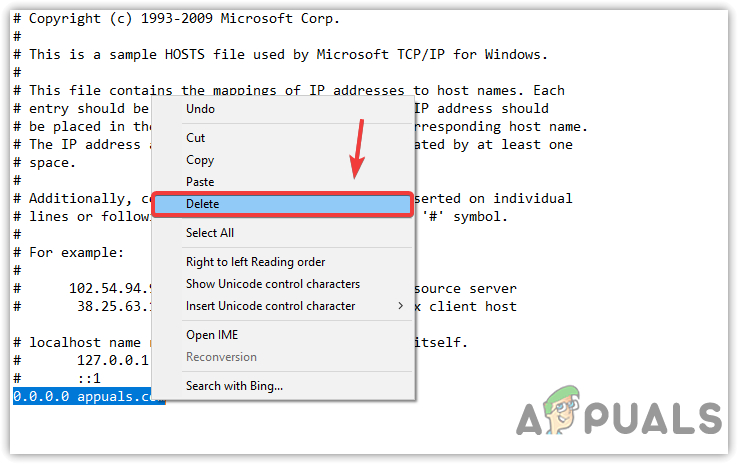
The hosts file is like an address book for your computer, directing where it goes to find certain websites. If a specific domain is incorrectly listed there, it could cause the error by overriding DNS settings.

By deleting any such entries related to the problematic domain, you essentially tell your computer to look up the address elsewhere, which can resolve the issue if the hosts file was indeed causing a blockage.

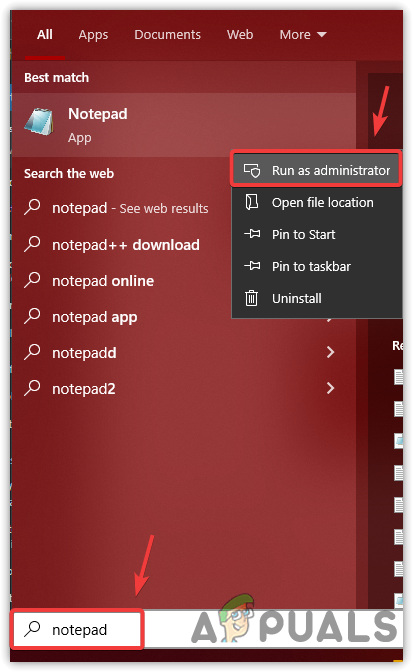
  1. Run Notepad as Administrator from the Start Menu.
  2. Once the Notepad is opened, click on File and then click Open.
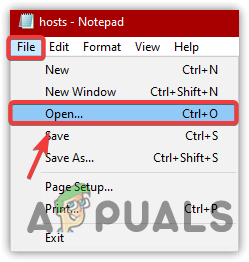
  3. Open the hosts file located at:
    C:\Windows\System32\drivers\etc
  4. If an entry for the desired domain exists, delete it and save changes with Ctrl + S.
6. Disable Third-Party Antivirus

Sometimes, antivirus software can mistakenly block legitimate DNS queries as part of its protective measures. By disabling the antivirus, you remove this potential blockade, allowing your device to properly communicate with DNS servers and resolve domain names into IP addresses. Always remember to enable your antivirus again after testing to maintain security.

  1. Find the antivirus icon in the system tray and right-click it.
  2. Select the disable or pause option, usually found in a sub-menu like Avast Shields Control.
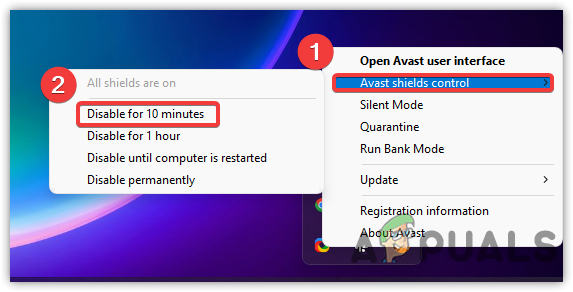
  3. Confirm the temporary deactivation and check for issue resolution.

7. Use VPN

Bypass restrictions by using a VPN. There are various VPN services available; for recommendations, consider the guide on The Best VPN For Streaming and Gaming in 2022.

Should these methods prove ineffective, the problem may come from your ISP. In that case, contact your service provider to address the DNS error.

ABOUT THE AUTHOR

Kevin Arrows


Kevin Arrows is a highly experienced and knowledgeable technology specialist with over a decade of industry experience. He holds a Microsoft Certified Technology Specialist (MCTS) certification and has a deep passion for staying up-to-date on the latest tech developments. Kevin has written extensively on a wide range of tech-related topics, showcasing his expertise and knowledge in areas such as software development, cybersecurity, and cloud computing. His contributions to the tech field have been widely recognized and respected by his peers, and he is highly regarded for his ability to explain complex technical concepts in a clear and concise manner.

Comments

163
    ST
    Stoo Jul 13, 2015

    Thanks

      KA
      K. Arrows Author Jul 24, 2015

      wc

    RA
    Ramo Jul 13, 2015

    I resetted the MTU and it fixed the issue but what exactly caused this?

      KA
      K. Arrows Author Jul 24, 2015

      One of your programs or changes to registry by a third party program usually causes this. However, MTU is usually related to connect_reset error.

      Reply
    RA
    Rayner Jul 15, 2015

    Thank you.

      KA
      K. Arrows Author Jul 24, 2015

      Ty

    ST
    STEVE Jul 18, 2015

    This fixed an issue i was having where my laptop wireless wouldnt work but an ethernet connection to it would. My phone would connect to the wireless fine but the laptopwould not. I think it may of made my connection a bit quicker to 🙂 now the wireless on my laptop is working again

      KA
      K. Arrows Author Jul 20, 2015

      Thank you for letting me know.

    PR
    Prati Jul 21, 2015

    This fixed the issue. The internet now seems faster as well.

      KA
      K. Arrows Author Jul 24, 2015

      Welcome

    SA
    Sam Jul 21, 2015

    If the routers DNS really broke, why could I access some site but not others and why where other computers connected to the same router not affected?

      KA
      K. Arrows Author Jul 24, 2015

      Because; the cache may have the dns pointing to the old server for some of your sites. Try ipconfig /flushdns as stated above.

      Reply
    DA
    David Jul 24, 2015

    This has been the best experience so far following a easy, precise and specific to the point guide. I am a new computer user and i am very well aware of the challenges BUT this the steps made it very simple for a noob to fix this issue. I have a subscription plan with GeekSquad and before attempting this myself i spoke to GeekSquad to see if they can fix it, regretfully theirs; they failed. Thank you.

      KA
      K. Arrows Author Jul 24, 2015

      Thank you

    JE
    Jellina Jul 25, 2015

    I changed the dns but i had a strange number in my primary and alternate dns settings, i don’t know how it came there?

      KA
      K. Arrows Author Jul 26, 2015

      This should be your old DNS server address. They can only be configured manually; they do not get their by itself. So this is most likely by the person who may have configured the router. Thanks

      Reply
    JA
    Jamal Jul 26, 2015

    Thank Kevin. I had my local tech here who resetted everything and did’nt even look at the DNS. May be he’s never experienced it but i myself following this guide have had this issue resolved. I have donated to your site. Keep up the good work. Thanks

      KA
      K. Arrows Author Jul 27, 2015

      Appreciate it. Thanks

    LI
    lina Jul 27, 2015

    Hi Kevin

    I have changed the DNS and also did ipconfig /flushdns but i am still getting dns_probe_finished_nx_domain error, what could be the problem?

    Lina

      KA
      K. Arrows Author Jul 27, 2015

      Please go to command prompt, and type ping -t 4.2.2.2 and tell me the results? You can also e-mail me for direct assistance. Thanks

        LE
        Leire Jul 27, 2015

        i have the same problem, typed ping -t 4.2.2.2 and nothing…. this problem is only with one page.

          KA
          K. Arrows Author Jul 27, 2015

          which page is it?

          LE
          Leire Jul 27, 2015

          is one that i’m creating with wordpress.org

          KA
          K. Arrows Author Jul 27, 2015

          Can you type me the full domain so i can test it here. OR you can email it to me on kevinarrows@appuals.com

          LE
          Leire Jul 27, 2015
          KA
          K. Arrows Author Jul 27, 2015

          This isn’t the issue with your computer or your DNS. This appears to be an issue with the DNS of the domain name. You need to make sure that the domain is correctly forwarded via the registrar to the hosting provider.

          KA
          K. Arrows Author Jul 27, 2015

          Domain is now accessible.

          LE
          Leire Jul 28, 2015

          OH! thank u anyway for ur help!!!

    SA
    Sat Jul 31, 2015

    Thank you

      KA
      K. Arrows Author Jul 31, 2015

      welcome.

    ST
    Stoner Aug 2, 2015

    I really wanted to write to thank you a million times.

      KA
      K. Arrows Author Aug 6, 2015

      You’re Welcome.

    ST
    Stuggart Aug 6, 2015

    Thank you for the instructions. I have managed to fix my issue.

    JU
    Jumper1 Aug 14, 2015

    This works – i had been scratching my a__ all last week.

    KJ
    Kenny James Aug 14, 2015

    Hello I have an issue with a particular website as well. Can you take a look?

    https://bridgevineservices.com/utilityfinder/

      KA
      K. Arrows Author Aug 15, 2015

      Your issue is with the hosting provider. ERROR: One or more of your nameservers did not respond: The ones that did not respond are: 69.20.95.4 65.61.188.4

      Either the site is not properly configured on the server; or your server is having issues. You need to get in touch with your hosting provider to fix this. (rack space)

      Reply
    JO
    Jocelyn Aug 21, 2015

    hey there! I just did all these steps and it’s not working for me! but the thing is I’m trying to connect to a university site and when I connect to the wifi it redirects me to a page where I have to log on and that’s when the DNS PROBE FINISHED NXDOMAIN comes in. I really need the Internet! please help?

      KA
      K. Arrows Author Aug 25, 2015

      Please tell me what the site address is so i can check it from here.

    LD
    L. Dijk Aug 23, 2015

    Hello, I followed all the steps you listed carefully, but something appearently went wrong. I can’t connect to internet now at all anymore (it says no networks are available) All the other devices in my home work just fine, it’s only with this particular pc. It also says it can’t connect with a windows-service (system event notification service.
    Thanks in advance!

      KA
      K. Arrows Author Aug 25, 2015

      See if the network connections are enabled, by clicking Start and typing ncpa.cpl (then click OK)

      Reply
    NA
    Nasir Aug 28, 2015

    Hi, i already did all of your steps but still i cant use chrome and IE. I can remotely use my computer by team viewer and logmein. It shows all connection is ok, even ping it and receiving data. If you can help me solve this, it will be great for me.

      KA
      K. Arrows Author Aug 28, 2015

      Have you tried disabling your firewall/antivirus?

        NA
        Nasir Aug 28, 2015

        Yes i tried with that too. But still no internet. Disabled the firewall then try but no internet, then restart again but still no internet in chrome or IE

          NA
          Nasir Sep 3, 2015

          I can browse my internet with ie with a link of microsoft from fix it portable, but cant browse directly. And internet it very slow. Any help ???

      KA
      K. Arrows Author Sep 3, 2015

      Disable anti virus / firewall and then test if DNS is set to 4.2.2.2

      Reply
        NA
        Nasir Sep 3, 2015

        I have tried with that too, but still dosent work. I can use ie from a link, from portable fix it. But some malware window pop up.

          KA
          K. Arrows Author Sep 4, 2015

          check your hosts file?

          NA
          Nasir Sep 5, 2015

          I have less knowledge about computer. What is host files ??

          NA
          Nasir Sep 7, 2015

          I am not that good in pc, what is hosts file ??? And how to check hosts file ???

          NA
          Nasir Sep 9, 2015

          I am not that good with computer. What is a hosts file ?? And how to check the hosts file ??
          ( i dont know why, i posted this same message 2 days ago but didnt show up here!!)

          KA
          K. Arrows Author Sep 9, 2015

          Here’s how “http://appuals.com/edit-hosts-file-windows-7-8/”

      RA
      Ravi Sep 21, 2015

      does it show proxy server error..???

    JA
    Jayfer Sep 11, 2015

    Hello, I always get an error like that in my website only. I did what you instructed but still the error occurs.

    This webpage is not available
    DNS_PROBE_FINISHED_NXDOMAIN

    This is my website link http://jayferbalecha.com/

    Thank you in advance.

      KA
      K. Arrows Author Sep 11, 2015

      You need to update your name server to the ones provided by your hosting provider. I can fix it for you remotely – please email me on kevinarrows@appuals.com

      Reply
        SO
        sofia101711 Oct 13, 2015

        Hi, I already done all of it but still not working. What should I do?

    TM
    Tanishq Mittal Sep 11, 2015

    thanks, it works perfectly fine now..!!

    SU
    Summaya Sep 14, 2015

    Thanks a lot 🙂 solved the issue..

    JA
    Jai Sep 18, 2015

    Thanks a ton, very useful. Solved my issue struggling from hours.

    AK
    Azii Khan Sep 18, 2015

    thnkuuu so much its work

    DO
    donna Sep 30, 2015

    Thank you so much!

    DR
    dreynasaurus Oct 2, 2015

    I don’t usually do this but this helped me a lot so thanks. 😀

    MI
    mino Oct 3, 2015

    it didnt work for me nothing changed can anyone help

    HE
    Heather Oct 4, 2015

    can anyone help me with this site? https://mcreator.pylo.co/download

    DM
    deepak meetoo Oct 9, 2015

    Hello Kevin, i see u r an expert in IT, well, i cannot sign in on live mail using window 10, it is saying the above problem and even though i followed the rules it is not correct. can u help me plz.?

      KA
      K. Arrows Author Oct 11, 2015

      Can you please upload a screen shot here? Thanks

      KA
      K. Arrows Author Oct 11, 2015

      Please upload a screen shot here.

        JL
        Jayesh Latne Dec 22, 2015
    TY
    Tyrone Oct 11, 2015

    Hi, i tried doing all the steps but nothing changed. It still stays the same. I’ve been having this issue for a days now. Can you help me please. I’m not really that good in computers.

    SO
    sofia101711 Oct 13, 2015

    I have already done command prompt and change adapter setting but still have de same problem. Dns probe finished nxdomain. More help please

      KA
      K. Arrows Author Oct 14, 2015

      Is the issue with a specific site?

    DD
    ddd Oct 14, 2015

    WEeee good job.

    RZ
    renfro t zetz Oct 15, 2015

    Thanks, it worked!

    HZ
    Humza Zubair Oct 16, 2015

    thnks …..it works

    NV
    Nancy Valentina Oct 16, 2015

    THANK YOU SO MUCH<3

    AL
    Alex Oct 16, 2015

    Hey there! I’m having problems with this site : https://minecraftleaks.com/get I hope you can help me!

      KA
      K. Arrows Author Oct 17, 2015

      That site is down.

    SA
    Sarah Oct 18, 2015

    Hi Kevin,
    Thank you very much for your time and for sharing with us your knowledge. I followed all your instructions and did not help me unfortunately.
    I am having this issue specifically with wordpress.
    Any other solution please. my first issue was not being able to log into my wordpress admin then when I tried again the error message came up it how I found you when I searched for a solution.
    any help would be appreciated.

      KA
      K. Arrows Author Oct 18, 2015

      This issue if occurs with all sites; then it is a dns issue on the PC but if it is occurring on specific sites then it is the site issue. You need to check your DNS / Name Server Settings to make sure that it points to your hosting from the registrar.

      Reply
        SA
        sarah Oct 20, 2015

        Thank you so much for your help, I will check that out. You are such a great person to share such great knowledge and help with us illiterate people.
        Thanks again.

        LG
        Lisa Gardner Oct 21, 2015

        How do you check your DNS/Name ServerSettings to make sure it points to my hosting from the registrar?

          KA
          K. Arrows Author Oct 21, 2015
    IS
    Isozaki Oct 21, 2015

    Holy crap it worked! Thank you so much!!!

    FL
    floot86 Oct 21, 2015

    I’m having problem with all the torrent sites. Someone help me please

      KA
      K. Arrows Author Oct 22, 2015

      Does it happens with one PC or your other PC’s as well connected to the same network?

    AR
    Abdul Rauf Oct 22, 2015

    Your method works perfectly. Thanks. Strange thing is that I was facing this problem while having google’ public dns in my router’s DNS settings.

    UK
    Usman Khan Oct 22, 2015

    Thanks a lot mate.

    PM
    Paul Masterson Oct 24, 2015

    worked. Thank you

    ¯/
    ¯_(ツ)_/¯ Oct 26, 2015

    Still doesnt work. Feels like I’ve tried everything. Shit.

      KA
      K. Arrows Author Oct 26, 2015

      Is it happening on all sites?

    SA
    Sam Oct 29, 2015

    Thanks man, it works, I have been struggling so hard and for so many days, finally the site that I’m following for financial news works. Thanks again.

      KA
      K. Arrows Author Oct 29, 2015

      Welcome.

    NS
    Nazmus Sakib Nov 5, 2015

    Hei man!! Take my bow!!

    LI
    Linkkservices Translation-Impo Nov 5, 2015

    Awesome dude Thanks a lot!

    RM
    Rubaisha Muskan Nov 9, 2015

    Ufff I try try again but i can’t

    RM
    Rubaisha Muskan Nov 9, 2015

    Any one plzzz help me yar

    KP
    kp Nov 10, 2015

    Champions! Champions!! You’re like magic wizards!

      KA
      K. Arrows Author Nov 10, 2015

      Thank you.

    DA
    Dan Nov 11, 2015

    Still doesn’t work for me. Can’t open any sites. Tried on multiple networks.

    JJ
    Jster Jammin Nov 15, 2015

    This method doesn’t work for me. I’ve tried every common solution that relates to using cmd with ipconfig but nothing seems to work and shows me the exact same message.

      KA
      K. Arrows Author Nov 15, 2015

      if it’s on a specific site, then its’ the issue with the site not the dns.

      Reply
        JJ
        Jster Jammin Nov 15, 2015

        It’s not just on a single site but on any site goto including youtube or google.

          KA
          K. Arrows Author Nov 15, 2015

          Please upload screen shot of your network adapter settings where you modified the DNS.

          JJ
          Jster Jammin Nov 16, 2015

          Heres a pic.

          KA
          K. Arrows Author Nov 16, 2015

          Which anti virus software are you running? And can type me two sites that aren’t opening?

          BR
          Branden Nov 18, 2015

          same thinf with me, nothing is working at all

    ND
    Natsu Dragneel Nov 18, 2015

    doesnt work for me… 🙁

      KA
      K. Arrows Author Nov 18, 2015

      If it is on a specific site, then it may be down.

        BS
        Bhanavi Shukla Feb 15, 2016

        Yes, it is on a specific site. and all my devices on the network are unable to access the page!

          KA
          K. Arrows Author Feb 15, 2016

          Then the issue is with the site.

          JM
          Jhilik Haimanti Mukherjee Nov 30, 2016

          I did for several times. It’s happening for Pinterest. Only on chrome. But in Mozilla and the app is running perfectly. What should i do now

          KA
          K. Arrows Author Dec 11, 2016

          Clear cache and flush dns

    JL
    Jiejie Lopez Nov 29, 2015

    it didn’t work .. my problem is that i can’t open the website of youtube..and when i try to open it..that dns thing pop up.. i need some help.. Thank You So Much 🙂

      KA
      K. Arrows Author Nov 30, 2015

      Does it opens on other devices connected to the same network?

    JL
    Jayesh Latne Dec 22, 2015

    https://cdnjs.cloudflare.com/ajax/libs/moment.js/2.10.2/moment.min.js

    please check i also not able to open this link..

      KA
      K. Arrows Author Dec 22, 2015

      Did you update the DNS?

        JL
        Jayesh Latne Dec 23, 2015

        Yes sir…

    AN
    Anca Jan 5, 2016

    It worked for me too! Thanks very much 🙂

    AS
    Ayush Saini Jan 7, 2016

    every other website seems to work well expect one particular website “NETFLIX” it’s only not working on my network. on any other network like LTE or at my friend’s home it works fine. It shows the same “dns probe finished nxdomain error”. Even the mobile app doesn’t work.

      KA
      K. Arrows Author Jan 7, 2016

      Download TunnelBear (google it) and then test?

    JJ
    Jayesh Jeyaprakash Jan 14, 2016

    Very Easy steps. Thank you so much. It works perfectly fine.

    GQ
    GqrlicBreqd Jan 17, 2016

    I think it worked, ive only just tried it.

      KA
      K. Arrows Author Jan 17, 2016

      Welcome.

    CA
    CatfishStew Jan 30, 2016

    Worked for me so far, thanks 🙂

    AK
    Akhil Feb 1, 2016

    Sir, the problem is till exist.
    Im using windows 10 and i had no problems 2days ago.
    One night i unplugged my modem and after sometimes i plugged it back.
    Bt from then onwards my PC shows network 2 internet access bt i cant open any sites and my uplay and steam says connection lost make sure you have a working internet connection.
    My modem is a WiFi and im able to use Internet from my phones and tablets through WiFi.
    Please help.!

      KA
      K. Arrows Author Feb 1, 2016

      Please uninstall and reinstall your network adapters.

    MS
    Matt s Feb 2, 2016

    Hey, i tried this, i tried the cmd prompts, i tried chrome://flags/, ive tried so many things and none of them have worked. Im connected fine to the wireless and all other devices in the house are working on it, just my computer isnt. I tried uninstalling and reinstalling the network drivers too. Are there any other options?

      KA
      K. Arrows Author Feb 2, 2016

      Which antivirus software are you using?

        DM
        Dominik Meyer Feb 11, 2016

        I have the same problem as Matt s, i tried everything but it didnt work, i am using windows 10 and my antivirus is avast

          KA
          K. Arrows Author Feb 12, 2016

          Have you tried disabling aVast?

    RA
    Raheel Feb 2, 2016

    How Fix DNS_PROBE_FINISHED_NXDOMAIN without administrator user???

      KA
      K. Arrows Author Feb 2, 2016

      Please elaborate.

    DD
    Don Deepak Feb 6, 2016

    thank you its working perfectly

    GM
    Gagan Mathur Feb 12, 2016

    sir i have done all the above things but still not working
    i am using McAfree internet security as antivirus in windows 10

      KA
      K. Arrows Author Feb 12, 2016

      Is it just with this computer or all your devices connected to this network?

    TY
    Tyler Feb 26, 2016

    It worked for one day and it all started after I tried installing an installation key for a game

      KA
      K. Arrows Author Feb 27, 2016

      After game has been installed, make sure the dns settings are correct

    NI
    nikhil Mar 6, 2016

    doest work :/

      KA
      K. Arrows Author Mar 7, 2016

      Is the issue on one device or all connected to 1 router?

        NI
        nikhil Mar 10, 2016

        on one device :/ i cant connect to some websites tried all steps ..now what can i do ?

          KA
          K. Arrows Author Mar 10, 2016

          Only on one computer or all devices connected to this network?

          NI
          nikhil Mar 10, 2016

          only on one comp !

          KA
          K. Arrows Author Mar 10, 2016

          reinstall network adapter and then test.

    CG
    Chandan Gianchandani Mar 11, 2016

    Sir this error is only one website . Is there anything that we can do to access it. Its not possible to access that site from any comp or cell. Its done purposely i think to block the site. The site is not down but i guess blocked. Can we do anything to access it.

    CG
    Chandan Gianchandani Mar 11, 2016

    Sir this error is only one website . Is there anything that we can do to access it. Its not possible to access that site from any comp or cell. Its done purposely i think to block the site. The site is not down but i guess blocked. Can we do anything to access it.

      KA
      K. Arrows Author Mar 11, 2016

      You’ll have to speak to the web administrator, since this is beyond your and our control

    JN
    Justin Nabong Mar 29, 2016

    YEEEEEEEEEAAAAAAAAHHHHH!!! The method 2 worked now we don’t need to pay someone to fix it thx a lot!

    PA
    Prudhvi Aero Apr 5, 2016

    The problem is with some of the sites like microsoft.com etc… My phone is windows so i am nt able to access all the apps provided by microsoft’s store. If I connect my lapy directly thrugh LAN then all the sites are working but through wifi It is not working. I use NETGEAR modem. Could you please solve the problem as soon as possible

    AB
    Abhilash Apr 8, 2016

    for me its working but again after some time it happens and i do again all above steps then it works and it continuous like that after some intervals……. any solution?

      KA
      K. Arrows Author Apr 9, 2016

      It looks like one of your program keeps changing it to something else. Try running your PC in clean boot, search this site for clean boot articles.

      Reply
    E2
    Everything 24x7 May 15, 2016

    Thank you, man..

    GH
    Ghumakkadd Nov 9, 2017

    Thanks it helped.

    AZ
    aziz Nov 25, 2017

    how to close the rest of windows ( last step means )

      KA
      K. Arrows Author Dec 2, 2017

      Just Click OK and it should close.

    MA
    M Anthony Arrieta Dec 14, 2017

    Thanks! Saved me today.

    BW
    b.ware97 Jan 9, 2018

    Thanks a lot, helped a bunch! 🙂

    AS
    Andrew Stanton Jan 16, 2018

    You are missing an important parameter at the end of that in that powershell “tip”.

    Set-ExecutionPolicy Unrestricted -Scope Process

    Otherwise you are turning off a security protection for the entire machine.

    Reply
    SV
    Sammy Villarreal Jan 25, 2020

    What about on a Mac?

      SW
      Shane Warren Author Jan 30, 2020

      You can also change the DNS servers on a mac

    SC
    Saurabh Chande Feb 27, 2020

    Server and Alternate DNS Server
    Preferred DNS SERVER: 8.8.8.8
    Alternate DNS SERVER 8.8.4.4

    This does work for me. Thanks for the info. gr8

    DA
    davidude Apr 5, 2020

    Thanks a lot, Kevin. It works like a charm BUT every time I shut the computer it goes back to the old settings. How can I prevent that?

    SW
    Shane Warren Author Apr 10, 2020

    You can try to get a .bat files created which does this for you but I’m afraid i don’t know how to do that. Otherwise you will have to repeat this process or performs clean install of Windows

    Reply
    DO
    Dolly Jun 11, 2020

    worked! thank you

    AB
    Anika Bushra Jun 29, 2021

    I don’t know how to thank you. It’ s been 3 hours, i have been trying to solve this problem. Finally i solved it. Thank you so much.