How to Fix ERR_CONNECTION_RESET Error?

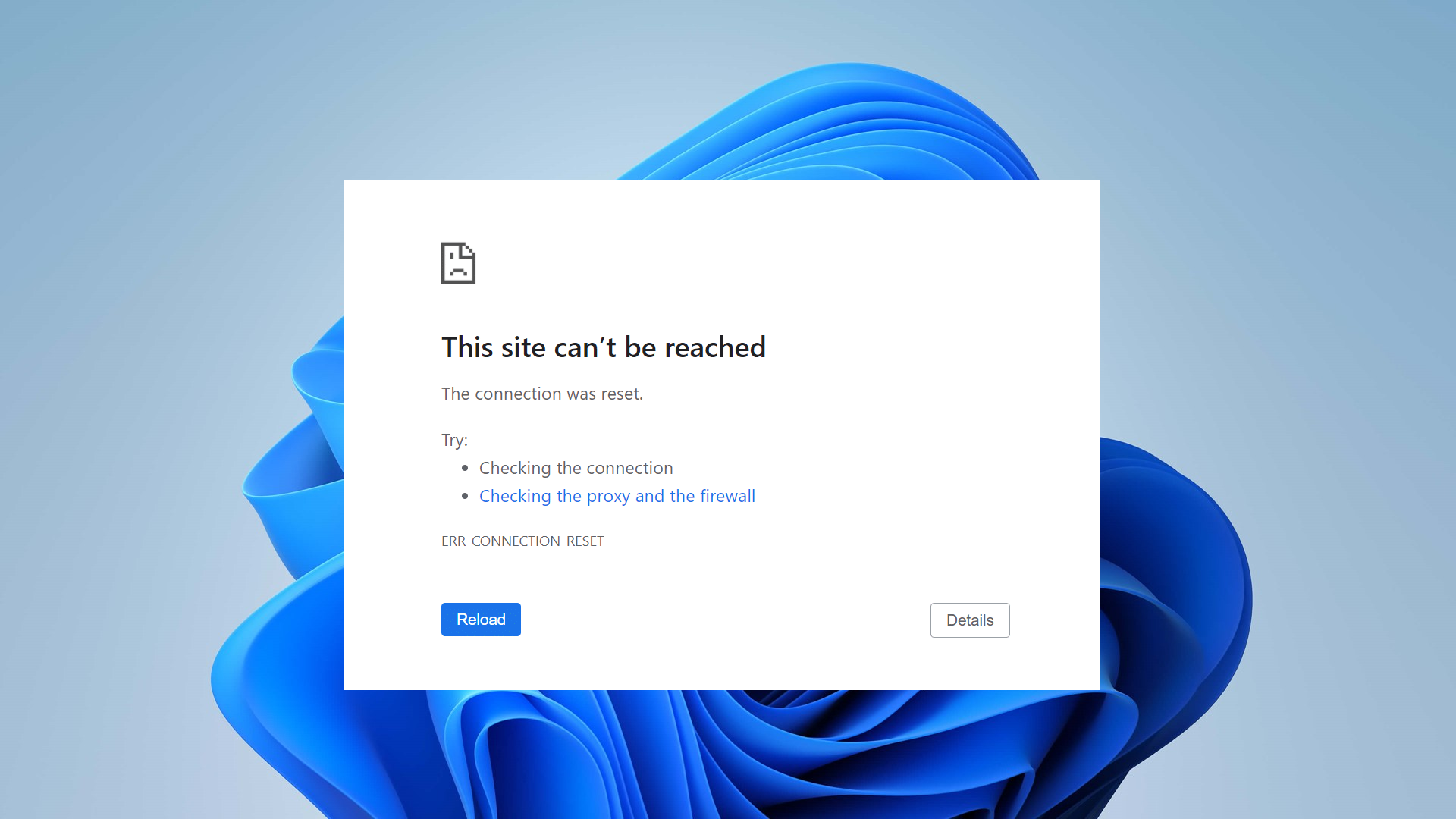
The “ERR_CONNECTION_RESET” error typically occurs when your browser fails to establish a connection with the destination site, causing the page to stop loading abruptly. While other sites may work, specific ones might not load due to this issue.
The most common reason is network misconfigurations, such as incorrect proxy settings or registry modifications by certain programs. Additionally, this error can be triggered by antivirus or firewall software mistakenly blocking the connection.

In this article, we will discuss different ways to solve this error.

1. Change Your DNS Server

Switching to a different DNS server can avoid problems with your current DNS provider, like slow speeds or wrong settings. This helps your device connect better to websites and may fix the “ERR_CONNECTION_RESET” error caused by DNS issues.

  1. Press and hold the Windows Key, then press I to open the Windows Settings app.
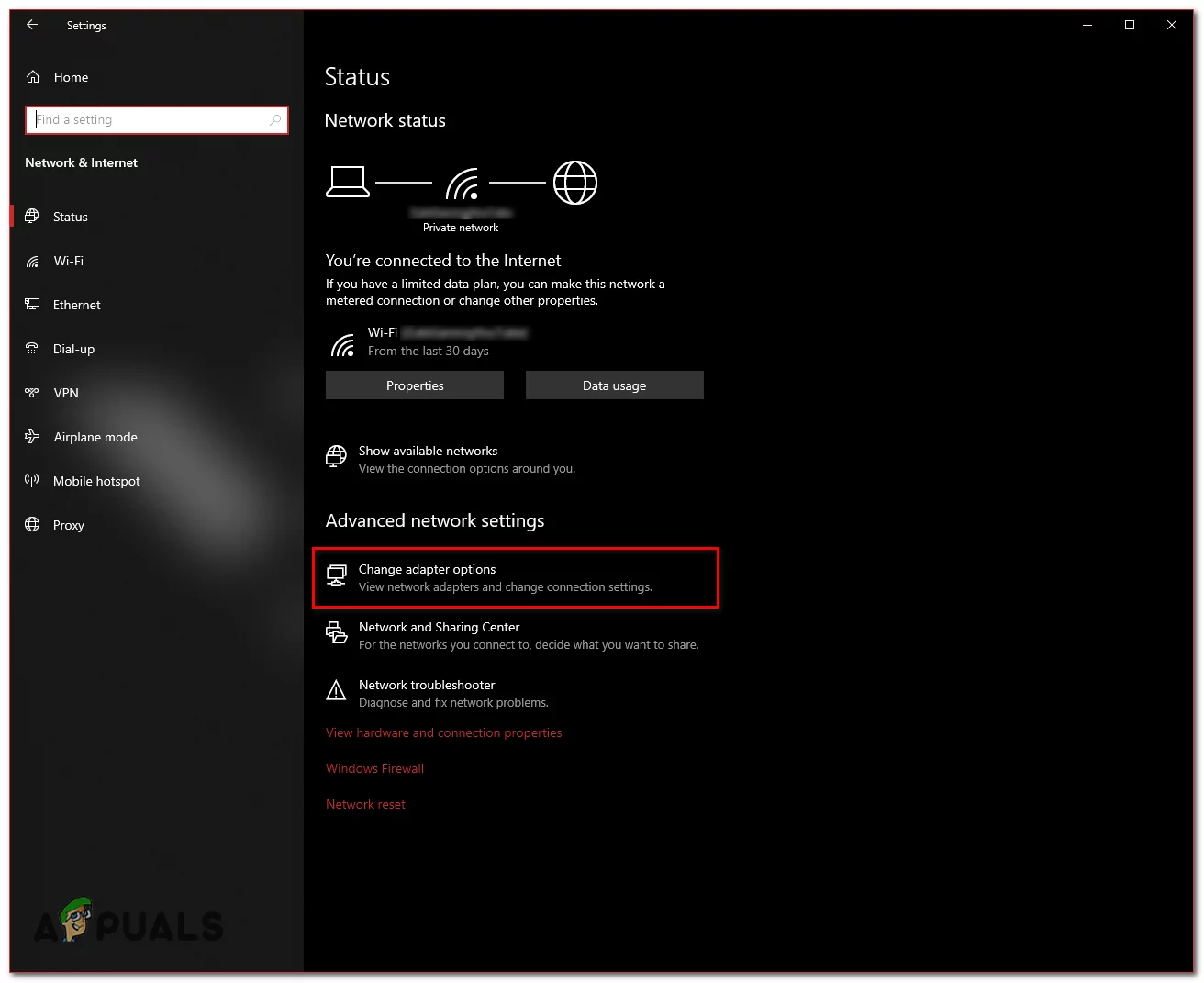
  2. Go to Network & Internet within Windows Settings.
  3. Click on Change Adapter Settings.
  4. Right-click on your Network Adapter and select Properties.
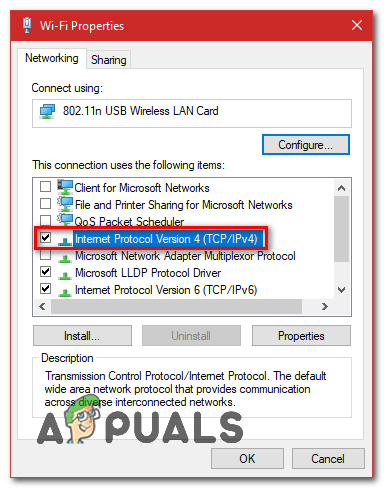
  5. Double-click on Internet Protocol Version 4 (TCP/IPv4).
  6. Select Use the following DNS server addresses.
  7. Enter “8.8.8.8” as the Preferred DNS server and “8.8.4.4” as the Alternate DNS server.
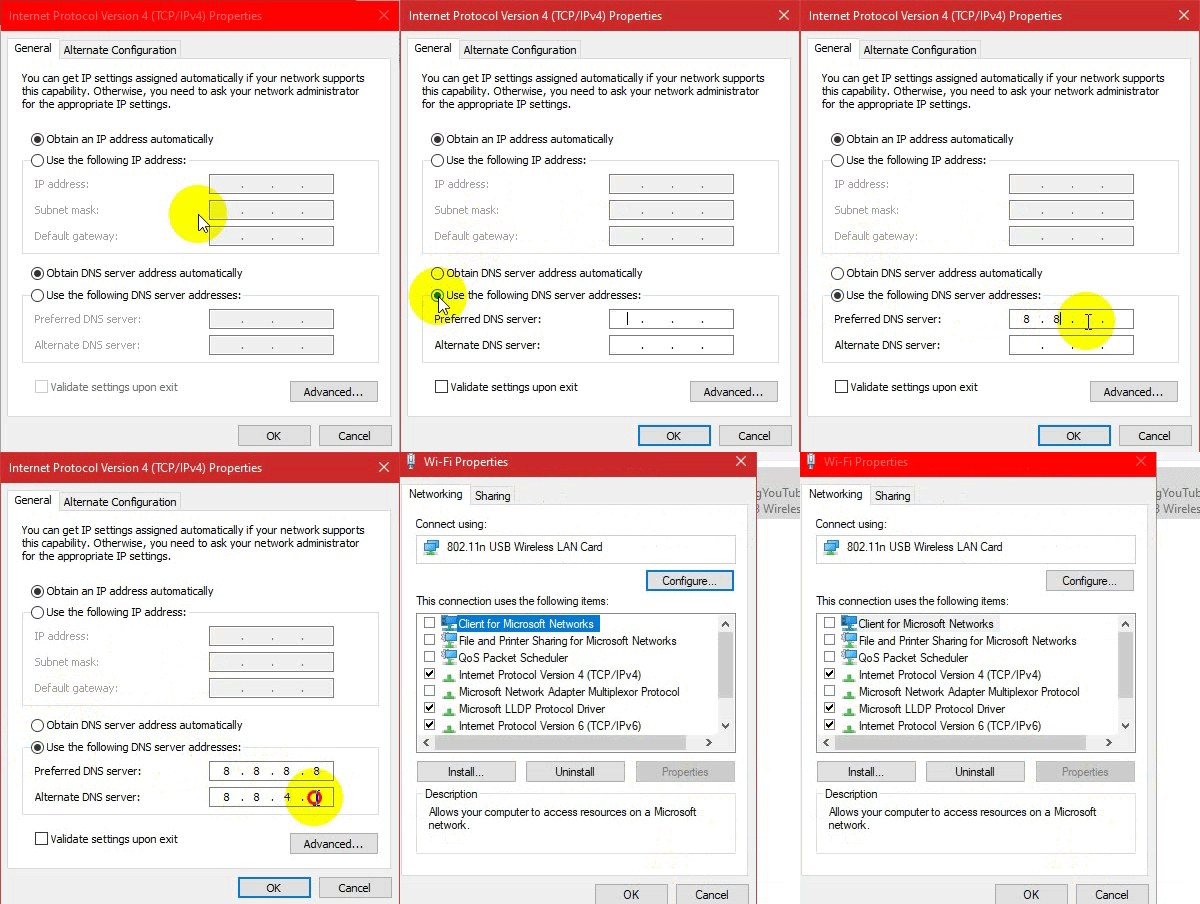
    Changing the DNS Server
  8. Press Windows Key + X, then select Command Prompt (Admin) or PowerShell (Admin).
  9. To refresh the DNS servers, type this command:
    ipconfig /flushdns
2. Reset LAN Proxy Settings

Sometimes hidden network settings, like proxy settings, can mess up your connection by sending your internet traffic the wrong way. Resetting these LAN proxy settings clears them out, allowing your browser to connect directly to the internet. This often fixes the “ERR_CONNECTION_RESET” error.

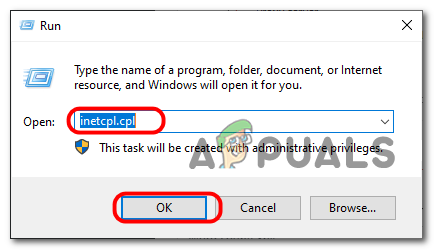
  1. Press and hold the Windows key and press R to open the Run dialog.
  2. Type inetcpl.cpl and press Enter to open Internet Properties.
  3. In the Internet Properties window, go to the Connections tab and click LAN Settings.
  4. Ensure all options are unchecked and click OK.
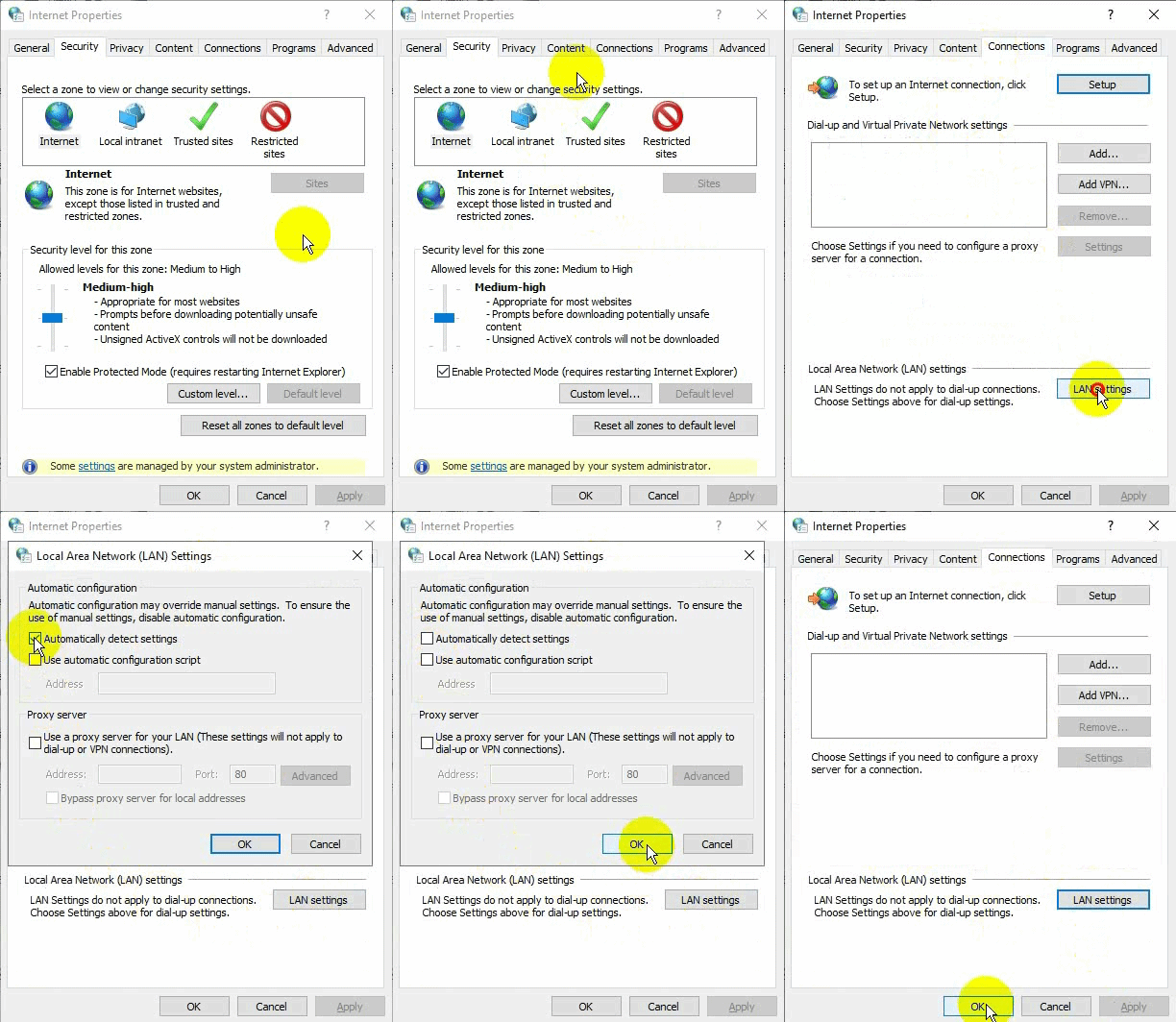
    Unchecking Proxy Settings
  5. Restart your computer and check if the issue is resolved.

3. Reset Your Network Configuration

A misconfigured network can disrupt the connection between your device and the server, causing the ERR_CONNECTION_RESET error. Resetting your network settings clears any custom changes, refreshes TCP/IP settings, and restores the default network setup, ensuring a stable connection without errors. This step fixes problems from bad configurations or network conflicts.

  1. Press the Windows Key + X and select Command Prompt (Admin) or PowerShell (Admin).
  2. Enter these commands one by one to reset your network settings:
    netsh winsock reset
    netsh int ip reset
    ipconfig /release
    ipconfig /renew
    netsh interface ipv4 reset
    netsh interface ipv6 reset
    ipconfig /flushdns
  3. Restart your computer and check if the issue is resolved.

4. Change Your MTU (Maximum Transmission Unit)

Changing your MTU size helps your device send data to the server more smoothly, avoiding problems that can cause the “ERR_CONNECTION_RESET” error. By setting the MTU to the right size, you ensure better communication, especially if your network has trouble with large data packets.

  1. Press Windows + R, type ncpa.cpl, and press Enter to find your network name.
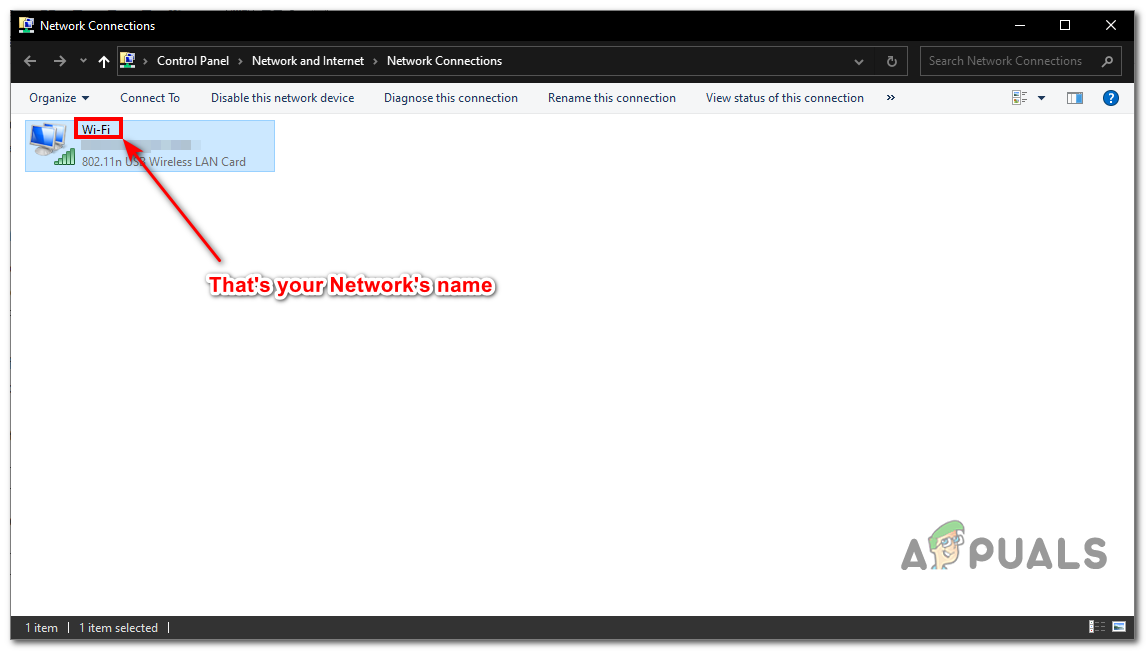
    Finding Your Network Name
  2. For Ethernet, use:
    netsh interface ipv4 set subinterface "Your Network Name" mtu=1472 store=persistent

    For Wireless, use:

    netsh interface ipv4 set subinterface "Your Network Name" mtu=1472 store=persistent
  3. Restart your computer and router.

5. Disable Antivirus Protection and Firewall

Security tools like antivirus programs and firewalls protect your system but can mistake safe web traffic for a threat, blocking connections and causing the “ERR_CONNECTION_RESET” error. Temporarily turning off these tools lets you check if they’re causing the problem and helps restore access to the website. You can then tweak their settings to stop this from happening again.

6. Use a VPN

Using a VPN can help fix the error by creating a secure path between your device and the server, bypassing any blocks or settings that might be causing the issue. This can solve problems related to ISP blocks, regional restrictions, or network mistakes.

ABOUT THE AUTHOR

Muhammad Zubyan


Muhammad Zubyan is a certified Google IT Support Professional with over 7 years of extensive experience. He has worked on more than 1500 computers, gaining valuable insights that enable him to detect and troubleshoot any complicated root cause of Windows-related issues and errors. In addition to managing Appuals as a Senior Editor, he is currently developing his own Game Optimization program that caters to both gamers and casual users alike.

Comments

62
    GR
    greatscott May 24, 2015

    Hi Kev. I tried the (correct win 7 syntax) set cmd but no luck. if i uninstall my wireless adapter and reboot i can launch browser immediately and get to site a few times but after 10-20 seconds if i try to load the URL i get ERR_CONNECTION_RESET. after that i cannot get to the site again. (in safe mode i can get to it every time) I did this with firewall and antivirus completely disabled so i think something is trying to attach/load later (during my browser session) that is corrupting the situation. any advice on how i can diagnose/see what is loading and then perform a step by step analysis of those programs/services/processes to see which one is causing the problem? thanks!

      HN
      Hedi Naily Jun 5, 2015

      Same here, did you resolve this issue?

      KA
      K. Arrows Author Jun 12, 2015

      It looks like you have a program running on your PC which is changing the MTU.

        GR
        greatscott Jun 12, 2015

        Hello! and Thanks!!! You were absolutely correct!!! Now, I know how to use netsh to set the mtu to 1490 (it was 1500) which 1490 works fine. but, can you tell me where/how to have my system set it to 1490 every time? is this done in a batch file? or is there a place in windows or elsewhere that i can fix it permenanently? (i still cannot tell which program is making the change to 1500)…. thanks again!

          KA
          K. Arrows Author Jun 12, 2015

          You can create a batch file and task it to run automatically but that is not the solution. Default windows defined mtu works, but since this is an issue caused by one of the programs, you need to find it and remove it. I suggest doing a clean boot.

    DM
    Dan McConnell Jun 19, 2015

    The requested operation requires elevation (Run as administrator).

      KA
      K. Arrows Author Jun 19, 2015

      right click cmd and select run as administrator.

        DM
        Dan McConnell Jun 19, 2015

        Thanks…Did that right before your reply. Will this help (you think) with trying to hook up with a good free antivirus (AVG, Avast…) used both in the past, but new PC is a refurbished DELL running Windows 7 and it will surf-but besides Chrome, every attempt to download shot back the ERR-CONNECTION error. Chrome worked okay, and I am reloading that right now on that DELL…but even dropping defender and firewall wouldn’t allow antivirus download-I even have my last AVG on USB drive and could start and update

          KA
          K. Arrows Author Jun 19, 2015

          AVG Free is better then avast. This indicates that something else may be wrong with your PC so in my opinion rather then spending hours troubleshooting whats wrong, i would suggest simply re-installing Windows to get rid of all errors.

          DM
          Dan McConnell Jun 19, 2015

          Yeah-somethings up. Came closer that time, download page thought, blinked, stuttered, then wen to ERR message again

    ST
    Stefan Thomas Sep 16, 2015

    Tried both and still running into the same issues. Tried uninstalling and reinstalling but still no fix

      KA
      K. Arrows Author Sep 16, 2015

      What did you uninstall and reinstall?

    FL
    flyfixer Oct 9, 2015

    Is this a user side or client side problem?

      KA
      K. Arrows Author Oct 9, 2015

      User side and client side are same. It can be a user side and can also be a server side. If the site doesn’t open on any of your other devices on different networks; then it’s the server side but if it does open then it’s the client side.

        FL
        flyinggoatman Oct 9, 2015

        Oh that’s a handy tip. Thank you so much!

    FL
    flyfixer Oct 9, 2015

    Is this a client or host side problem?

      KA
      K. Arrows Author Oct 9, 2015

      already answered this below?

    BO
    Bob Oct 16, 2015

    I tried the above advice and it did not work. Do I need to undo what I did since that obviously was not the issue?

      KA
      K. Arrows Author Oct 16, 2015

      If you have changed the MTU settings; then you don’t need to undo it because what i have mentioned in this guide is what the default should be.

    LI
    libralion Oct 31, 2015

    Where do I do this? “Replace Local Area Connection with the name of your network adapter and hit Enter.”

      KA
      K. Arrows Author Oct 31, 2015

      You need to see what the name of your network adapter is; then do this in “Command Prompt”

        LI
        libralion Oct 31, 2015

        I still don’t understand. I typed the “netsh etc. in the cmd and hit enter. It then said “OK”. And what then? My Lan is called ” ethernet”. Where do I type that?

          KA
          K. Arrows Author Nov 1, 2015

          Can you send me a screen shot of Network Connections window? i’ll then create you the correct command.

          LI
          libralion Nov 1, 2015

          Sorry. The LAN is: Realtek PCIe GBE Family Controller
          But where do I type that?

          KA
          K. Arrows Author Nov 1, 2015

          see image. This is what we need to know.

          LI
          libralion Nov 1, 2015

          that is “Ethernet”

          KA
          K. Arrows Author Nov 1, 2015

          Then this is what you need to type:

          netsh interface ipv4 set subinterface “Ethernet” mtu=1472 store=persistent

          LI
          libralion Nov 1, 2015

          Ah ok. Now I understand. Thanks a lot! 🙂

          KA
          K. Arrows Author Nov 1, 2015

          cool 🙂

    SK
    Solako Krestings Dec 4, 2015

    It did work for me.

    MO
    Morty Dec 15, 2015

    It says that it can’t find that command.

      KA
      K. Arrows Author Dec 15, 2015

      you’re typing the command incorrectly. even a space, is counted in the command.

    RI
    Riley Dec 17, 2015

    It worked! Thanks! If it wasn’t for good people like you I wouldn’t know what to do. Sends love your way

    BA
    Bagas Dec 20, 2015

    Well Thanks for this !
    I tried the Other and nothing work !
    and this is work for me !
    #SFMBE

    WI
    Windriven Dec 31, 2015

    This worked perfectly. But you should make clear that netsh needs to be run as Administrator (Win+X, then select Command Prompt (Admin))

    ジリ
    ジェイピー リサール Jan 5, 2016

    Thanks This really works for me.

    MT
    Manoharan Thangavelu Jan 28, 2016

    Mine is “Ethernet
    Network 2
    Realtek PCEi GBE Family controller” and the command doesn’t work. I am not getting my default hot mail loaded.

      KA
      K. Arrows Author Jan 28, 2016

      netsh interface ipv4 set subinterface “Ethernet Network 2 Realtek PCEi GBE Family controller” mtu=1472 store=persistent

      If the command doesn’t work, please send me a screen shot.

        MT
        Manoharan Thangavelu Feb 4, 2016

        could not load a screen shot as it exceeds 2 MB. I have copied the command and pasted it here.
        Been using “netsh winsock reset” command as an administrator and prompted to restart the system and after that the hot mail loads for a while and facing the same problem again. .

          KA
          K. Arrows Author Feb 4, 2016
          MT
          Manoharan Thangavelu Feb 4, 2016

          🙂 Wow ! It works. Thanks a lot

          OK
          Okenn Apr 16, 2016

          This one worked for me!! Thank you so much!

    TE
    Ted Feb 7, 2016

    Method 2 worked for me.

    OR
    Orlando Mar 22, 2016

    I have this problem on my Android phone. At the hospital when ! want to connect to wifi, it goes to the health page to “I accept” before you can connect. On all other devices, it loads that page and the wifi works great but on my phone, I get that ERR CONNECTION RESET. It also does that on the Best Buy website. I can’t get in.

    CW
    Chris Watson May 17, 2016

    Had this issue on 250 Server 2012/2016 systems.

    2012 and up – Issue: Cannot access NuGet repositories. Cannot access Bing.Com. Cannot access MSN.Com. Certain websites do not load properly such as TMobile W3Schools

    Cause – The TCP ECNCapability protocol is causing Windstream to drop the packets. Windstream will neither fix nor acknowledge the issue.

    Fix: From an elevated command prompt, type the following command and hit enter. Bing.Com should immediately begin working.

    netsh int tcp set global ecncapability=disabled

      KA
      K. Arrows Author May 17, 2016

      This is very helpful. Thanks

    PA
    Paul Jun 17, 2016

    Neither of the posted Solution works for me. I don’t have an Antivirus running, and evertime i try the second method, it works for a couple of minutes after the restart, and then without any specific reason it keeps going back to the err_connection_reset.

      KA
      K. Arrows Author Jun 18, 2016
        SH
        Sharath Jul 13, 2016

        Thanks…
        A combination of MTU reset, disabling antivirus & cleanboot worked for me….

          KA
          K. Arrows Author Jul 13, 2016

          Welcome.

    AT
    Abul Kashem Thefiredragon Aug 30, 2016

    I have same problem in android how I fix it in android (mate 8)

    PW
    P Wattay Mar 21, 2017

    I run on a school computer, so I get the error when I try to go to Wikipedia.

      KA
      K. Arrows Author Apr 6, 2017

      School may have set a firewall to block WP

        2S
        2Shyne Sep 7, 2017

        can i by pass something similar at work?

          KA
          K. Arrows Author Sep 29, 2017

          if they are not blocking through a firewall

          2S
          2Shyne Oct 1, 2017

          There’s a firewall affirmative and proxys as far as I know can be traced back to me. Any ideas on what else can be done

    CH
    christopher hernandez Nov 22, 2017

    i cant put youtube in my crome book

      KA
      K. Arrows Author Dec 3, 2017

      What error do you get?

    KO
    korrektor Feb 6, 2018

    “Element not found”….

      KA
      K. Arrows Author Feb 6, 2018

      for which method?

    TM
    That1 Mermaid Dec 9, 2018

    https://uploads.disquscdn.com/images/1894940fc3fdbe57b1ee987116a59ff87c3dbc360e7baf375996c28228440e93.png i run on a school laptop and it happens when i try to get on netflix, but i have watched netflix before on this laptop. Its not blocked, or it would say blocked by administrators, but i have tried everything in my power without needing an administration log in.

      KA
      K. Arrows Author Dec 9, 2018

      It definitely is blocked now by your internet provider (could be the school’s network). You can use a VPN to bypass it.