Fix: GTA 5 Online Not Working

When trying to enter GTA 5 Online, players might get stuck on the loading screen or see an error message that makes them exit. This problem can happen on both PCs and consoles. Rockstar Games says it’s often due to issues with the game disk or network settings and has noted this on their support site.
GTA 5 Online
GTA 5 Online

Main causes include server outages, the game being in an error state, or router problems.

In this article, we will discuss different ways to solve this error.

1. Check Server Outage

Before doing anything else, check Rockstar’s server status to see if the issue is on their end. If the servers are down or under maintenance, you can’t connect to GTA Online. Checking this first can save time and prevent unnecessary steps on your network or console.
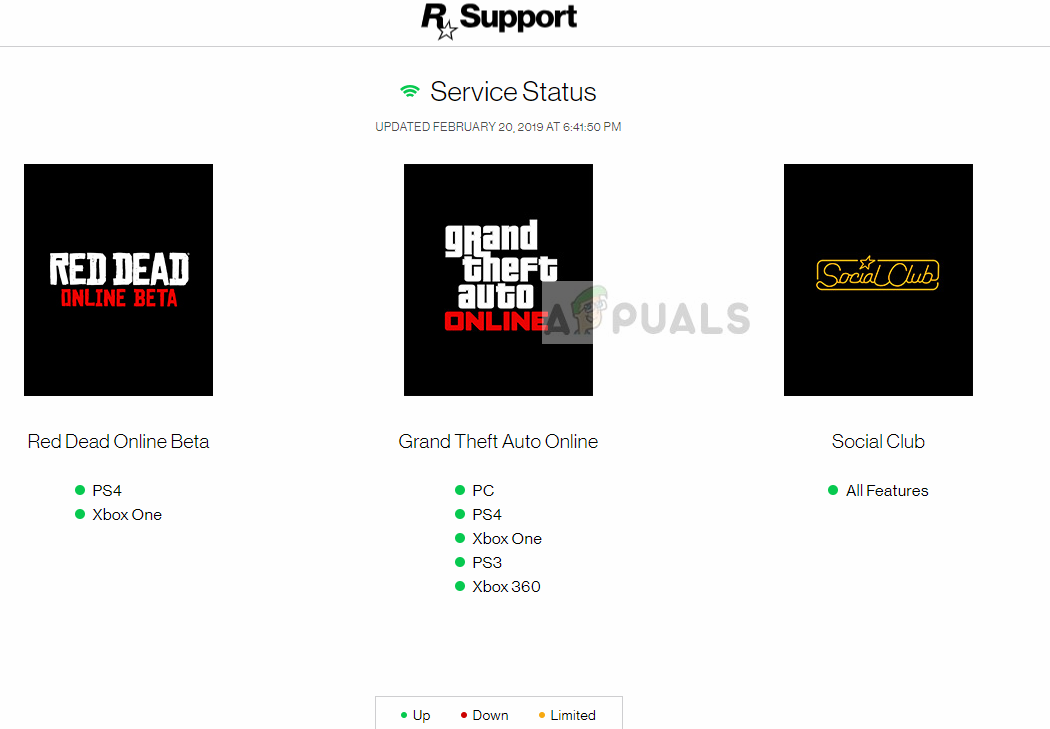
Checking Rockstar Server Status

2. End All GTA 5 Resources

This issue can happen because leftover GTA 5 processes can interfere with the game’s startup. Closing all GTA 5 resources removes these background tasks, letting the game restart fresh and potentially solving connectivity and performance problems in GTA Online.

  1. Press Windows + R, type “taskmgr” in the dialog box, and press Enter.
    Running the Task Manager
    Running the Task Manager
  2. In the Task Manager, click on the Performance tab and then click Open Resource Monitor.
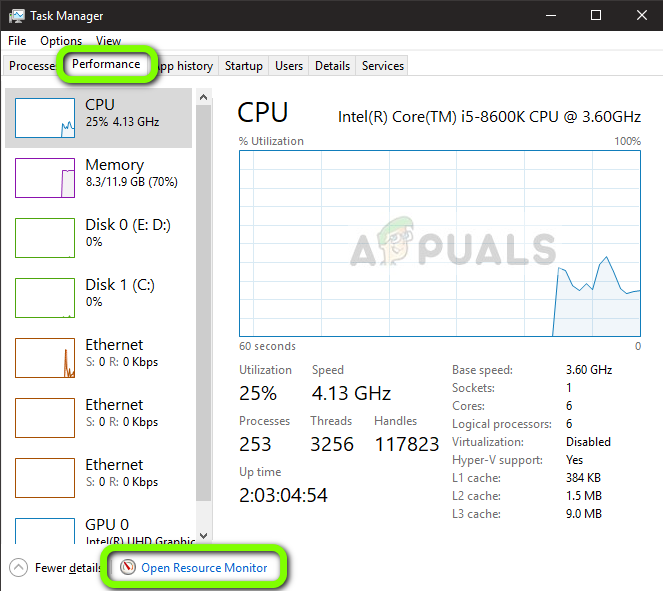
    Opening Resource Monitor
    Opening Resource Monitor
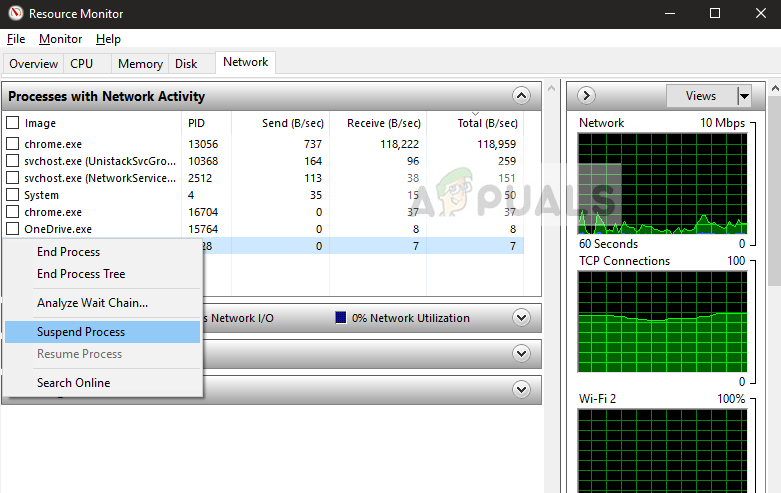
  3. Locate the process gtav.exe, right-click on it, and select Suspend Process.
    Suspending Rockstar Service
    Suspending Rockstar Service
  4. Wait for about 10-15 seconds, right-click again, and resume the process. Then, alt-tab to the game and check if you can log into the online mode.

If this doesn’t work, try pressing Alt + Enter for around 10 seconds to crash the game. Then you can launch it again and check if the issue is resolved.

3. Reset Your Router

Power cycling your router can refresh your network connection, fixing temporary issues that may block GTA 5 Online from reaching Rockstar’s servers. Resetting helps the router reconnect to your ISP, lowering the chances of data loss or connection issues that disrupt gameplay.

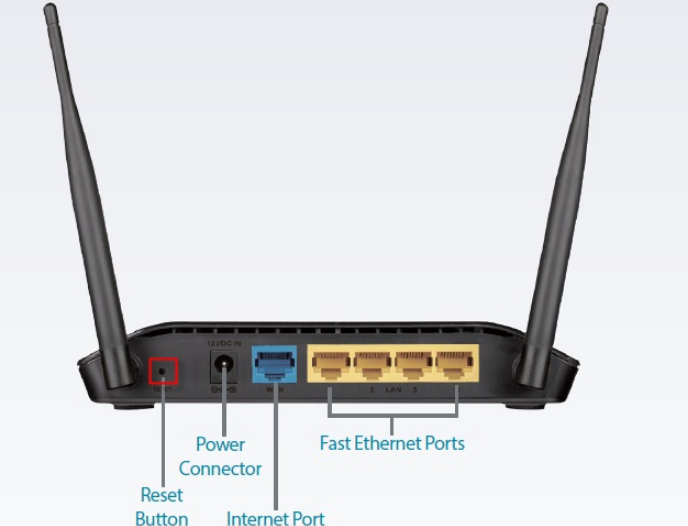
  1. Make sure your router is plugged into the power supply. Check the back for a small reset button or a hole.
  2. If there is a hole, use a pin to press the reset button for 10-15 seconds.
    Resetting Router
    Resetting Router
  3. After resetting your router, restart your computer. Once reconnected to the network, launch the game.

If resetting the router doesn’t work, try connecting to another network. You can make your mobile a hotspot temporarily and try connecting in-game using it.

4. Play Another Game and Then Switch to GTA 5

Playing another game for a short time can reset network settings and clear cache issues related to online play. When you switch back to GTA 5, this might help reconnect to Rockstar’s servers and fix temporary connection problems.

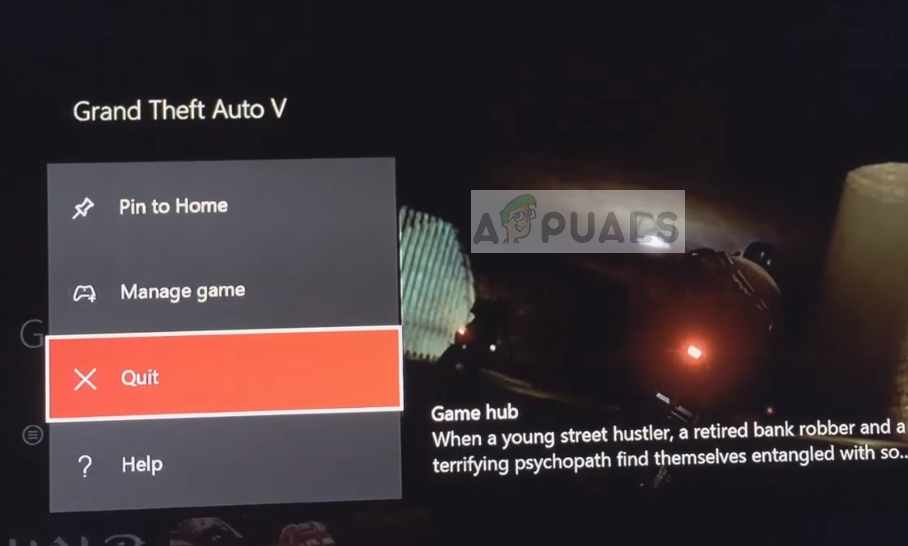
  1. Quit GTA 5 on your console by going to the main page, right-clicking the game, and selecting Quit.
    Exiting GTA 5
    Exiting GTA 5
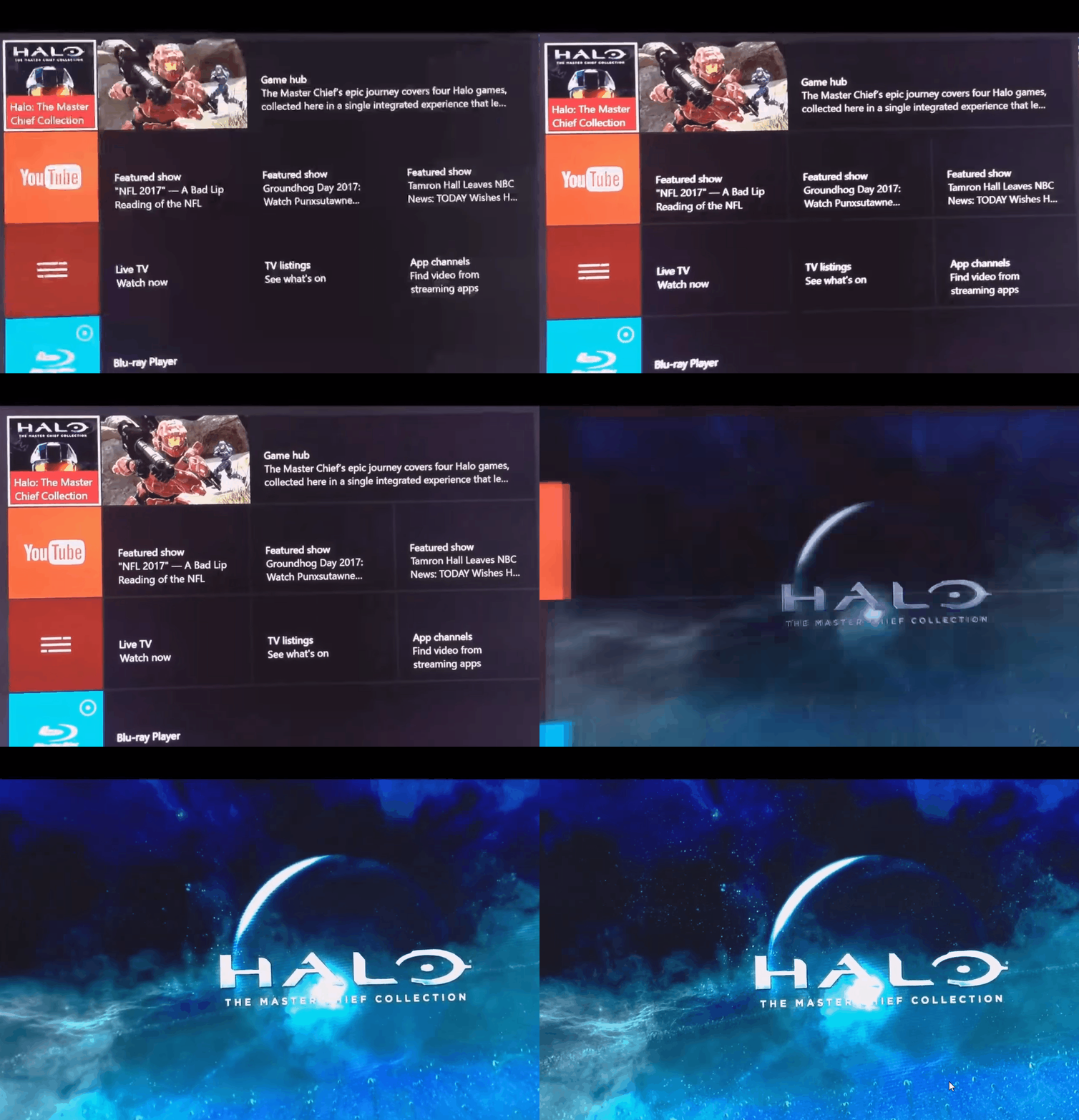
  2. Start a different game from your library and let it load completely.
    Launching another game
    Launching another game
  3. Quit the second game and relaunch GTA 5. Try connecting to GTA 5 online to see if the issue is resolved.

If nothing has worked for you, try playing the game in Safe mode or clean boot Windows to rule out any conflicts in the game.

ABOUT THE AUTHOR

Kevin Arrows


Kevin Arrows is a highly experienced and knowledgeable technology specialist with over a decade of industry experience. He holds a Microsoft Certified Technology Specialist (MCTS) certification and has a deep passion for staying up-to-date on the latest tech developments. Kevin has written extensively on a wide range of tech-related topics, showcasing his expertise and knowledge in areas such as software development, cybersecurity, and cloud computing. His contributions to the tech field have been widely recognized and respected by his peers, and he is highly regarded for his ability to explain complex technical concepts in a clear and concise manner.

Comments

37
    MU
    Martins Usigbe Jul 11, 2020

    hello I just downloaded GTA online and I can’t play the game online, the loading screen goes on forever I have left it for 4hours and it just plays the song and the cloud changes this my first time and it’s quite frustrating I can’t play the game, I need a fix badly, I’ve tried all the fixes on the support page and nothing seems to work… I saw something about spawn location but that shouldn’t apply because I haven’t played the game before,
    P.S It doesn’t show me the “loading gta online”
    any help would be appreciated.

      SW
      Shane Warren Author Jul 11, 2020

      Hello, are you using FiveM with the game aswell? and have you tried reinstalling?

        MU
        Martins Usigbe Jul 12, 2020

        I have reinstalled… And no I’m not using FiveM I’m just playing the game for the first time and don’t even have an online character it doesn’t even get the part where I have to create my character

          SW
          Shane Warren Author Jul 13, 2020

          Did you buy it through Steam or Rockstar? try clearing your download cache in Steam and also clear out all the temporary files being stored by the computer.

          MU
          Martins Usigbe Jul 14, 2020

          I got it on Epic games store

          SW
          Shane Warren Author Jul 16, 2020

          Okay, try to clear out the downloads cache and make sure to verify files from the launcher.

          NT
          noa Tjernberg Jul 28, 2020

          I got the same problem and i bought it from rockstar

          SW
          Shane Warren Author Jul 29, 2020

          Try reinstalling your game if you have already tried the methods in this article.

          RP
          Ritch Pavadey Oct 28, 2020

          how to verify the files please ???

          MZ
          Muhammad Zubyan Author Oct 28, 2020

          To verify the installation of game files, navigate to the game in your Library and click on the three dots. Then click verify. This process will take a while to complete so be patient.

    TH
    Thomas Oct 26, 2020

    Hello can any one help when I try get in to gta online dose not matter what I do it says that the Servers are unavailable can anyone help

      MZ
      Muhammad Zubyan Author Oct 26, 2020

      That’s unfortunate to hear can you confirm which platform are you playing on?

        TH
        Thomas Jan 12, 2021

        Ps4

          MZ
          Muhammad Zubyan Author Jan 13, 2021

          I suggest you hard restart your PS4 you can do that by following these steps:-

          1. Turn off your PS4 completely.
          2. Hold the PS4 button down for around 10 seconds and let go of the button.
          3. Start your PS4 Again.

          Check if the issue still persists, If it does persist try logging out of your account and then logging back in. If that doesn’t fix the issue for you as well I suggest you contact your ISP and explain this problem to him as this seems to be a problem with your router configuration.

    JF
    josh florence Dec 20, 2020

    Can’t get into gta 5 online on Xbox one

      MZ
      Muhammad Zubyan Author Dec 20, 2020

      Have you tried Hard Restarting your Xbox one?

        JF
        josh florence Dec 20, 2020

        Yes. I have also tried clearing the cache, deleting game and reinstalling. Everything I could find online.

          MZ
          Muhammad Zubyan Author Dec 20, 2020

          Is there any error code the game is showing or the game isn’t opening at all?

    UG
    Unlimited Gaming Apr 3, 2021

    gta 5 online on ps3 it worked before 4 days ago but since 4 days it started saying ‘timed out locating session pls return to grand theft auto 5 and try again later’ i tried about 70 times already also i could play with people on pc and other consoles before

      MZ
      Muhammad Zubyan Author Apr 4, 2021

      Is it not working on your PC as well? If it’s not working on your PC and PS3 I suggest you try contacting your ISP and let him about your problem.

        UG
        Unlimited Gaming Apr 10, 2021

        i did they said nothin is wrong and rockstar said to check my router but its right beside my ps3 so i have the best connection in the house

    PA
    Paweł Apr 26, 2021

    Hi, I know that this article is pretty old, but still one of the best 🙂
    Do you know any issues with GTA online when using VPN? I have used on my xbox VPN for 7 days and without VPN it worked also, but suddenly from yesterday it works only on VPN, no more on my regular internet connection.

      MZ
      Muhammad Zubyan Author Apr 30, 2021

      It seems like an issue from your ISP’s side. I suggest you to contact your ISP and explain everything to him so that he can fix this issue.

    SO
    Sadjia O'Connor May 17, 2021

    Hi, my gtav online on ps3 won’t let me join online session for over 5 days now it keeps saying “timeout location session.”! Is there an issue with ps3 online?

      MZ
      Muhammad Zubyan Author May 21, 2021

      Try creating a session instead of joining it check if that works out for you. If it does work for you, I recommend you to power-cycle your PS3. Follow these steps:-

      1. Hold the power button down for 30 Seconds it should beep 3 times.
      2. After it’s done beeping plug out the power cable.
      3. Wait for at least 30 seconds and then plug everything back in.
      4. Check to see if that resolves the issue for you.

      If this doesn’t fix your issue try restarting your router and contacting your ISP.

      Reply
    SS
    Seth Saunders Aug 1, 2021

    Hi, My GTA 5 suddenly quit working yesterday after never having this problem. I am using Xbox Series X. The weird thing is that I can’t even get into my Rockstar account on my computer either while I’m hooked to wi-fi. I hooked up to my hotspot from my phone and was able to get into Rockstar that way to put in a ticket for support, but I am still waiting for an answer. Can you help? Thank you

      MZ
      Muhammad Zubyan Author Aug 1, 2021

      In that case, I think that you should contact your ISP and explain to him the situation I had the same issue on my PC version of GTA 5 and it turned out that ISP blocked some ports that were being used by GTA 5 to contact game’s datacenters. I contacted him and he opened the ports again that helped me a lot.

      Reply
    YE
    YeBoyBlack Sep 9, 2021

    I can’t really join GTA 5 online and my internet connection is perfect but somehow it says that I have to check my internet connection and got to support and when I’m in my laptop It doesn’t let me load up the Website. Since it says that what should I do.

      MZ
      Muhammad Zubyan Author Sep 10, 2021

      In that case, I suspect that these connections are blocked by your ISP. Try contacting your ISP and explain the situation to them.

    BA
    bartholomew Dec 17, 2021

    hi i have just got gta v on my new Xbox series x and i have tried to go online but no matter what i do all it comes up with is your device does not have permission or something like that and i have no idea what to do

      MZ
      Muhammad Zubyan Author Dec 19, 2021

      Can you take a picture and send it to me? So that I can assist you accordingly.

    WS
    Wagner Stefan May 26, 2022

    Hi, thx for your guide. I am an IT professional myself (but not on Windows) and besides following the steps, I still seem to have network issues:

    Setup: Win 11 PC with GTA via RS Social Club.
    Description: After creating my online char and playing the first online tutorial mission (race against Lamar), I cannot log into any mode of online lobby (solo, friends, public). “Joining session” on endless loop.
    Note: I got another PC just working fine with GTA Online on the same subnet.

    What I did:
    – Updated OS and all drivers.

    – Disabled Antivirus.
    – Disabled Fw
    – Allowed UDP ports 6672 and 61455-7 on my router.
    – Deleted RS profile
    – Couldn’t find anything meaningful on the MS Event Log

    Any idea what I am missing?

      MZ
      Muhammad Zubyan Author Jun 16, 2022

      I had the same issue, turned out that even if I do port forwarding through my router. It won’t actually do port forwarding because the ISP set it up that way. I contacted my ISP and the issue is resolved now. Check if this can help in your case.

      Reply
    JH
    Jake Hayes Jun 7, 2022

    https://uploads.disquscdn.com/images/bd15b2d3605f4931b736f837ead4943950674f7ee723d7286ad34632d7c44272.jpg

    This is the error message I can’t bypass. I can’t log in to GTA V Online and it says “Servers are Down” and sometimes it says “I don’t have an internet connection working” which are BOTH not true. It says servers are up for GTA V Online for Xbox Series X (which I have) and my internet is MORE THAN FAST ENOUGH to handle GTA V Online! 🙁 I need help!!!

      MZ
      Muhammad Zubyan Author Jun 12, 2022

      It is possible that your ISP is blocking your access to GTA V online servers, can you try to contact him and explain this issue to him? Also, let me know if the game was working before.

    SM
    S.S Master Jul 21, 2023

    I m having a bizarre problem with gta online joining.
    When I play gta during daytime I can join gta online easily but when I play at night it keep stucking in infinite loading loop.
    If there is a solution for it plz share
    I have done resetting router and all the solution available on internet.

      MZ
      Muhammad Zubyan Author Aug 8, 2023

      In this case, it seems that your issue is originating from the configurations done by your Internet Service Provider, please contact them and explain the issue to them to get this issue resolved.