How to Fix Facebook Marketplace Not Working Issue?

Facebook Marketplace may experience issues that interfere with its proper functioning, such as problems with a user’s Facebook account, device incompatibility, or geographic location restrictions.

These issues can be caused by technical glitches or account limitations.

When attempting to access Marketplace, users have reported the following errors:

  1. Facebook Marketplace not loading
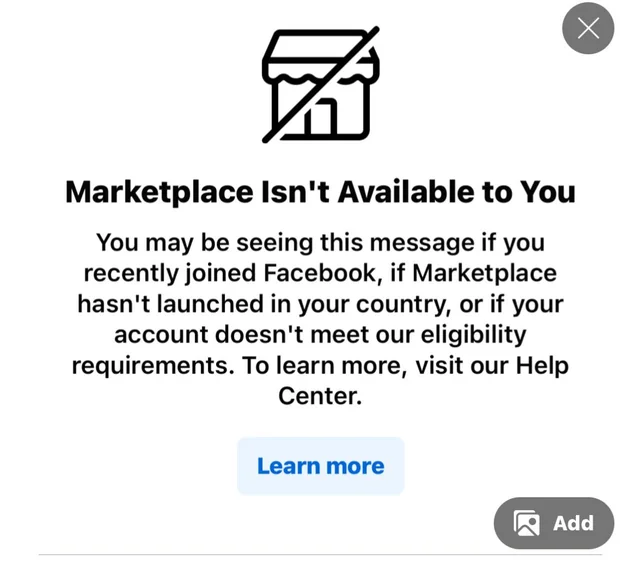
  2. No access, receiving the message: “Marketplace Isn’t Available to You.”
  3. Unable to find the Facebook Marketplace within the Facebook app’s secondary or More Menu.
  4. Encountering checkout problems while using Marketplace.
  5. Difficulty accessing certain ad categories.
  6. Issues with listing items on Marketplace.
  7. Unexpected errors occur upon clicking on a product listing.

Before You Troubleshoot

  1. Your account is established (not new).
  2. You are 18 years of age or older.
  3. You’re using the latest Facebook app.
  4. You live in a region where Marketplace is available. (Check list here)

Now, let’s proceed with the troubleshooting steps.

1. Disable Third-Party Extensions

Certain browser extensions may interfere with the way Facebook operates, leading to issues when using features such as Marketplace. These extensions could potentially allow unauthorized access or changes to your Facebook data.

By disabling any non-essential extensions, you reduce the risk of such interference and enhance your Facebook experience, possibly resolving Marketplace-related issues.

  1. Open Chrome on your computer.
  2. Click the Hamburger Menu (three dots) at the top right corner, select More tools, and then Extensions.
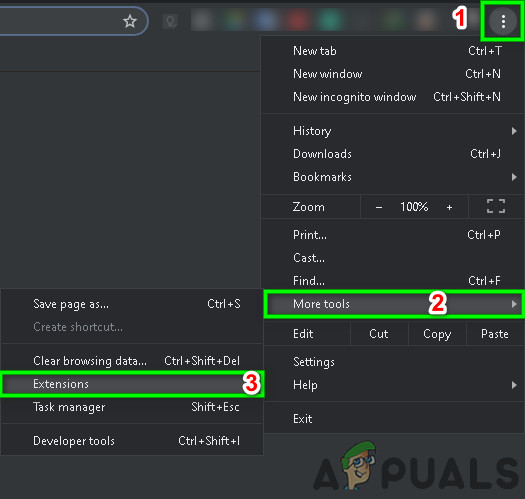
    Open Extensions in Chrome
  3. Find the extension you wish to remove, click Remove at the bottom of the box.
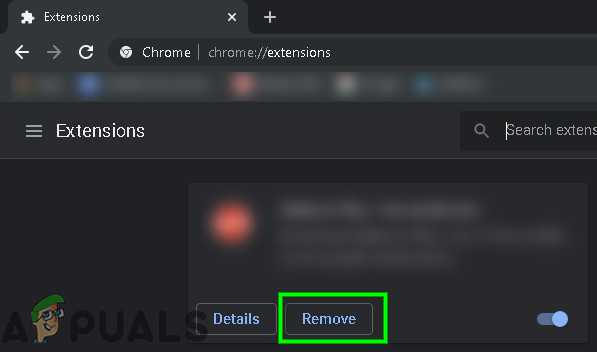
    Click on Remove under Extension Name
  4. Confirm your action by clicking Remove.
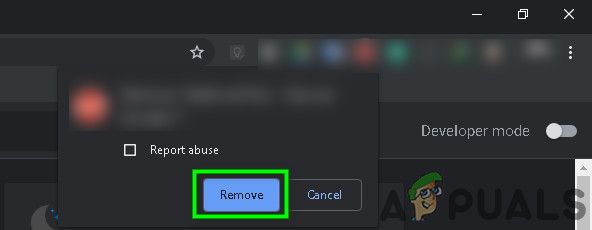
    Confirm Removal of Extension

If you use a different browser than Chrome, follow the corresponding steps to manage extensions.

After removing any problematic add-ons, verify if the error has been resolved.

2. Try a Different Browser

Certain web browsers may not function properly with Facebook Marketplace, leading to access problems or glitches. Trying a different web browser could resolve such compatibility issues, allowing you to use Marketplace without any issue.

  1. Download and install an alternative web browser that you prefer.
  2. Launch the newly installed browser.
  3. Navigate to Facebook Marketplace to check if the problem has been resolved.

3. Clear the Cache and Temporary Data

Clearing your web browser’s cache and temporary data can often resolve issues with Facebook Marketplace not loading or functioning correctly. This is because outdated or corrupted cache files can interfere with how web pages are displayed and operate.

By removing these files, you can help make sure that Marketplace loads with the most recent and error-free data.

  1. Open Chrome on your computer.
  2. Click on the Profile Picture next to the hamburger menu, then click on your Gmail address.
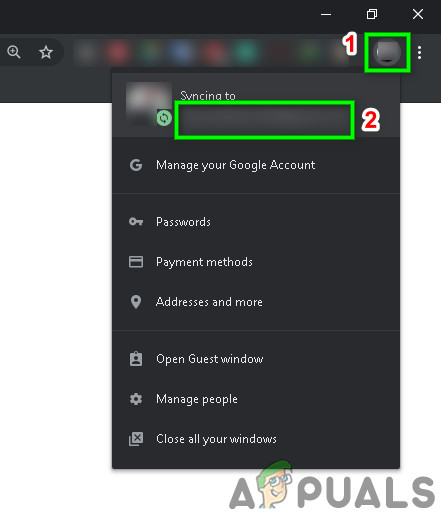
    Click on Profile Pic
  3. In the Settings window, click on Turn Off.
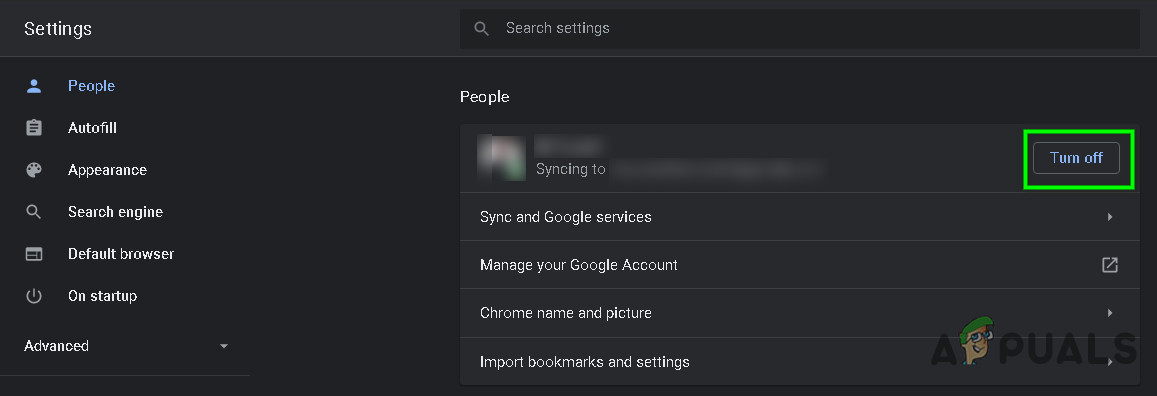
    Turn Off Sync
  4. At the top right, click on the Hamburger Menu (the three dots).
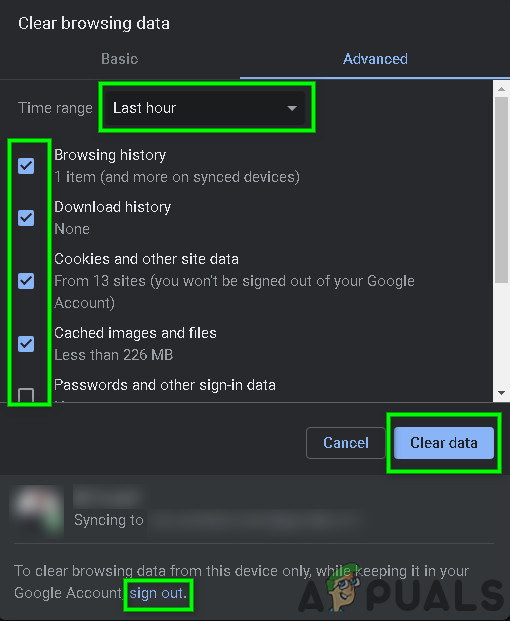
  5. Select More tools, then choose Clear browsing data.
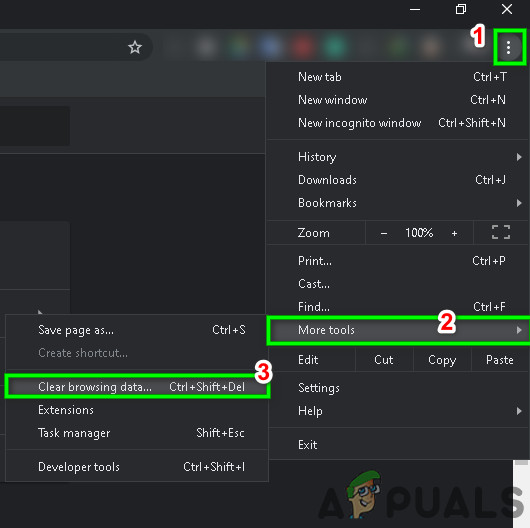
    Clear Browsing Data
  6. Pick a time range, such as Last hour or All time.
  7. Choose which categories you want to remove. To clear data on your device while preserving it in your Gmail account, sign out as needed.
  8. Click Clear data.
    Clear Browsing Data Options

These steps are specific to Chrome, but similar actions can be taken in other browsers.

For mobile devices, refer to these guides to clear cache and data for the Facebook app on Android and iOS.

Try accessing Facebook Marketplace again after clearing the cache and data. If the issue persists, continue to the next troubleshooting step.

4. Reinstall the Application

If you’re facing issues with Facebook Marketplace on a mobile device, a common fix is to uninstall and then reinstall the Facebook app. For iPhone or iPad users, visit the App Store to download the app again.

Android users should head to the Google Play Store for re-installation. This process can refresh the app and potentially fix any errors.

After reinstalling the app, verify if the marketplace is functioning correctly.

5. Revoke Removed Access to Facebook Marketplace

If Facebook Marketplace becomes inaccessible due to a possible violation of community policies, and you’re confident you didn’t breach any rules, you can request a review of your account to regain access.

  1. Log in to your Facebook account.
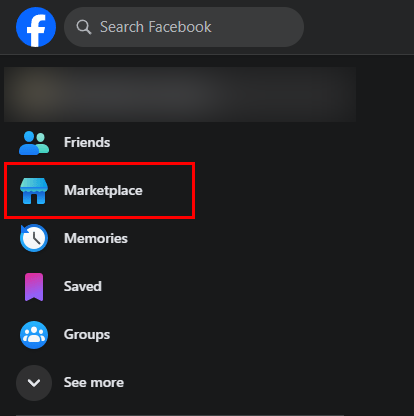
  2. Select the Marketplace icon.
  3. Choose the Request Review option.
  4. Complete the Request form.
  5. Wait a few days for the Facebook Team to respond to your appeal.
  6. Regularly check your Support inbox for updates.

Upon successful appeal, your access to Marketplace will be restored.

If you’ve attempted all the solutions and Facebook Marketplace is still not working, try using it on a different device to determine if the issue is device-specific.

ABOUT THE AUTHOR

Kevin Arrows


Kevin Arrows is a highly experienced and knowledgeable technology specialist with over a decade of industry experience. He holds a Microsoft Certified Technology Specialist (MCTS) certification and has a deep passion for staying up-to-date on the latest tech developments. Kevin has written extensively on a wide range of tech-related topics, showcasing his expertise and knowledge in areas such as software development, cybersecurity, and cloud computing. His contributions to the tech field have been widely recognized and respected by his peers, and he is highly regarded for his ability to explain complex technical concepts in a clear and concise manner.

Comments

49
    DM
    Diane Morfoot May 30, 2020

    I am trying to sell an item on Facebook marketplace. It won’t post and says it is a saved draft. How can I delete the item and start new again.

      SW
      Shane Warren Author Jun 1, 2020

      I don’t think individual accounts can delete their drafts, maybe the page admins saved it as draft? can u contact them to delete it? otherwise you can create a new account and post from that if it is just for the marketplace.

    JP
    Jose Perez Oct 27, 2020

    I’ve been trying to buy on market place but I’ve had my orders canceled twice by Facebook a few days later. Thier explanation is they are having technical issues with processing my payment. I see the authorization on my bank account.

    BM
    B Master Nov 15, 2020

    Hi, I can create an ad in Marketplace, and see the Publish button BUT I am unable to click the publish button and so my ad sits as a draft. Can you help please? Thanks

      MZ
      Muhammad Zubyan Author Nov 20, 2020

      How many likes do you have on your Page? If you have a small audience (Less than 1000 Likes) You won’t be able to publish the ad. If you have more than 1000 Likes on your Page you might have to contact Facebook to let you know what’s the actual issue.

        BM
        B Master Nov 26, 2020

        Thank you Zubyan. Yes only a small audience, so that might be the issue.

    GO
    Gordan Nov 29, 2020

    How do I change currency in Facebook Marketplace. My problem: Wrong currency in listings on Facebook marketplace. I live in Croatia and currency here is Croatian Kuna [KN] but in listings on the Marketplace is US $. I have changed the currency in Facebook pay settings to the Euro (because there is no KN). Some other (my) listings is in Croatian KN. My listing in US $ are probably invisible to the Marketplace.

      MZ
      Muhammad Zubyan Author Nov 30, 2020

      Just update the location name on the main page of the Facebook market place, then try to list the item, your currency will be automatically selected based on the location you have selected on the main page.

      Reply
        GO
        Gordan Nov 30, 2020

        Thanks, Zubyan Gul. But my location on the Facebook marketplace is ok. Everything has changed since the new (look/design) of Facebook and the new Facebook marketplace.
        According to this help:
        https://www.facebook.com/he
        ps. “old” listings are ok but every new one is in the wrong currency (in Euros instead of KN, the official currency in Croatia)

    JT
    Jean-Marc Tibo Dec 16, 2020

    Hi! I post items on Marketplace with my correct location(computer, tablet and cell phone). I see my location is ok in all of my postings. However when I search for my items or even my name they don’t show up in the 1km,5km,20km but only 40km range. Most of my buyers are usually from far away too. I’m in Montreal there are enough Montrealers browsing Marketplace why aren’t they seeing my items?

    GP
    Guiseppa Ann Posey Dec 26, 2020

    When I go on the marketplace to look at posts it tells me there are no posts in my area. I have reported it and checked my support inbox and no one has helped me. It has been several days and it’s getting really frustrating. I would like some answers please. I am not restricted, I just can’t see posts in my area. I’m having a problem with this on my phone and iPad.

      MZ
      Muhammad Zubyan Author Dec 26, 2020

      Have you tried checking if you are having the same issue on Browser? If you are not having this issue on the browser try clearing data of the app and then log in again that should fix this issue.

    DP
    Denise Provost Dec 29, 2020

    Hi I am having the same issue as Jean-Marc Tibo. I have not had this issue before. I have listed two items yet the show as active on my account yet show no views and when I search for them I can not find them. Please can you help?

      MZ
      Muhammad Zubyan Author Dec 31, 2020

      Have you tried searching for those items from a different Facebook Profile?

    DB
    Dale Brown Mar 15, 2021

    Hello. I have listed items on marketplace.but they still show under review. For the last 2 days. Third deleting then relisting. Changing my password. Deleting the app and reinstalling. Still just the same. It seems market place has stuck..

      MA
      Marcin Mar 16, 2021

      Hi. I have same problem last 3 days.

    MN
    Marcin Nowak Mar 16, 2021

    Hello. I have listed few items on marketplace but they still show under review for the last 4 days. i add and remove every day and nothing happens, still just the same. Marketplace has stuck.

    DM
    Darrell Miller Apr 25, 2021

    Hello! Only recently I became able to add tags to my listings. I assumed it was a new feature. I started updating my listings with tags. Now suddenly I no longer see the options to add tags when I am listing or when editing older listings. Is there a limit on how many listing can have tags? Is there a setting somewhere that I need to fix? I can’t seem to figure out how to turn this back on!

      MZ
      Muhammad Zubyan Author May 3, 2021

      No, I don’t think so that there is a limit on how many listings can have tags. I suggest you to try contacting Facebook regarding this issue as it seems like an account issue.

    JB
    jbob4mall May 8, 2021

    When searching on marketplace on iPad I can’t click into individual listings. However, on the front page I have no problem. On my browser on iPad it’s fine. And so is my android phone.

      MZ
      Muhammad Zubyan Author May 12, 2021

      It seems more like a bug, try letting Facebook know about it maybe they can help you with it or you can try re-installing the app.

    JE
    Jen May 9, 2021

    buyers who need the item shipped cannot purchase from my FB marketplace listings, they say the button is greyed out instead of blue. I cannot find any help sections on this.

    CI
    Cindycincin May 10, 2021

    Something went wrong
    Unavailable to access market place
    Please try again ……this is what I get when I try and go to a category .. the category come up but if I see an Item that I’m interested in I push on it and that is what I get

      MZ
      Muhammad Zubyan Author May 12, 2021

      Try logging in from another account and check to see if the issue persists, if it does then you can try to re-install the application and check to see if the issue persists. Keep me updated!

    DB
    Dudley Beyler Jun 28, 2021

    I need help with my Marketplace, It’s been a while since I used it to list items. I can touch the marketplace house at the bottom of the screen and marketplace comes up, I can shop fine. But when I hit sell, a window comes up and says something went wrong try again. What do I need to do? Thank you!

      MZ
      Muhammad Zubyan Author Jul 28, 2021

      Try posting the item you are trying to sell from another account as this seems like an account issue to me, unfortunately, we can’t fix any account issues you will have to contact facebook and let them know about the situation.

    NA
    Nashvillian Jul 2, 2021

    Whenever I open a page in Facebook Marketplace, a person who DM’d me some time ago shows up in the bottom right corner. I finished the conversation with him a long time ago and there is no new message by him or me. But he still shows up all the time — and only him. I’ve tried to get it to stop… I’ve even blocked him, but it keeps showing up. Does anyone know how to stop this?Thanks in advance for any help you can give me!

      MZ
      Muhammad Zubyan Author Aug 4, 2021

      It seems like an account issue to me, please contact Facebook and let them know about this bug.

    AB
    Ashley Beth Sep 18, 2021

    I can go to marketplace I just can’t get the search filters to work. It won’t filter by price or distance properly. I’ve tried clearing my cookies and cache data in Chrome and I’ve tried logging out and back into my account and neither have worked. Not sure what to try next…..

      MZ
      Muhammad Zubyan Author Sep 19, 2021

      This seems more like a server-based issue, I suggest you try searching with filters from another device if that doesn’t work for you then it is either a server-based issue or account-based issue. In that case, we can’t assist you. You will have to contact Facebook Help.

    SC
    Sonya Cerny Oct 24, 2021

    Hi Kevin! I used to be able to search for items on Facebook Marketplace but for the last few months the following message comes up whenever I search for anything. I have tried clearing cookies an cache data, tried using different browsers, logging out and back in again. This occurs on my desktop as well as on my mobile phone. I have had no luck actually being able to send a message to FB asking to help me with the issue. Do you know how I can fix this or actually ask FB how to fix this? I only have the one account. https://uploads.disquscdn.c

      MZ
      Muhammad Zubyan Author Oct 24, 2021

      If it is occurring on your Desktop and your Phone as well, I suggest you try creating another account and try searching from that account. If you can search from that account, it means there is something wrong with your main account. If that’s the case you will have to contact Facebook support.

        SC
        Sonya Cerny Oct 24, 2021

        Thanks!

        BA
        Bill Admond Dec 28, 2021

        I’ve the exact same problem, the search function is broken.
        I reported the issue several times to Facebook but they just ignore me.
        Do you know if there is another way to contact people from Facebook rater than requesting help from a computer bot?

          MZ
          Muhammad Zubyan Author Dec 28, 2021

          Unfortunately, there isn’t any way to contact them directly. None that I am aware of.

    MS
    M.shaheen Dec 9, 2021

    Hi Kevin, i was working on my Facebook marketplace and uploading a house for rent in Houston but i’m working in Pakistan. When I publish my work then I received a notice that “You can’t use Facebook because your account, or activity on it, doesn’t follow our Community Standards”
    And my three accounts have been blocked. Kindly resolve my issue!

      MZ
      Muhammad Zubyan Author Dec 9, 2021

      We can’t resolve your Issue you will have to contact Facebook support in order to get this issue resolved.

    SH
    Susan Henderson Dec 28, 2021

    I have been selling items on Facebook Marketplace for more than a year. I have great rating 4.9 and nothing negative no charge backs or purchase protection. Almost 2 weeks ago my buy now button turned grey. Facebook have no idea how they will fix it any suggestions ?

    FR
    Francene Feb 14, 2022

    I tried to list furniture and received message that I listed too many items as a first time seller. What is the list on items for a first time seller?

      MZ
      Muhammad Zubyan Author Feb 15, 2022

      Can you please send me a screenshot of that error message?

    IB
    Iris Bea Mar 6, 2022

    Hi!
    I’m trying to pay for something through facebook marketplace, but there either won’t be a buy now button, it will be gray and I can’t click on it, or I can click on it, but the pay button is gray, even though I have filled out the payment method and address. Could location be a factor? I’m in Hungary and buying from the UK.

      MZ
      Muhammad Zubyan Author Mar 8, 2022

      It’s possible that the seller can’t able to ship to Hungary that’s why the buy button is greyed out.

    ST
    Stephen Tobin Mar 28, 2022

    Hello Kevin on Friday March 11th 2022 at 7:51pm I received a notification that my access to Marketplace was removed I would like to know how to get it restored I have tried clicking on the link to request a review but it does not seem to work is there any other way to do a review I have tried reporting to Facebook I am getting no response constantly I’m getting messages that I’m logging in from another state I keep changing my password I think that’s what led to this I don’t know I didn’t go against policy I’m just trying to get my account restored I have since had to make a new account on Facebook but I would rather have my old one back I have been in contact with people that told me they could restore my account but they need money I’m on a budget I can’t afford to send money to people with no proof of reactivation

      MZ
      Muhammad Zubyan Author Mar 29, 2022

      Unfortunately, we can’t help you in this case. Only Facebook can help you if they want to.

    SA
    Sarah Apr 19, 2022

    Hi Kevin! Whenever i try to list an item on Market place the price is always appended with ‘Rp’. I’ve tried selling multiple times on Market place and never had this issue before. I do have a 4.0 seller rating. Do you know how i can fix the issue?

    KA
    KatieRemi Jun 1, 2022

    I searched some of my older listings to see if they would pop up as they were not getting any views.
    Unfortunately none of my older listings were showing up no matter if I had a filter or not. Near, far, shipping, no shipping, price. I have renewed them all and still they aren’t showing up. I have made minor edits to them to see if that would trigger it and they are still not popping up. Items I posted the last several months show up show up just fine. Anything I posted 12/2021 and later is showing, anything before that is not. Please help! I have a lot of posts before 12/2021.

      MZ
      Muhammad Zubyan Author Jun 21, 2022

      In this specific case, we can’t really help you. Only Facebook can help you.

    MA
    MasterCatz Jun 15, 2022

    Can we PLEASE go back to the OLD facebook layout , Market Place is Ruined , chat messages USED to have a link to the sale page you were messaging on ,this is no longer acessable so you have to try and refind what you were looking at when they finally reply back to messages , all messages pop up on every damn page , before you could have multiple tabs open with that sellers chat just on their own page , now you get 50+ messages popping up over the top of all other chats …. when selling you just get hammed with is this still avail , and you have to try and remember what that picture was for and find your ad to see what the description and prices were .. instead of clicking a link that used to be with every message

    JE
    jesp Nov 4, 2023

    When I click on an item in Marketplace it goes to the item and then immediately that page becomes blank white so you cant see the full description photos etc. I have cleared cache etc, have relogged in.
    It does not happen on my phone.