Fix: Charging Paused: Battery Temperature Too Low

As hard as it may be for the average Android user to believe, some Samsung smartphones actually deny the user the ability to charge the device due to the battery being ‘too cold’. Samsung smartphones almost always come with Li-ion batteries, and these batteries only deny a charge if their core temperature drops below 4°C. However, numerous Samsung smartphones, particularly the Samsung Galaxy S4 and the Samsung Galaxy S4 Active, have been noted to stop charging and display a message that says ‘Charging paused: Battery temperature too low,’ regardless of their batteries’ core temperatures.

It appears that the culprit behind Samsung smartphones sometimes believing that the core temperature of their batteries is below 4°C, even when they are in tropical areas, is a faulty thermistor that reads the battery’s temperature as either too high or too low, causing the charging process to pause. Not being able to charge one’s smartphone, a device integral to the average person’s everyday life, is definitely not something a person can tolerate. The following steps can be utilized by individuals to prevent their Android devices from halting charging and displaying the “Charging paused: Battery temperature too low” error message:
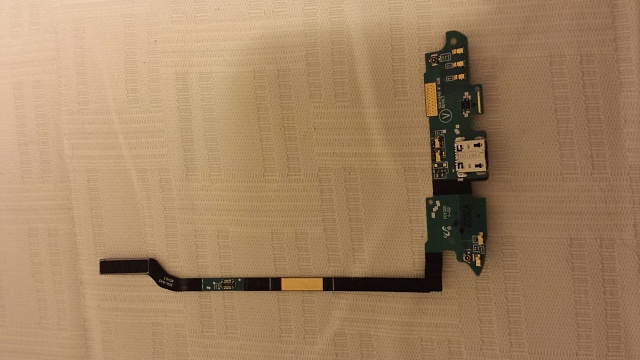
charging paused

  1. The thermistor is located in the USB charging board (shown in the image above) of most Android devices and almost all Samsung devices. That is why the first step a person needs to complete is to buy a new USB charging board for their respective device.
  2. Carefully open the device.
  3. Disconnect the device’s USB charging board.
  4. Install the new USB charging board and connect it.
  5. Reassemble the device carefully and boot it up.

If a person happens to have a valid warranty for their device, they should simply claim the warranty and send the device to the manufacturer to be fixed. In the event that a person’s device does not have any warranty and they do not want to take the risk of opening their device, a workaround they can use is to purchase an extra battery kit and charge one battery externally while using the other one. Another viable workaround for the “Charging paused: Battery temperature too low” problem is charging the device while it is turned off, which seems to work on most devices that suffer from the issue but sacrifices device uptime.

ABOUT THE AUTHOR

Kevin Arrows


Kevin Arrows is a highly experienced and knowledgeable technology specialist with over a decade of industry experience. He holds a Microsoft Certified Technology Specialist (MCTS) certification and has a deep passion for staying up-to-date on the latest tech developments. Kevin has written extensively on a wide range of tech-related topics, showcasing his expertise and knowledge in areas such as software development, cybersecurity, and cloud computing. His contributions to the tech field have been widely recognized and respected by his peers, and he is highly regarded for his ability to explain complex technical concepts in a clear and concise manner.

Comments

33
    TS
    Taylor Jacob Sayavong Jan 7, 2016

    Thank you for the info, Kevin! I have a Galaxy Note 5 and this recently happened to me. I have read online that water damage may be a factor to this problem. A month prior to my phone displaying the “Charging Paused: Battery Temperature Too Low” message, I dropped my phone only slightly submerging the bottom of the phone where the charging port is and flickered off. I left my phone to dry for 3 days in rice and it worked fine after that…well until now. Should I still take your advice and replace the USB Charging Board?

      KA
      K. Arrows Author Jan 7, 2016

      Hi Taylor

      Since it is now working, you don’t need to do anything else unless you notice significant problems.

      Thanks

        TS
        Taylor Jacob Sayavong Jan 7, 2016

        Well, it isn’t working now. It did before but abruptly started displaying the “Charging Paused: Battery Temperature Too Low” message a week ago. It only works if I keep the phone on the charger but it remains on 0%

          KA
          K. Arrows Author Jan 8, 2016

          I would suggest that it’s time to replace the charging board.

        TS
        Taylor Jacob Sayavong Jan 8, 2016

        Basically it still will not charge or hold a charge.

    EA
    Eagle2016 Feb 2, 2016

    I had problem same to you. I just removed battery from the unit then 5″ put it back. power on back then click to reboot and wait. It was work to my smart phone, charge very good now. Nothing to fix and replace. Try to do on my way – Good Luck

    Reply
      MB
      Matthew Beck Nov 11, 2016

      what do u mean about 5″

    AK
    Ashok kumar Mar 4, 2016

    I had problem in my Samsung galaxy s5 showing charging paused battery temperature too low.then I changed the charging port ,then it worked fine for one month and suddenly one day same problem occured ,I not able to charge the phone and it shows charging paused battery temperature too low.please sombody help to solve the problem.

      JA
      Jay Mar 29, 2016

      try wireless charger

    DM
    Dan Mckinley Jun 16, 2016

    Great info.I just ran into this for the first time and I am going to change the charging port board and see if it does the trick.Ok this worked perfectly.Thanks for some very useful information

      KA
      K. Arrows Author Jun 16, 2016

      Welcome – do let us know the results.

        DM
        Dan Mckinley Mar 30, 2017

        Worked perfectly

    SS
    Sandeep Singh Sengar Aug 5, 2016

    I have same problem of battery temp is low, and my phone was not charging. I tried all the way then I went to shop to change my battery or to check other faults. repaired person has took out the battery, and there was just one spot on battery pin, he clean that spot with pin. then my lenovo mobile was working perfectly. So you can just tried this one also!!

    Reply
      AN
      Anil Aug 14, 2017

      Bro…My lenovo mobile can’t be charge after 2%…It always warn by battery having low temperature…Give me some suggestions please

    FL
    Francisco Lemus Apr 23, 2017

    I changed the charging board on my daughter tablet and its still gaving the same problem

      DM
      Dorothy Martin Aug 7, 2017

      Did everything (changed the daughter board on my s4 …mine is still not working!!!! Is it possible that I need a new battery as well. Any advise THANK YOU!!

        MF
        MFJ Aug 10, 2017

        Here are a few things that you can do:

        Open the cellphone and take out the sim card, sd card and mid frame. Just above the usb charge connector you will see two small gold contacts which would be your sensor. Clean those nicely and then reattach the frame. Make sure it is properly inserted and fitted. You might have to push it a little bit harder where the connections are to make sure they are connected. Once done, check if it works.

        If your cellphone was dropped in water or you are in a very humid place then make sure it is fully dry. Turn off the phone and open the casing and leave it in air or under sun for a little while. But, don’t leave it for too long under the sun. Make sure any droplets of water are dried. Once done, try to turn it on and check if the problem is solved.

        Reply
    JE
    JeremiahtpoG May 26, 2017

    i have the same problem but i have the samsung galaxy note 5 and the back of my phone does not come off, or that is what people have told me. So would i just need to send it to the manufacturer instead of trying to do it myself?

      KA
      K. Arrows Author Mar 7, 2018

      Yes, if its under warranty.

    WS
    Weni Sereki Aug 14, 2017

    my phone says the same thing when plugged in charger.. what else can i do since my phone is build in.. I was not able to remove the back part of it.

    DP
    David Perry Jan 17, 2018

    I have the Same problem with my Galaxy J3. the problem began right after I clicked on some spam link about a free $500 ALDI’s gift card. Now my Phone will not charge. I suspect a virus here. I also found that I can get the battery to charge if I start up the phone with the down arrow key and home button pressed and then pretend to download something an OS to my phone. In this mode where it says Downloading in Cyan Screen, I notice that my battery actually charges. This must be something in my Firmware that got corrupted. Only question is how hard it will be for me to fix my firmware if this is indeed infected by a virus?
    Meanwhile I found that i can do this once a day until I can afford to buy a new phone.

    Reply
    RS
    RAJKUMAR SAGAR May 14, 2018

    hi
    i have same problem of ” battery temprature is too low , charging paused ” unable to charge please can anyone give me the solution.

    DD
    Deler Deler Aug 14, 2018

    the ic charger u have to change it in the cell shop

    Reply
    PS
    paul swinnen Sep 4, 2018

    Where can i buy USB charging board for Oneplus 3T, because i look and look and find alone the flex cable and not the hole board. Thx Thx. Sorry for my bad englisch

    VA
    Vahid Mar 8, 2019

    i have same issue in HTC phone but battery is inbuilt. its been long time i am facing same issue, please advice on same

      SW
      Shane Warren Author Sep 18, 2019

      We recommend that you take it in for service as it is likely that there is a hardware issue with the phone.

    SW
    Shane Warren Author Sep 24, 2019

    I’m sorry but we cannot make any recommendation but I suggest that you check on some local sites that provide a platform where you can buy and sell used items.

    SW
    Shane Warren Author Sep 28, 2019

    Most likely it is due to a hardware issue with the battery

    SW
    Shane Warren Author Sep 30, 2019

    A simple hard reset should fix the issue.

    LE
    lennox Aug 7, 2020

    My phone has a problem of saying the battery temperature is low please turn off i changed the charging bord but stil the problem is same

      SW
      Shane Warren Author Aug 9, 2020

      I think it is a hardware issue in cases if it isn’t fixed with these methods. Most probably a charging port issue or a battery issue.

    AH
    Austin Harding Nov 10, 2020

    So I had to get a new screen an digitizer for my s8 an being the DIY kinna guy I decided to do it myself, I found that repairing a phone was surprisingly simple however it requires a steady hand and some patience. Anybody that tell you yr phone cant be opened up to get to the battery do not understand, almost all phones now have in built batteries but you can still remove it once you take it apart. Anyways with the confidence I gained and after getting a new phone, some years later it broke an this time got a lil cocky an while taking it apart I wasnt patient enough an destroyed the digitizer for my s10 an had to use my s8+ again . I took that apart got a new battery an back plate but while at it I decided to get a new charging port circuit board. If what u say is true then the new charger circuit board I got must be an aftermarket an not an OEM, so I guess I’ll have to take her apart again an throw in the old charger circuit board, but dam it’s still risky doing that, the back plate can crack if yr not super super careful an too impatient

    Reply
    MM
    Mike McNeill Apr 2, 2023

    The battery temperature sensor for the s20+ and s21+ is located just below the camera on a separate board connected to the motherboard. It is very small and it can get damaged when the phone is dropped, making the phone think the temperature is too cold. A temporary fix is to slap the back of the phone fairly hard with the palm of your hand, but not hard enough to break it. It seems counterintuitive, but it works. You could also possibly press down really hard for a few moments right below the camera. It started charging normally after I slapped it.

    Reply