Fix: Remove FBI Virus from your iPhone / iPad

iPads, iPhones, and basically all Apple devices were thought to be immune to viruses and malware. However, that changed around three years ago when hackers all over the world started targeting Apple devices. One of the most fearsome and common kinds of malware currently known to infect the iPad and the iPhone is the FBI virus (also known as the FBI MoneyPak virus).

The FBI virus is a piece of ransomware that either locks infected devices down entirely or blocks their internet access. It informs the user that the measure has been taken by a law enforcement organization, such as the FBI, due to illegal activity and requires the user to pay a hefty fine to make the ordeal go away. However, even if the user pays the fine, the virus has no intention of leaving their device, which makes it all the more important for those affected by the FBI virus to get rid of it. The following are the known methods that can be used to remove the FBI virus from an iPad or iPhone:

Method 1: Erase All Traces of the Virus from Safari.

In the event that the FBI virus infects an iPhone or iPad via a malicious website accessed through Safari, all traces of the virus must be strategically erased from the application.

1. Go to settings.

2. Locate Safari in the list of applications, and tap on it.

 Tap ‘Clear History and Website Data,’ and in iOS 7, tap ‘Clear History‘ and ‘Clear Cookies and Data.’

4. Then tap Settings > Safari > Advanced > Website Data > Remove All Website Data.

5. Then, hold the Home button and the Sleep/Wake button together until you see the white Apple logo; when you see it, release the buttons.
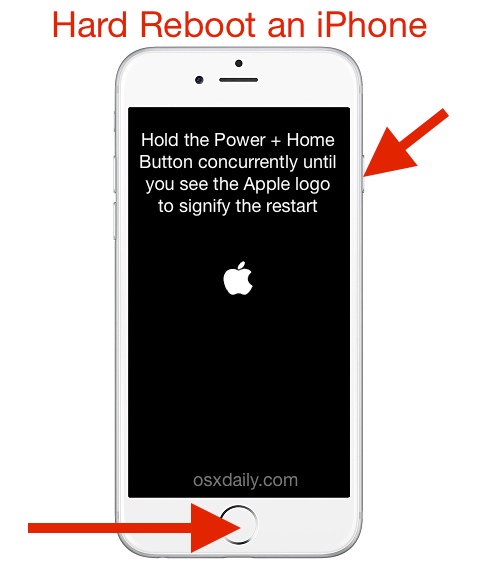
force-restart-iphone

Method 2: Uninstall the application that introduced the virus to the device.

In some iOS devices, especially those that have been jailbroken, an FBI virus infection can be caused by the installation of a malicious application, which, in most cases, comes from a third-party source. In such instances, uninstalling the application in question will get rid of the virus. First and foremost, a person must determine which of their recently installed applications allowed the FBI virus access to their device.

Method 3: Restore the Device to Factory Settings

1. Install the latest version of iTunes onto a computer.

2. Connect the device to the computer.

3. If desired, back up all valuable data, such as contacts, to Apple’s remote servers.

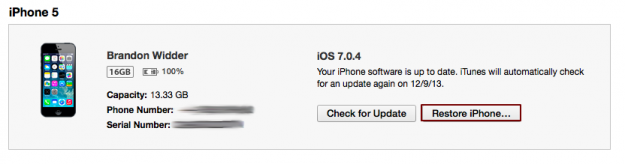
4. Click the ‘Restore iPhone’ button in the device’s ‘Summary’ tab in iTunes.
restore ipad-iphone

5. If prompted by a pop-up window, confirm the action by clicking on “Restore,” and then follow the on-screen instructions.

6. Wait for iTunes to work its magic.

7. Ensure that the device has been restored to factory settings. If the device displays the iOS Setup Assistant upon booting up, the restoration was successful, and the FBI virus was successfully removed.

ABOUT THE AUTHOR

Kevin Arrows


Kevin Arrows is a highly experienced and knowledgeable technology specialist with over a decade of industry experience. He holds a Microsoft Certified Technology Specialist (MCTS) certification and has a deep passion for staying up-to-date on the latest tech developments. Kevin has written extensively on a wide range of tech-related topics, showcasing his expertise and knowledge in areas such as software development, cybersecurity, and cloud computing. His contributions to the tech field have been widely recognized and respected by his peers, and he is highly regarded for his ability to explain complex technical concepts in a clear and concise manner.

Comments

30
    CI
    Cheri Indriks Oct 26, 2015

    I think I have a bug in my iPad. Lately it makes me resign into email and I haven’t received new email in a few days and can’t delete old email.

      KA
      K. Arrows Author Oct 26, 2015

      Try re-adding your email account.

    HE
    HelpME Dec 22, 2015

    How do I know I properly removed it?

      KA
      K. Arrows Author Dec 22, 2015

      If it is not re-appearing, then it’s removed.

    ER
    eric Jan 6, 2016

    Got it, thank you so much!! it was easy

    TO
    Tom Feb 14, 2016

    The pop-ups disappeared after I reset my browsing history so I didn’t do the hard reset. Hopefully that will work. Thanks though!

    KA
    K. Arrows Author Feb 19, 2016

    The symptom you’re stating indicates something else is wrong, probably hardware or memory corruption.

    DA
    Dan Feb 26, 2016

    solution no1 worked for me, thank you!

    TI
    Tianne Mar 1, 2016

    I somehow got out of the pop up, now it shows I should plug into itunes, I’m a little afraid to do that.

      KA
      K. Arrows Author Mar 1, 2016

      iTunes is fine. You can login.

    PK
    Pronin Karmchyk Mar 5, 2016

    Does it really tap into your mic and camera or is it just BSing you?

      MW
      Ms. Whiteplume Apr 27, 2016

      It does but it isn’t recording and isn’t really law enforcement anyway….just a bunch of fools trying to get rich the easy way…

    EC
    Emily Chin May 22, 2016

    I have virus on my ipad, please help!
    Its so strange! it moved by itself & it keyed in password by itself too!
    I was trying to do a reset to “erase all contents and settings”, but unfortunately it says “Verification failed, there was an error connecting to the Apple ID server”.
    Now its getting worst, the apps will open by itself… What should I do? Please advise.

      KA
      K. Arrows Author May 22, 2016

      You can restore it using iTunes. see here: http://appuals.com/restore-ipad/

    JS
    James Segal May 28, 2016

    I use google chrome browser on my iphone 6 and got infected with this ransomware virus. I’ve been researching fixes. I can’t get to the chrome menu to delete browsing history, cookies, etc. Will restoring the phone to factory reset get rid of the problem?

    (this is written the following morning)
    Now I have another problem. Without thinking to prevent it, my iphone backed up again last night. Now the backup includes the ransomware, so a restore using the latest backup will not get rid of the problem. What do I do? Can a previous backup be restored? Is the ransomware restricted to the google chrome browser, and is there a way to isolate that to not include it in the restore?

    Thank you for your help!

      KA
      K. Arrows Author May 28, 2016

      Just delete Google Chrome, and clear safari.
      reboot phone, and then take a new back up.

        JS
        James Segal May 29, 2016

        Thanks for your reply and suggestion. I’ve already resolved the problem. I deleted google chrome from my iphone then turned the phone off. After rebooting, I downloaded a clean google chrome app from the App Store. The problem disappeared; no more ransomware. Easier than I thought, very happy to say. Thank you for your website and others like yours that gave me the info I needed to come up with my solution.

        Reply
    JU
    Julia Jun 12, 2016

    Will the virus spread to my laptop if I connect it to my laptop for iTunes?

      KA
      K. Arrows Author Jun 12, 2016

      no, it wont.

    NP
    Noman Parosi Jun 23, 2016

    i have problem that pictures and videos which i delete, they do appear again in the same folder for example it it i have 360 pictures and videos in Camera Roll Folder and i deleted 30 pictures. when i go back and reopen the pictures, it is again 360. can u tell me the solution. is it a virus.

      KA
      K. Arrows Author Jun 23, 2016

      Looks like it is in sync with something probably iCloud?

    CH
    Clare H Aug 8, 2016

    Does erasing all content and settings on the iPad have the same effect as connecting it to iTunes and returning to factory settings?

      KA
      K. Arrows Author Aug 8, 2016

      No. Doing a factory restore would return it to factory state, meaning all apps are removed, and will need to be redownloaded. Deleting content and settings will keep the apps, but delete other data such as history, caches, contacts (etc).

      Reply
        CH
        Clare H Aug 8, 2016

        Sorry to keep bugging you, but when you erase all content and settings it sets up the iPad as a new iPad and you can’t access any of the old data unless restoring from an iCloud backup, which I haven’t got. I don’t really see why this isn’t the same? – I don’t have easy access to a computer is all so doing it this way would be far easier if possible! Thanks for all the help.

          KA
          K. Arrows Author Aug 8, 2016

          If you are just looking to clear FBI Virus, then just delete data for Safari.

    G
    Gerald Ulrey Jr. Oct 5, 2016

    Hello

    G
    Gerald Ulrey Jr. Oct 5, 2016

    I have an iPad that got Federal Bureau of Investigation

    G
    Gerald Ulrey Jr. Oct 5, 2016

    Hello

    G
    Gerald Ulrey Jr. Oct 5, 2016

    I have a Federal Bureau Of Investigation on my IPad and I can’t get rid of it

      KA
      K. Arrows Author Oct 7, 2016

      Did you do a force reboot and deleted safari cache, cookies and content?