How to Stop Google Chrome from Syncing
When you search for anything on Google or using the Google app on a phone or other mobile device, Google saves your search. The search is also synced across every single device that you are logged into with your Google account / Gmail Account and is visible in places such as your Google account’s Web & Activity page and the recent searches that show up under the Search box in the Google Chrome apps on mobile devices and Desktop/Laptops. Anyone who values their privacy to a serious extent can choose to disable their Google searches from being both saved and synced across their devices. To do so, you need to:
Visit your Google account’s Activity controls page on a computer or any mobile device.
Turn the switch off to disable the saving and syncing of your Google searches and other browsing activity.
Tip: If you only want to disable the saving and syncing of your Google searches and browsing activity for a short period of time, you should consider simply browsing in an incognito window on Chrome instead. In Google Chrome, you can use the short keys (CTRL + SHIFT + N) to open incognito window.
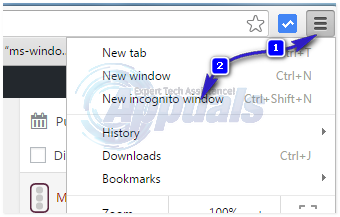
Similarly, Google Chrome (both the desktop and mobile versions) also records a significant amount of data – ranging from your internet browsing activity and Autofill information to your open Chrome tabs, passwords and bookmarks – and syncs them across all of the devices that you are logged into with your Google account. In addition, as soon as you log into a new device with your Google account, all of the previously synced data is brought over and saved to the new device, resulting in an overhaul of the Chrome application on that device. This is good if you want all your information to sync, such as bookmarks, passwords, extensions etc.. BUT not good in the scenario where you frequently use public computers, (unless you sign out of Chrome) every time; or if you have a adware which can also sync from one device to another. I’ve seen this happen where a user had a malware, that redirects them from Google Search to something else, such as “ask” or “mysearch” and one infected device spreads the virus onto other devices as well.
In this case; you should plan and think which devices you don’t want to sync and which are the ones you do want to sync, devices/computers where you want the sync off can be done using the following method.
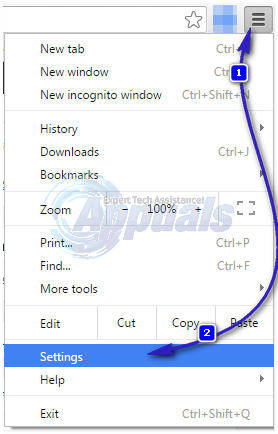
Open the Google Chrome. Open the Menu (usually triggered by the button with three vertical dots). Tap on Settings.
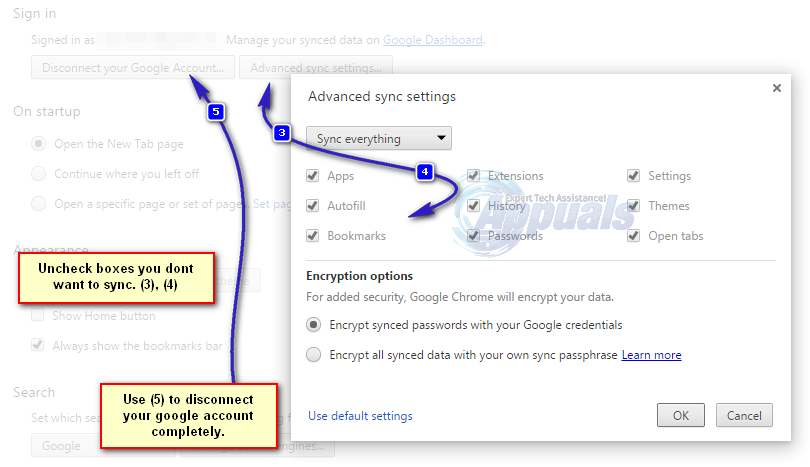
You can see the options here, if you want to disable only selected information then choose “Advanced Sync Settings” and uncheck the boxes you don’t want to be included in the sync and if you want to disconnect completely from sync then choose; Disconnect Your Google Account

Thank you! I have been looking for quite a while for these controls