How to Increase a Dedicated Video RAM (VRAM) in Windows?

If you have a low-VRAM Graphics card, consider upgrading it to handle tasks that require more graphical resources, such as video editing and playing high-graphics games. A lack of VRAM can lead to graphical memory errors during various computer games. Unfortunately, aside from making advanced settings adjustments, there’s no fix besides upgrading the Graphics card.
Before attempting to increase VRAM, it’s highly recommended to understand what VRAM does and when its expansion is beneficial.

How to Increase Dedicated Video RAM?

To increase VRAM, you can follow one of two methods: through BIOS settings or via the registry editor.

Both methods may help run games that require more VRAM. However, it’s often more effective to purchase an affordable GPU.

Check the Amount of VRAM

Before increasing Video RAM, you should verify the current amount of VRAM on your system:

  1. Click the Start Menu and type Settings.
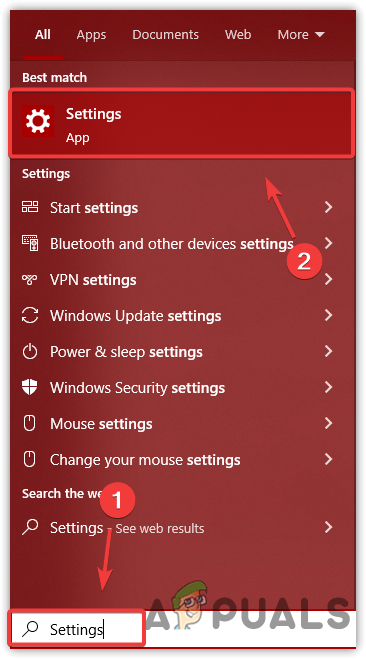
    Launching Settings
    Launching Settings
  2. Open Settings, and navigate to the System section.
  3. Under Display, scroll down and click on Advanced Display Settings.
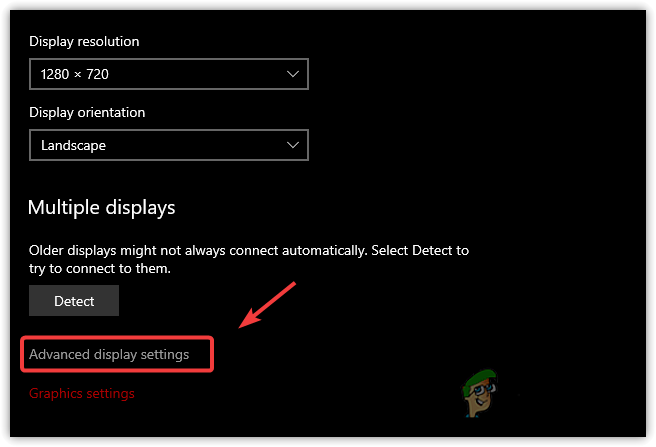
    Opening Advanced Display Settings
    Opening Advanced Display Settings
  4. Click on Display Adapter Properties For Display 1.
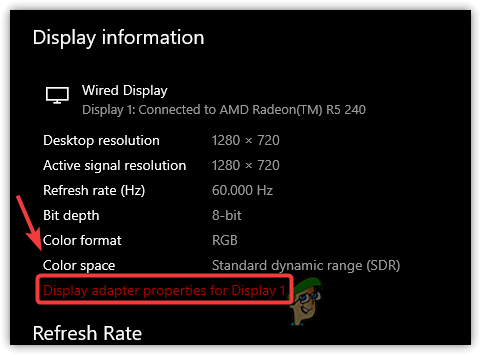
    Navigating to Display Adapter Properties
    Navigating to Display Adapter Properties
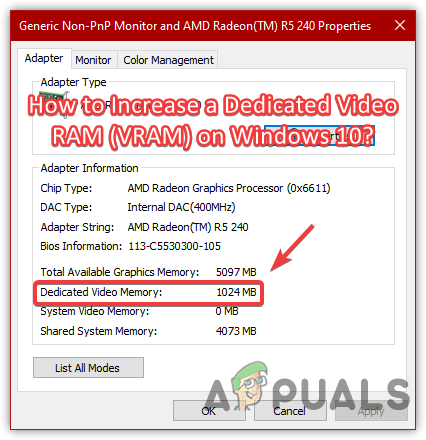
  5. Here, information related to your Graphics Card, including VRAM, will be displayed.
  6. For example, a 1GB Graphics card will show a Dedicated Video Memory of 1024 MB.
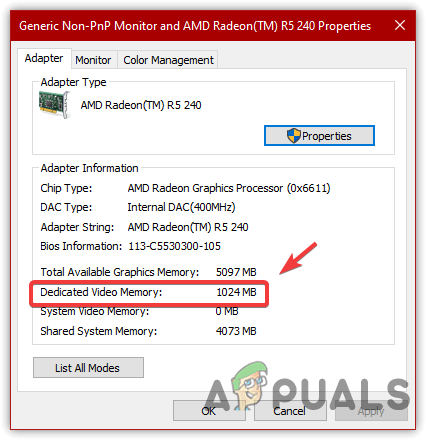
    Checking Graphics Card Information
    Checking Graphics Card Information

1. Increase VRAM From Motherboard BIOS Settings

Some computers offer a feature called Dynamic Video Memory Technology (DVMT) within the BIOS settings, which allows users to allocate more VRAM. This could reduce your physical RAM because the increase in Pre-Allocated VRAM is taken from system memory.

Some BIOS settings may also enable you to specify a custom amount of memory to allocate. However, use caution to avoid system instability. If your system doesn’t support this option, you could use the registry editor method to simulate increased VRAM.

  1. Start your computer and press F2, F5, F8, or Del as the logo appears to access BIOS settings. Refer to your motherboard’s manual or website if you’re unsure which key to press.
  2. Look for options like Graphics Settings, Video Settings, or VGA Share Memory Size.
  3. Adjust the Pre-Allocated VRAM to a higher value. This may be found under the advanced settings of your BIOS.
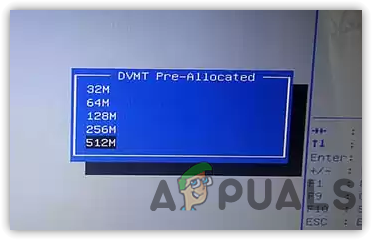
    Increasing VRAM From BIOS Settings
    Increasing VRAM From BIOS Settings
  4. Save the BIOS settings and restart the computer.

2. Increase VRAM Via Registry Editor

Using the registry editor, you can create a DedicatedSegmentSize entry that tricks the system into reporting more VRAM than actually present. This can sometimes enable a game with high VRAM requirements to run on a system with less VRAM. 

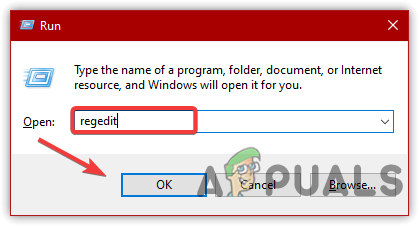
  1. Press Win + R to open the Run dialog.
  2. Type regedit and hit OK.
    Opening Registry Editor
    Opening Registry Editor
  3. Navigate to the following path:
    Computer\HKEY_LOCAL_MACHINE\SOFTWARE\Intel
  4. Right-click on the Intel folder, choose New > Key, and name it GMM.
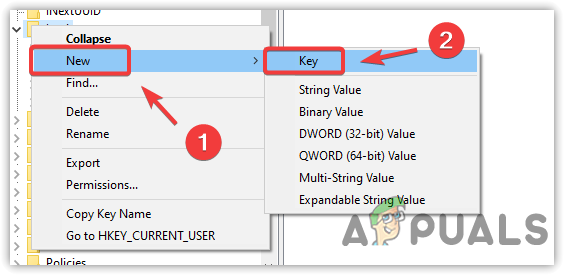
    Creating A New Key
    Creating A New Key
  5. With the GMM folder selected, right-click in the right pane, select New, and then click Dword (32-bit) Value.
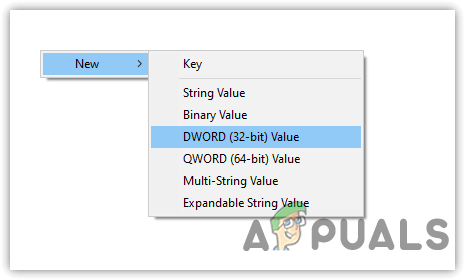
    Creating An Entry
    Creating An Entry
  6. Name it DedicatedSegmentSize.
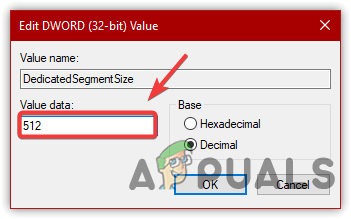
  7. Double-click on DedicatedSegmentSize, set the base to Decimal, and enter 512 as the value data.
  8. Click OK and restart your computer.
    Increasing VRAM
    Increasing VRAM
  9. If previously encountering errors, try launching the game again to see if the issue has been resolved.
  10. If you wish to revert the changes, return to the registry editor and delete the GMM folder.

3. Upgrade System RAM (Integrated GPUs)

Stepping up your RAM could be a strategic move, particularly if you’re using an integrated GPU that relies on shared system memory. When you increase your computer’s total RAM, you proportionally boost the memory available for the GPU to use as VRAM. This can lead to improved performance for graphically intensive tasks and gaming, especially in systems where the graphics chip doesn’t have its own dedicated memory.

ABOUT THE AUTHOR

Kevin Arrows


Kevin Arrows is a highly experienced and knowledgeable technology specialist with over a decade of industry experience. He holds a Microsoft Certified Technology Specialist (MCTS) certification and has a deep passion for staying up-to-date on the latest tech developments. Kevin has written extensively on a wide range of tech-related topics, showcasing his expertise and knowledge in areas such as software development, cybersecurity, and cloud computing. His contributions to the tech field have been widely recognized and respected by his peers, and he is highly regarded for his ability to explain complex technical concepts in a clear and concise manner.

Comments

221
    DM
    Dāvid Müller Jul 2, 2018

    When I changed my windows to windows 10 pro, my dedicated vram dropped to 0 and I have tried to fix it but no solution please help me

    MA
    Manu Sep 30, 2018

    Thx for the intel registry setting man <3
    Finally got a way to increase ded.Vram on my surface!!!

    AL
    alex Oct 24, 2018

    this at least make me feel a little bit better after regretting buying a surface pro

      ML
      Michael LeCompte Nov 3, 2019

      Should have done the thorough research before putting your savings into a new PC! Plus it’s best to purchase 2 times the required power for what you need the PC for, just to be safe so you don’t end up like me, obsolete too quick and struggling to save up the moneys needed for a new PC! Plus this whole cryptocurrency craze is really ruining it for us people trying in vein to get the nceserry upgrades!!!!!

        SS
        Saitama_Sensei May 16, 2020

        dislikers are owners of potato machine.

    SA
    Sawbones Dec 23, 2018

    Hi!
    For method 2, it doesn’t actually increase the Dedicated VRAM right?

    Because I tried method 1 (BIOS) and when I increased the Dedicated VRAM, Windows (7 32-bit) wouldn’t start.
    Just would like to confirm if doing this wouldn’t result to the same problem.

    (I’m doing this so I could play Maplestory 2 btw which needs 512MB)

    Thx in advance! 😀

    here is my adapter info btw (just in case):

    – Total Available Graphics Memory: 1543 MB
    – Dedicated Video Memory: 64 MB
    – System Video Memory: 0 MB
    – Shared System Memory: 1479 MB

    also some other info (from [Ctrl + R] msinfo32):

    – Installed Physical Memory (RAM): 8 GB
    – Total Physical Memory: 3.39 GB (usable)
    – Available Physical Memory: 1.27 GB
    – Total Virtual Memory: 6.78 GB
    – Available Virtual Memory: 4.32 GB

    PV
    Petar Vukadinovic Feb 19, 2019

    dali moze da se poveca na 4 gb

      SW
      Shane Warren Author Sep 19, 2019

      There is a limit for increasing the VRAM and it is dictated by the options available in the BIOS.

    TK
    Timothy Kaleopa Feb 21, 2019

    i have have a intel hd 520 i have DCH version of it can you help pls it wont change

      SW
      Shane Warren Author Sep 19, 2019

      You can’t increase the dedicated video ram effectively except by going into the bios. Therefore, it is recommended that you go into the bios and try the method if you can’t do it by doing that there isn’t any other effective method.

        SA
        samer alnademi Feb 3, 2020

        I check 512m in bios but it still read only 128m in Windows ?

          SW
          Shane Warren Author Feb 8, 2020

          Did you save your changes? Also, how much RAM do u have on your system?

    AB
    abdulazeez Mar 9, 2019

    please can i use morethan 512mb? ad also can i increase my 2gb dedicated nvidia to 4gb?

      SW
      Shane Warren Author Sep 18, 2019

      This only works on integrated GPUs and there is a limit to using the amount of VRAM with your GPU. You can increase the VRAM from your Registry to as much as you prefer but this doesn’t actually increase the VRAM it just fools an application into thinking that you did.

      Reply
    SJ
    Sean JPaddy Jun 10, 2019

    How do i increase for NVIDIA?

      SW
      Shane Warren Author Jun 10, 2019

      It isn’t really possible to increase the value for NVIDIA. Only possible for APUs

      Reply
        ME
        megcox Jun 20, 2019

        Abybody knows how to decrease “shared sysyem memory” with Nvidia cards and Win10
        ?
        Thanks

          SW
          Shane Warren Author Jun 20, 2019

          We wouldn’t recommend doing that as it can cause many issues with the computer. Decreasing the shared memory would actually result in worse performance. For Nvidia Cards its actually not possible. Only possible for integrated GPUs that come with the processors that is done by going into “Advanced Bios Features” as indicated in this article. It can be reverse used to decrease memory

          AS
          Aramis Squilacci Jul 6, 2019

          https://www.youtube.com/watch?v=85fvbD7CbmU

          Is Working for me on AMD R5.

    AB
    abdullah Jun 28, 2019

    does the second method actually affect the performance? or its just a bypass to the game?

      SW
      Shane Warren Author Jun 28, 2019

      The thing is editing from the registry doesn’t actually change the performance or the amount of video ram it just shows you that it did. You can select any number of the segment and it would show that in the details. It can be used to trick some games which require you to have a particular number of dedicated VRAM.

      Reply
    MA
    Matthew Jul 4, 2019

    I have an Intel graphics 620 graphics card with a Dynamic Video Memory of 4158 MB, my total RAM is 8 Gb, but my dedicated VRAM is 128 Gb, the game I want to play requires 1 Gb. When I went on the Intel FAQ it says my computer can use a maximum of one-half of system memory (8Gb), which would mean I could use a maximum of 4Gb or 4000MB, but here it says I can only set a maximum of 512MB, my question is, is it possible for me to set my VRAM to 1000MB using the Registry Editor?

      SW
      Shane Warren Author Jul 11, 2019

      Yes you can set it through the registry editor but keep in mind that it won’t actually improve performance except it might just “Fool” the game to think your computer has 1GB and it might work. Also settings the dedicated memory so high through the registry editor rarely might damage the Windows installation so make sure important stuff is backed up before trying to do it.

      Reply
    JG
    John De Guia Jul 10, 2019

    wait does increasing shared vram actually increase fps or its just their for fake stats cause I have atleast 2gb shared vram

      SW
      Shane Warren Author Jul 11, 2019

      Depends, increasing Dedicated VRAM through the bios actually improves performance, increasing dedicated VRAM through the registry just changes the stats and doesn’t do anything. Shared VRAM between the RAM and Card only helps to a certain extent. Meaning that if it is less than the required amount it does harm and if it is more than the required amount it improves performance to a certain extent and increasing beyond that point doesn’t help.

      Reply
    AL
    Ahmad luthfi Jul 19, 2019

    Does the 2nd method work on amd??

      SW
      Shane Warren Author Jul 19, 2019

      There is no specific advantage to doing this except for bypassing minimum requirement restriction for some games. But as for the question if you can find the appropriate key for AMD it should work.

    DO
    doug Aug 27, 2019

    not working

    SW
    Shane Warren Author Aug 28, 2019

    This only works for inbuilt GPUs and the VRAM cannot be increased for GPUs from Nvidia or AMD

    Reply
    ZA
    Zaid Sep 18, 2019

    i have 4gb video ram, and i decide to increase dedicated video ram from 256 up to 1024, but it stuck at 512mb. how do i fix this?

    SW
    Shane Warren Author Sep 19, 2019

    Might be limited due to the card that you are using, did you increase it from the registry or the bios?

    JI
    Jishan Sep 22, 2019

    if i increase vram using registry, will it stop using shared memory?
    in gta v it used to show i have 2048 mb of vram, but after inputting 512 in the registry it’s showing 512 and red mark.

    SW
    Shane Warren Author Sep 23, 2019

    No it won’t, navigate back to the registry and return it to the previous value and you should be set.

      ML
      Michael LeCompte Nov 3, 2019

      May have to get my dad or brother or someone else who knows how to do stuff like this to increase the VRam from 2 GB to 4 GB on my NVidia GeForce GTX 1050 graphics card for me! All I need the increase for is so that I can continue to play WoW once WoW Shadowlands gets released sometime next year! But I’m afraid if I do it myself I could screw something up real bad with my shitty luck! And if all else fails, I may just get the 1050ti card instead as I hear it already has the 4GB VRam needed for the new WoW expac, which should buy me at least 2 more years, and hopefully the whole cryprtocurrency bubble will have burst and collapsed and been rendered extinct by then! Cryptocurrency is making it real expensive on getting new video cards as it is due to hoarding ***holes!!!!!

        SW
        Shane Warren Author Nov 5, 2019

        Following the guide will get you through the issue, I suggest you go with the registry method because it will actually get past the game’s detection but it will not really affect performance. Depends on your budget, if you can go for an upgrade I suggest you try to flip the current card and get a GTX 1060 or something with AMD in that range, an AMD RX 580 would also suffice. It depends on the location and the price of the cards but it shouldn’t be that much after selling the previous card.

        Reply
    PR
    ProDigit Sep 27, 2019

    I just followed the guide, with an Intel Pentium N5000 on Windows 10, and the GPU still shows 128MB.
    Does nothing.
    The GPU drivers take automatically care of the max GPU mem size.

    SW
    Shane Warren Author Sep 27, 2019

    Try the Bios method, if there isn’t an option to increase Dedicated VRAM through bios, I’m afraid you can’t increase the VRAM affectively.

    SW
    Shane Warren Author Sep 27, 2019

    Your drivers for the graphic card aren’t installed properly. You need to install the drivers and try again.

    ML
    Michael LeCompte Nov 3, 2019

    I don’t understand all this stuff! May have to get an IT professional who knows what they’re doing! Not recommended to do unless you have IT skills, people!

      SW
      Shane Warren Author Nov 5, 2019

      No, actually, you can easily go through these methods without hurting your actual hardware. At worst, you will have corrupt windows that can easily be installed again.

      SE
      Seabass120 Feb 9, 2020

      lmao!

    WW
    War_master_9 Warmaster Dec 1, 2019

    How do i save the changes i dont get an option to save it.

      SW
      Shane Warren Author Dec 8, 2019

      The button to save changes will be indicated in the Bios

    JU
    Juan Dec 3, 2019

    I have ASUS ZenBook 14 8219 MB of RAM, and i only have 128 on dedicated VRAM pls help, method 2 doesnt work and method 1 i cant find dedicatedvram

      SW
      Shane Warren Author Dec 3, 2019

      You won’t be able to increase more than that

        DM
        DAVID MALOLLARI Dec 22, 2019

        hey i have a chromebook that i turned int windows but none of your methods worked for me please help me i really need to change my vram

          SW
          Shane Warren Author Dec 24, 2019

          You won’t be able to change it if these methods don’t work. Increasing through the registry won’t increase the performance at all.

    RK
    Ravindu Karunaratne Dec 11, 2019

    My laptop is a HP 250 g6 notebook. i have a total graphic memory of 6230 and the shared system memory is 6102, while there’s only 128 mb for dedicated video memory, i tried doing the second method since i could’t find an option in my bios, but that didn’t work out too, is there any other method that i can try?

      SW
      Shane Warren Author Dec 12, 2019

      This is the only option that you have, dedicated memory can’t be increased with any other method.

    TL
    tman Leo Dec 12, 2019

    i’m using win10 x64 os. should i make new dword x32 or qword x64 in 2nd method.

      SW
      Shane Warren Author Dec 12, 2019

      Dword 32

    UA
    Umar Ali Jan 1, 2020

    What will happen if I exceed the 512 value

      SW
      Shane Warren Author Jan 1, 2020

      It is advised to refrain from doing that because depending on your systems it can prevent you from being able to boot up properly or it might slow down your system.

    RO
    Ron Jan 17, 2020

    I have followed these instructions several times and nothing changes. I have Win 10 with and intel 82945G graphics. The values stay the same. 256Mb total Memory, 0 Dedicated memory, 64Mb System Memory, 192MB Shared Memory. Do you think I should invest in a new Graphics Card?

      SW
      Shane Warren Author Jan 18, 2020

      It wont matter much even if you manage to increase them. I’d seriously recommend an upgrade in the Graphics department since yours is pretty much outdated now. Besides, what do u do on the computer? is it just for work or do u also play games?

      Reply
    UP
    UpRate Jan 25, 2020

    I currently have a GeForce Gtx 1060 6gb installed in my PC. However, when I try to run modern warfare, an error message pops up telling me that I don’t have enough dedicated VRAM. I’ve followed the steps to both methods multiple times and don’t know what to do.

      SW
      Shane Warren Author Jan 25, 2020

      That seems odd, have you tried to reinstall the game and the GPU drivers? If not, try that and check if that fixes your issue.

    CU
    Ciro Uchiha Feb 14, 2020

    I have a Dell e5450 intel HD 5500 with 16GB of RAM and it says that I have only 128MB of VRAM, how can I increase it? The bios doesnt show advanced graphic options

      SW
      Shane Warren Author Feb 17, 2020

      You can try the registry method but it wouldn’t have any performance effect on it.

    DH
    Dhananjay Feb 15, 2020

    bro. it’s not working in hp elitebook 8440p, can ypu please help me.

      SW
      Shane Warren Author Feb 17, 2020

      Is there an option to increase in the bios?

        PF
        Phineas Flaherty May 23, 2022

        If you are on a dell, then no. If not try the guide.

    TR
    Technology Root Feb 18, 2020

    Thanks for sharing this method and telling us the truth. There was a fool on YouTube tricking everyone claiming that this method actually increases performance. Once again I want to thank you a lot for sharing the truth, there would’ve been a lot of victims if you wouldn’t have shared this.

    DT
    dtfyg Feb 22, 2020

    In bios, I have pretty much no display options except for 256 and 512. Changing either does nothing. I’ve previously already done the regedit method which is how I’m at 576 mb. Is there any other way? Or am I just stuck with 576MB at best?

      SW
      Shane Warren Author Feb 24, 2020

      Your stuck, even if you somehow increase the value through the registry, you will end up with zero performance gains and probably more instability. Better to keep it where it is and maybe go for an upgrade in the future.

      Reply
    LM
    Lord Mobious Feb 25, 2020

    Method 1 wasn’t available for me and method 2 didn’t work O_O

      SW
      Shane Warren Author Feb 29, 2020

      Then im afraid that it is the max you can go for. The default VRAM is the max you can opt for.

        LM
        Lord Mobious Mar 12, 2020

        pity…thanks anyway 😀

    WB
    William B Mar 4, 2020

    The regedit method worked for me. I went from 128 to 576 with no issues at all. I’m running an ancient HP Pavillion (550-192). Good luck everyone!

    G
    G Mar 26, 2020

    I’d like to recommend having at least 12+ GB ram to go larger than 500

    JA
    Jacob Apr 11, 2020

    I have 2 GB of RAMand 64 MB DRAM.So if I increase the DRAM value to256 MB of DRAM, will it affect my actual performance?…..will it increase my system’s graphical capability a little ?…..(Intel i3 core 540). Oh and what do you mean by Available Graphics Memory… And Thanks. https://uploads.disquscdn.c

      SW
      Shane Warren Author Apr 13, 2020

      If you do it through the Bios it will increase but otherwise through registry it won’t increase actual performance.

        RR
        Raiyan Bin Rais Apr 18, 2020

        Right you are, Shane Warren…

        I had also gone through the registry method… it DIDN’T EVEN CHANGE my DRAM!!! No matter however I did it… my DRAM remains unchanged… what to do??? please help me.

          SW
          Shane Warren Author Apr 21, 2020

          I recommend you to just leave the idea because it might damage your computer if you try to forcefully increase it. Unless you are able to increase using these two methods, don’t increase it.

          RR
          Raiyan Bin Rais May 6, 2020

          Yeah, Shane Warren. You are right.

          JA
          Jacob Sep 17, 2020

          Hey I found that for my computer in the bios you can go up to 256mb (there was an option for maximum DRAM but it didn’t do anything) . So I selected that option and though it didn’t show up in that adapter information , it did improve my dedicated video memory ( I’ve tested it playing games and using MSI Afterburner’s OSD).

          MZ
          Muhammad Zubyan Author Sep 18, 2020

          That means your Computer can max support up to 256MB if 256 MB was already selected and you selected maximum from BIOS it really won’t change anything also I assume that you have an Intel GMA Graphics right? correct me if I am wrong please, in that case, you can’t really change the amount of VRAM but you can do something things to speed up your GPU’s performance which can be done through Intel GPU settings it won’t do much but it will definitely help.

        PR
        Preston May 6, 2021

        dram is needed

    SH
    shan Apr 12, 2020

    i have 16gb pc my vram is 2048 mb how i increase that>

      SW
      Shane Warren Author Apr 13, 2020

      That is enough Vram. Are you using a dedicated GPU or Intel?

    AS
    Ashik Apr 16, 2020

    total available graphics memory : 6227 MB
    dedicated video memory : 128 MB
    system video memory : 0 MB
    shared system memory : 6099 MB
    Processor : I7 8550
    RAM : 12GB
    But my system resolution is 1366×768. There is no option to increase resolution.What will i do?

      SW
      Shane Warren Author Apr 17, 2020

      That is the maximum that your computer supports. Increasing Dedicated memory won’t help.

        AJ
        Ashik Jamal Apr 18, 2020

        How can i increase resolution? is there any way? do i hav to use graphics card

          SW
          Shane Warren Author Apr 21, 2020

          You cannot unless you change your screen.

    RR
    Raiyan Bin Rais Apr 18, 2020

    In BIOS there is NO SETTING for changing DRAM!!! I’ve went through the WHOLE BIOS but found nothing as pictured here… My laptop is an ancient one :3… specs:
    HP ProBook 450 G0
    Intel Core i5-3230M 2.6GHz
    RAM: 4GB
    GPU: Intel HD Graphics 4000 Mobile

      SW
      Shane Warren Author Apr 21, 2020

      If there isn’t a setting in the bios then the DRAM cannot be increased.

    TH
    ThatGhostMan100 Apr 22, 2020

    Mine says I have 9190 MB total available graphics memory and 2048 MB dedicated. I use my PC for gaming and 2gb is usually enough but most games now require 3-4 or more. How do I increase my dedicated vram to 4gb?
    Also I am using a Ryzen 3 2200g with Radeon Vega 8 integrated graphics on a Gigabyte Aorus Elite b450 motherboard. Says bios info is 113-raven-113 if that helps to figure out how to increase my dedicated vram.

      SW
      Shane Warren Author Apr 26, 2020

      I wouldn’t recommend increasing it beyond that point because it won’t increase any performance and might just end up hurting the stability of your computer. The best thing to do if you want to go ahead with increasing it is to just increase from the registry as indicated in the post.

      MT
      Matt Thompson Feb 15, 2021

      You’re in the same boat as me (Ryzen 5 3500U/Radeon Vega 8) and I don’t think you actually can allocate more than 2GB VRAM. My Asus X512DA has 4GB permanently installed in Slot A and I would like to dedicate the entire Slot A to VRAM, using Slot B for SDRAM. I don’t think that’s actually possible, and certainly not with the stock UEFI.

    DN
    Deno Nonu Apr 24, 2020

    Method 2 has worked from 112 mb to512 mb my ram is 4 gb but wanted the vram to be 1200mb.Is it possible to increase vram higher than 512?

      SW
      Shane Warren Author Apr 25, 2020

      It is recommended not to do it since it will damage the capability of your system.

    MQ
    Mqsh Apr 29, 2020

    I tried both methods. The bios has 3 options, 128,256 and “MAX”. However when i tried all of them, it stayed 32MB. I tried regedit but nothing happened

      SW
      Shane Warren Author Apr 29, 2020

      Changing from the Bios should change in the computer. How much RAM do u have? try updating the drivers as well.

        MQ
        Mqsh Apr 29, 2020

        I have 4GB RAM and 1700MB VRAM
        The drivers are up to date

          SW
          Shane Warren Author Apr 29, 2020

          Your VRAM 1700MB and Dedicated is 32 MB? maybe it isn’t increasing due to less RAM. it should be 8GB in normal cases but try going for bit older version of the driver and check if the issue is fixed then.

          MQ
          Mqsh Apr 29, 2020

          How would it be 8GB when neither my ram nor vram are that high

          SW
          Shane Warren Author May 5, 2020

          im saying that you should have atleast 8GB RAM for that.

          MQ
          Mqsh May 5, 2020

          Yea, I have just realised that there’s an underlying issue that my driver won’t update past a certain version even though theres a newer version available.

    SH
    Shaunak May 2, 2020

    I have AMD Radeon R5 integrated graphics on a HP laptop and there’s no
    option to increase VRAM in the BIOS. I already have 12GB DDR4 RAM. So
    now how do I increase my VRAM to at least 2048MB? (My VRAM is currently
    just 512MB). Also, I have an AMD A9-9425 APU. Please Help!

      SW
      Shane Warren Author May 5, 2020

      Increasing VRAM won’t help unless it is done from the Bios so i advise you to keep it as it is since it might cause instability for your system if you increase it that much from the registry.

    BD
    Bamidelescope DA'BOSS May 9, 2020

    My system is 12gb RamTotal Graphics 8gb
    Dedicated Vram 2gb (NVIDIA)I tried the registry option but it didn’t increase

      SW
      Shane Warren Author May 11, 2020

      Try the Bios option

    সৃ
    সৃজন May 9, 2020

    first time the regedit worked for me.but after updating intel graphics drivers it’s back to the previous stage,and now not changing at all.some programs which used to open before not working now due to low vram.plz help ……

      SW
      Shane Warren Author May 11, 2020

      You can go back to the previous version. The option might have been disabled in newer version of the drivers.

    SW
    Shane Warren Author May 11, 2020

    Don’t be sad, where there is a will there is a way. You will get it one day.

    TE
    Tiago Esteves May 17, 2020

    My BIOS don’t have any advanced menu for graphics. I’m starting to hate Dell

    TI
    tiger May 20, 2020

    total memory : 4163 mb
    dedicated memory : 128 mb
    system memory : 0 mb
    shared memory : 4035 mb
    ram : 8gb
    processor : i7-8650u @ 1.90 Ghzis it fine if i increase dedicated memory?

      SW
      Shane Warren Author May 22, 2020

      Best if you keep it at 128, is there an option in the Bios? if it is in the Bios then go for it, otherwise, keep it as is.

        TI
        tiger Jun 12, 2020

        nope, im using dell latitude 7490

          SW
          Shane Warren Author Jun 13, 2020

          Then it is advised to keep it as it is.

    K
    K May 25, 2020

    total memory : 6212 mbdedicated memory : 128 mbsystem memory : 0 mbshared memory : 6084 mbram : 12gbprocessor : i7 7500u 2.90Ghzhow much dedicated memory should i put?

      SW
      Shane Warren Author May 27, 2020

      Choose the max from the Bios and you should be good to go

        RA
        rascal0pl Jun 18, 2020

        Is is possible to unlock more options in BIOS? I have 128, 256 and 512 options only (my t460 i5-6300U laptop has 16GB RAM installed). My friend has same CPU and Intel 520 graphics (but different brand of laptop), he is able to set 1024MB and many games works significantly faster because of this (especially if we are talking about random frame drop due the low amount of vram).

          SW
          Shane Warren Author Jun 20, 2020

          Nope not possible, it is probably because he has a different motherboard which comes with different bios. It is best that you leave it be for now.

    PI
    Pijke00 May 30, 2020

    Can the value in DedicatedSegmnetSize be more than 512?

      SW
      Shane Warren Author Jun 1, 2020

      It can be, it is reported as working for some and not working for some. You can try but try not to overdo it since it can affect stability.

    SW
    Shane Warren Author Jun 1, 2020

    You can try the registry method but do it at your own risk since increasing so much can cause instability in some cases.

    AS
    Adeyi Shedrack Jun 1, 2020

    i have 128mb of vram currently, registry editor didn’t work for me and my bios has the 512mb option but didn’t still work for me.

      SW
      Shane Warren Author Jun 1, 2020

      How much RAM do you have?

        SR
        shohanur rahman Jun 4, 2020

        i have the same problem(i have 128mb of vram currently, registry editor didn’t work for me and my bios has the 512mb option but didn’t still work for me)……………..i have 8gb RAM

          SW
          Shane Warren Author Jun 5, 2020

          It should normally work but i guess it is being blocked by your GPU manufacturer. Best if you keep it as it is for now since increasing forcefully is likely to cause instabilities.

        AM
        amrseiam Jun 11, 2020

        2GB RAM

          SW
          Shane Warren Author Jun 11, 2020

          Don’t increase it any further as it will only cause instabilities.

    TN
    Tevin Van neel Jun 5, 2020

    i cant access my video ram in bios ,how do i get to advance menu in bios

      SW
      Shane Warren Author Jun 6, 2020

      Should be mentioned on the bottom of the screen. Can you attach a screenshot of your bios?

    AM
    amrseiam Jun 9, 2020

    pls can someone help me i did the method 1 and put it to 512vram but she became 128vram and i tryied the method 2 and put it 256 said maybe will work but the same thing didn’t work and she still on128vram and dosen’t change pls if someone have asnwer pls answer me

      SW
      Shane Warren Author Jun 10, 2020

      That is probably the maximum recommended limit of VRAM that you can achieve on the computer. Try to keep it at 128 and don’t increase it any further as it may cause instabilities.

    MS
    mohamed-seiam Jun 19, 2020

    i got into the bios and i didn’t find anything of what did you say so i try method 2 and the same thing she didn’t work and i have 8 GB RAM and 128vram and a lot of games she need atlest 512 vram or 1 GB RAM
    but i can’t increase it cuz i can’t find it so pleas someone help me

      SW
      Shane Warren Author Jun 20, 2020

      These are the only two methods to change that option without harming your computer’s stability. I’m afraid you won’t be able to increase VRAM using any other method.

    AR
    Argen Jun 20, 2020

    Works perfectly fine on Asus, infinite amount of thank you to the author 🙂

    AS
    amr-seiam Jun 20, 2020

    i am wana know something now my video card can go up to 256 vram and i put it to 256 but when i see the vram he say i have 128 vram
    and i have 2 GB RAM so the question is if i got 2 more ram will the vram increase?

      SW
      Shane Warren Author Jun 21, 2020

      I cannot say for sure but 2GB RAM is very less for modern apps and software so its best to get 2GB more and check if that gets the VRAM up to 256MB.

        AS
        amr-seiam Jun 22, 2020

        i have to 2gb ram and when i get 2 more i will be have 4 gb ram is 4gb ram bad for games?

          SW
          Shane Warren Author Jun 23, 2020

          It depends on what kind of games you play. Most modern games require at least 8GB of RAM but if you don’t play the latest AAA titles, you should be fine.

        AS
        amr-seiam Jun 22, 2020

        and thank you for helping me 😀

          SW
          Shane Warren Author Jun 23, 2020

          It was a pleasure

    KV
    kven Jul 2, 2020

    guys is the programs like royal bna driver and the other’s increase the vram and make the fps better or its just fake and dosen’t change anything?

      SW
      Shane Warren Author Jul 3, 2020

      No program can increase your performance, performance is limited by the hardware in your computer and not the software. Best not to trust apps like these that make these claims

    HC
    Henry Crowther Jul 8, 2020

    I managed to get onto my BIOS but there was no option for data configuration and my options were very limited.

      SW
      Shane Warren Author Jul 9, 2020

      The option to increase VRAM might not be available for you I’m afraid.

    AG
    Ayoub El Ghabzouri Jul 13, 2020

    so my laptop has 8bg of vram but only uses 2gb. it literally uses 81% and i dont know what for. i hope anyone can help me. i have a amd radeon vega 8

      SW
      Shane Warren Author Jul 13, 2020

      How much RAM does it have?

    DH
    Dio Hidayat Jul 19, 2020

    why i only used 512mb on dedicated while i got 4gb vram and 8gb ram,im using amd radeon r5

      SW
      Shane Warren Author Jul 20, 2020

      You can choose only the max available memory in the Bios. You cannot go beyond that because your system becomes unstable

    TT
    Tyson-TVN Jul 25, 2020

    I have tried the first method, but I couldn’t find anything related to VRAM Settings in the BIOS Menu.
    Then when I tried the second method, I was able to complete the procedure but there was no change in the VRAM. I tried increasing and decreasing it but there was no change at all.
    I am using a HP Pavilion laptop-Windows 10, RAM 8+8GB.

      SW
      Shane Warren Author Jul 26, 2020

      It is best that you don’t change its value then. It might render the system unstable.

        TT
        Tyson-TVN Jul 26, 2020

        Ok, thanks a lot.
        Is there any other way I could run my game?

          SW
          Shane Warren Author Jul 29, 2020

          I think adding a dedicated GPU might be the only way to go for you since you were also unable to run it by using the registry method.

    SM
    Sandon McCann Jul 26, 2020

    Hi all,
    I have a Dell Inspiron and I was told that it is impossible to get more VRAM, I’ve tried these methods apart from the Restoro app. Any suggestions or am I doomed to labelling this as a work laptop?
    Thank you!

      SW
      Shane Warren Author Jul 29, 2020

      Nothing else is possible if you have already tried these methods and Restoro won’t help in this case too. So you are limited with upgrading to a gaming laptop or desktop if you want the dedicated Graphics Card performance. Sorry we couldn’t be of more help

    NE
    Nelson Jul 27, 2020

    I would like to say a BIG ‘THANK YOU’ for writing this rich information. My 3D graphics became slow after upgrading to windows 10. I have gone through lots of articles, but yours made me understand and gave the solution to it. I tried the registry approach and it worked perfectly. Thanks once again. Thank to those who commented too….I learnt a lot from your comments.

    সৃ
    সৃজন Jul 31, 2020

    the regedit worked for my acer laptop.but after resetting my pc the regedit not working anymore.what shold i do.plz help

      SW
      Shane Warren Author Jul 31, 2020

      Did you reset your computer to the factory settings? you will have to do the regedit method again for it to take affect.

    MA
    manaconda Aug 4, 2020

    My laptop has 3GB of Ram but it’s only using 128mb, how much can I upgrade it? 250? 512? More?

      SW
      Shane Warren Author Aug 5, 2020

      If there is an option in the Bios, go for the maximum amount available there. If there isn’t, do not try to increase it since it will probably cause stabilization issues on your computer.

    AR
    Augis Rickevičius Aug 13, 2020

    i was wondering is there a way to fix video memory in games like GTA V?, i have a gtx 550ti, 1GB but in the gta V options it says i have over 4GB, before it did not have that and my game was running smoothly but after the latest update it changed to 4GB and i have no idea how to revert it, it works fine on other games like r6s where it shows i only have 1GB

      SW
      Shane Warren Author Aug 15, 2020

      You can try to reinstall the game, maybe it glitched out during the update.

    SH
    Shaayaan Aug 23, 2020

    Hey I M Using The Regedit To increase VRAM and When I Go to Software/intel and Create New, it shows 32-bit DWORD and 64-bit QWORD but My Pc Supports 64 Bit So Shall I Go For 64-bit QWORD or 32-bit DWORD only?

      SW
      Shane Warren Author Aug 27, 2020

      Create a 32-bit QWORD Value.

      Reply
    SH
    Shaayaan Aug 23, 2020

    Hey

    KE
    Kelvin Aug 27, 2020

    My PC is 8gb RAM
    And my vram is 64mb
    Intel HD graphics
    How can I increase it

      SW
      Shane Warren Author Aug 27, 2020

      Try the Bios method and put the maximum available value in the Bios.

    EL
    Emiel Lagerweij Aug 27, 2020

    Would this help to get my pc from running 1VRAM to 2VRAM or is that impossible without upgrading videocard?

      SW
      Shane Warren Author Aug 29, 2020

      No, it won’t, you will have to change the GPU.

    PR
    Pat Reily Oct 13, 2020

    Hello, I have tried method two a few times but, after re-booting, I noticed that there is no change to the dedicated video memory number. It is still set a zero. Can anyone help with this?

    Thanks,

    Pat

      MZ
      Muhammad Zubyan Author Oct 14, 2020

      Can I have a screenshot of your computer specifications, please? Here is how you can get them:-1. Head over to Start Menu and Open “Run”
      2. Once Run is opened type “DxDiag” in it and press Enter.
      3. Now Head over to the “Display” Tab and Take a screenshot.
      4. Reply to me with the screenshot.Hope this helps! Thank you!

    AL
    Aldo Oct 29, 2020

    I tried both methods, in method 1 i found the option in BIOS and changed it to 512 MB, but Windows still reports 128 MB. Then I tried method 2 and it didn’t change the value

      MZ
      Muhammad Zubyan Author Oct 30, 2020

      Can I have a screenshot of your computer specifications, please? Here is how you can get them:-1. Head over to Start Menu and Open “Run”
      2. Once Run is opened type “DxDiag” in it and press Enter.
      3. Now Head over to the “Display” Tab and Take a screenshot.
      4. Reply to me with the screenshot.Keep me updated. Thanks!

    सम
    सुनील मिश्रा Oct 30, 2020

    I have hp pavilion dv7 series with 8 gb ram and 1632 MB dedicated graphics memory . It is intel HD 3000 . There is no option in bios to change VRAM and registery method failed . I am still stuck with 0 MB VRAM yes zero.

      MZ
      Muhammad Zubyan Author Oct 31, 2020

      Unfortunately, If there is no option in BIOS for it you can’t increase it anymore but you said that you are stuck with 0MB VRAM That’s because Intel HD 3000 graphics are not supported on Windows 10. You are using the Microsoft generic driver, which is limited in performance and features. You will have to install Windows 8/8.1 to Download the drivers supported for Intel HD 3000 to continue getting benefit out of it but that won’t make really much of a difference as it’s a really outdated piece of technology.

      Reply
    GI
    Game Iron Nov 2, 2020

    I cant find the option in my BIOS and registry method dosent work too

      MZ
      Muhammad Zubyan Author Nov 2, 2020

      Unfortunately, If there is no option in BIOS for it you can’t increase it anymore.

    VC
    Vlad Ciolache Nov 4, 2020

    I have an intel UHD graphics 620 with 4166mb total available graphics memory and I want to boost my dedicated video memory to 1024mb. I don’t have graphics setting with the first method and I tried the second one but it keeps saying I have 128mb after restarting my pc.

      MZ
      Muhammad Zubyan Author Nov 5, 2020

      Try the method number 2 again but this time use increments like, 256>512>786 restart your computer after changing the value each time and the check what’s the highest value you can reach. Keep me updated.

    RE
    Rezxr Nov 4, 2020

    it not working in my elitebook8470p can you help ?

      MZ
      Muhammad Zubyan Author Nov 5, 2020

      Did you try the 2nd method properly? Can you provide us with more details it’ll help us detect where the issue is coming from in the process?

    MZ
    Muhammad Zubyan Author Nov 20, 2020

    Yes, it will work on your PC. Unfortunately, it won’t increase performance of your Intel HD GPU method number 2 is just for faking your VRAM and make some programs think that your VRAM is high enough to use them.

      AM
      Abdelrhman Mosleh Nov 30, 2021

      so what if i actually want to increase my VRam and increase the performance .. i have 16 GB ram and UHD Intel graphics card

        MZ
        Muhammad Zubyan Author Nov 30, 2021

        If the methods shown above didn’t help you then you pretty much can’t do anything else Instead of buying a discreate GPU.

    RO
    Rocky Dec 3, 2020

    Thanks. This will help me with my next PC purchase.

    HA
    haji Dec 16, 2020

    hi
    my system pc
    ram 32 gig
    min biostare z97x
    cpu 4790k
    vga only onboard intel 4600
    please see this photo of manual min
    How to Increase a Dedicated Video Ram (VRAM)??
    What settings and which one should I change?
    https://uploads.disquscdn.com/images/a787583821dcba3dee16fdbc234b9c8d2a8d3efbe3909fb5dada8389f9bb50d3.png

      MZ
      Muhammad Zubyan Author Dec 16, 2020

      You will have to change DVMT Total GFX Memory settings and set it to “Max” to get the maximum VRAM out of your Intel HD keep in mind that you can’t go any further than what the Maximum option selects for you.

      Reply
        HA
        haji Dec 16, 2020

        thanks for Increase a Video Ram (VRAM) in bios
        I change? How much?Internal Graphics
        Aperture Size For Haswell
        DVMT Pre-Allocated

          MZ
          Muhammad Zubyan Author Dec 16, 2020

          Set it to Max.

    AA
    Asyraf Amin Jan 28, 2021

    hi, dxdiag shows vram 1010mb..but from display adapter properties shows 1024mb
    my game cannot play since the requirement is 1024mb
    can it be changed?

    https://uploads.disquscdn.com/images/1eb23a311843f39543a1792516ac7349290e02247eda439d5eaa5628659f56b1.png https://uploads.disquscdn.com/images/1c42c24917756b67b3cef06b5361746c0724eac21ed632194dce609df3733f1d.png

      MZ
      Muhammad Zubyan Author Jan 28, 2021

      Unfortunately, You can’t increase the VRAM in this case.

        AA
        Asyraf Amin Jan 30, 2021

        Why the difference ya?
        Only by changing gpu can increase it then?

          MZ
          Muhammad Zubyan Author Jan 30, 2021

          Yeah, it can only be increased by changing the GPU.

          AA
          Asyraf Amin Feb 2, 2021

          noted. thanks

    DA
    davage Feb 25, 2021

    Is it the same for amd chipset?
    i followed the instructions but instead went to amd and created it. laptop is definitely alot smoother but display properties still show the same

      MZ
      Muhammad Zubyan Author Feb 26, 2021

      Yes, this should work for the AMD Chipsets as well!

    CO
    Corona Feb 28, 2021

    Hey fellas
    I have Nvidia geforce mx 250
    Intel UHD 620
    The problem is
    My nvidia gpu has 6gb memory and the shared memory is 4 gb while dedicated is 2 gb
    For running free fire on bluestacks at 90 fps I need 4 gb vram
    It works awesome on the intel gpu but the problem is u can only use image sharpening on an nvidia gpu using the nvidia control panel.
    So maybe u can help me have 4 gb for my nvidia gpu and 2 gb for intel gpu for the display
    I have an Asus laptop
    8GB ram
    Intel i5 something processor which goes to 3.8 Ghz at max.

      MZ
      Muhammad Zubyan Author Mar 1, 2021

      Unfortunately, That’s not possible to do. However, I can suggest you use the Gameloop emulator for playing Free Fire as that emulator is more gaming-oriented the Bluestacks on the other hand is for having android on your PC.

    AN
    AnshuxD Mar 11, 2021

    a e e ee

    JA
    jason Mar 30, 2021

    How do I get into the bios on a mac running bootcamp

      MZ
      Muhammad Zubyan Author Mar 30, 2021

      Macs do not run BIOS, but use a compatibility layer called CSM-BIOS. There is no user interface. CSM-BIOS builds the boot device list on the fly based on what is currently plugged in. Also, you cant increase your VRAM on Mac.

      Reply
    EX
    ExpertNugget Apr 12, 2021

    and how about for the larger brand for graphics… NVIDIA????

      MZ
      Muhammad Zubyan Author Apr 13, 2021

      Unfortunately, you can’t increase the dedicated VRAM of dedicated graphics cards. This is only for integrated GPUs.

    ME
    Mechaboy95 Apr 15, 2021

    It asks to go to software>Intel, but what if i don’t have a intel cpu or gpu. i have a amd apu so im not sure where to go with this

      MZ
      Muhammad Zubyan Author Apr 15, 2021

      Unfortunately, then you can’t increase it’s dedicated VRAM.

    HI
    hi Jun 11, 2021

    how much vram is needed (how much do i allocate) run minecraft dongeouns
    specs 8gb ram
    intel hd graphics
    i5 core cpu

      MZ
      Muhammad Zubyan Author Jun 13, 2021

      The maximum amount should be better for you, select the maximum value that’s available for you.

        HI
        hi Jun 13, 2021

        how do i do that

          MZ
          Muhammad Zubyan Author Jun 13, 2021

          We have the instructions in the article. Check out the Method 1.

    HI
    hi Jun 27, 2021

    it doesn’t work on a opltiplex 990 intel hd graphics 200 with 8 GB ram help

      MZ
      Muhammad Zubyan Author Jul 8, 2021

      If it doesn’t work for you, you can’t really increase the VRAM of your Integrated GPU. You will have to buy more RAM Sticks to allow your computer to allocate more VRAM.

    AB
    Abhi Jul 12, 2021

    It doesn’t work on Acer Aspire 7 ryzen variant both method doesn’t work

      MZ
      Muhammad Zubyan Author Jul 13, 2021

      Unfortunately, then you can’t increase the dedicated VRAM of your GPU.

    AN
    Anonymous Jul 26, 2021

    I did the 2nd step, and my ram was reduced to only 2.48 usable out of 4 gb, how do i reverse it??

      MZ
      Muhammad Zubyan Author Jul 27, 2021

      Basically, the VRAM that is going to be added will be deducted from your actual RAM. Therefore, you will have to select the lowest possible value from your BIOS if you want to keep more RAM. Please let me know the model number of your Motherboard so that I can assist you further.

      Reply
    VK
    Vamsi Krishna Sep 27, 2021

    you forgot to explain how to do this on an amd processor

      MZ
      Muhammad Zubyan Author Sep 29, 2021

      It’s same process for both Intel and AMD.

    DA
    Dawit Oct 4, 2021

    My approximate total memory is 4181mbs and the shared memory is 4053, it’s taking up almost all of the total memory and is there a way to access the shared memory.

      MZ
      Muhammad Zubyan Author Oct 6, 2021

      Unfortunately, no, your computer automatically allocates it.

    DG
    Diallo Grant Oct 12, 2021

    didnt work for me it said to save the changes but theres no save button and after restarting it still says 128mb

      MZ
      Muhammad Zubyan Author Oct 13, 2021

      Unfortunately, then you can’t really increase your dedicated video ram.

    TA
    Tahseen Nov 11, 2021

    Regedit Didn’t work for me but i cant find the bios graphics option on my Strix B250H motherboard

      MZ
      Muhammad Zubyan Author Nov 12, 2021

      Unfortunately, there isn’t any other way. You will have to increase your RAM to improve the VRAM in this case. However, I suggest you to just buy an entry-level GPU or if you want to buy something good you can also do that.

    IS
    Isua Apr 11, 2022

    Windows (by means of the application) takes up available RAM dinamically for GPU integrated memory (VRAM). If you set up a large default size, you end up with less available RAM and you don’t want this. On the contrary, you should set the minimum size in BIOS and let the application take up as much RAM and VRAM as necessary. Only old applications that can’t use available RAM can only use dedicated VRAM by BIOS. But nowadays any serious app do.
    I have tried setting HKEY_LOCAL_MACHINESOFTWAREIntelGMMDedicatedSegmentSize to 0 (disable) as per Intel documentation, but Windows 11 will take 128MB even if I set the minimum 30Mb on BIOS.

    Reply
    NN
    nsbox nsns Oct 26, 2022

    And how about AND Radeon graphic cards?

    MZ
    Muhammad Zubyan Author Nov 4, 2022

    You can’t really increase Dedicated VRAM on Radeon cards.