How to Fix DX11 feature level 10.0 is required to run the engine?

The error DX11 feature level 10.0 is required to run the engine appears when the system does not possess the required Direct3D Hardware Feature Level necessary for the game engine. This message indicates that the application engine cannot utilize Direct3D Feature Level version 10.0. Which typically suggests that the GPU either does not meet the minimum system requirements or uses outdated driver software. Users will encounter this error when attempting to run games or other applications that require extensive graphical processing.

What is DirectX?

DirectX is a collection of application programming interfaces (APIs) developed by Microsoft for managing tasks related to game programming and multimedia on Microsoft-affiliated platforms. This collection provides DirectX-compatible programs with hardware-accelerated multimedia support.

DirectX enables a program, such as a game or other application, to recognize hardware capabilities and adjust its settings for optimal performance.

Numerous APIs within the DirectX infrastructure are considered fundamental and vital for everything from simple video playback to advanced 3D video games.

DirectX Runtime vs. Direct3D Hardware Feature Level

Many users confuse the DirectX runtime environment with the Direct3D Hardware Feature Level. The DirectX Runtime refers to the version of DirectX that the operating system’s software can handle. On the other hand, the Direct3D Hardware Feature Level indicates the support provided by your video hardware (GPU).

Therefore, having the latest DirectX runtime installed does not guarantee that your hardware can support Direct3D Hardware Feature Level 10.0. Even if your version of Windows is configured to work with the most current DirectX APIs, your GPU may not support the requisite feature levels. This issue is common with older or integrated GPUs.

How to Determine if DirectX is Installed

On Windows, DirectX 12.0 Runtime is automatically included with the operating system, assuming that you have updated Windows to the most recent version. However, to support the new DirectX APIs, your GPU card must also be compatible.

  1. To check which version of DirectX your operating system supports, run the DirectX Diagnostic Tool (dxdiag). Access this tool in any version of Windows by opening the Run box (Windows key + R), typing dxdiag, and pressing Enter.
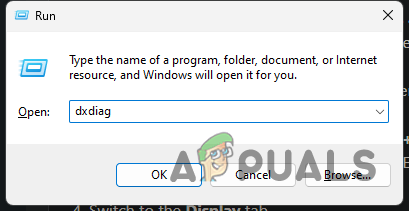
  2. Your DirectX runtime version can be found under System Information on the System tab.
  3. To determine if your GPU supports the required feature levels, navigate to the Display tab under Drivers, and check which Feature Levels your graphics card supports.
  4. If you notice that feature level 12_0 (12.0) does not appear among the entries within the DirectX Diagnostic Tool, one of the following issues may be present:
  • The graphics card (GPU) is using outdated drivers that need updating. Without drivers that instruct the graphics hardware on utilizing the respective feature level, it will not appear in the DirectX Diagnostic Tool.
  • The graphics card does not support Feature Level 10.0. If this is the case, the solution would be to invest in a new GPU.

DirectX is backward compatible, meaning if you have DirectX 12, previous runtime distributions should already exist on your system, which is also valid for DirectX 11 and DirectX 10.

However, certain older games may require outdated DirectX APIs, which have become outdated on Windows and are exclusively available in DirectX 9.0c or earlier versions. You will need to install the particular distribution needed to run such games. While the latest version of DirectX is 12.0, most games still primarily use features that were established with the DirectX 10 runtime.

Fixing the DX11 Feature Level 10.0 is required to run the engine Error

If the DirectX Diagnostic tool indicates that your system supports DirectX 10 runtime or newer and your GPU is compatible with the required Direct3D feature level, you should possess the necessary components to run the application. Nonetheless, if the error persists despite satisfying the requirements, the solutions in this article should help you resolve the issue.

Please proceed with each method sequentially until you find a solution that works for you.

Note: The methods below are appropriate only if you are certain that your GPU supports Feature Level 10.0. Before attempting any fixes, it is recommended that you research your graphics card specifications to verify its support for Direct3D Feature Level 10.0.

1. Run the Application with the Dedicated GPU

On laptops or notebooks that feature both a dedicated GPU and an integrated solution, the system usually decides which GPU to use based on the resource demands of the application engine. This decision can be influenced by a battery-saving utility—if set to battery-saving mode, the system might use the integrated GPU because it consumes less power.

This can be resolved by setting the utility to Performance mode or by removing the software altogether.

  1. Alternatively, if you prefer not to uninstall the battery manager, you can prompt your dedicated GPU by right-clicking on the game shortcut and selecting Run with graphics processor. Then, choose your dedicated card and test if the app starts without the error.
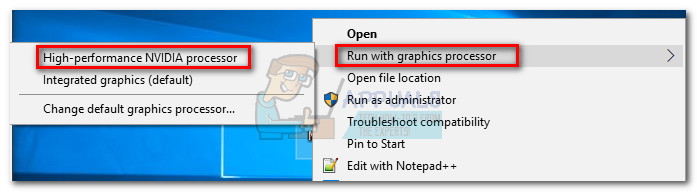
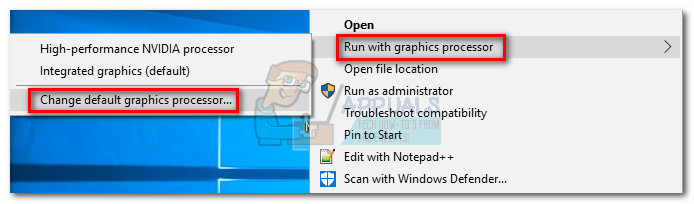
  2. If the application successfully starts, you can make this a permanent setting for the program by navigating to this option again and clicking Change default graphics processor within your GPU’s Control Panel settings.
2. Update Your Graphics Card Driver

To resolve the error, start by updating your graphics card drivers. While there are multiple methods to do this, the best approach depends on the manufacturer of your video card.

For newer Windows versions, your system should automatically install the necessary software driver for your graphics card. However, even if a driver is provided automatically, it might not be the most recent version. A possible cause for the error could be that your GPU does not recognize how to use Feature Level 10.0 despite being capable of doing so.

You can resolve this by installing the latest appropriate graphics driver. There’s a universal method available, but it may not be as reliable as following the manufacturer’s specific installation instructions.

Installing Graphics Driver via Device Manager

Below, you’ll find the steps for updating your graphics driver via Device Manager. It’s a good starting point, but it is dependant on Windows Update to locate the relevant driver online. If this approach does not update your GPU driver, proceed with the manufacturer-specific guides that follow.

  1. Press Windows key + R, type devmgmt.msc, and hit Enter to open Device Manager.
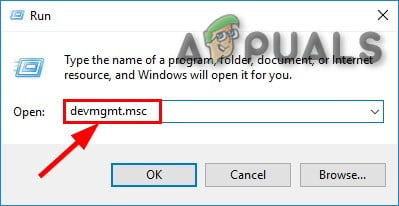
  2. Expand the Display Adapters section. Right-click on the graphics driver and select Update Driver (Update Driver Software).
    Note: There may be two entries under Display Adapters, often seen in laptops and notebooks with both integrated and dedicated graphics cards. Update the dedicated card as it is more powerful and suitable for running demanding applications and games.
  3. Choose Search automatically for updated driver software, and allow Windows to search online for drivers. If a newer driver is found, install it and reboot your system when prompted. Should Windows indicate that you have the latest driver, proceed with the following manufacturer-specific guidelines. If a new driver was installed, verify if the error persists when launching the application.

Users with Nvidia Graphics Cards

For those with Nvidia GeForce dedicated graphics cards, there are two methods for updating the drivers. The most convenient option is to download GeForce Experience and allow the software to identify your GPU and install the correct drivers automatically. This tool saves you the effort of manually searching for the latest driver version.

If you’re unable to use GeForce Experience due to compatibility issues with your motherboard, follow the steps below to manually download the latest graphics card driver:

  1. Browse to the official Nvidia download page (here), select your Product Type, Product Series, and Product. Make sure that you choose the correct Operating System and then click the Search button.
  2. Download and begin installation of the recommended Nvidia driver.
  3. Once the installation is finished, reboot your system and check if the issue has been resolved.

Users with ATI Graphics Cards

AMD Radeon Software is the ATI equivalent to Nvidia’s GeForce Experience. You can use this utility to automatically keep your graphics card drivers up to date. Apart from updating your drivers, this software optimizes game settings for an ideal playing experience based on your system’s specifications.

  1. Go to the official AMD download page (here).
  2. In the Manually Select Your Driver section, choose your product type, product family, and model. Then, select your operating system and click on Display Results.
    Note: For an even easier process, you can also click Download Now under Automatically Detect and Install Your Driver. This option installs an AMD utility that scans your system and applies the latest driver.
  3. After the driver installation completes, restart your computer to see if the error has been corrected.

Users with Integrated Intel Graphics

Most of the time, updating the driver through Device Manager (as described in the first section of this method) should be successful. However, if you encounter difficulties, you can download the driver from Intel’s Download Center (here).


3. Repairing the DirectX Runtime Environment

While DirectX API files rarely become corrupt, it can happen. Unfortunately, uninstalling DirectX effectively is not practical. DirectX runtime 11.3 and 12, included with Windows 10, are maintained through Windows Update, and there is no standalone package for these versions of DirectX.

Nevertheless, you can repair all DirectX files (with the exception of DX12) by utilizing the DirectX End-User Runtime Web Installer and the DirectX Redist (June 2010).

  1. Begin by downloading the DirectX End-User Runtime Web Installer (here). Right-click the executable and choose Run as administrator to grant the necessary privileges. Then, follow the on-screen instructions to ensure all DirectX 9.0c files are intact.
  2. Next, download the DirectX Redist (June 2010) from this link (here). Extract the DirectX SDK to an accessible location. In the extracted files, run the DXSetup executable and follow the prompts to reinstall the DirectX components.
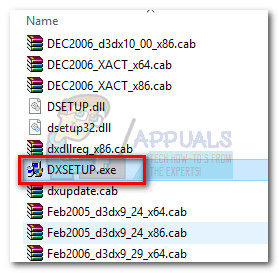
  3. Following the installation, restart your computer to determine if the problem has been resolved.
ABOUT THE AUTHOR

Kevin Arrows


Kevin Arrows is a highly experienced and knowledgeable technology specialist with over a decade of industry experience. He holds a Microsoft Certified Technology Specialist (MCTS) certification and has a deep passion for staying up-to-date on the latest tech developments. Kevin has written extensively on a wide range of tech-related topics, showcasing his expertise and knowledge in areas such as software development, cybersecurity, and cloud computing. His contributions to the tech field have been widely recognized and respected by his peers, and he is highly regarded for his ability to explain complex technical concepts in a clear and concise manner.

Comments

155
    TB
    The bomber Feb 20, 2019

    didnt work but whatevs

      SW
      Shane Warren Author Sep 19, 2019

      Try to install all the versions of the Microsoft Visual C++

    SK
    silent killer Feb 27, 2019

    hello man in my laptop its showing 10_0 and some others but still facing this issue

      SW
      Shane Warren Author Sep 19, 2019

      Try this:
      Install the latest supported version of “.NET Framework” and also install all the versions of “Microsoft Visual C++”. Keep in mind that you have to install all the available versions of Microsoft Visual C++

    HA
    Haemon Mar 8, 2019

    Well everything is fine in my case
    And fortnite also runs without any dx11 feature 10 error
    But when i try to run pubg lite pc it starts to show errors

      SW
      Shane Warren Author Sep 18, 2019

      Some games require more backup software and drivers than others so I suggest you check out this solution:
      “Install the latest supported version of “.NET Framework” and also install all the versions of “Microsoft Visual C++”. Keep in mind that you have to install all the available versions of Microsoft Visual C++”

    RD
    RedGeek Daiki Apr 22, 2019

    Don’t work for me ;_;

    MM
    Mahmoud Mohmed Jun 1, 2019

    can i play pubg lite on gtx210

      SW
      Shane Warren Author Jun 2, 2019

      The official requirements are for your system to be DirectX 11 compatible. GTX 210 is DX 10.1 capable at most. It might not work on your graphics card but you can always try some games don’t announce support for older DX versions but still do support them

      Reply
    JA
    jagdeepsaggu Sep 7, 2019

    i have dx11 feature level 10.1,10.0 but still it (pubg lite) says directx feature level 10 is required to run the engine.
    please help

    SW
    Shane Warren Author Sep 8, 2019

    Install the latest supported version of “.NET Framework” and also install all the versions of “Microsoft Visual C++”. Keep in mind that you have to install all the available versions of Microsoft Visual C++

    Reply
    SW
    Shane Warren Author Sep 14, 2019

    Install the latest supported version of “.NET Framework” and also install all the versions of “Microsoft Visual C++”. Keep in mind that you have to install all the available versions of Microsoft Visual C++

    PE
    peter Oct 11, 2019

    can i play pubg lite with gtx 285

    SW
    Shane Warren Author Oct 13, 2019

    The game requires at least a card that supports DX 11 and the card supports a maximum of DX 10. If you are buying the card from someone, i would recommend you to not do it. However, if you already have it, check it out it can sometimes work and you might be able to play the game.

    PL
    pls Oct 19, 2019

    how to do this on fortnite?

      SW
      Shane Warren Author Oct 19, 2019

      Follow the same steps as indicated in the article to identify the issue and then solve it using some methods provided in the end

    YM
    you_help_meh Oct 28, 2019

    Is window profesianol good to install DX11 10.0 . pls i need to play fortnite

      SW
      Shane Warren Author Oct 29, 2019

      Are you talking about Windows Pro? if yes, then it does support DX 11

    MO
    Mohamed Nov 6, 2019

    i did all the updates , i have direct x 12 and i verified the features with dxdiag , but i still can’t run fortnite …

      SW
      Shane Warren Author Nov 12, 2019

      Try to reinstall it and check if it works

    SZ
    Shamsuz Zaman Nov 19, 2019

    I can’t find “Feature Levels” in display option!it is not there!
    What should I do now? I alredy installed DX11
    My graphics driver is “Mobile Intel(R) 4 Series Express Chipset Family”

      SW
      Shane Warren Author Nov 19, 2019

      Download this driver:
      https://downloadcenter.inte
      Uninstall the previous one and reinstall all related things and try again.

    FD
    Flubs Dubz Nov 23, 2019

    I tried updating my NVIDIA graphics driver but it failed… I don’t know what to do. The problem still shows
    Pc specs:
    Intel core i5-3317U @ 1.70ghz
    GPU: NVIDIA Geforce GT620m

      SW
      Shane Warren Author Nov 24, 2019

      Use DDU and uninstall all graphics drivers, download drivers manually and install them. Check if the issue persists.

    DB
    dbassman Nov 30, 2019

    I’m trying to play Fortnite and keep getting the error. I’m running Windows 10 and have an Nvidia GeForce 9600 GT video card. It shows I have Direct3D DDI 11.1 and Feature Levels: 10_0, 9_3, 9_2, 9_1. I installed the latest driver from Nvidia. I have followed everything on your website, including uninstalling and reinstalling epic games, but still get the error. Any help would be greatly appreciated!

      SW
      Shane Warren Author Dec 8, 2019

      Maybe try downgrading to an older version of your Graphics Cards’ drivers?

    DB
    dbassman Dec 2, 2019

    I made a post yesterday and was wondering while not listed?
    I have a Nvidia GeForce 9600 GT GPU and have done everything on your post above to try and get my nephew to be able to play Fortnite but still keep getting the error. Any help would be greatly appreciated!

      SW
      Shane Warren Author Dec 8, 2019

      Use the DDU facility to completely uninstall the drivers, after that, download the drivers directly from the manufacturer’s website and install them.

    BO
    bob Dec 20, 2019

    i do all steps but i think my gpu gts250 dont support dx11 or dx12 even it s installed?!

      SW
      Shane Warren Author Dec 24, 2019

      Supports till dx 11.1

    AP
    Ana Clara Peressim Jan 16, 2020

    I followed all the methods, but it didn’t work out. The feature level of my DirectX is 10.0,9.1. What do I do to solve this?
    Note: I want to install fortnite on Windows 10

      SW
      Shane Warren Author Jan 18, 2020

      Use DDU to uninstall your graphics drivers completely and then reinstall them. After that, uninstall all the Microsoft Visual C++ versions and reinstall them again. Lastly, reinstall/repair direct x and try again. If that doesn’t work, uninstall and reinstall the game/engine.

      Reply
    SY
    SymbioteSidd Jan 27, 2020

    It shows that I have Direct X 12 and that my DirectX3D DDI is 12 but yet it still shows the error message
    I have been playing Bus Simulator 18 for a while now and there was no problem but suddenly yesterday this error message popped up and i updated my graphics card and my Intel graphics card and both are in the latest version, I am using a Windows 10

      SW
      Shane Warren Author Jan 30, 2020

      Try to downgrade your drivers.

        RO
        Ron Feb 15, 2020

        But how?

          SW
          Shane Warren Author Feb 17, 2020

          You can use DDU to completely remove your drivers and afterward go to the GPU manufacturers’ website and select your model. Download older drivers and install them.

    NT
    ntani Mar 20, 2020

    i tried all the methods they dont work i want to start unreal engine

      SW
      Shane Warren Author Mar 21, 2020

      try to reinstall Graphics drivers completely and also try to reinstall Microsoft NetFramework and Runtime applications.

        AI
        Aidan Apr 28, 2020

        how do i reinstall a graphics driver with only 1 graphics card without my device stop functioning

          SW
          Shane Warren Author Apr 29, 2020

          When you uninstall the driver, it switches it to Microsoft’s basic visual adapter so you still get the display.

    MR
    Matthew Rutten Apr 3, 2020

    Got to method two came up with not able to complete method due to error 43. I then closed it and it finished said was all up to date and has not changed a thing

      SW
      Shane Warren Author Apr 4, 2020
    KR
    Krishna Reddy Apr 28, 2020

    while trying to run Fortnite (Epicgames) I am getting DX11 Feature Level 10.0 required1. I am trying to run Fortnite – Epicgames
    2. I am using i7, 16 GB RAM, Intel grahics card
    3. I have updated windows 10 to the latest
    4. Graphics card is updated to the latest one
    5. dxdiag shows version 12 and features 10_0 (display tab) DDI Version: 11.1
    Feature Levels: 10_1,10_0,9_3,9_2,9_1
    Driver Model: WDDM 1.2
    Graphics Preemption: DMAwhat should be done to resolve the issue?

      SW
      Shane Warren Author Apr 29, 2020

      Try reinstalling Microsoft Redistributables from 2005 to the latest one and make sure to replace the existing ones. Try to reinstall Direct X and then remove drivers completely using DDU and reinstall them as well. After this, check if the game works. If it doesn’t, reinstall the game aswell.

      Reply
        KR
        Krishna Reddy Apr 29, 2020

        Shane,

        Thank you,

        1. I have installed Microsoft Redistributables to the latest ones.

        2. I have uninstalled and reinstalled DDX to the latest one

        3. Uninstalled the game and re-installed it

        Problem is still there

          SW
          Shane Warren Author May 5, 2020

          Happy to Help 🙂
          One thing that you seem to have missed is reinstalling the drivers using DDU or have you maybe tried that as well? DDU removes drivers completely. even the registries and that can sometimes fix issues related to drivers.

      FO
      Felipe Amaury Cruz Ortiz Apr 30, 2020

      Hi, have u found a solution? im having exatcly the same error after the last fortnite update.

        SW
        Shane Warren Author May 5, 2020

        Try this one:
        Try reinstalling Microsoft Redistributables from 2005 to the latest one and make sure to replace the existing ones. Try to reinstall Direct X and then remove drivers completely using DDU and reinstall them as well. After this, check if the game works. If it doesn’t, reinstall the game aswell.

    FF
    FAZE FLICK May 8, 2020

    mine is showing 12_1,12_0…

      SW
      Shane Warren Author May 11, 2020

      Can you please elaborate?

    GH
    Ghalaghor May 31, 2020

    I use win7 and tried to use method 4 only to get a message that I already have that update. My graphic card is Intel(R) HD Graphics 3000 and I keep encountering the “DX11 feature level 10.0 is required to run the engine” error. I even tried to install the graphic cards driver via the Device Manager, but that didn’t work either besides saying that everything is up to date. And my battery settings aren’t in energy saving mode either since I use the balanced mode.

      SW
      Shane Warren Author Jun 1, 2020

      Use the Power Mode instead of the balanced mode, make sure that you install an older driver instead of installing a newer one after downloading from the intel website and installing manually. Remove the previous driver completely first.

      Reply
        GH
        Ghalaghor Jun 1, 2020

        How can I remove the previous driver, will deinstalling it work?

          SW
          Shane Warren Author Jun 1, 2020
    AM
    arnav mathur Aug 8, 2020

    HI, my PC had Dx12 and 10_0 is showing in the display tab. My windows is up to date and my graphics driver is also up to date. Whenever I try and run Unreal engine 4, this error message pops up. I only have one graphics card- Nvidea Geforce G210. Please tell me how i can fix this. Thanks.

      SW
      Shane Warren Author Aug 9, 2020

      The card itself can be one of the reasons due to which this error message pops up. Is this a recent thing that the error messages started showing up or are you trying to run the software for the first time?

    강선
    강선땅 Apr 19, 2021

    might sound weird but im trying to solve this problem in mac. using boot camp of course. there are too much drivers and i don’t know which one to download… please help

      MZ
      Muhammad Zubyan Author Apr 22, 2021

      What’s the model number of your mac? We will have to check it manually and provide you drivers accordingly.

        강선
        강선땅 Apr 22, 2021

        thanks for helping but I fixed it! 🙂

          JO
          john May 28, 2021

          im having same problem what did u do to fix it?!?!?!

    RT
    Redundant Jovian Thor May 1, 2021

    none of these solutions work for me. i cannot enable dx11 mode 10.
    i have a dell laptop, windows 7, “Intel HD Graphics Family” which idk what i can even do with? i should know more than i seem to be able to do here. help?

      MZ
      Muhammad Zubyan Author May 1, 2021

      Unfortunately, if updating your drivers didn’t work out for you. You can’t do anything else instead of buying a Graphics Card that actually supports DX11 feature level 10.0 you are both software and hardware bounded here.

      Reply
    MZ
    Muhammad Zubyan Author May 9, 2021

    That’s unfortunate, still, let me know your Laptop model number so that I can check about it in-depth and let you know.

      RT
      Redundant Jovian Thor May 13, 2021

      Ooohph, boy. How do I find out?

        MZ
        Muhammad Zubyan Author May 13, 2021

        So, press and hold the Windows key then press the “R” key on your keyboard. This should open up the “Run” Program for you. Once the program is opened type in “DxDiag” and press enter. Now give me a screenshot of that Window.

          RT
          Redundant Jovian Thor May 17, 2021

          Well… I no longer have internet access for the foreseeable future, but thanks a ton nevertheless.

          Ill check back via phone after I figure txt out, hoping for the best.

    MO
    Monder May 14, 2021

    How can I even run the dx11 in the 8.1 windows? I doesnt had the NVDIA system in the device manager yep I guess im gonna stay like this forever

      MZ
      Muhammad Zubyan Author May 15, 2021

      Are you using a laptop or computer? Follow these steps and provide me a screenshot please:-

      1. Press and hold the Windows key then press the R key to open the Run program.
      2. Type “dxdiag” and press enter.
      3. Head over to the “Display” tab and then give me a screenshot.

    -ItzCarlPlayz- Jul 23, 2021

    does anyone know how to fix this? i cant seem to find my feature levels in directx diagnostic tool…

      MZ
      Muhammad Zubyan Author Jul 28, 2021

      If you can’t able to see the DirectX version in your Direct X Diagnostic Tool, it means that you have an older version of DirectX Installed. Follow these steps to install the latest driver for DirectX, Here is the link to our article on this issue: https://appuals.com/how-to-reinstall-directx-on-a-windows-computer/

    GA
    Gabitzuuu Oct 23, 2021

    Hello, i have the same problem, my graphic gard is up to date and it suports dx lvl 10 and when i try to run valorant it dosen’t start at all.
    i don’t know that else to do if somebody has a solution.

      MZ
      Muhammad Zubyan Author Oct 24, 2021

      Are you using a laptop or a desktop?

    SI
    Sanzidul Islam Oct 31, 2021

    i tried all the method…and my graphics driver also supports requirements…but still the error is showing

      MZ
      Muhammad Zubyan Author Oct 31, 2021

      Which game are you trying to play? Also, are you using a laptop or a computer? Please post your system specifications here.

        HP
        halp pls Jan 12, 2022

        yo i ve tried somay meathods but cant run valorant. i han no problems a week back but from today i cant play it 🙁

          MZ
          Muhammad Zubyan Author Jan 15, 2022

          Are you on a laptop or computer?

    ON
    onyankopon Nov 17, 2021

    https://uploads.disquscdn.c… is there anything else I could do? I tried the methods specific for me

      MZ
      Muhammad Zubyan Author Nov 17, 2021

      Which game are you trying to run?

        ON
        onyankopon Nov 17, 2021

        MIR4

          MZ
          Muhammad Zubyan Author Nov 18, 2021

          It seems like your computer isn’t powerful enough to run MIR4.

    PS
    Pushpendra Singh Feb 1, 2022
      MZ
      Muhammad Zubyan Author Feb 2, 2022

      Are you using a laptop? If yes please let me know the exact model number of your laptop.

    TO
    Tomski Feb 7, 2022

    Hello, i have tried all of the methods, my drivers show 10_0 on my graphics card, i have a i5-3330 and a 9500 geforce gt and 6 gb ram, my thoughts are that it may be that my graphics card is too old? idk but help will be apreciated

      MZ
      Muhammad Zubyan Author Feb 8, 2022

      Are you using a laptop or PC?

        CG
        Confidential_Gamer Mar 7, 2022

        https://uploads.disquscdn.com/images/eb91f84c100741826fd5894ffc4c4cf3524c03f18193dfb13c0737ca9d2a8a0c.png Hi, my friend have been recently having the same issue in valorant. The error is “DX11 feature level 10.0 is required to run the engine.” His laptop is an HP EliteBook 8440p Notebook. He has an intel core i7 M 640 and an Nvidia NVS 3100M. This is his dxdiag window:
        BTW none of the fixes worked

          MZ
          Muhammad Zubyan Author Mar 8, 2022

          Unfortunately, I searched but couldn’t able to find the appropriate driver for your laptop. I don’t think he can run Valorant.

    เย
    เฮนริค ยอร์นเนอร์ Mar 14, 2022

    my laptop requirement is enough for valorant , feature levels is 10_1 but i still can’t run it show ”DX11 Feature Level 10.0 is required to run the engine” my directX version is 12 can you help me step by step am dumb ;-;

      MZ
      Muhammad Zubyan Author Mar 16, 2022

      Please tell me the exact model number of your laptop. So that I can help you accordingly.

    ST
    steve Mar 16, 2022

    i did everythig but still unable to play

      MZ
      Muhammad Zubyan Author Mar 17, 2022

      Are you using a laptop? If yes please send me exact model number of your laptop.

    AZ
    Abdus Samad Bin Zeeshan Mar 22, 2022

    Device name DESKTOP-UH519BJ
    Processor Intel(R) Core(TM) i5-2500S CPU @ 2.70GHz 2.70 GHz
    Installed RAM 4.00 GB (3.90 GB usable)
    Device ID 0CE68FA3-01D6-4680-A878-33BBCD1FCEC7
    Product ID 00330-80000-00000-AA377
    System type 64-bit operating system, x64-based processor
    Pen and touch No pen or touch input is available for this display
    this is my PC specifications please tell me which driver am i supposed to install from all the the AMD driver in the website https://www.amd.com/en/support

      MZ
      Muhammad Zubyan Author Mar 22, 2022

      Send me screenshot of your “Display” Section in DxDiag.

    TS
    the street Apr 4, 2022

    i still cant play valorant and im not on a laptop. what can i do

      MZ
      Muhammad Zubyan Author Apr 5, 2022

      Send me exact model number of your laptop please.

    IA
    iliya akhavani Apr 5, 2022

    Device name iliya
    Processor Intel(R) Core(TM) i3-2370M CPU @ 2.40GHz 2.40 GHz
    Installed RAM 4.00 GB (3.88 GB usable)
    Device ID AAB170C1-8514-4619-9F0B-D76B62FA18B9
    Product ID 00327-60000-00000-AA786
    System type 64-bit operating system, x64-based processor
    Pen and touch No pen or touch input is available for this display
    i have done every thing but it did not worked
    im using a laptop and i wanna play valorant

      MZ
      Muhammad Zubyan Author Apr 8, 2022

      Send screenshot of your DxDiag Window please.

    AD
    Abish Dawn Apr 16, 2022

    https://uploads.disquscdn.com/images/7cb94638967e2d7dd8f23484f57e236fb5fa2cca48655b069b249f269beff324.png Hello. All in one PC User here. Cannot run Valorant. Installed necessary requirements.

    KF
    Kazuki Fujiyama Apr 18, 2022
    AM
    AMMAR May 12, 2022

    I have one game needs feature levels 12_0, But i don’t have even my model is WDDM 2.3

    https://uploads.disquscdn.com/images/49d25b94938d8560262e9d878f615133bf985948995e05055717c411960dae81.jpg

      MZ
      Muhammad Zubyan Author May 13, 2022

      Which game are you trying to play?

        AM
        AMMAR May 14, 2022

        Elden Ring

          MZ
          Muhammad Zubyan Author May 15, 2022

          Your GPU is too weak to run that game, you need at least a GTX 1060 to run that game.

    NB
    Nicolas L. Bustillo Jun 12, 2022

    I like to play rogue company but I have problems

      MZ
      Muhammad Zubyan Author Jun 21, 2022

      Which game are you trying to play?

        YU
        Yukine Aug 12, 2022

        Valorant

          MZ
          Muhammad Zubyan Author Aug 15, 2022

          Unfortunately, you can’t run Valorant and your GPU doesn’t supported that game.

          YU
          Yukine Aug 18, 2022

          does getting zotac gt 730, can i run valorant?

          MZ
          Muhammad Zubyan Author Aug 18, 2022

          It should run, but you will get really low FPS.

          YU
          Yukine Aug 20, 2022

          what should I upgrade to have stable fps?
          12GB DDR3 1600
          intel i5 2500
          mobo: H61H2-MV

          MZ
          Muhammad Zubyan Author Aug 26, 2022

          I suggest you get a new GPU, however, make sure you take your PC to a professional as some components don’t work very well together or they are straight up not compatible.

    KG
    Katya Granit Jun 20, 2022

    Hi, do you think it is possible to run Virtual machine( Win 10 ) from UBUNTO to play Minecraft dungeons ?We get the same error and I see that we have DX12 installed as you explained.I find that feature level 10_0 (10.0) is showing among the Feature Levels entries inside DirectX Diagnostic Tool. what else can i try?

    thank you so much for your time and effort!

      MZ
      Muhammad Zubyan Author Jun 21, 2022

      Which GPU is it showing in the DxDiag can you send a picture please.

        KG
        Katya Granit Jun 21, 2022

        Are you talking about physical GPU ? Or virtual, that Vm shows? I apologize for maybe a naive question ?

          MZ
          Muhammad Zubyan Author Jun 21, 2022

          Virtual that VM Shows

          KG
          Katya Granit Jun 22, 2022

          VMWare SVGA 3D . is it a correct one ?
          I am so grateful for your assistance, it means a lot for me!

          MZ
          Muhammad Zubyan Author Jun 22, 2022

          Yes correct, can you send me a screenshot of DxDiag tool’s Display page?

          MZ
          Muhammad Zubyan Author Jun 23, 2022

          That’s the reason, your Display Memory (VRAM) is 0 that’s why you can’t play the game.

      MZ
      Muhammad Zubyan Author Jul 3, 2022
    ST
    Stef Jul 4, 2022

    I’ve tried absolutely everything but I still can’t seem to be able to run my game. I got an NVIDIA GeForce 210 with 1GB of VRAM. I have directx version 12 and I got the feature level 10_0 available.

      MZ
      Muhammad Zubyan Author Jul 19, 2022

      Which game are you trying to play?

    S;
    sachi ; Jul 12, 2022

    zzzz

    S;
    sachi ; Jul 12, 2022

    I have tried this method but it still doesn’t work. I can’t play valorant. Please help me. I’m using pc and this is my system right here. https://uploads.disquscdn.com/images/6f9656b04068f049beccf04e98f249f7cb2818f8a1d7db12b482b311fc73160b.png https://uploads.disquscdn.com/images/aeb9eed5ec6c6c99d6f1ba14f45ef5b07e6e6a20d575d6a161616ea4b0c6309f.png

      MZ
      Muhammad Zubyan Author Jul 13, 2022

      Please contact me on my Discord so that I can look into this issue. Zubyan Gul#9955

        S;
        sachi ; Jul 13, 2022

        I have sent a friend request.

      MZ
      Muhammad Zubyan Author Jul 22, 2022

      Your GPU doesn’t support Valorant, you can’t play on this PC.

    MA
    matyou Jul 21, 2022

    Hi, i also tried the methods but still the can’t run valorant. Please help
    https://uploads.disquscdn.com/images/280eadddbb8ba4d0c9a5f7197710b79bcaae350bd7af11dd12bca4f12440921d.png

      MZ
      Muhammad Zubyan Author Jul 22, 2022

      Your computer can’t run Valorant because the GPU you have doesn’t meet minimum requirements of Valorant.

      MZ
      Muhammad Zubyan Author Jul 23, 2022

      It seems like you are using an untested driver, can you please let me know the model number of your laptop? I will send you a proper driver that is available for your laptop.

    SH
    Syed Ishaq Hussain Jul 23, 2022

    Assalamualaikum Mohammed akhi i tried everything that is instructed in this blog to play valorant and i also formatted my whole laptop twice later I saw you in the comment section helping others akhi i want to know what’s the problem and how it can be solved really need someones help in this one .

      MZ
      Muhammad Zubyan Author Jul 26, 2022

      Can you please tell me your laptop’s model number? So that I can assist you accordingly.

    D:
    Double-chin cat lady :) Jul 24, 2022
      MZ
      Muhammad Zubyan Author Jul 26, 2022

      Unfortunately, your PC can’t run Valorant because your GPU isn’t supported.

      MZ
      Muhammad Zubyan Author Aug 1, 2022

      Are you on a laptop?

        AH
        Ameer Hamza Aug 3, 2022

        pc

    AP
    adrian padasas Jul 29, 2022

    directx 11 feature 10.0 engine need to run?how to fix this
    Device name TOSHIBA
    Processor Intel(R) Core(TM) i3-2310M CPU @ 2.10GHz 2.10 GHz
    Installed RAM 4.00 GB
    Device ID 50DD4AB9-7677-4EB3-9549-8BB078A43317
    Product ID 00331-10000-00001-AA203
    System type 64-bit operating system, x64-based processor
    Pen and touch No pen or touch input is available for this display

      MZ
      Muhammad Zubyan Author Jul 30, 2022

      No graphics card?

      MZ
      Muhammad Zubyan Author Aug 9, 2022

      Can you contact me on my Discord? Zubyan Gul#9955

    DE
    dewy Aug 9, 2022

    i just did

    JC
    Job Jacob Regino Cube Aug 10, 2022
      MZ
      Muhammad Zubyan Author Aug 16, 2022

      Unfortunately, your PC can’t run Valorant.

    AL
    Alucard Aug 12, 2022

    THX for info!

    AI
    aiden Dec 23, 2023

    i tried everything even deleted and reinstalled my driver but still cant play pacify it sais “dx11 feature level 10.0 is required to run the engine also cant play valorant :c

      MZ
      Muhammad Zubyan Author Jan 24, 2024

      What are your computer’s specifications?

    RP
    Ricardo Paccelle Jan 27, 2024

    Hey, I don’t have a problem with Valorant, but I’m getting this error when trying to play Borderlands 3 using DXVK.

    https://uploads.disquscdn.com/images/ee17863f767d546ea8e9eafa4883fb2f6f5a75fba68a53eef4d0dcd6d1725e00.png

      MZ
      Muhammad Zubyan Author Feb 18, 2024

      These steps will work on Borderlands too, please try and let me know.

        RP
        Ricardo Paccelle Feb 19, 2024

        I’ve already tried. I’m using a notebook, I made it only use the dedicated GPU. My drivers are up to date and I also tried repairing DirectX. None of this worked. I can play BL3 normally, my problem is that it stutters a lot. I read that it works better with DXVK, but when I try I get this error.