Fix: Essentials Error 0x80070426 in Windows 10

As of Windows 10, Microsoft Security Essentials is no longer available; it has been replaced by a program called “Windows Defender”. When you upgrade from a previous version of Windows to Windows 10, Windows Defender takes over and replaces Microsoft Security Essentials. However, in approximately 10% of all Windows 10 upgrades, something goes wrong and Windows Defender fails to replace Microsoft Security Essentials, resulting in the operating system having both Microsoft Security Essentials and Windows Defender installed.

In such instances, Windows Defender fails to start, implying that it does not provide any protection to the computer whatsoever. Even though Microsoft Security Essentials is always operational, its Spyware and Unwanted Software Protection, as well as Virus Protection, are both deactivated. When the user attempts to enable these disabled protection features, a Microsoft Security Client dialog appears, displaying the following error message:”.

An error has occurred in program initialization. If this problem continues, contact your System Administrator. Error Code: 0x80070426.

Although error code 0x80070426 usually refers to a non-genuine copy of Windows, in this instance, the error is indicating that MSE is not functioning correctly. When error 0x80070426 occurs, it leaves your computer entirely vulnerable; both Windows Defender fails to start up and MSE ceases to work properly.

The solution to this problem is to simply uninstall Microsoft Security Essentials, allowing Windows Defender to do its job and protect your computer.

The following are all of the steps you need to follow in order to fix error 0x80070426.

Hold the Windows Key and press R. Type ‘taskmgr’ in the run dialog. Locate the Windows Defender Service (WinDefend), right-click on it, and choose ‘Stop’.
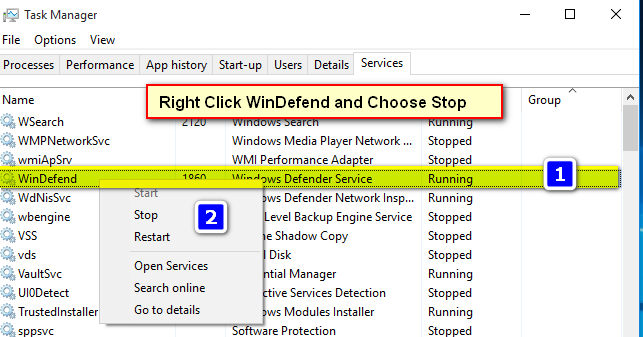
0x80070426-1

This should stop the service, but it will start automatically after the computer reboots. While it is stopped, you can uninstall Essentials. Normally in such cases, you cannot uninstall Microsoft Security Essentials because Windows Defender is programmed to block both the installation and uninstallation of Microsoft Security Essentials.

However, you should be able to uninstall Microsoft Security Essentials as though it were any other program now since the Windows Defender has been temporarily disabled.

To uninstall it, go to Control Panel -> Programs & Features -> Uninstall a Program, or hold the Windows Key and press R. Type “appwiz.cpl” and click OK, locate Microsoft Essentials, and uninstall it. Then, restart your computer.

After the reboot and removal of Essentials, proceed to ‘Settings -> Update & Security’. Choose ‘Windows Defender’ and ensure that Real-time protection is switched on.

Now go back to Task Manager -> Services tab and make sure that the Defender service is running.

ABOUT THE AUTHOR

Kevin Arrows


Kevin Arrows is a highly experienced and knowledgeable technology specialist with over a decade of industry experience. He holds a Microsoft Certified Technology Specialist (MCTS) certification and has a deep passion for staying up-to-date on the latest tech developments. Kevin has written extensively on a wide range of tech-related topics, showcasing his expertise and knowledge in areas such as software development, cybersecurity, and cloud computing. His contributions to the tech field have been widely recognized and respected by his peers, and he is highly regarded for his ability to explain complex technical concepts in a clear and concise manner.

Comments

26
    BE
    Ben Oct 6, 2016

    Hi! Thanks for this description. Unfortunately Windows says “Access denied” as soon as I try to stop the Windows Defender Service (running tskmgr.exe as Admin). Any ideas, why this happens? (Win 10 + Millenium Update).

      KA
      K. Arrows Author Oct 7, 2016

      Please reboot PC and make sure you are logged in as admin, and then try.

    JH
    Julian Haddad Oct 9, 2016

    I have restarted my computer and i’m on the only account on the pc. I found the windows defender service under the antimalware service executable tab in the processes section of the task manager. when I right click to stop the windows defender service I am told the access is denied

      KA
      K. Arrows Author Oct 11, 2016

      Can you open services.msc, disable and stop the windows defender service from there and then try?

    UM
    umakanth Oct 16, 2016

    Hi Mr. Kevin. Thank you very much. I was trying to fix this problem since last few days. Now its working.

    PA
    PaddyMac Oct 19, 2016

    Recently started getting “Error Code: 0x80070426” on a new laptop that came with Windows 10 and Defender. There was and is no Microsoft Essentials to uninstall. Cannot go back to a previous system restore point as Windows “Anniversary” Update has disabled System Restore and removed all restore points. Defender seems to be working fine. How do I get rid of this error every time I boot up Windows? Thanks.

      KA
      K. Arrows Author Oct 30, 2016

      Can you type the complete error message and provide information on when and where does the error occurs?

      ST
      steveliddleSK Dec 30, 2016

      used google, came up with ****

      is it a cracked or legit copy ?

      there is software out there that can “fix” these issues, but not that legal

        KA
        K. Arrows Author Dec 31, 2016

        which?

          ST
          steveliddleSK Dec 31, 2016

          not want to post links to cracked software or to software that has some legal concerns, but I imagine a technician would know about windows activators ?

    KA
    K. Arrows Author Oct 26, 2016

    Boot into safe mode, and then try.

      AO
      Anderson Oliveira Oct 31, 2016

      Im getting the same error as Jorge even in Safe mode

        KA
        K. Arrows Author Nov 1, 2016

        Right click the defender process (in safe mode) open the file location, and rename the defender process to something like WinDefend1. Then test?

        Reply
          JK
          Josh Opal Kelso Nov 2, 2016

          Same “Access Denied” error as above. Won’t let me rename defender process; “You require permission from TrustedInstaller to make changes to this file”

          KA
          K. Arrows Author Nov 4, 2016

          go to properties of the process -> security -> advanced, and add your username as the owner of this process.

          JK
          Josh Opal Kelso Nov 14, 2016

          Makes no difference. File the service points to, that I am trying to rename is `MsMpEng.exe`. Even with ownership set to ‘Everyone’ I still cannot make changes to this file.

          KA
          K. Arrows Author Nov 29, 2016

          Can you try this in Safe Mode?

          JK
          Josh Opal Kelso Nov 16, 2016

          I used a free take ownership program to allow me to rename the file which caused the service to stop. However ‘Microsoft Essentials’ is not listed in ‘Uninstall a program’ for me to uninstall it.

          KA
          K. Arrows Author Dec 11, 2016

          It may have already been uninstalled. Are you still able to open essentials? You can also use RevoUninstaller to search and uninstall any left overs and traces of Essentials.

    DE
    DemonDelight Nov 13, 2016

    Interesting that this error can be caused by this issue. I started getting this error after installing chipset and Intel’s Rapid Storage Technology drivers to utilize the caching SSD in my laptop. Trying to find a fix for this now…

    AH
    Ahmed Jan 12, 2017

    I tried sopping it, but i got an error saying that “access is denied”. So i tried going onto services and it says ” an administrator had blocked me from it, even though im an administrator

      KA
      K. Arrows Author Jan 26, 2017

      boot into safe mode, then try.

        TE
        tenshi7angel Feb 21, 2017

        That didn’t work for me. Safe mode produces the same result.

    JO
    Joel Feb 4, 2017

    You said to uninstall Microsoft Essentials. The actual name of the program is Windows Essentials.

    CH
    Chaestifol Nov 15, 2019

    sorry, I’ve tried all of these methods still can not, and still can not be used by my word

      SW
      Shane Warren Author Nov 16, 2019

      Run an SFC scan and check if it helps.