Fix: Error 50 DISM does not support servicing Windows PE with the /online option

Deployment Image Servicing and Management (DISM) is used to refresh a Windows image, or prepare an image. It is a command line tool. It has many uses, including its use to repair when System File Checker scan reports errors or corrupted files.

But rarely users have reported getting the following error “Error 50 DISM does not support servicing Windows PE with the /online option. The DISM log file can be found at x:windows\dism\dism.log” when they run the DISM command. Its cause is that the windows seem to think that we are in Win PE (Pre-installation Environment). This is the result of a misplaced registry key. Follow our guide to fix it quickly.
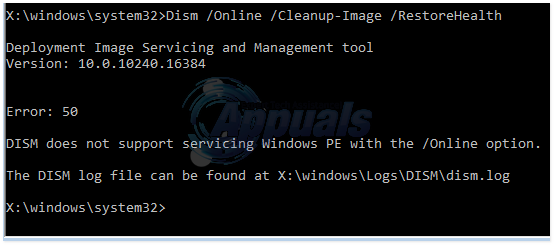
dism error 50

Deleting the Registry key

Hold down Windows key and press R. Type regedit and press Enter. Click Yes if a UAC warning appears.

In the registry editor windows, click on HKEY_LOCAL_MACHINE In the left pane to expand it.

Under HKEY_LOCAL_MACHINE, click on SYSTEM to expand it. Similarly navigate to HKEY_LOCAL_MACHINE\SYSTEM\CurrentControlSet\Control.

Under Control, there will be a folder named MiniNT. Right click on it and click Permissions.

Select your username in the group or usernames list and make sure the check box against Full Control is checked. Then click OK.

Right click on the same MiniNT key, and click Delete. Confirm any message for deletion. Restart your system and run the command again. You problem should be gone.

Update BIOS

If the above solution doesn’t work; make sure that you restore bios to it’s default settings. You can do this by booting into BIOS. Since all models are different; it would be best to refer to the manual to see how to restore bios to default.

ABOUT THE AUTHOR

Kevin Arrows


Kevin Arrows is a highly experienced and knowledgeable technology specialist with over a decade of industry experience. He holds a Microsoft Certified Technology Specialist (MCTS) certification and has a deep passion for staying up-to-date on the latest tech developments. Kevin has written extensively on a wide range of tech-related topics, showcasing his expertise and knowledge in areas such as software development, cybersecurity, and cloud computing. His contributions to the tech field have been widely recognized and respected by his peers, and he is highly regarded for his ability to explain complex technical concepts in a clear and concise manner.

Comments

19
    MA
    Michael Ardrey Feb 15, 2016

    This doesn’t really help much, since I don’t have any access to computer functions like Windows Key R, regedit, and the like. All I have access to is the System Repair X:Windows Command Prompt. Is it possible to get to regedit through X:Windows Command Prompt? I’m posting this from an alternate backup device.

      KA
      K. Arrows Author Feb 15, 2016

      Are you able to login to Windows?

        MA
        Michael Ardrey Feb 15, 2016

        No. I’m in the Startup Repair Envionment, and I can’t get any further than that.

        MA
        Michael Ardrey Feb 15, 2016

        I am unable due to the Startup Repair Infinite Loop, which is why I’m here trying to use DISM to fix a corrupted MSISADRV.sys driver.

          KA
          K. Arrows Author Feb 15, 2016

          This guide won’t help with MSISADRV.sys, which operating system are you running?

          MA
          Michael Ardrey Feb 15, 2016

          Windows 10

          KA
          K. Arrows Author Feb 15, 2016

          Is there any important data on this system, and what is the exact product model # of this system?

          MA
          Michael Ardrey Feb 15, 2016

          I’m not sure what you mean by product model, but all of my most important data is on external drives. I tried the reset PC option in the Startup Repair, and it failed, so it made no changes. I’ve actually tried every single option in the Startup Repair, and nothing works. Since then I’ve been looking up any article I can related to this issue and trying out their supposed fixes, and nothing’s worked so far. I’m currently trying to use DISM Cleanup-Image tool since the current article I was trying said that if MSISADRV.sys is corrupted you can fix it with DISM Cleanup. However, I got the very error message in your screencap, so I was thinking of trying this. I’m currently making an Installation USB as an emergency measure in case the tech guy I’m sending my PC to tomorrow can’t fix it. I’d rather not have to track down all the programs I have installed to reinstall them after a fresh Win10 install, but I’m willing to do it if it turns out to be the only option to fix it.

          KA
          K. Arrows Author Feb 15, 2016

          I suggest that the reinstall is the best option.

          MA
          Michael Ardrey Feb 15, 2016

          Thanks! I’ll keep that in mind.

          LH
          Lynn Hati Dec 31, 2016

          K. Arrows, I need your help. I’m in a similar situation as Michael, but with Win 7 and my OS is installed on my only hard drive with a bunch of programs. Is it safe to reinstall?

          KA
          K. Arrows Author Dec 31, 2016

          What is the actual issue that lead you to this page?

          LH
          Lynn Hati Jan 2, 2017

          (Typed out a long and detailed post but my stupid phone decided to go ahead and refresh the page.)

          I did an incredibly stupid thing, and shut down while a system update was installing. Now I get a black screen with a cursor after boot, and basically any fix I’ve tried has run into a fail. SFC scan, can’t do because pending action. Dism fix for SFC scan, doesn’t work. I haven’t tried using another Windows 7 PC to fix it, or reinstall Win 7.

          I’m running Home Premium 64 bit.

          LH
          Lynn Hati Dec 31, 2016

          K. Arrows, I need your help. I’m in a similar situation as Michael, but with Win 7 and my OS is installed on my only hard drive with a bunch of programs. Is it safe to reinstall?

          KA
          K. Arrows Author Dec 31, 2016

          What is the actual issue that lead you to this page?

    MS
    Mike Silva Mar 11, 2016

    Excelente, solo que ahora me apareció el error 87.
    Igual gracias 🙂

    TO
    Toto Aug 21, 2016

    Hi!
    I don’t find MiniNT in the Control folder. Am I cursed?
    Thanks!

      KA
      K. Arrows Author Aug 21, 2016
    CC
    Cameron Clough Nov 8, 2016

    Thank you!