Step By Step Guide To Install Microsoft Teredo Tunneling Adapter

To understand what Teredo Tunneling is, we must first understand what IPv4 and IPv6 are. IPv4 refers to an IP protocol that assigns our computers a unique address, enabling us to communicate with the world over the internet.
Most of the world, including many of us, uses IPv4 technology. However, the Internet is running out of IPv4 addresses due to all available IPv4 addresses being occupied. As more people heavily use the internet and networks, we transition to IPv6 (Internet Protocol Version 6).

IPv6 provides an unimaginably large number of addresses—2 to the power of 128, or 2^128 (340 undecillion)—ensuring a nearly infinite supply.

Understanding the shortage of IPv4 addresses makes it easier to understand what Teredo Tunneling is. IPv4 is still widely used. To put it simply, everyone used to speak one language, but now there are two languages. A system speaking the IPv4 language will be understood by others using that language but not by those using IPv6.

As the internet relies on interconnected and communicating networks, we need a way to translate between IPv4 and IPv6 and vice versa. This is the role of Teredo Tunneling: it acts as an interpreter between the two IP languages.

Microsoft’s Teredo Tunneling Adapter Driver

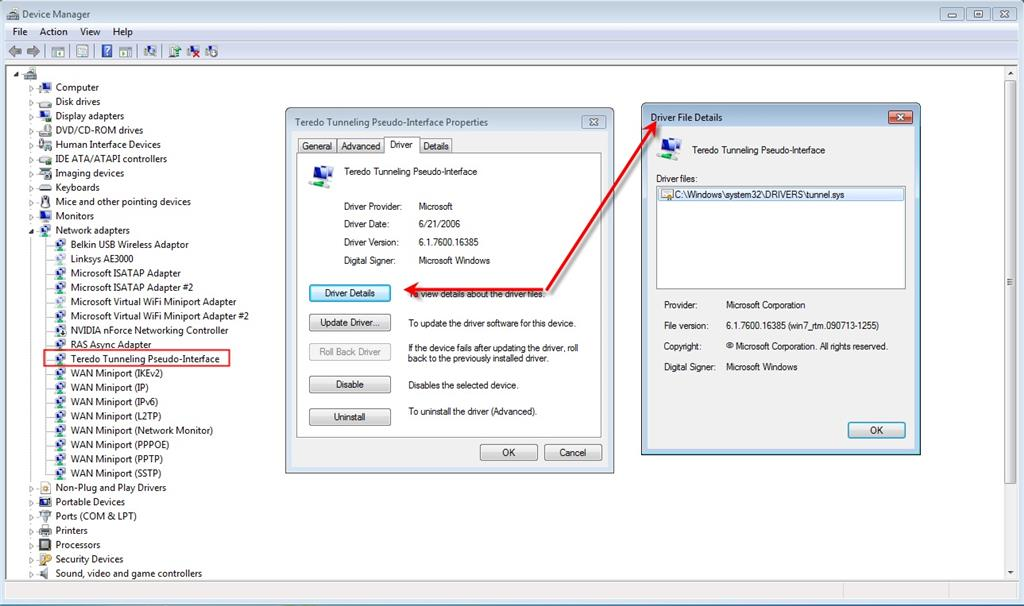
Let’s look at how to install the Teredo Tunneling Adapter on Windows 7, a driver that comes built into the operating system.

  1. Open the Device Manager by holding the Windows key and pressing R. In the Run dialogue that appears, type hdwwiz.cpl and click OK.
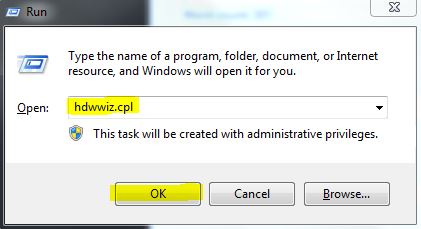
    Device Manager
  2. In the Device Manager, click on Network Adapters.
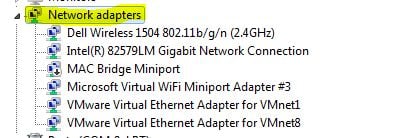
    Network Adapters
  3. Next, select the Actions tab at the top and choose Add Legacy Hardware.
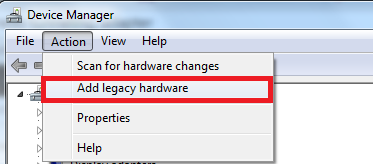
    Add Legacy Hardware
  4. Click Next twice to proceed to the Common Hardware Types screen.
  5. Scroll down, select Network Adapters, and click Next. You will now enter the Add Hardware dialogue.
  6. Choose Microsoft from the Manufacturer list, then Microsoft Teredo Tunneling Adapter from the Network Adapter list, and click Next.
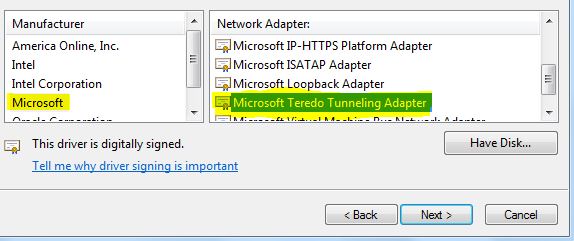
    Selecting Teredo Tunneling Adapter
  7. Click Next, click Next again, followed by Finish to complete the installation.

If you cannot find the Teredo Adapter under Network Adapters or in the list of Legacy drivers, try the following steps that have helped many users:

  1. Open an Elevated Command Prompt by pressing the Windows key + R, typing ‘cmd‘, pressing Ctrl + Shift + Enter, and selecting ‘Yes’ at the User Account Control (UAC) prompt.
  2. In the elevated Command Prompt, type the following command to disable the Teredo interface:
    netsh interface Teredo set state disable
  3. After disabling, close the Command Prompt and reboot your computer.
  4. Upon the next startup, open an elevated Command Prompt (following step 1), execute the command below, and press Enter:
    netsh interface Teredo set state type=default
  5. Check Device Manager to see if the Teredo Adapter is now present and enabled.

If the method above is inefficient, follow these steps to check Teredo’s state and enable it if necessary:

  1. Open an Elevated Command Prompt as per the first step above.
  2. Type the command below to check your Teredo state:
    netsh interface teredo show state
  3. If the state is ‘Client’ or ‘Dormant’, Teredo is functioning properly. If the state is ‘Offline’, enable Teredo with the following command:
    netsh interface teredo set state type=enterpriseclient
  4. Restart your computer and verify if the Teredo adapter appears in Device Manager.

Resolving the Teredo Tunnel Error with a Yellow Exclamation Mark:

  1. Open the Registry Editor
  2. Navigate to the following key:
    HKEY_LOCAL_MACHINE\SYSTEM\CurrentControlSet\Services\Tcpip6\Parameters
  3. In the right pane, right-click on ‘Disabled Components‘ and select ‘Edit.’ Set the DWORD value to 0.
  4. Restart your computer; the Teredo tunneling adapter should now function correctly.

How to Fix Issues with the Teredo Adapter on Windows 10

As the Teredo Adapter is considered a legacy component, Microsoft has removed it starting with Windows 10 Build 1803.

If you are experiencing issues with the Teredo Adapter on Windows 10 and have a build newer than 1803, here are alternative solutions:

  1. Open the Xbox Networking tab of the Settings App by pressing the Windows key + R, typing
    ms-settings:gaming-xboxnetworking

    and hitting Enter.

  2. Allow the software to complete the checks, clicking Check Again if necessary.
  3. If your server connectivity is blocked, use the Fix it button to fix the issue.
  4. Reboot your computer and check if the issue has been resolved.

If the problem persists, make sure Windows Firewall is active, then follow these steps:

  1. Open an elevated PowerShell window by pressing the Windows key + R, typing powershell, then pressing Ctrl + Shift + Enter and clicking Yes at the UAC prompt.
  2. Execute the following commands:
    netsh
    int teredo
    set state servername=win1711.ipv6.microsoft.com

  3. Restart your computer and check if the Teredo issue has been resolved.

If these steps are unhelpful, consider using the Group Policy Editor to change a potentially problematic port:

  1. Open the Local Group Policy Editor by pressing the Windows key + R, typing gpedit.msc and hitting Enter. (Note: This tool is only available in select versions of Windows 10)
  2. Navigate to Computer Configuration > Administrative Templates > Network > TCP/IP Settings > IPv6 Transition Technologies using the left pane.
  3. On the right side, double-click Set Teredo Client Port to edit this policy.
  4. Enable the policy and set the port to 3544, making sure it is open and forwarded through your router. If unsure how to do this, seek specific instructions for your router model.

Note: Sometimes, after installing the Microsoft Tunneling Adapter, you might encounter Error Code 10.

ABOUT THE AUTHOR

Kamil Anwar


Kamil is a certified MCITP, CCNA (W), CCNA (S) and a former British Computer Society Member with over 9 years of experience Configuring, Deploying and Managing Switches, Firewalls and Domain Controllers also an old-school still active on FreeNode.

Comments

227
    MM
    Mimina Mows Jul 1, 2014

    Je trouve pas adapteurs réseau

      KA
      K. Arrows Author Jul 1, 2014

      It is in the Device Manager.

    MA
    Mamatha Jul 27, 2014

    Mine is dell windows 8 laptop,
    after doing above steps its again showing yellow mark.
    will you say me what to do?

      KA
      K. Arrows Author Jul 27, 2014

      1. Open registry editor.

      2. Navigate through the following: HKEY_LOCAL_MACHINESYSTEMCURRENTCONTROLSETSERVICESTCPIP6PARAMETERS.

      3. In the right pane, right click Disabled Components and select Edit. Set the DWord value to 0.

      4. Restart your computer and the teredo tunneling adapter will now start.

      If you have any questions, feel free to ask in the comments section below.

      Reply
        TC
        Trisha Cagnolatti Oct 15, 2014

        On my register, it does not show ‘DWord’, only modify, modify binary data, delete, and rename. OS is Windows 7 64 bit… Thank you for helping!

        I input 0 on both…but still have exclamation point.
        All right dear, finally fixed 🙂
        Thank you!

          CC
          Chris Clay Oct 16, 2014

          How did you fix it?

          MA
          Malek Oct 24, 2014

          hi bro i have the same problem like you had before please can you tell me how did u fix it my windowns is 7 with 64bits
          thank you

          ER
          Erehscat Aug 9, 2015

          how did u fix it?… plz

        L
        lisa p. Oct 20, 2014

        This doesn’t work!!

          LK
          Lisa K Nov 29, 2014

          I got to the select network adapter and it didn’t go too a manufacture area it says unable too find drivers use disc, I don’t have one. What do I do now please

        SN
        Sisong Song Nars Nov 3, 2014

        I can’t find Disabled Components.

          RI
          Richard Nov 22, 2014

          IN the Right-hand pane

          KA
          K. Arrows Author Dec 2, 2017

          are you seeing it with a exclamation mark in device manager?

        RF
        robert fullerton Nov 27, 2014

        I just happened across this site looking for an answer to the same question these other folks have.The
        difference between them and me is I can follow directions.It did’nt say edit though it said modify but
        that did’nt deter me and now I give thanks for your assistance.Worked good.

        AM
        ameen Aug 1, 2016

        i cant edit the dword value
        ït shows “error writing the dword value”
        pls help

          KA
          K. Arrows Author Aug 1, 2016

          what value are you trying to input?

    JO
    jose Aug 10, 2014

    Mr.Kevin thanks for you helping

    AR
    Allen Rose Aug 13, 2014

    totally awesome

    PR
    Paul R Aug 18, 2014

    Worked great, thank you!

    DG
    Dave G Aug 20, 2014

    I still see the yellow exclamation mark after following this procedure. Any other suggestions? Thanks

      KE
      Kevin Aug 28, 2014

      Please follow the second part of instructions, to get rid of the yellow exclamation mark.

    CA
    caninelady Aug 22, 2014

    Rec’d the tunnel adapter, now I have teredo and teredo 2 with Ivg4 and Ivg6 am I supposed to have both of these?Thanks

    MA
    Moon Anthem Aug 24, 2014

    ***** !!!!!! it worked perfectly !!!! */////* big thanks … you the best XD

    HA
    Hans Aug 28, 2014

    Perfect!!!!

    AS
    Akash Shah Aug 30, 2014

    i have tried but it shows up that
    the device may not work correctly
    the device cannot start.(Code 10) pls help

      AM
      amdunn Oct 9, 2014

      SAME HERE

        CC
        Chris Clay Oct 16, 2014

        Same here!

          KA
          K. Arrows Author Oct 17, 2014

          Hi Chris

          Did you restart the system?

          Thanks

      DA
      dave Oct 20, 2014

      same here

    CO
    confused Sep 7, 2014

    I followed the first step to install the Teredo adapter. It showed up in the device manager with a yellow exclamation mark. After setting the DWord to zero, the Teredo adapter disappeared, no longer in the device manager.

    Is the Teredo adapter still there but not showing or it is gone?

      PA
      Paul Nov 7, 2014

      I followed the same instructions with same results as you. The teredo adaptor was no longer there so I just followed previous instructions is add legacy hardware to reinstall it. All good. Whenever you go back into device manager it doesn’t show unless you choose the option show hidden devices.
      Thanks for all the above advice.

      AD
      Adrie Mar 10, 2015

      Thank you so much. I have followed the steps to solve the exclamation mark, but also found that Teredo disappeared from the Device Manager menu. I clicked View and then Show hidden devices. Under Device Status I got the following message: “This device is working properly”. Thank you once again.

    MH
    mhon Sep 14, 2014

    thank you bro but i,ve got 6 teredo and sill existing after i install it

    CB
    confused bigtime Sep 15, 2014

    Where is the registry editor ????

      KA
      K. Arrows Author Sep 15, 2014

      You can open the registry editor by going to start or holding win key + r and typing regedit

    HA
    Happy Sep 22, 2014

    Thank You! You’re the only one who’s method has worked! The Microsoft Teredo Tunneling Adapter was found in the hidden items after restarting the computer. No Probems! Yay!

      KA
      K. Arrows Author Sep 22, 2014

      I provide technical support to my clients, and only put up working solutions. If you have a tech support issue, do check me out. 🙂 kevinarrows@appuals.com

    JI
    jirald Sep 29, 2014

    thank you

    GL
    Glynn Oct 3, 2014

    I have completed steps one and two ( twice) and have Teredo adapter 2 and 3 both with a yellow triangle and exclamation mark.

      KA
      K. Arrows Author Oct 3, 2014

      You have over done it. Uninstall adapter 2/3 by right clicking on them and selecting uninstall. Then, fix the yellow triangle issue by following the steps below:

      1. Open registry editor.

      2. Navigate through the following: HKEY_LOCAL_MACHINESYSTEMCURRENTCONTROLSETSERVICESTCPIP6PARAMETERS.

      3. In the right pane, right click Disabled Components and select Edit. Set the DWord value to 0.

      4. Restart your computer and the teredo tunneling adapter will now start.

      Reply
        GL
        Glynn Oct 3, 2014

        Have completed that, but now have no Teredo adapter showing in the device manager

          KA
          K. Arrows Author Oct 3, 2014

          You can now re-add the adapter following steps 1 to 7

          GL
          Glynn Oct 3, 2014

          Have done that and now have Teredo adapter #2 with the yellow triangle and exclamation mark

        GL
        Glynn Oct 3, 2014

        I have done as you asked, but now have no Teredo adapter in the device manager

    GL
    Glynn Oct 3, 2014

    I have completed what you wrote, but have no Adapter in the device manager now

    GL
    Glynn Oct 3, 2014

    How do I find the “hidden items” ??

    GS
    Gurpreet Singh Oct 5, 2014

    i want to set teredo on four computer two client and two server waht should i do

    SJ
    Sherry Johnson Oct 7, 2014

    Kevin, Before I proceed with this process, I’d like to get your thoughts on the information below that I stumbled across this morning:

    “Teredo is intended to be a temporary measure: in the long term, all IPv6 hosts should use native IPv6 connectivity. The Teredo protocol includes provisions for a sunset procedure: Teredo implementation should provide a way to stop using Teredo connectivity when IPv6 has matured and connectivity becomes available using a less brittle mechanism.
    As of IETF88, Microsoft plans to deactivate their Teredo servers for Windows clients in the first half of 2014 (exact date TBD), and encourage the deactivation of publicly operated Teredo relays. Additionally, activating Teredo can leave your computer vulnerable to outside threats: Teredo increases the attack surface by assigning globally routable IPv6 addresses to network hosts behind NAT devices, which are otherwise mostly unreachable from the Internet. By doing so, Teredo potentially exposes any IPv6-enabled application with an open port to the outside. Teredo will happily bore holes in your host-based firewall, using Plug-n-play, and unless your firewall knows about NAT traversal and Teredo, and has mechanisms to block it, Teredo typically goes right through your border gateway as well. Once a connection is open, traffic can go both ways, and there is no inspection of that traffic by the host-based firewall.”

    Is there any truth to this? If so, what do you advise? As always, thanks so much for your help!!

    PE
    Poe Etic Oct 7, 2014

    I don’t think anyone other than businesses will ever have to worry about this. People have been saying to prepare for IPv6 for a very long time and nobody uses it.

    JA
    jamshaid Oct 8, 2014

    where is registory editor in windows7 64 bit

      PE
      Poe Etic Oct 8, 2014

      Start (search programs and files) /regedit/view (from the drop down)/modify. Google works too : )

    MA
    mayank Oct 11, 2014

    it is not working sir

    RH
    Rhonda Oct 13, 2014

    I tried setting the DWord value to zero but it keeps saying “cannot edit DisabledComponents: Error writing the value’s new contents”. What should I do?

    SY
    Synergy1 Oct 14, 2014

    Thank you, went back together like clockwork……Thx again

    CR
    Charles Reid Oct 16, 2014

    THANK YOU VERY MUCH! Followed each step through the registry editor and the yellow exclamation mark has gone

      KA
      K. Arrows Author Oct 16, 2014

      You’re Welcome. If you ever need help with any issue, simply send an email on kevinarrows@appuals.com

        MA
        Malek Oct 24, 2014

        i’ve followed all your steps but the yellow exclamation didn’t go
        please help and thank you

    ST
    Steve Oct 16, 2014

    Another total success story here Kevin. Thanks for such a clearly written set of instructions and associated illustrations.

    GA
    Gail Oct 16, 2014

    Hi I have caried out the steps too but when I get into Registry Editor and choose the HKEY…etc nothing comes up in the right pane pane other than a default and I cant get any further
    Very frustrated as am not very technical
    Please can you help as I need this to work
    Thank you
    Gail x

      KA
      K. Arrows Author Oct 16, 2014

      You need to expand the selection, clicking the + sign will do that.

        GW
        Gail Whyte Oct 17, 2014

        Hi Can you explain how I do this I have double clicked on the above HKEY etc but cannot see a plus sign anywhere?
        thanks x

          DS
          Dr. Schwartz Oct 17, 2014

          The hkey is a folder you need to browse through the folder tree to the one stated above though you aren’t really using ipv6 so you may just leave as it is it makes no difference

          GW
          Gail Whyte Oct 17, 2014

          How Do I get rid of the yellow triangle/exclamation mark
          I think this is restricting my access to a portal I need to get back into for work
          Can you advice if this makes sense to you
          Having MAJOR issues and IT dept offering not help at other end x

        GW
        Gail Whyte Oct 17, 2014

        How Do I get rid of the yellow triangle/exclamation mark
        I think this is restricting my access to a portal I need to get back into for work
        Can you advice if this makes sense to you
        Having MAJOR issues and IT dept offering not help at other end xsee moresee more0

    TB
    Tobi Bakare Oct 18, 2014

    it worked! Thanks!!

    CS
    Chase Stubblefield Oct 18, 2014

    thank you

    DA
    dave Oct 20, 2014

    did everything that was said and all i get is a error 10 and a yellow icon

    CH
    chetan Oct 21, 2014

    where is this registry editor?

      TH
      The Helper Oct 23, 2014

      Press Windows+R, then type in “regedit”. Click yes if it asks you if you want to open it.

    CH
    Charles Hunley Oct 21, 2014

    Hey your guide worked great. Thank you !

    RH
    Randy Hall Oct 21, 2014

    Thanks

    EH
    ehunt Oct 22, 2014

    I completed the entire thing you stated and it came back but it has the yellow triangle, even after I restarted…any help?

      MA
      Malek Oct 24, 2014

      same here

      KA
      K. Arrows Author Oct 26, 2014

      Yellow exclamation mark can be fixed by performing the steps below:

      1. Open registry editor.

      2. Navigate through the following: HKEY_LOCAL_MACHINESYSTEMCURRENTCONTROLSETSERVICESTCPIP6PARAMETERS.

      3. In the right pane, right click Disabled Components and select Edit. Set the DWord value to 0.

      4. Restart your computer and the teredo tunneling adapter will now start.

      If you have any questions, feel free to ask in the comments section below.

        MA
        Maikl Oct 27, 2014

        I do not have “TCPIP6”. I have only “TCP/IP NetBIOS Helper”.

        [IMG]http://i60.tinypic.com/qy67ox.png[/IMG]

          KA
          K. Arrows Author Oct 27, 2014

          You are in the Services console, you need to go to the registry editor.

    JS
    Joe Soprano Oct 22, 2014

    In the final step I have nothing to disable in the right pane of parameters. This procedure has helped quite a few people in this forum and I only wish I was one of them. Can you suggest anything to help?

      KA
      K. Arrows Author Oct 26, 2014

      Are you at the correct path in registry editor ?

      HKEY_LOCAL_MACHINESYSTEMCURRENTCONTROLSETSERVICESTCPIP6PARAMETERS

    FA
    faraz Oct 25, 2014

    where is the registory editor in windows 7 32-bit ?

      KA
      K. Arrows Author Oct 26, 2014

      If you click Start -> Run -> type regedit and click OK registry editor will open up.

    BB
    Brian D. Baker Oct 30, 2014

    same as trisha…she said “all right dear, finally fixed” I did same thing…no joy. I too have 64-bit system. Is that a factor? Everything else she described is the same as mine. What’s next?

      KA
      K. Arrows Author Oct 31, 2014

      Which step do you get through to successfully?

        BB
        Brian D. Baker Oct 31, 2014

        I had to go back & try it again; couldn’t remember everything I did. So…went to device mgr – uninstalled teredo (marked with a yellow “!”, then to “action”, “add legacy hardware”, to “network adapters”, to “microsoft”, then “Microsoft Teredo Tunneling Adapter”…still get the exclamation mark.

        so then, to the registry…yes, to your “correct path” question (checked it again). See here is the copied key name; that is, I right-clicked on parameters…copied…pasted here > HKEY_LOCAL_MACHINESYSTEMCurrentControlSetservicesTCPIP6Parameters

        right-click on disabled components. Choices are: MODIFY, Modify Binary Data… , Delete, Rename. So…I right-clicked on MODIFY, opened…on the title bar of the dialog box is: “Edit DWORD (32-bit) Value”, so I changed the value in the “Value data:” field to 0…what else? Went re-installed teredo – same thing “!” properties dialog box says “This device cannot start. (Code 10)” Oh gee…re-installing un-installing, restarting blah blah…reckon I’m missin’ something. Sounds just like that other long post by Keas 123. But…your help is most certainly desperately appreciated….so there :-

    K1
    Keas 123 Oct 31, 2014

    Dell-PC Laptop win7.
    I followed your instructions and all went well untill changing the binary value of REG-DWORD to “0”.
    Previous value was “0x0000008e (142)”. Editing would only accept 0000 00 00 00 00, which changed the new value to “0x00000000 (0)”.
    After restart the Ms TTA was gone. So I re installed it per your instructions. Repeated the regedit and restarted again. The MS TTA was still there but so was the yellow exclamation mark. Repeated a couple of times. Same result.

      KA
      K. Arrows Author Oct 31, 2014

      What path are you in when in the registry editor to change values?

        K1
        Keas 123 Oct 31, 2014

        Thank you for your response and patience.
        First I got to regedit command with MS key + R
        I was in path HKEY_LOCAL_MACHINESYSTEMCURRENTCONTROLSETSERVICESTCPIP6PARAMETERS. –>DisabledComponents.
        Then I could either right click on “DisabledComponents” and choose “Modify”, “Modify Binary data”, “Delete” or “Rename”. (or L click on “Edit” on the menu bar )
        When I click “Modify”, I could select base Becimal or Hexadecimal, Both with the same outcome.
        I clicked “Modify Binary data” I deleted previous number except “0000” which could not be deleted. Then I added zero’s, which automatically appeared two at a time.
        One, two or three paires of zero’s respectively changed the value to
        “(invalid DWORD(32bit)value)”.
        Entering “0000 00 00 00 00” changed the value to “0x00000000 (0)”

        Note: The former value was “0x0000008e (142)” which I could only recreate by entering
        “0000 8e 00 00 00”.

        I was only doing this because I noticed the “yellow !” in device mgr when I was trying to get a Bluetooth connection with an new OBDII module and a USB Bluetooth dongle. Could this have something to do with it? Otherwise, my network works just fine.

    KS
    Ksam Nov 2, 2014

    Thanks. But this didn’t completely help me. The yellow exclamation for Microsoft Teredo Adapter has now disappeared but my audio is still not recording (ex: on skype test call) Under device manager there is an exclamation for something called “BHDrvx64” and the “Symantec Iron Driver”.. What do I do to activate my audio (to make calls through skype) I am using a HPdv6

    SN
    Sisong Song Nars Nov 3, 2014

    I can’t disabled components can you guys help me.

    SN
    Sisong Song Nars Nov 3, 2014

    I can’t find disabled components can you guys help me.

    LD
    Lye Danny Nov 3, 2014

    I cannot find the HKEY_LOCAL_MACHINESYSTEMCURRENTCONTROLSETSERVICESTCPIP6PARAMETERS in my system. What should I do ?

    YE
    yexxo Nov 5, 2014

    worked; thx

      KA
      K. Arrows Author Nov 7, 2014

      You are Welcome

    ME
    Mel Nov 5, 2014

    I had been having this problem with no sound, followed your advice to the letter regards registry editor and I got sound back straight away after rebooting the system. Many thanks.

      KA
      K. Arrows Author Nov 7, 2014

      You are Welcome.

    WY
    worked_thank_you Nov 12, 2014

    Worked for me. Thank you.

    CH
    chakri Nov 17, 2014

    i followed the steps suggested by you. but i m still getting an code 10 error . and when i open the device manager, it is showing yellow triangle in teredo tunneling adapter #2 and #3. please help me. thanks in advance.

    CH
    chakri Nov 17, 2014

    i followed the steps suggested by you. but i m still getting an code 10 error . and when i open the device manager, it is showing yellow triangle in teredo tunneling adapter #2 and #3. please help me. thanks in advance.

      KA
      K. Arrows Author Nov 27, 2014

      Please follow steps @ http://appuals.com/teredo-tunnel-adapter-error-code-10/ to resolve error code 10.

      RI
      rizwan Nov 30, 2014

      this problem i have

    RI
    Richard Nov 22, 2014

    After reading all the below comments, I’m wondering how many of us have HP computers? I followed the instructions, and no change occurred. I really appreciate the help( whether it works or not, frankly). However, I remember an HP I had a few years ago that I could NOT get the tv card to work. Turns out it was a malfunctioning card. ALL of them on ALL HP’s.

    MS
    MsRella Nov 25, 2014

    I also have got a yellow triangle with the error code 10 for the Teredo adaptor. I have followed the sequence suggested several times and still have the triangle. I went to regedit then navigated to HKEY_LOCAL_MACHINESYSTEMCURRENTCONTROLSETSERVICESTCPIP6PARAMETERS and followed the instructions to edit the disabled components, changing the values to 0. I restarted and still the yellow triangle code 10 error. I uninstalled it and installed via legacy hardware and repeated the sequence. I’ve done this three times and still have the yellow triangle. Please let me know if I am missing something here. This computer is Windows 7 64 bit, not sure if there is a different solution. Thank you so much!!

      KA
      K. Arrows Author Nov 27, 2014
    GE
    Genteel Nov 27, 2014

    Man you are an angel! Followed your code 10 error instructions and they worked perfectly. Thank you! 😀

    MA
    Makki Nov 27, 2014

    thank you so much.. the device doesn’t show up, but u can see it when u unhidden.. and it’s working again.. my PC is Windows 7 Ultimate 64bit.. god bless u…

      KA
      K. Arrows Author Nov 28, 2014

      You’re Welcome.

    RG
    Rahul Gaur Nov 28, 2014

    where is registry editor

      KA
      K. Arrows Author Nov 28, 2014

      Hold windows key and press R, type regedit in the run dialog and click OK

    HE
    Hershey Nov 29, 2014

    Thank you! I had tried so many solutions, but yours finally solved it! The error 10 was driving me crazy!

      KA
      K. Arrows Author Nov 29, 2014

      You’re Welcome. Don’t forget to check out my other guides 🙂

    GI
    Ginger Dec 1, 2014

    Than you so much ! your a blessing with all this information !!! It took me a long time and I had to keep doing and undoing ! the great thing is ,I have to more error code 10 and the tunneling adaptor is working ..thank you

    HA
    Harleyowner Dec 4, 2014

    Thank you sooo much! It worked just dandy fine.

    SN
    Snowdog Dec 4, 2014

    I have tried to reinstall the adapter using the ‘legacy hardware’ option, but when I run the wizard, it gives an error message:
    an error occurred during the installation of the device
    a device attached to the system is not functioning

    I can’t find any reference to this anywhere. The Teredo adapter is not part of an actual hardware set up is it? It is virtual, isn’t it?
    Any help much appreciated!
    Andy

      SN
      Snowdog Dec 5, 2014

      I have decided that the easiest thing to do here was implement a system restore. I think I had downloaded something unpleasant. So problem solved, in a manner of speaking…
      Andy

    AL
    Alex Dec 9, 2014

    I’m not sure why the Teledo Adapter was missing in the first place but your fix worked so
    thank you for this

      KA
      K. Arrows Author Dec 11, 2014

      Thanks

    CE
    Celine Dec 11, 2014

    Thank you! Worked great.

    Would you have an idea on how to fix this problem: in-built camera doesn’t work (webcam software, skype) and impossible to find it in device manager (no imaging device showing) nor in the BIOS.

    The messages from Skype and webcam software vary from: no camera found, camera disabled.

    I’ve re-installed camera software and nothing has changed. It looks like there is no driver for the camera itself (at list none from Asus).

    Laptop: Asus UX32a zenbook, running Windows 7 64 bit.
    The camera was working before a reset of the laptop was done to clean everything in order to sell the computer.

    Struggling on this problem…

      KA
      K. Arrows Author Dec 11, 2014

      Can you restart the laptop and logon to bios and see if camera is disabled from there?

        CE
        Celine Dec 11, 2014

        Yes I’ve done that and there is no camera showing either.

        The only place I see it is in the camera software global setting. It says IgnoreDevice and it’s name USB2.0 1.0M UVC IRCam.

        The software fails to open, here is the resource text from it.

        CE
        Celine Dec 15, 2014

        No idea?

    DK
    Dottie Kuck Dec 16, 2014

    Thank you so much it worked. I had to follow the Error Code 10 Guide as well.

      GO
      GotMyGoat Mar 3, 2015

      Yep same and after reboot it appears in the Hidden Drivers in Device Manager, first can’t see it so did “Show Hidden Files” and it’s in there with Yellow Flag cleared and update driver MSFT says; “Up to Date” Thanks!

    AB
    Abs Dec 18, 2014

    Thank you!!!

    RA
    randy Dec 22, 2014

    how you open registry editor

      KA
      K. Arrows Author Dec 22, 2014

      By Clicking Start -> typing run and in run dialog, type regedit or by holding windows key and press r (to open run dialog), in run dialog, type regedit

      KA
      K. Arrows Author Dec 30, 2014

      To open registry editor, hold windows key and press r
      type regedit and click ok

    AR
    adi raj Dec 28, 2014

    from where can i get disabled components

    CO
    confused Dec 29, 2014

    i dont get where you have to set the DWORD TO 0 is it like this reg_0 i dont know how you do it please help

      KA
      K. Arrows Author Dec 30, 2014

      You need to edit disabled components to do that.

    DA
    david Dec 29, 2014

    How do you ” Open registry editor: I am a novice on laptops>

      KA
      K. Arrows Author Dec 30, 2014

      Click Start -> type run and hit enter, in the run dialog, type regedit

    CH
    Cheryl Dec 30, 2014

    Where do I find the registry editor?

      KA
      K. Arrows Author Dec 30, 2014

      Registry Editor : Hold windows key and press R type regedit to open registry editor.

    AS
    Ashish Singh Jan 4, 2015

    Hello
    I followed the above steps, but still code 10 error appears & I’m not able to connect to the internet while connecting LAN cable to my system.

    Please Help.

      KA
      K. Arrows Author Jan 4, 2015
    JN
    jnlg Jan 11, 2015

    thank you for the original post and helpful answers to comments, fixed the problem for me.

    HY
    Hydroglyphic Jan 22, 2015

    So, I did all this, uninstalled it, and it keeps coming back saying the driver is up to date, but always get the code 10, driver fails!!!! WTH and windows does not see that it is missing upon boot up and reinstalls it…I have to do it manually every time!!!

    MA
    Maureen Jan 29, 2015

    Wow thanks! This worked! I had to follow EVERY SINGLE STEP and it wasn’t until the very last one with the registry editor that this worked. THANK YOU!!!!

    SD
    Sandeep Dara Feb 5, 2015

    I’ve tried this & I got an error code 10.. I tried the same using the steps provided in code10 error page.. but i can’t found teredo tunneling pseudo-interface. Plz help…

    LG
    Lisa Gill Feb 11, 2015

    I went thru until i had to choose a manfacturer and i dont have microsoft to choose from. Only intell. What can i do now? Thank you in advance

    JO
    johnboy Mar 1, 2015

    i have a toshiba satilite laptop and followed your instructions to the teeee. I still have an issue with the toredo tunnel adapter. I have done this 3 or 4 times. this is not allowing me to upgrade from win 7 to 6.1. I am beside myself now. what else can i do. I have a install disc for 8.1 and its a bought version from best buy. It will get to the point that says my laptop has issues with a dvd, hdd, or network problem.????

    JA
    jadoo Mar 10, 2015

    Thanku so much….. I was havin’ d problem with teredo tunneling adapter… Nd i followed d steps nd t worked so well…. Thanks again.

    RO
    Rosa Mar 10, 2015

    where do I find the registry editor?

    BA
    Bangash Mar 16, 2015

    Sir Kevin my system was working properly even with yellow exclamation mark but i thought of resolving it n with ur guidance i solve it in no time,Sir i from core of my heart deeply appreciate the commendable work,helping other for free,u sure r man with conscience larger then life..Folks in registry dont miss to change DWORD value to zero.Trust me it is easy if u follow the instructions mentioned by SIR Kevin.Once again thanks sir Kevin my best wishes n prayers are always b with u,Folks i also voluntarily help others in my limited knowledge.regarding this issue if still someone does not get it can ask me for assistance.U can mail me at fawadmalik2000@yahoo.com bcoz i mostly come online to check my mails.My best wishes to all of u take care n good bye sir Kevin

    BA
    Bangash Mar 16, 2015

    Dear friends just follow the instructions given by Sir Kevin trust me it is very easy to solve the problem.

    DL
    David Leonard Apr 3, 2015

    I cannot find the right pane or disabled components. See screen print. I have the adapter by Teredo on devices on twice now and both are marked with the yellow exclamation symbol. Do not know what to do now. Thanks.

      KA
      K. Arrows Author Apr 3, 2015

      David, you need to be in SYSTEMCURRENTCONTROLSETSERVICESTCPIP6PARAMETERS., click the + sign for system, then click the + for current control set, then services then tcipip6 then parameters, you will then see disabledcomponents in the right pane, double click on it to modify the registry.

    DL
    David Leonard Apr 3, 2015

    I went through the entire instructions in cmd and all the commands to uninstall and set Teredo again. Teredo did not show up under devices after that so I started the legacy set up again. Teredo installed from legacy but gave me the same code 10 error and the yello exclamation mark is still there. What to do now? Thanks, confused at this point.

    DE
    Del Apr 9, 2015

    I’ve followed all the instructions on how to fix the Microsoft Teredo Tunneling adaptor and still got the error 10. So I followed your instructions on how to fix it by going through the Registry Editor. I went through all the steps – system-current control set-services-TCPIP6-parameters—but disabled components did not show up in the right pane. (see attached picture). I’d sure appreciate your help.

    ND
    NDS Apr 10, 2015

    Hello Kevin, thnx for the essay and I tried it but still I am facing the same issue that driver installed and not working properly and showing that it has error code 10.
    When I tried to connecting my mobile to system through data cable, it is connecting but not sharing pics and songs. It is only showing that charging my phone.
    Since today morning it is worked well(connection of phone to system through data cable and sharing pics is also enabled, but suddenly connection disabled)
    Also , as Chakri said I got that adapter with not working symbol. can u check this issue?

    DP
    Debbie Coleman Pennington Apr 22, 2015

    after doing this, my computer says it is working correctly. After 10 min online the driver stopped. I went back into the device manager and it says that the driver is working correctly. Now what should I do?

    CG
    Cabbie Glass Apr 29, 2015

    As a user who recently faced the same problem, I learned after a couple of trials and errors that you must ask to “view hidden devices” or it will not appear in the device manager list under network adapters. If you have followed all the steps in the proper order, the yellow exclamation point should not be there anymore, and when you right click on the device name, its properties should say that it is now working properly.

    Reply
    HA
    Holly Allison May 21, 2015

    I was unabel to navigate to HKEY_LOCAL_MACHINESYSTEMCURRENTCONTROLSETSERVICESTCPIP6PARAMETERS it isn’t there. I was also not able to find the ‘free version’ of malware bytes and can’t spend another penny updating this machine. I also found 4 Other Devices (HP prnter) with yellow ! marks. I see Teredo has reinstalled but w/yellow ! . I’ve never been able to use my wireless printer and recently had to update DSL and I’ve lost all my wireless features including printer, amazonfire stick use, I’ve updated all the security codes and things are just getting worse. I run W 7 64 bit

    FC
    Filipe Chitofo Jun 1, 2015

    Hi I followed all the instruction till PARAMETER but on the right panel I found under Name column -“ab(Default); Type Column-RZ_SZ and Data column 0. What do I do?

    SH
    Shay Jun 17, 2015

    I followed all the steps. Including going to the registry changing the Dword value to 0 and then running the cmd prompts as an administrator. I was able to uninstall it, but when I followed the instructions to reinstall it, it did not reappear.

    I selected “show hidden devices” in the device manager and the Teredo Adapter was no longer there. I then reinstalled it by choosing Network Adapter > Action> Add legacy hardware” . I followed the steps above and now it seems to be working properly. I no longer see the error 10 code. THANK YOU !

    T
    Tommye G. Jun 25, 2015

    Thank you for explaining the Teredo adapter’s function to me. What I don’t understand is why, after 4.5 years, mine is suddenly not working.

      KA
      K. Arrows Author Jun 25, 2015

      It’s because windows updated. Please follow the guide to fix it.

    ER
    Erehscat Aug 9, 2015

    i found the disabled componentz.. bt there is no edit.. it haz options lyk modify and modify binary digits

    RW
    Richard Wyatt Aug 18, 2015

    I can’t thank you enough for your clear, concise and effectivet utor on toredo tunneling adapter. Anyone who has searched the web looking for any kind of help in this area should join me in sincere gratitude for the help you have provided. I really do appreciate it!

    BT
    Brahim Touagh Aug 27, 2015

    if you figure out that you have more then Microsoft Teredo Tunnel Adapter in the device manger, #2, after install it, its ok if i uninstall TTA #2 and to keep the original without # numbers?

      KA
      K. Arrows Author Aug 27, 2015

      Yes, absolutely fine. You only need 1.

    SU
    sudeshna Oct 2, 2015

    Thank u a lot ….i followed the steps and it all worked…yayyyy!!!!!!!!

    AG
    Alexis Gonzalez Oct 30, 2015

    Hi Kevin, I own an Acer aspire 2555, and I have a very ugly problem. It
    started on 10/24/2015, when I did updated some Microsoft updates. After
    that everything turned to the worst. I could not update any software at
    all. It would tell me that the server could not be reached or something
    like that. After checking with more anti virus and spyware software that
    I can count, I went to Microsoft.com and searched for answers. I ran a
    few apps that were recommended to solve the Windows Update problem but I
    caused my WiFi to die. The light of the Wifi stays off even though the
    Atheros wifi adapter info says is working properly. HELP Please.

      KA
      K. Arrows Author Oct 30, 2015

      Is there a wifi switch via the function keys or on the side?

        AG
        Alexis Gonzalez Oct 30, 2015

        NO SWITCH. There is a key combination to turn it on and off: alt + f3. That used to work, now it does not.

          KA
          K. Arrows Author Oct 30, 2015

          when you do ncpa.cpl in run dialog and click OK – does it shows the network adapter? If yes, what is it’s status? Also if you can ask this question on eQuestions.net it will be easier to keep it separate since it is off topic (from this guide)

          AG
          Alexis Gonzalez Oct 30, 2015

          ok

    CA
    Caiablue Nov 3, 2015

    Thanks so much, it worked perfectly!Now, can you give me an idea why I find so many corrupted images on many sites? As the example at http://imgur.com/gallery/Oz5SW . I use FF but I ried with Chrome and it’s all the same. I find it odd that there’s no comments about pics being corrupted in the post I’, sharing with you. I’m completely lost. The problem begun suddenly about 4-6 months ago. I thought it could be some incompatibility with the browser so I updated them. Well ,nothing changed. Any idea? Thanks so much in advance.

      KA
      K. Arrows Author Nov 3, 2015

      Thank you for letting me know. Do you mean the green image on the pictures as shown on the link above? OR Do you mean that it’s not showing any pictures at all? I suggest submitting the issue to http://equestions.net/ask so i can offer dedicated help.

        CA
        Caiablue Mar 18, 2016

        The problem is gone now after I installed W10 (which isn’t great, by the way). But I meant pictures were almost all with errors, showing but partially, like the one above.Maybe it was a corrupted driver or some other file? I won’t post about it again,sorry. Thanks for answering!

    TR
    TrishG Dec 9, 2015

    Kevin,
    I want to thank you so much for the above instructions! I had the Code 10 error on this adapter and followed the instructions provided on another site and no longer had the adapter in my Device Manager (Even clicking on hidden files in the View). So I googled “How to I install the Teredo…..” and found your site. I’m so happy! Your instructions were clear to follow even for me….a novice to say the least. It loaded the adapter without any Code 10 error. Again thanks so much!

    CA
    camille May 21, 2016

    Hi i clicked on tweakbit program and it said you are entering a dangerous sight with a big red x. what’s up with that?

      KA
      K. Arrows Author May 21, 2016

      I am not sure why, but you can skip that step and go on with the other steps.

    FM
    Freddie Mercury May 29, 2016

    Thanks Kevin, I had been looking for a while for an article like this. Most of the guides on Teredo installation assume too much foreknowledge(and if my scores on this MCSA app are anything to go by I know nothing!)

    MG
    Makarand Gawde Jul 11, 2016

    it tells that device is installed but not work properly (code 10)

      KA
      K. Arrows Author Jul 11, 2016
    DF
    Darren Fuge Nov 8, 2016

    The Teredo Adaptor never shows at all for me.

      KA
      K. Arrows Author Nov 9, 2016

      you need to view the hidden devices

    KD
    Kyle Deylen Apr 19, 2017

    there is no disabled components in mine

    JP
    JLA Plasma Apr 23, 2017

    i cant find the disable conponents

    AL
    AlienHunterG May 25, 2017

    Thank you Thank you Thank you!!!!! That was an easy fix!

    RN
    Rokas Noreika Jun 27, 2017

    hi can you help me? there is no teredo tunneling adapter in add hardware and in network adapters. what i need to do?

      KA
      K. Arrows Author Jul 16, 2017

      Click view and choose show hidden devices.

        JO
        John Feb 23, 2018

        Show hidden devices is enabled.
        In add hardware, I see the Microsoft Network items, but
        I do not see the teredo tunneling adapter.

    E!
    emdo843 ! Aug 2, 2017

    i dont have the “edit” button

    Z:
    Zetla7 :D Aug 3, 2017

    pls i don’t have teredo tunnel adpter in add Hardware i need your help

    E!
    emdo843 ! Aug 3, 2017

    i am confused as to how to set the Dword to zero
    i dont have an option to “edit” only “modify” wich doesnt bring up anything that lets me change it

      KA
      K. Arrows Author Aug 3, 2017

      use the modify option, its the same.

    FO
    Foreskii Aug 4, 2017

    i don’t have teredo in the add hardware at all

      UG
      Ugandan Knuckles God Mar 24, 2018

      oh my god me too have you found a fix?

        LI
        Liam Jul 22, 2018

        ever found a fix???

          KA
          Kamil Anwar Aug 6, 2018

          Teredo Tunnel Adapter is not needed however if you still wish to install it, and running into the issue – please email me on kamil@appuals.com so i can see what’s happening.

    RH
    Rhylee Feb 4, 2018

    Did what you said, got to the Microsoft, Teredo Adaptor bit, came up with nothing except other parts.

    YJ
    Yelo Jelo Apr 24, 2018

    …It’s not there? Why? Help plz!

    LT
    Liam Tidy May 24, 2018

    Microsoft Teredo Tunneling Adapter didn’t show up for me dude 🙁

    SH
    Shaye May 26, 2018

    Hey Kevin,

    I don’t have Teredo under manufacturer -> microsoft -> network adapters. Any other fixes?

    NL
    Nils Lenaerts Jun 1, 2018

    I tried using this fix but when i try to install via the legacy hardware install it isnt available in the list. Do you have any solutions for this problem

    ET
    Ethen Jun 4, 2018

    What if the tunneling adapter does not appear on my list in step 6?

    LE
    Liam Easton Jun 4, 2018

    The adapter does not even come up for me…

    RG
    Ronald Gonzales Jun 24, 2018

    Thank you so much. I’ve been using my phone as a modem for the past week and I’ve been unable to play a certain online game due to this IPv4 stuff.

      SW
      Shane Warren Author Sep 14, 2019

      Go into Device Manager and click on “Actions”. Select “Add Legacy Hardware” option and it should show after that.

    SQ
    squish Apr 18, 2019

    THIS ARTICLE WORKED FOR ME IN 2019.

    What ended up solving the issue was GPEdit forcing the port to 3544, which I have forwarded in my Ubiquiti Networks Edgerouter X to my local IP address.

    Reply
    SQ
    squish Apr 18, 2019

    THIS ARTICLE WORKED FOR ME IN 2019.What ended up solving the issue was GPEdit forcing the port to 3544, which I have forwarded in my Ubiquiti Networks Edgerouter X to my local IP address.

    SK
    Silvio Kramar Jun 18, 2019

    Microsoft Teredo Tunnel Adapter Driver
    On step 6 i dont have teredo to instal, what now? :S

    SW
    Shane Warren Author Sep 27, 2019

    Have you added the legacy hardware? also try to give the computer a restart and try again

    SW
    Shane Warren Author Sep 28, 2019

    Have you added the Legacy Hardware? if you have try to give it a few restarts and check if it shows up

    SW
    Shane Warren Author Sep 28, 2019

    Try to add the legacy hardware again and restart the computer and try again.

    SW
    Shane Warren Author Sep 28, 2019

    Restart your computer a couple of times and try to run an SFC scan to patch any missing drivers/files.

    SW
    Shane Warren Author Sep 28, 2019

    Try to add legacy hardware again and give your computer a couple of restarts. If that doesn’t help, conduct an SFC and a DISM scan.

    SW
    Shane Warren Author Sep 28, 2019

    Try this in the command prompt:
    “netsh interface teredo set state type=enterpriseclient”

    Reply
    SW
    Shane Warren Author Sep 29, 2019

    Paste this command in the cmd:
    netsh interface teredo set state type=enterpriseclient
    Also, try to restart the computer and run an SFC scan

    DE
    David Engelhard Jun 1, 2020

    This article has a date of February 2020, but the info is related to Windows 7, and the comments are all several years old. I am running out of ideas. I have tried all of these methods ad nauseum to no avail. I am still unable to find the Teredo Adaptor anywhere on my Windows 10. Can someone PLEASE give me an updated solution that actually works?????

      SW
      Shane Warren Author Jun 1, 2020

      Articles are often edited and updated to accommodate new solutions, are you unable to install the Teredo Adapter on your Windows 10 system? Have you tried typing this command in the command prompt;
      netsh interface Teredo set state type=default
      What does it return?

    PH
    Philip Jul 20, 2020

    Attempted all the above steps. Teredo shows to be working in cmd. Xbox networking has open NAT type and connected to servers. Teredo adapter still doesn’t show up in device manger list when trying to add legacy hardware. Xbox party chat still unavailable.

      SW
      Shane Warren Author Jul 20, 2020

      You can try troubleshooting Xbox Party chat, it might not necessarily be caused due to a missing Teredo Adapter. Have you tried any other options to fix it?

    SL
    slap Aug 16, 2020

    The part that worked for me instantly was using “netsh interface teredo set state type=enterpriseclient” – Thankyou! The fact this is still a problem on a fresh Win10 install is pretty ridiculous but oh well

    VI
    Vincent Aug 19, 2020

    Hi, im missing the teredo adapter completely its not in device manager and when I go to add legacy hardware its not in there either.

      SW
      Shane Warren Author Aug 20, 2020

      What version of Windows are you on?

        VI
        Vincent Aug 21, 2020

        I am on windows 10

          SW
          Shane Warren Author Aug 23, 2020

          Windows 10 Home or Pro? 64 bit or 32 bit? i need these details to ensure that your version actually supports this adapter.

          JM
          jo mama Sep 19, 2020

          i am having this problem and am windows 10 pro 64 bit

          MZ
          Muhammad Zubyan Author Sep 20, 2020

          Have you tried all the methods listed above?

          DE
          Derk Nov 2, 2020

          I have tried all of the methods and I still cannot even get into microsoft store

          MZ
          Muhammad Zubyan Author Nov 4, 2020

          What’s the exact problem you are having? are you getting any kind of error code or warning?

    FL
    Francis Li Dec 29, 2020

    If you’re here because you can’t connect to online multiplayer for Microsoft games (e.g. Forza Horizon 4) AND you’re using an Apple AirPort router, you may need to explicitly allow Teredo tunnels via the router configuration. Open the AirPort Utility app. This app is preinstalled on MacOS, but can also be downloaded for iOS or Windows. Go to the Network tab. Click the Network Options… button. Check “Allow Teredo tunnels”.

    Reply
    SG
    Shivanshu Goyal Jan 28, 2021

    Setting the server + the group policy edit did the trick for me!