How to Fix User Profile Cannot Be Loaded Error?

When the “User Profile Service failed the logon” error occurs, the system prevents the user from logging in, displaying a message that the user profile cannot be loaded. This error means the user profile, which contains settings and preferences for the user account, is corrupted or cannot be read by the system.
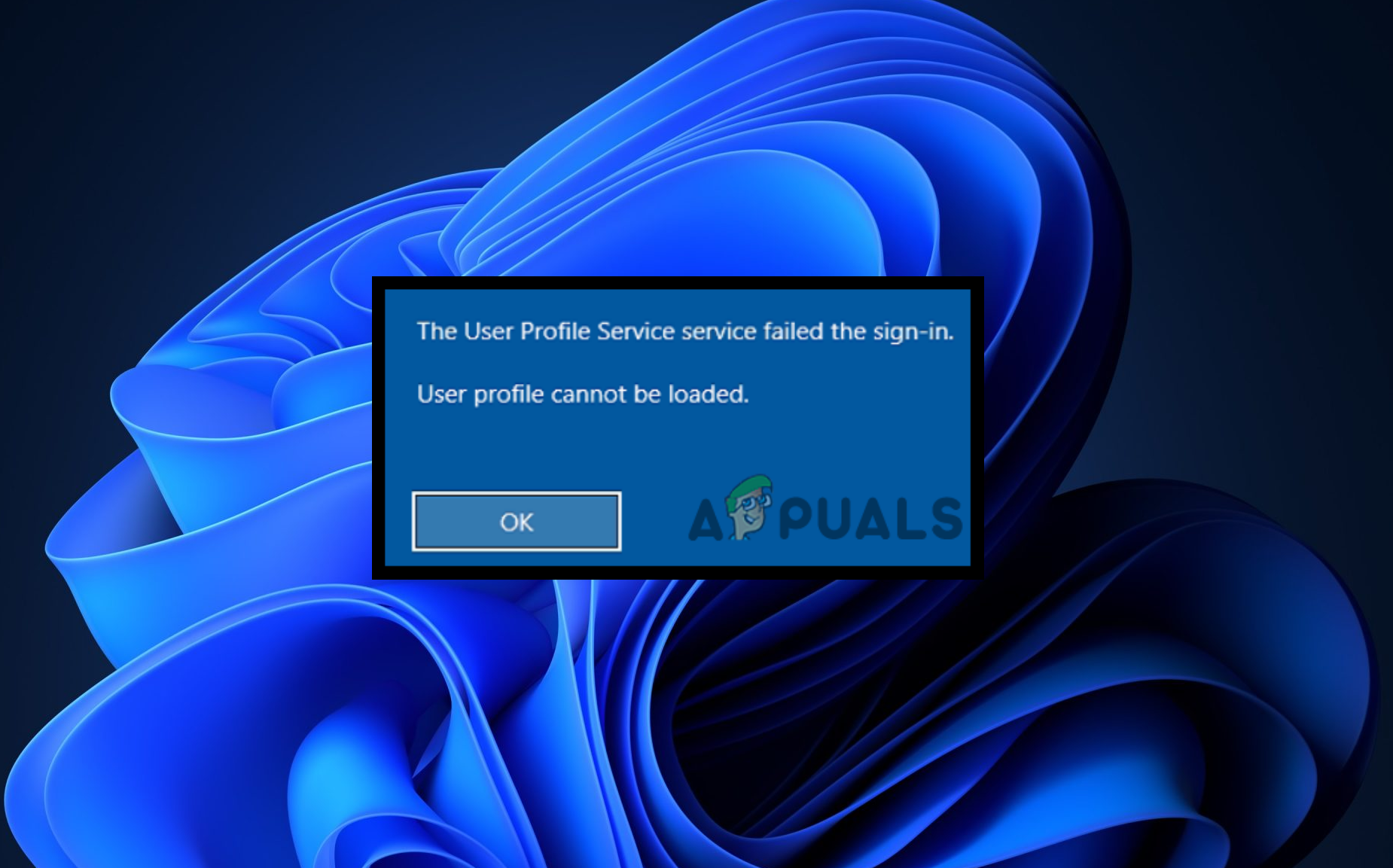
The usual cause of this issue is a corrupted user profile due to a sudden shutdown, disk errors, or system updates. Other causes include wrong permissions on the profile directory and registry issues.

Before trying the solutions below, we recommend restarting your computer.

If the issue persists, try the following methods:

Important Step: Boot Windows in Safe Mode

To follow the methods below, boot in Safe Mode. Safe Mode only loads essential services and drivers, which can help diagnose and resolve problems.

  1. On the sign-in screen, click the power button in the bottom right corner.
  2. Hold Shift and click Restart.
  3. On the Options screen, click Troubleshoot > Advanced Options > Startup Settings.
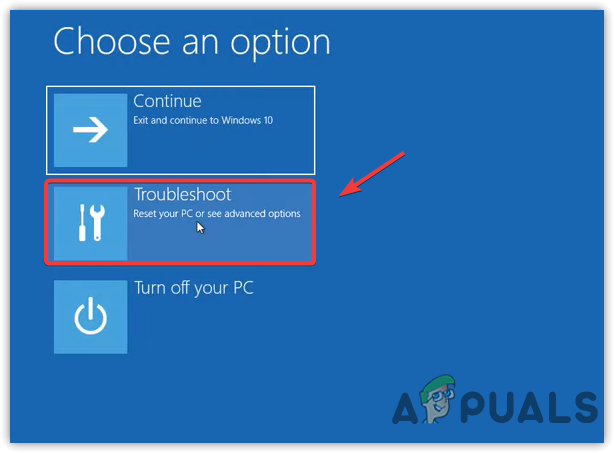
    Navigating to Troubleshoot
    Navigating to Troubleshoot
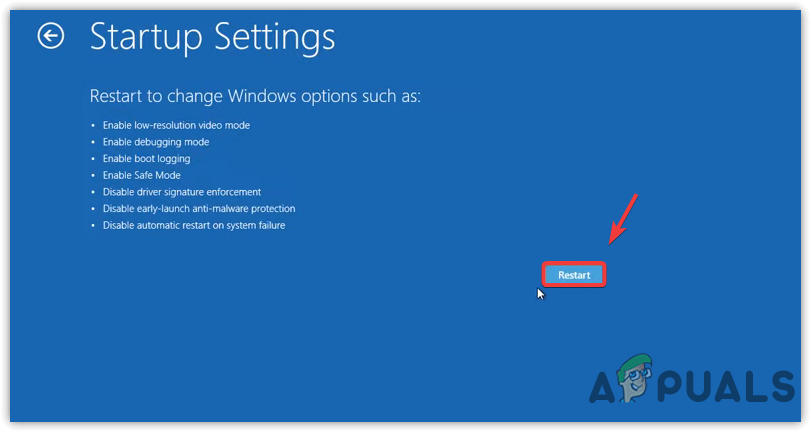
  4. Click Restart in the bottom right.
    Restarting the Computer to Boot into Safe Mode
    Restarting the Computer to Boot into Safe Mode
  5. Once the computer restarts, press 5 or F5 to boot into Safe Mode with Networking.
  6. After entering Safe Mode, try the following methods to resolve the error.

1. Edit Registry Profile Entry

Windows Registry contains a key named ‘ProfileList’ that stores info about user profiles. Each user profile is represented by a unique subkey under ‘ProfileList’, which includes various settings and paths related to that user’s profile. Sometimes, duplicate or corrupted entries in this key can cause user profile errors, like “The User Profile Service failed the logon.”

Editing the registry incorrectly can cause system instability or prevent Windows from running correctly. Follow the instructions precisely and only make changes if you’re confident. It’s also advisable to back up the registry before making changes.

  1. Press the Start Menu button and type “Registry Editor”.
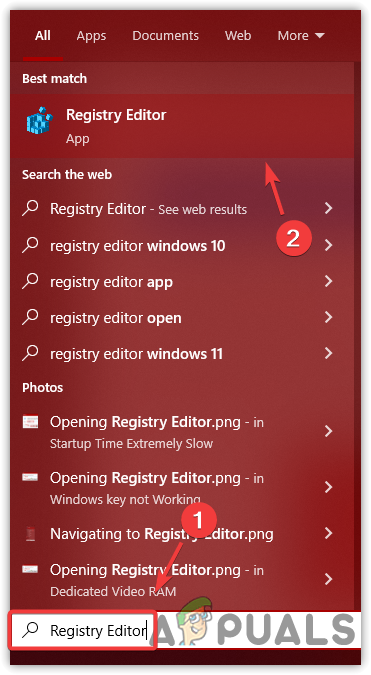
    Opening Registry Editor

    Opening Registry Editor
  2. Launch the Registry Editor and navigate to:
    Computer\HKEY_LOCAL_MACHINE\SOFTWARE\Microsoft\Windows NT\CurrentVersion\ProfileList
  3. Check for any subkeys with a .bak extension. If you don’t find any, skip to step 6.
  4. If a subkey with a .bak extension is present, right-click it and select Rename.
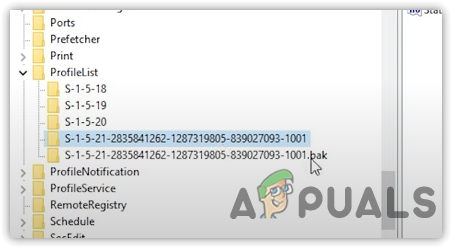
    Checking For Duplicate Entries
    Checking For Duplicate Entries
  5. Remove the .bak extension. Next, right-click the subkey without the .bak extension and select Rename. Add .bak or .ba to this subkey name and press Enter to save changes.
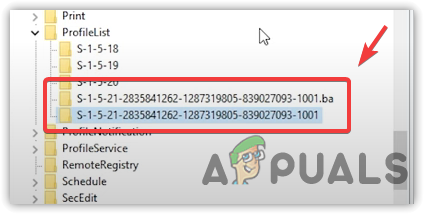
    Renaming Entries
    Renaming Entries
  6. In the right pane, right-click the State key and select Modify.
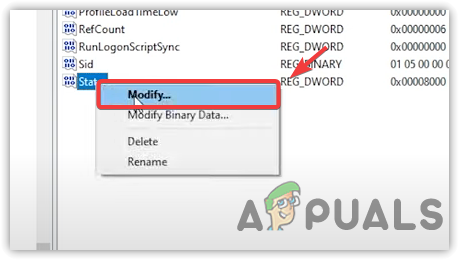
    Clicking Modify
    Clicking Modify
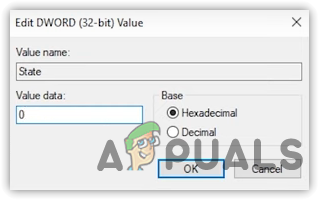
  7. Set the value data to 0.
    Editing a Registry Value
    Editing a Registry Value
  8. Repeat the same steps for the RefCount key.
  9. After completing these steps, close the Registry Editor and restart your computer to see if the error is resolved.

2. Replace NTUSER.DAT

The NTUSER.DAT file contains your individual configurations and settings; if it becomes corrupt, it could be the direct reason for login issues. By renaming the old file and copying a working version from another profile, you effectively reset your profile’s state, which can fix any errors preventing you from signing in.

  1. Boot into Safe Mode as instructed above.
  2. Open File Explorer and navigate to the drive where your OS is installed.
  3. Go to the Users directory.
  4. Click on View at the top and check the Hidden Items option.
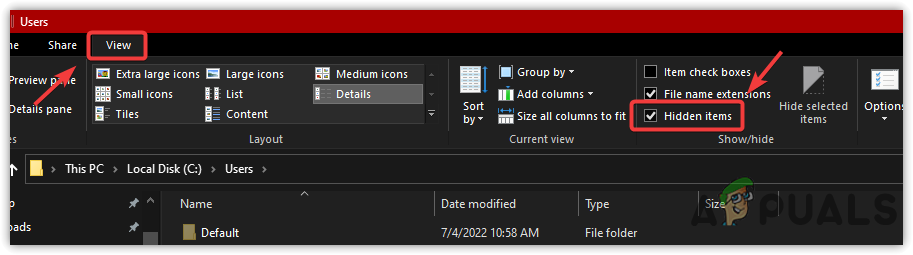
    Seeing Hidden Items
    Seeing Hidden Items
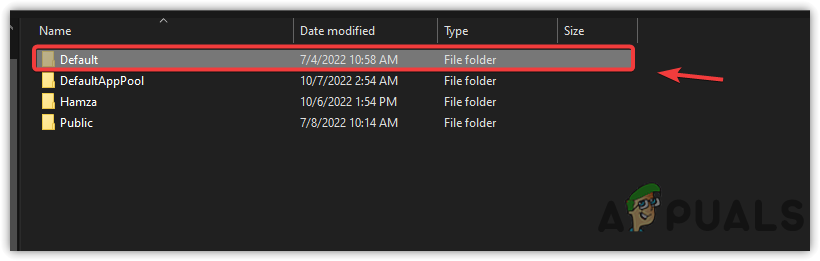
  5. Navigate to the Default folder.
    Opening Default Folder
    Opening Default Folder
  6. Right-click the NTUSER.DAT file and select Rename.
  7. Add .old to rename the file to NTUSER.DAT.old.

    Renaming User Profile File
    Renaming User Profile File
  8. Return to the Users directory and enter the Guest folder or another user folder.
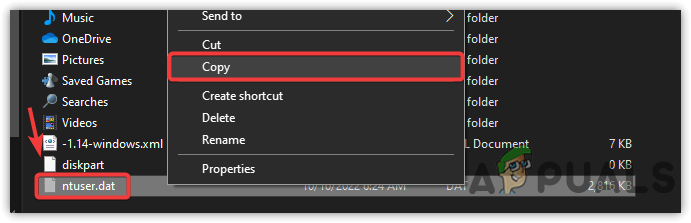
  9. Copy the NTUSER.DAT file from there.
    Copying User File
    Copying User File
  10. Paste the copied file into the Default folder.
  11. Restart your computer to see if the error is fixed.

3. Use System Restore

System Restore can revert Windows to an earlier state using a restore point, which may fix various issues, including driver corruption and the current login error.

Note: Although the System Restore method only works if a restore point exists prior to having this problem, Windows often creates restore points automatically during updates or software installs. Hence, try this method as your system might already have an existing restore point.

  1. Click the power button and hold the Shift key, then click Restart.
  2. Go to Troubleshoot > Advanced Options.
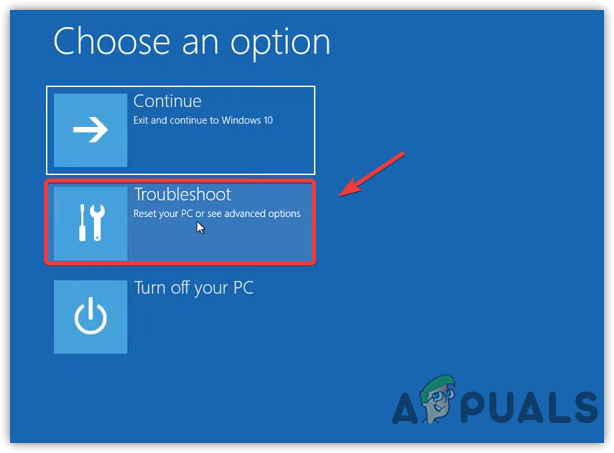
    Navigating to Troubleshoot
    Navigating to Troubleshoot
  3. Click on System Restore and then click Next.
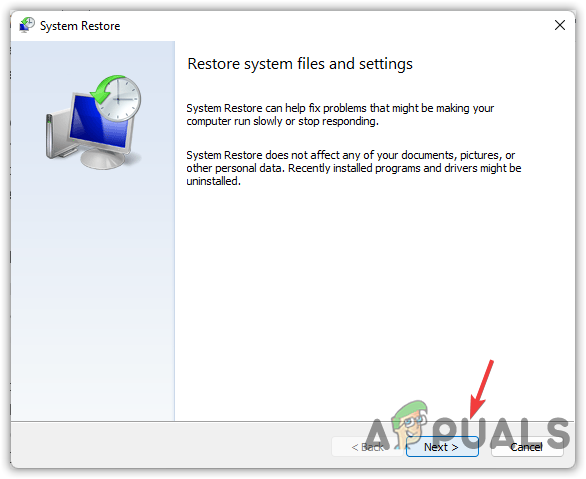
    Click Next
    Clicking Next
  4. Choose a restore point and click Next.
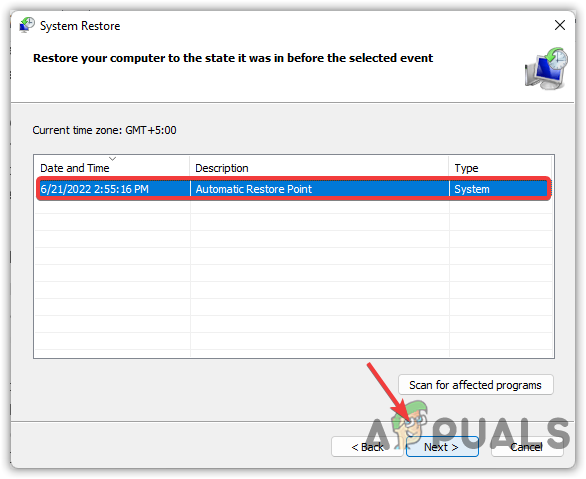
    Selecting a Restore Point
    Selecting a Restore Point
  5. Click Finish to start the restoration.
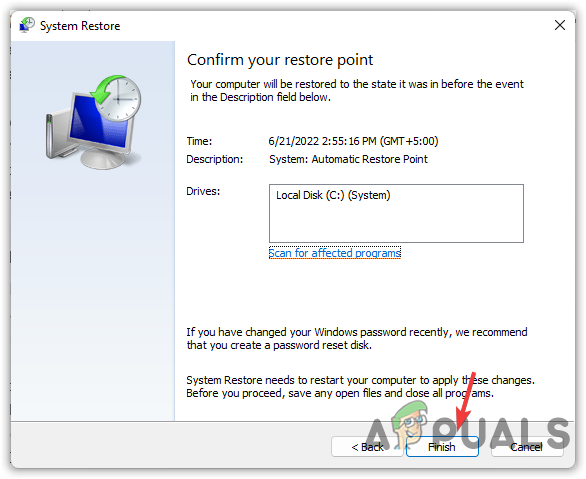
    Clicking Finish
    Clicking Finish
  6. Once the restoration process is complete, the error should be resolved.

4. Restart the User Profile Service

The User Profile Service is crucial for user logon management in Windows. If it’s not running due to a glitch or configuration issue, users may be unable to log into their accounts, thus causing the error message. By restarting the service and setting it to Automatic, you’ll make sure it’s active and ready to manage user profiles as soon as the system boots up, hence resolving any login issues.

  1. First, boot your computer into Safe Mode by following the instructions provided above.
  2. Press Win + R to open the Run dialog box.
  3. In the Run dialog box, type Services.msc and press Enter.
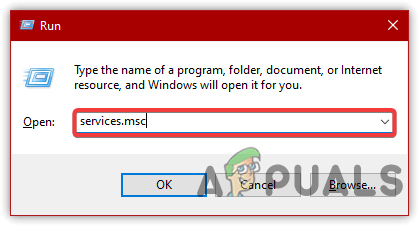
    Navigating to Services Window
    Navigating to Services Window
  4. In the Services window, find the service named User Profile Service, right-click on it, and select Properties.
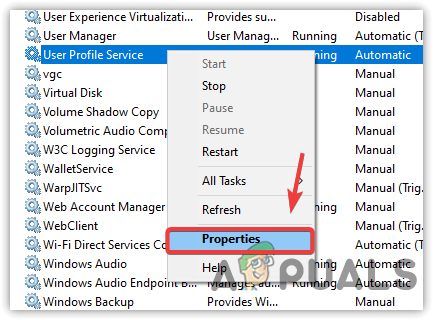
    Opening Service Properties
    Opening Service Properties
  5. Check if the startup type is set to Automatic. If it is not, change it to Automatic, and click Apply. If the service is not currently running, click Start, then click OK to save the changes.
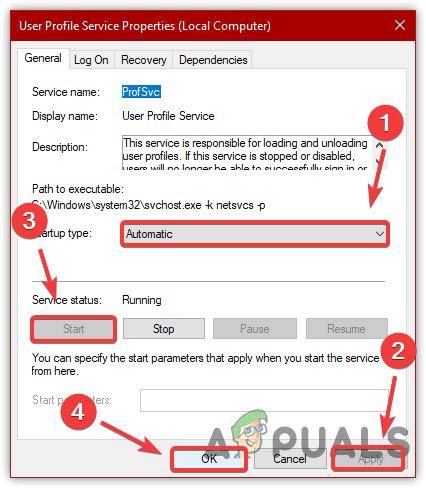
    Restarting User Profile Service
    Restarting User Profile Service
  6. Close the properties window and restart the service. Finally, restart your computer to check if the issue has been resolved.

5. Create a New User Account

By creating a new user account, you remove any potential corruption in the profile that’s causing the logon issue. The new user account essentially acts as a clean slate and, if successful, provides a path to smoothly transition your personal files without the issues of the previous account’s errors.

  1. In Safe Mode, click the Start Menu and type Command Prompt into the search box. Then, press Enter.
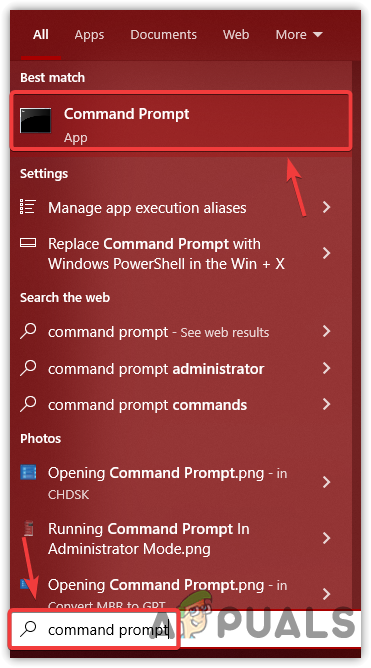
    Opening Command Prompt
    Opening Command Prompt
  2. In the Command Prompt window, type the following command to add a new user and press Enter:
    net user /add username password

    Note: Replace “username” with your desired account name and “password” with your chosen password (optional).
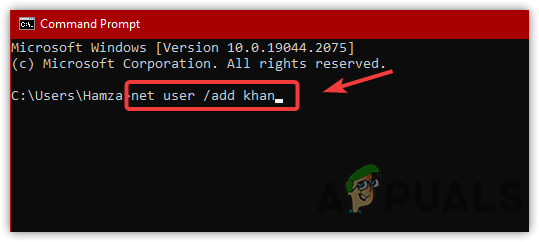
    Adding A New User Account
    Adding A New User Account
  3. Next, add the new user to the administrators group by entering this command and pressing Enter:
    net localgroup administrators username /add
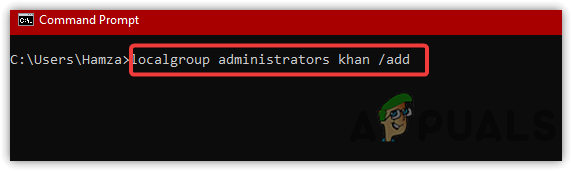
    Adding A New User Account to Administrators
    Adding A New User Account to Administrators
  4. Log out and then log in with the new account. Transfer your data into this new account.

6. Switch to Normal Startup

Selectively disabling Microsoft services during a clean boot can result in various errors. Make sure no Microsoft services are disabled and consider switching back to a normal startup, which enables all drivers and services.

  1. First, boot your computer into Safe Mode using the instructions provided in previous methods.
  2. Press Win + R to open the Run dialog box, type msconfig, and then click OK.
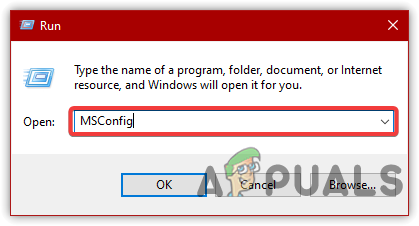
    Opening MS Configuration
    Opening MS Configuration
  3. In the System Configuration window, if the startup selection is set to “Selective Startup,” change it to Normal Startup.
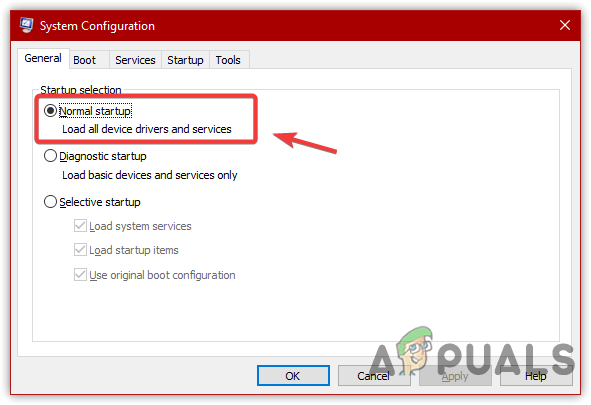
    Selecting Normal Startup
    Selecting Normal Startup
  4. Next, go to the Services tab. If available, click on Enable All.
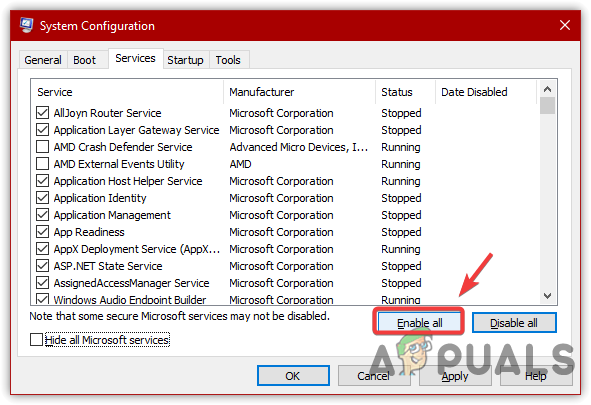
    Enabling Microsoft Services
    Enabling Microsoft Services
  5. Restart your computer and check to see if the issue has been resolved.

7. Reset or Reinstall Windows

If the error persists, consider resetting or reinstalling Windows as a last resort. Follow the link to learn how to perform a clean installation.

ABOUT THE AUTHOR

Kamil Anwar


Kamil is a certified MCITP, CCNA (W), CCNA (S) and a former British Computer Society Member with over 9 years of experience Configuring, Deploying and Managing Switches, Firewalls and Domain Controllers also an old-school still active on FreeNode.

Comments

262
    MO
    moronwithakeyboard#1749 Aug 8, 2014

    This is very helpful, thank you. Seems to have fixed my issues.

      KA
      K. Arrows Author Aug 8, 2014

      You’re most welcome.

    KY
    Kyle Aug 23, 2014

    You saved my computer! Thank you!

      KA
      K. Arrows Author Nov 7, 2014

      You are Welcome.

    DC
    dave conifer Nov 5, 2014

    Same here, thank you!!!!

      KA
      K. Arrows Author Nov 7, 2014

      You are Welcome

    CR
    Cris Nov 11, 2014

    Success! You, Sir Arrows, rock more than rock itself! Merci!

      KA
      K. Arrows Author Nov 11, 2014

      Thank you Cris.

        CR
        Cris Mar 1, 2016

        I need your help again, Kevin. I think I really blew it this time. I cannot log on to my laptop anymore as the Administrator. Here’s what happened:

        As usual, I needed go through the whole Restore Point routine; which I did. But this time, a notification that there wasn’t enough room on the C Drive to create/access a Restore Point popped up.

        I decided to do a wipe of my C Drive using CC Cleaner in hopes that this would clear up some space. After that, I made the seriously regretted step of wiping the Recovery (D) Drive? (I guess I thought, why stop at one drive when you can wipe two?) :oP I know. Ridiculous.

        It was after that point that I noticed that there was no longer an option to go back to any Restore Point and have not been able to log on to my laptop since. Please help!

        And MANY many “Thanks” in advance.

          KA
          K. Arrows Author Mar 1, 2016

          Are you able to login to Safe Mode?

          CR
          Cris Mar 1, 2016

          Yes.

          CR
          Cris Mar 1, 2016

          Yes. Sorry if my answer appeared twice. I refreshed my screen and the first one disappeared. :o/

          KA
          K. Arrows Author Mar 7, 2016

          Please follow command line steps to create new admin account from safe mode, then login to it and copy old profile to th new profile.

          CR
          Cris Mar 17, 2016

          Thanks Kevin. It worked. :o)

          VI
          vinay May 25, 2016

          Press F8 reportedly but didn’t happen help me

          KA
          K. Arrows Author May 25, 2016

          It should be pressed at the post screen.

          VI
          vinay May 25, 2016

          I couldn’t understand please tell me more

          KA
          K. Arrows Author May 25, 2016

          power off the system, and as soon as press the power button to turn it on, start pressing f8 continuously until you see the menu to go to safe mode.

          VI
          vinay May 27, 2016

          I face a problem that I won’t able to system restore please tell me solution….

          VI
          vinay May 27, 2016

          Hello sir..I reached in safe mode with networking..after this I typed system restore then many options in here..which I will choose

          KA
          K. Arrows Author May 27, 2016

          choose the restore point when the system worked ok

          VI
          vinay May 27, 2016

          I saw many options .when I choosed restore point then saw a screen there system protection off..I don’t know that how should I on this ….I tried many times please help me…. please really I need

          TG
          Trish Gluvic Jun 5, 2016

          Could you tell em the exact steps please of how to create a new admIn account from safe mode and then how to copy the old profile across I’m a little older and don’t want to risk losing all my husbands business files

          KA
          K. Arrows Author Jun 5, 2016

          It’s all mentioned in this guide.

          CR
          Cris Mar 6, 2016

          Help?

    ME
    Mr. E Nov 15, 2014

    Seriously, thank you so much. You saved me so much time and money.

      KA
      K. Arrows Author Nov 16, 2014

      You’re Welcome.

    BR
    brew Nov 18, 2014

    Awesome Guide Kevin. This worked and save the hassle.

    PR
    Prownnie Nov 19, 2014

    You’re a champion!! Thank you

    JE
    Jennifer Nov 19, 2014

    It worked, 10x

    SH
    Shailene Nov 19, 2014

    How do i reboot to safe mode, F8 is not working for me

      KA
      K. Arrows Author Nov 20, 2014

      Restart the computer and repeatedly tap f8 key to get to safe mode. Which operating is it? If it is windows 8, then at the logon prompt, click the power icon and select restart holding shift key, then from the troubleshoot menu in the advanced options, select safe mode.

      Reply
    DT
    Debbie Tillson Nov 20, 2014

    Thank you so much, worked like a dream 🙂

      KA
      K. Arrows Author Nov 20, 2014

      You’re Welcome.

    JA
    Jason Nov 23, 2014

    So I my system restore doesn’t have any other restore points available…? Any advice??

      KA
      K. Arrows Author Nov 23, 2014

      Did you put a check on show more restore points?

    T:
    Thankful :) Nov 24, 2014

    OMG THANK YOU THANK YOU THANK YOU

    PA
    Paras Nov 24, 2014

    Thank you – i got my system back, i had a lot of important files i couldn’t afford to lose. Thanks a billion

    TY
    Thank_you Nov 24, 2014

    Thanks

    JE
    jeffosi Nov 25, 2014

    It worked thank you

    VA
    Vahan Nov 29, 2014

    hi, I use windows 7 and have the same problem. But after I Boot in Safe Mode, it asked me for login and password and when I entered those it said that my login or password is incorrect, however I am sure that I entered everything correctly. Could you please tell me what can be the problem?

      KA
      K. Arrows Author Nov 29, 2014

      It should work in Safe Mode. I think you are not logged into safe mode.

    RE
    renuprasath Dec 1, 2014

    thanq so much 🙂 really great

    MI
    Midale Dec 2, 2014

    THANK YOU SO MUCH!

      KA
      K. Arrows Author Dec 2, 2014

      You’re Welcome

    HC
    Helena Chambers Dec 7, 2014

    thank you so much. Simple to do even for a techno dinosaur like me!!!

    RO
    Robyn Dec 9, 2014

    Genius! Thank you so much… You saved my battered old laptop which I’m relying on while the new one has ‘issues’… Any idea how to fix my browsers which time out consistently after upgrading to windows 8.1 – I’ve been told nothing but a complete system reboot is required meaning clearing the laptop of everything I need…

    MF
    mfaz Dec 13, 2014

    Is it going to be delete everything inside?

      KA
      K. Arrows Author Dec 13, 2014

      nope, it will only affect programs not data.

    NO
    Nina O' Dec 13, 2014

    OH MY GOSH- THANK YOU SOOO MUCH!!!! I set up the in-laws pc with password protect and a month later they got this failure message – I’m 48 years and I swear I felt like a kid again- panicking about how I was going to fix this. I found several internet “how-to’s” to no avail- turns out they all said to press & hold the F8- you were the only one who said keep tapping it and tap the hell out of it i did!!!

      KA
      K. Arrows Author Dec 22, 2014

      I am glad it worked for you.

    DM
    Dean M Dec 22, 2014

    Hi. I have used this method in the past successfully and it has been really good. Recently, my parents Dell Laptop has been doing the same thing and I have been able to get them back up and running with this method. However, their computer keeps doing it. It is a minor pain rather than a major problem because we’ve been able to System Restore them back to functionality but I would like to know why it keeps happening. Does anyone have any suggestions as to a possible cause?

      KA
      K. Arrows Author Dec 22, 2014

      Hi Dean

      Have you tried turning off automatic updates?

      Thanks

    IA
    Istiaque Ahmed Dec 29, 2014

    many thanks… it works quick…

    RO
    Robert Dec 29, 2014

    Hi ! I did exactly what you said but immediatly afther i put the PC in safe mode , he starts from himself to reboot and i got nothing to do . please help !!

      KA
      K. Arrows Author Dec 31, 2014

      Hi Robert, Which operating system are you running ?

    IS
    Issy Dec 30, 2014

    I keep tapping the f8 but its not working

      KA
      K. Arrows Author Dec 31, 2014

      Which operating system are you running?

    OM
    Olivia Medellin Jan 2, 2015

    My laptop says the same thing, and I did what it says and it only takes me back to the same thing on safe mode

      KA
      K. Arrows Author Jan 2, 2015

      Are you selecting Safe Mode – It will take you to the same logon screen but it will log you into it with your password from where you need to perform a system restore.

    KE
    Kent Jan 2, 2015

    It worked beautifully Kevin. Many thanks. The MS support solution was a complex mishmash of utter nonsense.

    SA
    Sak Jan 4, 2015

    It works!! I have been tried so many link to fix this issue…but nothing work. This link was really helpful to resolve my laptop issues. I was really losing my hope to save my laptop. Thanks very much

    CA
    Carl Jan 5, 2015

    OMG, It really works!!.. Problem solved, you saved my laptop and most importantly the important document that I couldn’t afford to lose…. Thank you very much!!

      VI
      vinay May 27, 2016

      Bro tell me how can you did,,,I logged in safe mode with networking..I won’t able to system restore

    MA
    Mark Jan 6, 2015

    After YEARS working on computers I should have thought of doing this myself. Guess I was just too panicked to think and just sat there screaming at a (shockingly) unresponsive screen. Thank you very much for your calmness in the face of my insane panic!!!

    BI
    bigong Jan 7, 2015

    Very helpful, thank you! 🙂

    RA
    Rod Andrew Jan 10, 2015

    What if the system restore is not working because of the error?

    LI
    Linda Jan 10, 2015

    I tapped onto F8 and only got the ‘Boot Menu’, no advanced options. Not even the Safe Mode option appeared. Can you please advise? I am on Windows Vista.

    SH
    Shareef Jan 11, 2015

    the best fix is to edit registry in safe mode, if you have admin privileges

    SA
    satyendra Jan 12, 2015

    I am verry thankfull to you. You gave best way to resolve that problam… thanx again

    SA
    Salvo Jan 13, 2015

    We keep tapping f8 without success on a Dell Inspiron, What is the solution to get past this point, nothing is happening?

      KA
      K. Arrows Author Mar 18, 2015

      Which operating system is it on which you are doing this?

      BM
      Bill Mitchell May 25, 2015

      use an external keyboard if you are using a laptop

      DA
      Daniyal Sep 13, 2015

      I found a solution for this problem.
      you just have to go to your bios and enable usb legacy mode, and your keyboard will start working

      Reply
      KA
      K. Arrows Author Sep 16, 2015

      F8 works; Reboot PC and start tapping F8 even before it boots so you don’t miss the interval within which it becomes active…

    JI
    jim Jan 13, 2015

    hello, i get to advanced boot options , i start in safe mode with networking, but it just takes mw back to sign in icon then give me the same mess. cant log on

      KA
      K. Arrows Author Jan 13, 2015

      it should let you login with safe mode.

    JI
    jim Jan 13, 2015

    i know but it will not only take me back to sign on icon , and it wont let me sign on

    SB
    Stacy Brown Jan 15, 2015

    Thank you.The information that I found out in on the page really helped me

    CH
    chino Jan 17, 2015

    if f8 does not work. take off the battery start the pc and then unplug the cable. start the pc again and you will see the safe mode.

    Reply
    BO
    bob Jan 19, 2015

    Worked for me on the first attempt.

    FA
    Fadia Jan 19, 2015

    thank you for the info. I don’t know what i would do, Many thanks to you friend, now i got my computer back and i din’t have a password in it, that’s why i was more freak out about it. I hope it doesn’t come back again when i shut down the computer. Many THANKS!!!!

    AV
    Anand Vignesh Jan 20, 2015

    Really great 🙂 Yes, it works perfect. Thank You!

    SC
    Sarah Crosby Jan 22, 2015

    What can I do if I have no restore points? It’s never been set up. Please help!!

    GU
    Guest Jan 24, 2015

    I successfully got into safe mode (multiple times) and I picked several earlier and earlier restore dates and none of them worked. There is a separate user profile set up and I can “use” my laptop from that. But the issue is that the profile that wont load is the administrator profile. I read into using the advanced restore options (re-installing the program and some other frightening choices). My files are not backed-up (I’m poor and cant afford a back up hard drive) and I am terrified of using the advanced options and loosing everything/anything. any ideas?

    SA
    Sam Jan 26, 2015

    There are two keys to enable safe mode, one is ‘F8’ key and the other is ‘Del’ key. We can see these options on the boot screen.

    PA
    Pankaj Jan 28, 2015

    Hi I had already tried to login into the safe mode but i am not able to login to the safe mode as well.
    What should i do now?

    JU
    June Feb 3, 2015

    Tapping F8 is not working for me…help!

    JU
    June Feb 3, 2015

    I am using Windows 7 and tapping F8 has done nothing. Is there any other advise you can offer? (getting desperate…)

    WI
    Will Feb 9, 2015

    Thank you for the help. It took a couple of attempts but it worked

    ED
    eddie Feb 10, 2015

    thank you so much,, it worked, i just followed the steps , as you instructed, i will definitly, favourite your site, and donate when i can

    VI
    vivian Feb 11, 2015

    If the f8 button isn’t working take the battery out of your lap top or if you have a computer unplug it at the log in screen and put the battery back in or plug it back in and it should give the menu automatically.

    Reply
    JA
    JayNak Feb 12, 2015

    Thank you so much!

    FP
    FebS PB Feb 14, 2015

    Hello. I followed the instruction step by step and the computer restore before the problem happened ” The User Profile Service failed the log on”. Then, when the Restore completed, and try to log on, still The User Profile Service failed the log on. What shall I do? My computer is Windows 7. Thank you for your help.

    TM
    Tom Meisenheimer Feb 14, 2015

    Thank you for offering this solution. I haven’t tried this fix yet. The Dell is down in the studio and I am up at the main house on a mac. Why is that mentioned? Because the Dell is NOT connected to the internet. It hasn’t been connected for three years. I use it to edit music and videos. Ergo the OS hasn’t been updated. So no update and no internet how does it get corrupted? Could it be that “Automatic Update” is the actual culprit? I haven’t turned it off or disabled it as at best it was a source of amusement since it would tell me that updates for various programs were “available”. Could MS inadvertently installed “mal”ware when they set-up the auto update feature?

    VE
    Veronique Feb 15, 2015

    Thanks a lot! Worked as is.
    JF

    JH
    jhe Feb 24, 2015

    mine cannot work because there is no restore points…..is there any way to solve this not using restore point.

    AM
    amori21 Feb 24, 2015

    Thank you so much. You save one more laptop 🙂

    FI
    Fiddlestar Feb 28, 2015

    If i dont have any restore point will my pc be empty like brand new?

    BU
    bunnynuts Feb 28, 2015

    So far its doing what you say!! Thanks so much:)

    SS
    suraj saste Mar 4, 2015

    helped me, thanks

    LB
    Loi_Boi Mar 5, 2015

    Hey, I did all the steps and downloaded Malwarebytes as well like you suggested. Now I constantly have pop ups saying that there is a “bad image error” on a bunch of different screens whenever i start up my computer and its annoying to press OK for all of them. How can i resolve this.

    RO
    Rock Mar 10, 2015

    Thanks it worked for me 🙂

    BL
    blueblood Mar 14, 2015

    Thank you to this post…you save my computer and all

    GI
    Gilbert Mar 18, 2015

    My Sony Vaio Laptop (Windows 7) did not let me log on this morning. I was thinking of bringing my Laptop to a Computer repair Shop but I tried searching in the Internet for a possible solution. Thanks a lot for your help, Kevin. I followed your instruction and now it’s working properly again. Muchos gracias, Sir.

      KA
      K. Arrows Author Mar 18, 2015

      You’re Welcome

    MA
    Manu Mar 21, 2015

    I m stuck at point 5. No previous restore point available on my system as it was disabled previously. Please point out an alternative.

      KA
      K. Arrows Author Mar 22, 2015

      You will need to follow the Microsoft guide in this case, or you can create a new user account from safe mode and copy data from your previous account to it.

      Reply
    PA
    Pam Mar 24, 2015

    I had this issue with user profile service failed the logon and I use the microsoft windows fix and ended up loosing all the photos, docs, and everything. I have been told my photos are in there somewhere. I had to create another profile. So now I have 2. I tried doing a search with *jpeg and they aren’t coming up. What to do?

    YU
    yuen Mar 24, 2015

    it worked on my window 7 home laptop, thanks Kevin

    CO
    colin Mar 27, 2015

    Kevin…my system restore doesn’t have any restore points available…? Can you please provide a step by step guide to solve this and get mu user profile working again??? Many thks.

      KA
      K. Arrows Author Apr 3, 2015

      If there are no restore points, then login through Safe Mode and create a new user account.

      Reply
      KA
      K. Arrows Author Apr 3, 2015
    TT
    Tarik Tarajia Apr 1, 2015

    Hey kevin arrows. I am usung windiws 7 home version. I am stucked at no. 5.
    No option like. “show more restore points”. Help me for the same

      KA
      K. Arrows Author Apr 3, 2015

      Your second option is to login through Safe Mode and create a new user account via command prompt.

    RS
    RAVI SHANKAR Apr 2, 2015

    Great, my The User profiles service failed the logon solved in single attempt. Thank you

      KA
      K. Arrows Author Apr 3, 2015

      You’re Welcome.

    TH
    Thomas Apr 4, 2015

    Everytime I try to load system restore dates my screen goes black, what do I do?

    BU
    buda Apr 5, 2015

    Excellent save,wife and her laptop very happy, thanks

    HB
    Helgi Bjarnason Apr 8, 2015

    Thank you.

    MA
    Manolo Apr 10, 2015

    Thank you very much, I’ve forgotten about this option to restore to an earlier time, and it worked, I appreciated.

    JI
    JimmyLikesRye Apr 23, 2015

    Sometimes the problem is related to a file in the Default user folder that fails to copy into the a new user account, and nothing to do with malware or corrupted registry ProfileLists.
    In my case removing .sqm files like C:UsersDefaultAppDataLocalMicrosoftVSCommon12.0SQMsqmdata00.sqm solved my “The User Profile Service service failed the logon. the user profile cannot be loaded” error.

    Administrative Tools->Event Viewer listed errors under the Custom Views->Administrative Events group as a Warning in the “User Profile General” Source column, Event ID 1509, like this:

    Windows cannot copy file
    \?C:UsersDefaultAppDataLocalMicrosoftVSCommon12.0SQMsqmdata-6068-039-00000.sqm
    to location \?C:UsersClassic .NET
    AppPoolAppDataLocalMicrosoftVSCommon12.0SQMsqmdata-6068-039-00000.sqm.
    This error may be caused
    by network problems or insufficient security rights.

    DETAIL – Access is denied.

    So you may want to look for 1509 errors in the Event Viewer.

    Reply
      BR
      Bryan Jul 14, 2015

      This fix worked perfectly for 2 machines on our network, once I located the .sqm file that came up under the 1509 Event ID and deleted it. Thank You!!

      Reply
      EN
      EnigmaV8 Aug 14, 2015

      This fixed two workstations for me too. It is usually the likely culprit if you have Visual Studio installed (specifically 2010 or 2012). Ironic that it’s an issue with a Microsoft Windows development tool installing a file where it shouldn’t on a Microsoft Windows OS.

      Reply
      MO
      Mary Zarlene de Ocampo Nov 27, 2015

      The Event ID shown in mine is 1530. Is this process still applicable?

      JU
      Justin Mar 22, 2018

      Thanks a lot for posting this, it helped resolve me a problem with a brand new imaged laptop and the first time user logon.

    TB
    The Bam May 4, 2015

    This wont work if your admin profile account is the one corrupted and with password on it.

      KA
      K. Arrows Author May 7, 2015

      In Safe Mode, you can log in to the admin account which is what this guide suggests.

    MC
    Mrs C May 8, 2015

    Just worked for me! Thank You.
    Kevin Arrows you are a ★
    😉

    KA
    Katie May 11, 2015

    My computer managed to restore, however I am unable to download the link malware because my internet browsers aren’t acting correctly. Google Chrome has turned into a command prompt program and internet explorer isn’t loading pages. What should I do?

    PA
    parrotpaullie May 23, 2015

    YES!!!

    Thanks a lot!

    BM
    Bill Mitchell May 25, 2015

    I am having an issue where no matter what time I try to restore to I can’t seem to get it to actually work, it will fail each time trying to restore. I goes through the entire thing reboots and I get the same error

      KA
      K. Arrows Author May 26, 2015

      I would suggest using the the other method to add a new user account.

    RS
    Roberto Silva May 27, 2015

    My system restore fails to load what should I do?

      KA
      K. Arrows Author May 27, 2015

      Use the method to add a user and then copy the previous profile to the new user.

    RA
    Raja May 28, 2015

    If this problem arise, can I recover data from desktop?

    MI
    Michele May 30, 2015

    Worked! Thank you so much!!! They need to hire people like you at microsoft. Their website was no help at all!

    HA
    haszami Jun 3, 2015

    sir..i cant open restore point..how?

    LY
    Lynn Jun 10, 2015

    I got all the way to the last scan and its says “Windows Resource Protection found corrupt files but was unable to fix some of them” Any suggestions for what else I should do?

      KA
      K. Arrows Author Jun 10, 2015

      Use this command: Dism /Online /Cleanup-Image /RestoreHealth

      Reply
    EL
    Elcontable Jun 11, 2015

    It works perfectly, thanks. Also it was much better and easier your solution than the one in the windows page. Why does that happens? I have to be honest, i was scared.

    AL
    Alana Jun 15, 2015

    Hi, would this work on a computer if it’s part of a network?

    NA
    Naomi Jun 19, 2015

    You have to tap F8 constantly why it is restarting

    NA
    Naomi Jun 19, 2015

    *while it is restarting

      KA
      K. Arrows Author Jul 28, 2015

      You’re Welcome.

    RO
    roV83 Jun 19, 2015

    Thank you, Kevin

      KA
      K. Arrows Author Jul 28, 2015

      You’re Welcome. ^

    TH
    theoninaz Jul 9, 2015

    I first went on the Microsoft help program, spent an hour deciphering
    it, never worked, spent 15 minutes on your instructions and it worked. Thank you for taking the time for posting great advice

      KA
      K. Arrows Author Jul 28, 2015

      You’re Welcome. ^^

    CA
    Cathy Jul 11, 2015

    Thank you so much, it worked! You’ve made me very happy! I’m so relieved I have all my files back.
    Cathy

      KA
      K. Arrows Author Jul 28, 2015

      You’re Welcome. ^

    SC
    Scream Jul 16, 2015

    SIR THANK YOU VERY MUCH IT WORKED! You saved my life! But how did malware get into my laptop?

      KA
      K. Arrows Author Jul 28, 2015

      You’re Welcome. ^^

    KG
    Katie Gillespie Jul 20, 2015

    Thank you, thank you, thank you!!! “System Restore completed successfully.” I really appreciate your help!!

      KA
      K. Arrows Author Jul 28, 2015

      You’re Welcome. ^

    DW
    Drew Wicher Jul 21, 2015

    An even better answer without having to install crappy programs.

    When you create a new user
    account and try to logon to it, Windows uses the Default user profile as
    a template to construct the files for the newly created user account. If, for
    some reason Windows can’t access the Default folder or if the Default
    folder isn’t present in C:Users location, the user profile cannot load.
    Here are the instructions to reinstate the Default folder in the Users
    directory.

    1. Log on as an administrator.

    2. Open the folder C:Users using Windows Explorer.

    3. Click Organize, click Folder and search options, and click the View tab

    4. Click Show hidden files, folders and drives, and click OK.

    5. If the Default user profile folder already exists under C:Users, rename it to Default.OLD

    6. Copy the Default folder from a working computer.

    7.Paste the folder and contents to C:Users

    The newly copied Default folder should inherit the permissions from its parent folder, C:Users. That is, the SYSTEM and Admninistrators are assigned full control, and
    “Users” and “Everyone” have Read permissions. You may want to verify if the permissions are assigned correctly. To do so, right-click the folder C:UsersDefault and click Properties, and select the Security tab. Inspect the permission entries there.

    It’s all set now! Try logging on to the new user account and check if the problem is resolved.

    Reply
      KA
      K. Arrows Author Jul 21, 2015

      Thank you for the suggestion.

      WI
      wilson Oct 1, 2015

      Not the good solution

    JN
    Jessica Nubla Jul 25, 2015

    Thank you! It was my first time to encounter this problem but you really helped me out! It’s working again, I really appreciate your effort to post this on the internet. 🙂 Cheers to you!

      KA
      K. Arrows Author Jul 28, 2015

      You’re Welcome^

    RR
    Rajender reddy Jul 28, 2015

    It Worked for Lenevo Laptop with Windows 7. You are a genius. Thank you very much

      KA
      K. Arrows Author Jul 28, 2015

      You’re Welcome.

    TZ
    Tanushka Zariwala Aug 4, 2015

    When I ran the final scan, with the cmd command, it said that corrupt files were found but that it was unable to fix some of them. What would I do in that situation?

      KA
      K. Arrows Author Aug 4, 2015

      Please follow the command from this guide: http://appuals.com/best-fix-endpoints-available-endpoint-mapper/

        TZ
        Tanushka Zariwala Aug 4, 2015

        I tried that and it said that it doesnt recognize the command-line option “cleanup-image”

          KA
          K. Arrows Author Aug 5, 2015

          Your best bet is to create a new user account then.

        TZ
        Tanushka Zariwala Aug 5, 2015

        I tried it again this morning and now it says:
        The restorehealth option is not recognizedin this context

    NH
    Nivlaco Hill Aug 5, 2015

    This restore point didnt work

      KA
      K. Arrows Author Aug 5, 2015

      You have no restore points available then. You will need to create a new profile and copy over the data.

    MM
    Maddi Lee Miller Aug 15, 2015

    Umm well I managed to get my HP Pavillion into Safe Mode and Networking perfectly fine, but when I typed in my password it still said User profile service failed the logon. What do I do? It won’t let me into my account at all.

    MM
    Maddi Lee Miller Aug 15, 2015

    Hi Kevin, I commented a little bit earlier…my computer just finished doing a full system restore from almost two weeks ago (the last point it could restore to was the same day it started not letting me log on) and it STILL WILL NOT LET ME LOG ON. Please help, I have been logging into the admin account to use my laptop for the last two weeks and I have all my info and pictures AND my iTunes account on my other profile. I really need help.

      KA
      K. Arrows Author Aug 15, 2015

      Since your user profile is severely corrupt it would be best to create a new user account via Safe Mode (as per the command line) instructions above and then migrate old data to the new profile.

    RO
    Rob Aug 16, 2015

    Hello Kevin,

    in my situation, under Windows 7, the account gets created but nothing gets written to registry and the default folder structure is also not created. I can’t login to thew newly created account due to the “User Profile Service failed the logon” error. The account does exist as it is visible at command prompt.

    Tried all suggestions but can’t get the account to work. Any other thoughts?

      KA
      K. Arrows Author Aug 17, 2015

      Did you set the account type as administrator via command line?

    RO
    Rob Aug 17, 2015

    Hi Kevin. None of your suggestions work, I have tried every single step of them. Here is my problem: A new account has been created on a PC (account has standard rights) but every time when I log on with the account I get “The User Profile Service failed the logon”.

    Interestingly, the account is not visible in the registry with the strings described in your post. The default folders are also not created in the c:users directory.

    When at prompt I enter “net user” the account is visible though. PC is virus free.
    Running Windows 7 with latest patches installed.

    I am assuming there is a corruption somewhere but am at a loss where to search else.

      KA
      K. Arrows Author Aug 21, 2015

      In this case i would suggest you do a clean reinstall and use the command line to copy your profile to a usb drive.

        RO
        Rob Aug 21, 2015

        Thanks Kevin. I will do that indeed as I am out of other options.

    RM
    Robin Moore Sep 14, 2015

    Hi Kevin, I just wanted to thank you for posting this because I had this problem and I was able to solve it using your instructions. Not only was my problem solved but I felt proud of myself for doing it myself (and I didn’t have to pay anyone to help me) 🙂 thanks and have a great day!

    AV
    Anusha Vedapriya Sep 16, 2015

    Hi ,

    I am facing similar issue, When I am tapping F8 key nothing is happening . please suggest what to do.
    Laptop Details: Dell Inspiron 5 , Windows 7

      KA
      K. Arrows Author Sep 16, 2015

      F8 works; Reboot PC and start tapping F8 even before it boots so you don’t miss the interval within which it becomes active.

    NI
    nicholaslau Sep 17, 2015

    Hi, I am using Windows Vista. I tried the methods as above but I can’t access to Safe Mode Page. Everytime I selected the safe mode with networking, it will go back to the same restart page. How should I solve this problem? Thanks

    VJ
    Vibhor Jaswal Sep 17, 2015

    i have put a password on my comp when i put password it comes user profile service failed the logon then what should i do??

    CO
    Colin Sep 21, 2015

    I have got to safe mode with networking but I cannot find the start button to continue. Any suggestions please.

      KA
      K. Arrows Author Sep 22, 2015

      Press the windows key and that should pull up the start menu

    PI
    Pizzle Sep 27, 2015

    Thank you so much Kevin..managed to fix my pc just by following your instructions

    JO
    Jason Oneill Nov 1, 2015

    Thanks so much, I’m very much a dinosaur when it comes to tech, this was a great help, and easy to follow, thanks again !

    WJ
    wjharris Nov 3, 2015

    This article was a life saver .. perfect instructions .. perfect results .. Thanks a million!!

    US
    Usha Nov 9, 2015

    Thanks … U saved my life. I had assignments I have to submit by weekend. The steps worked like a dream. Haven’t yet downloaded malwarebytes tho.

    RA
    Ratish Nov 11, 2015

    ion

    Occasionally, Windows might not read your user profile correctly, such as if your antivirus software is scanning your computer while you try to log on. Before you follow the methods here, try restarting your computer and logging on with your user account again to resolve the issue. If you restart your computer and it does not resolve this issue, use the following methods to resolve this issue.

    Note You must be able to log on to an administrator account to fix your user profile or copy your data to a new account. Before you resolve the issue, log on to Windows by using another account that has administrative permissions, or restart in safe mode to log on with the built-in administrator account. For more information about how to start in safe mode, visit the following Microsoft website:

    Start your computer in safe mode

    Method 1: Fix the user account profile

    To fix the user account profile, follow these steps:

    Important This section, method, or task contains steps that tell you how to modify the registry. However, serious problems might occur if you modify the registry incorrectly. Therefore, make sure that you follow these steps carefully. For added protection, back up the registry before you modify it. Then, you can restore the registry if a problem occurs. For more information about how to back up and restore the registry, click the following article number to view the article in the Microsoft Knowledge Base:

    322756 How to back up and restore the registry in Windows How to back up and restore the registry in Windows

    Click Start, type regedit in the Search box, and then press ENTER.

    In Registry Editor, locate and then click the following registry subkey:

    HKEY_LOCAL_MACHINESOFTWAREMicrosoftWindows NTCurrentVersionProfileList

    In the navigation pane, locate the folder that begins with S-1-5 (SID key) followed by a long number.

    Click each S-1-5 folder, locate the ProfileImagePath entry in the details pane, and then double-click to make sure that this is the user account profile that has the error.

    If you have two folders starting with S-1-5 followed by some long numbers and one of them ended with.bak, you have to rename the .bak folder. To do this, follow these steps:

    Right-click the folder without .bak, and then click Rename. Type .ba, and then press ENTER.

    Right-click the folder that is named .bak, and then click Rename. Remove .bak at the end of the folder name, and then press ENTER.

    Right-click the folder that is named .ba, and then click Rename. Change the .ba to .bak at the end of the folder name, and then press ENTER.

    If you have only one folder starting with S-1-5 that is followed by long numbers and ends with .bak. Right-click the folder, and then click Rename. Remove .bak at the end of the folder name, and then press ENTER.

    Click the folder without .bak in the details pane, double-click RefCount, type 0, and then click OK.

    Click the folder without .bak, in the details pane, double-click State, type 0, and then click OK.

    Close Registry Editor.

    Restart the computer.

    Log on again with your account.

    Reply
      VR
      VR46 Nov 15, 2016

      Be blessed man ! Your registry fix worked like a charm !!!
      The restore point fix didin’t work for me.
      Many, many thanks !!!

    MM
    MidCities Antique Mall Nov 13, 2015

    Yes, it work for me. MUST follow all the steps. Save my life. I use window 7. I was very frustrated for a few days and tried other ways that does not work. This one actually work. THANK YOU!

    CH
    Chris Nov 25, 2015

    Thanks for everything!! 😀

    AI
    Aileen Nov 30, 2015

    Thanks Kevin, I can now login to my computer. Your instructions were so easy to follow, I really appreciate your help.

    SA
    Salman Dec 22, 2015

    I followed the above steps.. But still the problem remains the same.. Please help

      KA
      K. Arrows Author Dec 22, 2015

      Please submit this as a new question on http://equestions.net/ask

    KO
    Kortney Dec 30, 2015

    Nothing i do will work because there is no administrator account i can get in to i could use some help

      KA
      K. Arrows Author Dec 30, 2015

      Were you able to boot into Safe Mode?

        KO
        Kortney Jan 5, 2016

        Yes i was able to

          KO
          Kortney Jan 9, 2016

          Yes i did but i can’t do much else because there is no administrator account i can get in to

          KA
          K. Arrows Author Jan 9, 2016

          Are you able to login to safe mode as administrator, if not then who holds the administrator account?

    CW
    Cheyanne Wight Jan 5, 2016

    If I do this, will I lose all my pictures and documents?

      KA
      K. Arrows Author Jan 6, 2016

      No, you will not lose pictures.

    SH
    Sharon Jan 10, 2016

    I have a HP laptop windows 7 Home Premium. When I enter my password I get the user profile service failed the logon. I have tried shutting down taking out the battery restarting. Is my fhe is in the upper left hand corner of a ti did the shift nfak I tried to use the Fn key function key with the number 8 I tried to control if a tight right off of fate and none of those will let me into the FA function in order to do the Advanced Boot menu safe mode with networking as you suggest in the solution.
    Any other suggestions for me?

      KA
      K. Arrows Author Jan 10, 2016

      Don’t use Fn keys, just use the F8 key on the post screen.

    BE
    Bean0712 Jan 15, 2016

    Hey Kevin…thanks. My company IT department, DELL & Microsoft couldn’t fix this issue. My wife was able to do with your help! So very grateful!

    MA
    marija27 Jan 18, 2016

    It works, thanks!

    DI
    diane Jan 18, 2016

    Success ! Thank you sir 🙂 God bless you !

    MU
    MudTurtle Jan 24, 2016

    I solved the user profile problem by watching a youtube video. However, now it seems my music files, photos, and other documents are gone. Can I do anything about this? Thanks.

      KA
      K. Arrows Author Jan 24, 2016

      You can go to C:users[lookup for your older user account here] and copy the files to the new account.

        MU
        MudTurtle Jan 24, 2016

        Trying and not getting anywhere. I’m sure I’m doing something wrong.

          KA
          K. Arrows Author Jan 24, 2016

          Please submit question on eQuestions.net for assistance.

        MU
        MudTurtle Jan 25, 2016

        How do I get to this? Having trouble.

    GI
    GiorgioByName Feb 11, 2016

    It worked also for me at the first try.
    Great stuff!!!
    Thanks
    🙂

    RB
    Rowel Jim Bulac Feb 15, 2016

    I owe you one Sir ! Thank you very much.

    WF
    Wendy Foss Mar 3, 2016

    Hi Kevin,

    I just wanted to Thank You for your article. My PC came up with the following error message: The User Profile Service failed the logon…and I could not log in no matter what I did.
    I am usually pretty smart when it comes to computers. However, when it comes to the technical stuff I am not so knowledgeable…
    so the first thing I did was type into my cell phone search engine the error message along with my operating system which is Windows 7.
    I’ll be honest…I never expected to find anything that could help me with this. Then I came across your article. I followed your instructions step by step and it worked like a charm!!! Just AMAZING…Thank You so much!!!:-) You have saved me a lot of time and money. Without seeing your article I don’t think I could have ever figured this out on my own.

    SS
    S SHADAB SEHAR Mar 13, 2016

    I am having the same problem…. never created restore point. … I started laptop in safe mode and networking…. and follow first three step but don not found “choose a different restore point”. Still facing the same problem. Please help me … my contact details is sssehar6229@gmail.com, +918409019634.

      KA
      K. Arrows Author Mar 14, 2016

      If you are able to login via safe mode, then from there create a new account using the command line method.

    KA
    K. Arrows Author Mar 17, 2016

    For remote service, please send an email to kevinarrows@appuals.com with subject Remote Request

      CR
      Cris Mar 23, 2016

      You are too kind. I was able to successfully create a new admin profile by following your instructions. Thanks again for all of your help. :o)

      CR
      Cris Apr 1, 2016

      Kevin,
      1. Should I delete my original admin profile?
      2. You are a gift. I don’t have much, but I would love to donate something to you/your site. Without a doubt, you have saved many of us a lot of expense trying to get our systems back up and running without seeking the help of local paid pros.
      Thanks.

        KA
        K. Arrows Author Apr 1, 2016

        Thank you. You can, after you have copied your original profile, presumably you have created a new user account.

          CR
          Cris Apr 4, 2016

          Yes, with your help, I was able to create a new user account.
          Thank you.

    MI
    Michelle Mar 23, 2016

    Hi Kevin, I just wanted to say thank you! You have really helped me out. Bless you for this kindness!

    SU
    sunrie Apr 9, 2016

    Thank yoiu so much! Very very great help!

    DA
    davidgreentwin Apr 23, 2016

    Success and most grateful. Tapped F8 repeatedly whilst opening and got safe mode. Followed the instructions through to restore and got everything back. Thank you so much.

      KA
      K. Arrows Author Apr 23, 2016

      Welcome.

    SP
    Spence Apr 30, 2016

    Worked for me… Thanks for the support… Will try the Malwarebytes install next,

    AG
    Aga May 1, 2016

    Love it !!! It worked thank you so so so much!

    AM
    Alyssa McCoy Jun 5, 2016

    Okay so if I do this whole thing…it’s not going to make me lose any of my documents is it? My whole life is on my laptop

      KA
      K. Arrows Author Jun 6, 2016

      That’s right.

    ST
    strawberrie Jul 25, 2016

    it says I need a license key to start the repair?

      KA
      K. Arrows Author Jul 27, 2016

      What is the exact message?

    HA
    Hasini Sep 8, 2016

    Wow..Thank you so much… it worked fine. you are a genious.

    KB
    Kay Bratton Nov 9, 2016

    Thanks, Kevin, I was about to chuck my beloved laptop in the trash bin. I followed your simple path from f8 to an option to restore a version before 2 major windows updates and now my laptop is alive again! You rock, buddy… and saved me hundreds… thanks again.

    SU
    Syed Uzair Dec 13, 2016

    F8 is not working.. please tell me how it might work in hp pavilion g4, windows7

    SU
    Syed Uzair Dec 13, 2016

    F8 is not working. I kept tapping. My laptop is hp pavilion g4, with windows 7 ultimate

    MV
    Mad Tom Vane Dec 30, 2016

    Log Name: Application
    Source: Microsoft-Windows-User Profiles General
    Date: 12/30/2016 11:33:43 AM
    Event ID: 1509
    Task Category: None
    Level: Warning
    Keywords:
    User: DOMAINusername
    Computer: COMPUTERNAME.domain.com
    Description:
    Windows cannot copy file \?C:UsersDefaultAppDataLocalMicrosoftWindowsTemporary Internet FilesSQMiesqmdata_setup0.sqm to location \?C:UsersusernameAppDataLocalMicrosoftWindowsTemporary Internet FilesSQMiesqmdata_setup0.sqm. This error may be caused by network problems or insufficient security rights.

    DETAIL – Access is denied.

    needed to delete C:UsersDefaultAppDataLocalMicrosoftWindowsTemporary Internet Files folder

    Reply
    TP
    Tiffany Plyler Jan 20, 2017

    Hi, I have a acer computer and I restored it to factory reset, and now it won’t load past the Acer logo screen, can u help me

    CR
    Christian Rodriguez Mar 9, 2017

    Hey so I had fixed the issue using your steps thank you so much but 2 weeks later the same thing happened to the second user I created. Will this continue to happen after fixing the issue again?
    Thank you for your help

    SA
    Salatiela Alfredo May 10, 2017

    Hello Kevin I did step one but now when I press the start button nothing happens

      KA
      K. Arrows Author May 15, 2017

      Can you explain exactly which steps did you do

    PB
    Paul Balsiger Jul 8, 2017

    can’t sind in with password. shows …it does not recognize user proflie. can i get around this? need to change password? hard drive problems? thanks paul

      KA
      K. Arrows Author Jul 14, 2017

      Which version of Windows is it?

    MC
    Miss Cellany Jul 18, 2017

    System restore didn’t work.

    ER
    Ernest Jul 22, 2017

    Hello. I am having the same issue. When I attempt to logon the error message “The User profile Service service failed the logon. User profile cannot be loaded” appears. I have tried to tap(1 second intervals before the laptop comes on and at the BIOS menu) and hold F8 but that does not send me to the Safe mode menu. I have a Dell Latitude E6420 running windows 7 home premium. Is there another way to get to the safe mode menu?

    ER
    Ernest Jul 22, 2017

    Hello. I’m having the same issue (error message at the logon) but tapping (1 sec intervals) and holding down F8 are not sending me to the Safe Boot menu. is there another way to get there? I have a Dell Latitude E6420 running Windows 7 home premium.

    MA
    Martha Sep 7, 2017

    It worked!!! I was terrified! You are a true guardian angel! Thank you, thank you, thank you!!!!!!!!! xxxxxxx

    KA
    kausar Sep 28, 2017

    Thanks brother….

    SA
    samajder Dec 24, 2017

    GR8, It’s working.

    SG
    Stephanie G Jan 4, 2018

    Sorry if this is a old topic, but i’m trying to fix my nephew’s laptop. I thought it would be as simple as booting the laptop into safe mode and creating a new admin account from there. But what i found is that even after booting the pc in safe mode it just takes me back to the same user profile screen only to give me the same message after i attempt to log in?

    JG
    Julio A González Jan 12, 2018

    Hi Kevin, I just ran into this issue today and I suspect the culprit was 9 Windows Security Updates that were applied the other night. I did a System Restore using Safe Mode with Networking and now I’m back in.
    QUESTION: Do I really need to run REIMAGE REPAIR? I assume this is a 3rd party application. Is it necessary to run and more importantly is it SAFE to run?
    Thanks!

      KA
      K. Arrows Author Jan 13, 2018

      It is safe to run, but it is not necessary.

    MR
    Madhusudhan R Apr 6, 2018

    It especially happens with LENOVO Pads/Books due to Registering your “Fingerprint” into system and deleting the Fprint s/w or Uninstalling Fprint s/w (which is already present in sys) without registering your Fprint.

    This causes windows REG>>Profilelist damage

    SS
    sudheer sunny Apr 17, 2018

    hello im trying to press f8 from long time but still .. is not working

    PS
    proshant sarker Aug 29, 2018

    Thank u so much..U r great !!

    HH
    Henrietta Heny Nov 19, 2018

    Perfect ! ✌

    SW
    Shane Warren Author Sep 29, 2019

    The key might be different for you, try del or f2

    KB
    Keri Jo Brown Apr 10, 2020

    Hello Kevin! I had this user profile service problem, could not get it to do anything with the F8. I tried for hours, rebooting, F8, rebooting F8. All of a sudden, my computer turns on with the blue background screen, wiped with a clean slate? I didn’t even get past the trying to do the F8? Now all of my files are gone, everything is gone? Any suggestions? Thanks!

      SW
      Shane Warren Author Apr 13, 2020

      What is the motherboard model that you are using? Try pressing other keys such as del, f12 or f10 while startup

    AS
    Adrian Solomon Jun 5, 2020

    i tried all of the above, nothing worked, i then logged in with an admin account, went to C:Users and deleted unused profiles in the list, tried again and it worked..

    Reply
      SW
      Shane Warren Author Jun 6, 2020

      Added to the post, thanks for sharing.