How to Troubleshoot Windows Update Error 0x80070057?

Solutions to Resolve Error Code 0x80070057

Error 0x80070057 indicates that Windows updates have failed. This error may occur due to a variety of reasons, such as corrupt Windows update components, previous updates that failed and as a result, caused corruption within the system files required to package and unpackage update packages, as well as apply them.
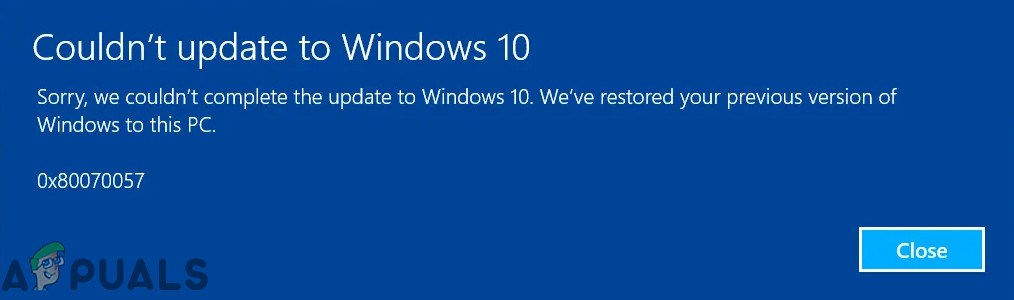
The error is often accompanied by a message that reads, “There were some problems installing updates, but we’ll try again later. If you keep seeing this and want to search the web or contact support for information, this may help – (0x80070057).” Alternatively, the error may present a slightly different message, such as “Something went wrong.”

In this guide, we have compiled several methods that have proven successful for a large number of Windows users. Please review all the methods, as they are regularly updated. Based on experience, it’s possible that you may need to revisit this page due to multiple restarts while implementing the methods. To facilitate quick access, consider emailing the link to this page to yourself or bookmarking it. Before proceeding, disable any proxies (if in use) and consider temporarily disabling your antivirus software.

1. Run an SFC Scan

SFC scan is a built-in Windows utility, that goes through protected system files to identify any incorrect versions or corruption. By executing an SFC scan, your computer independently seeks out and replaces problematic files with the correct versions directly from Microsoft. This process can heal the update mechanism by restoring the integrity of the system files necessary for a successful update application.

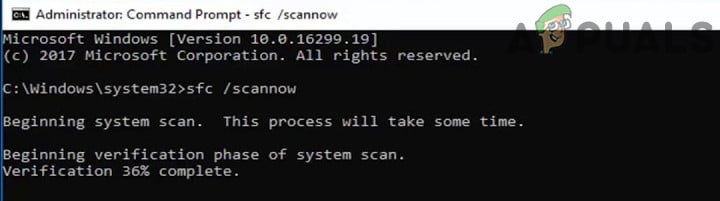
  1. Execute the SFC scan.
    SFC Command
  2. Completely restart your computer and check if the update error has been resolved.

2. Run SFCFix

SFCFix is a specialized utility that tackles complex file corruption issues that SFC cannot resolve. By running SFCFix, it thoroughly scans and repairs critical Windows components, potentially fixing the 0x80070057 error when SFC alone is insufficient. This targeted approach can be the key to restoring update functionality.

Download and launch the SFCFix.exe file. Follow the command prompt instructions by pressing any key until the process is complete.

0x80070057 sfcfix
Run SFCFix.exe

3. Editing the Registry

Editing the registry can address error 0x80070057 by changing registry entries that directly influence Windows Update processes. Tweaking certain keys can remove blockages, allowing updates to download and install without further issues. Remember, this method is like fine-tuning an engine for optimal performance, but with the caution due to the sensitivity of the registry.

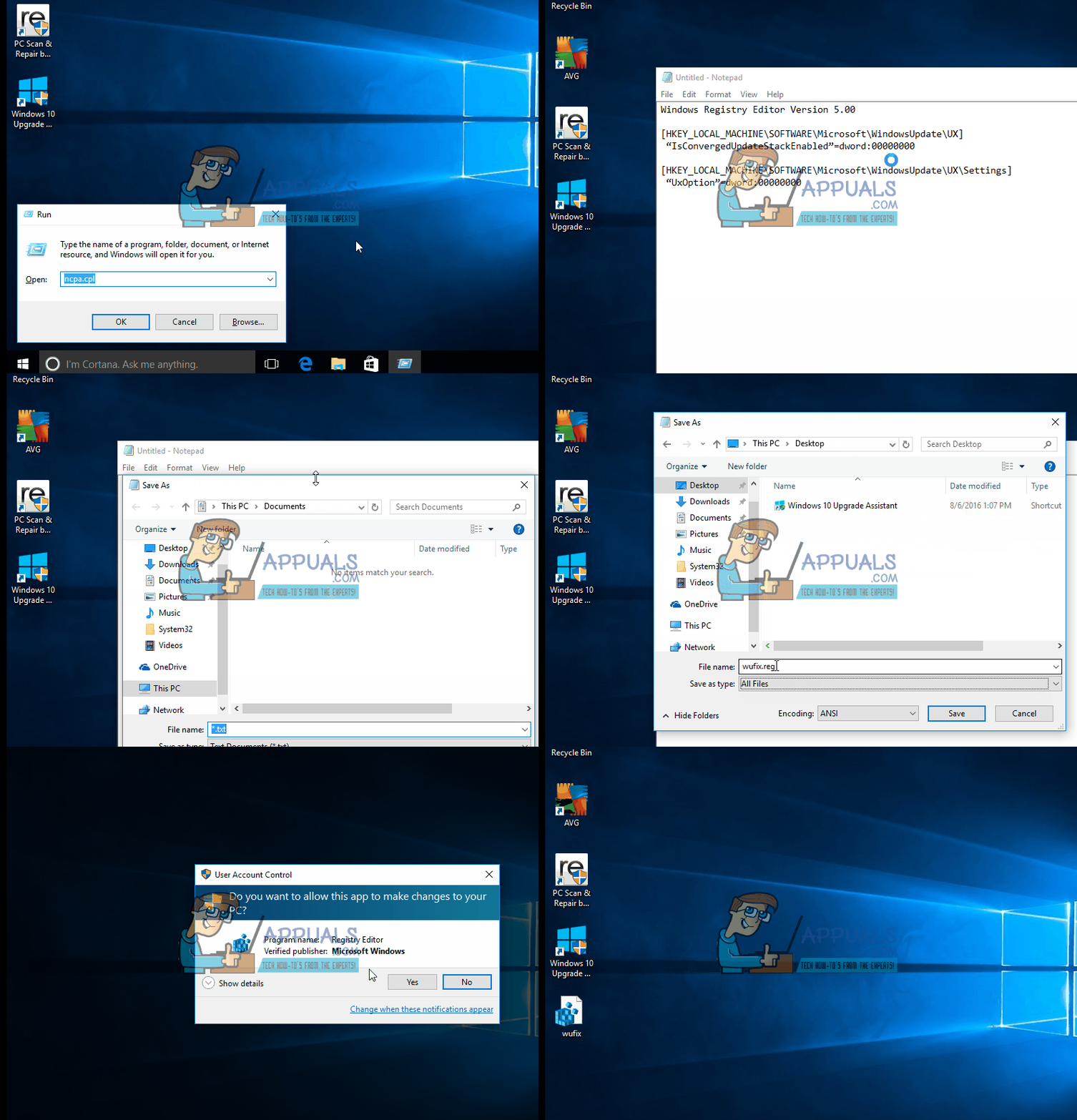
  1. Press the Windows key and R together.
  2. Type in notepad and select OK.
  3. In Notepad, copy and paste the following:
    Windows Registry Editor Version 5.00
    
    [HKEY_LOCAL_MACHINE\SOFTWARE\Microsoft\WindowsUpdate\UX]
    "IsConvergedUpdateStackEnabled"=dword:00000000
    [HKEY_LOCAL_MACHINE\SOFTWARE\Microsoft\WindowsUpdate\UX\Settings]
    "UxOption"=dword:00000000
  4. Go to File → Save As.
  5. Choose the file type as All Files and save this as wufix.reg on your desktop.
  6. Make sure the file is named exactly as wufix.reg because the *.reg extension allows the system to process this file through the registry editor. Execute the file and confirm the prompts.
0x80070057
Save File as wufix.reg

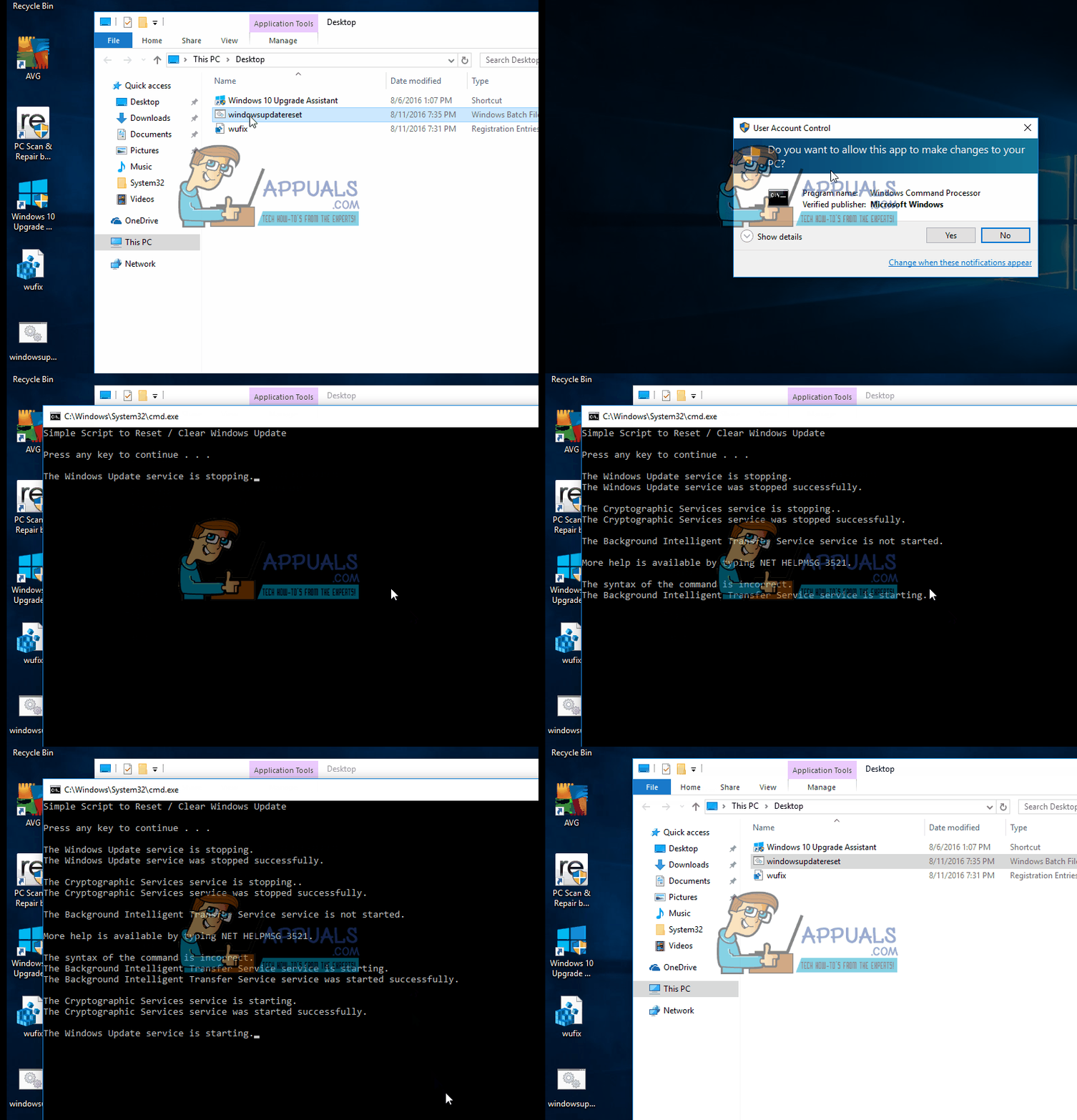
After running the program, verify if it has resolved the issue. If not, download the Windows Update Reset script and run it as an administrator. [Download Here] (Right-click and select ‘Save As’). Save it to your desktop, then right-click on it and choose Run As Administrator.
0x80070057 windows update error
Run Windows Update Script as Administrator

4. Windows 10 Anniversary Update Failing Due to Error 0x80070057

Error 0x80070057 commonly occurs in Windows 10 when the system is unable to verify downloads. This problem often comes after users update from Windows 7 to Windows 10 and encounter updates applied prior to the Anniversary Update. It is plausible that significant corruption within the update store is blocking the Anniversary Update’s installation.

  1. Press the Windows Key and R. Type ncpa.cpl and select OK.
  2. Right-click on your Wireless LAN Adapter or Ethernet LAN Adapter and select Disable. Re-enable the adapter by right-clicking on it after the update verification is complete.

Additionally, following the installation of the Anniversary Update, some users have encountered frequent freezes and crashes on their Windows 10 devices. If this applies to you, refer to the guide: Anniversary Update Crashes.
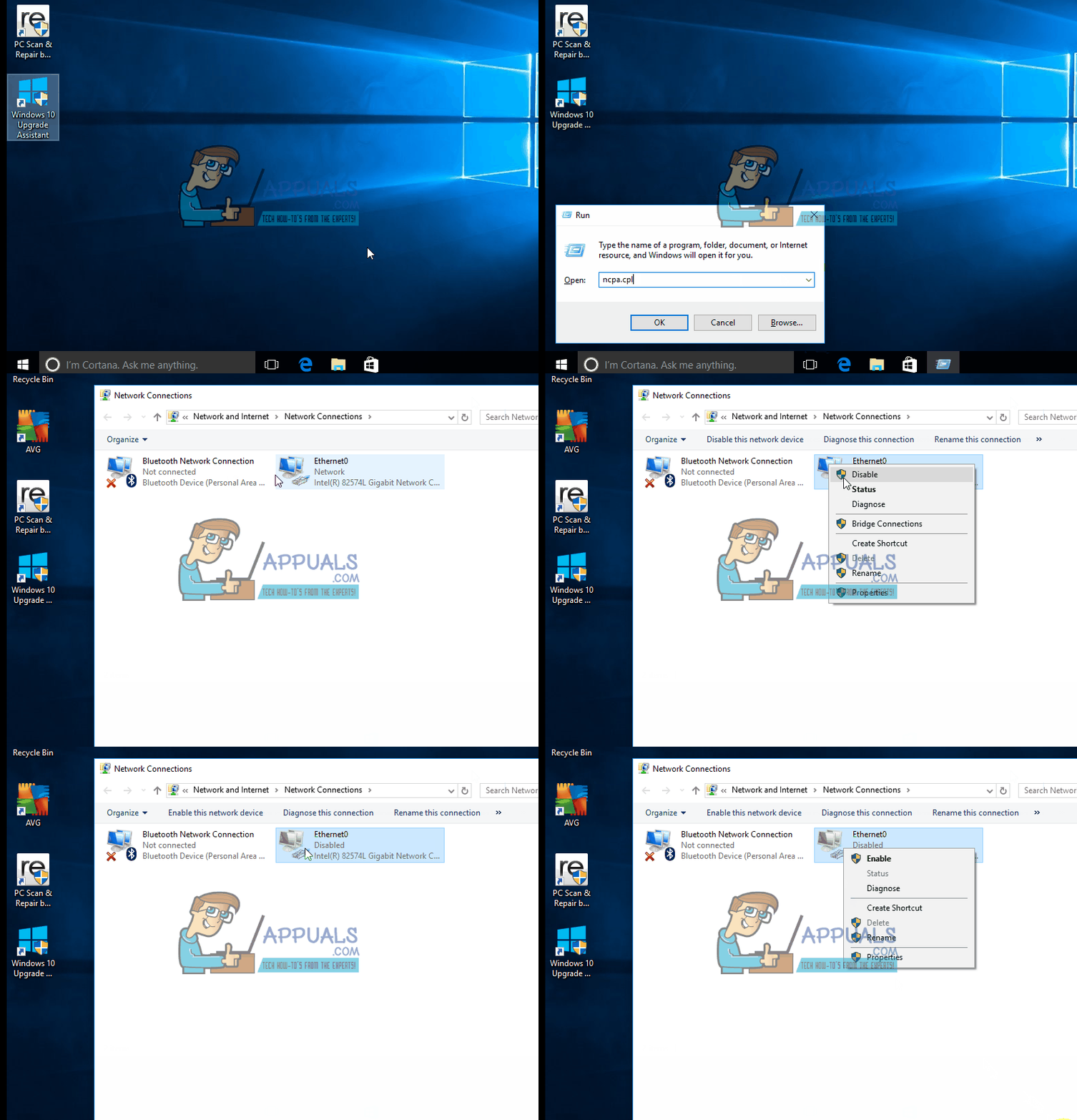
windows 10 error 0x80070057
Disable Ethernet

5. Removing CloudFogger

CloudFogger, designed for encryption and securing cloud files, installs filter drivers that might disrupt Windows system calls needed for these operations. Uninstalling CloudFogger can remove these conflicts, thus smoothing out the update process or system functions that were being blocked.

  1. Press Windows key + R, type appwiz.cpl, and click OK. On Windows 8.1 or later, you can also press the Windows key + X and choose Programs/Apps and Features.
  2. Locate CloudFogger in the list, then double-click it. Follow the uninstaller prompts to complete the process.
  3. Reboot your computer and verify if the problem is resolved.

6. Update through the Microsoft Update Catalog

If Windows Update is unable to install any updates, you can download the updates manually to your computer and install them. Visit the Microsoft Update Catalog and download the latest cumulative update to a location you can access easily.
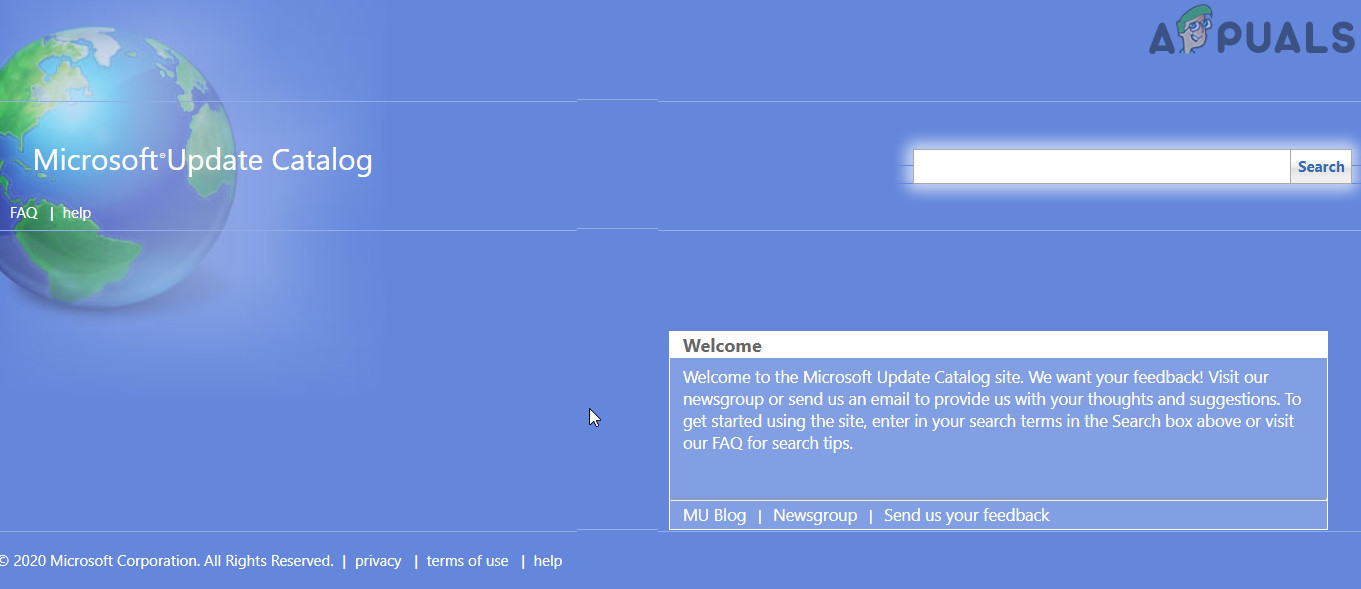
Microsoft Update Catalog

After downloading the update, close all applications, right-click on the update package, and select Run as Administrator. Once the update is installed, perform a complete restart of your computer and check if the issue has been resolved.

7. Update BIOS

If none of the mentioned solutions have helped, updating your BIOS to the latest version may resolve the problem. The BIOS is a critical component in your computer that interfaces with both hardware and software. If your BIOS has issues or is outdated, potentially being incompatible with the current OS version, you might face update errors.

Warning: Proceed at your own risk, as updating the BIOS can be hazardous. Improperly updating your BIOS may permanently damage your system.

  1. Update Lenovo BIOS.
  2. Update HP BIOS.
  3. Update Dell BIOS.

Error 0x80070057 is also related to the “Credential Manager” on Windows 10. If you are encountering this error with the Credential Manager, please refer to the guide on ‘Incorrect Parameter’ for instructions on fixing it. You may also try using the Windows Update Troubleshooter.

ABOUT THE AUTHOR

Kamil Anwar


Kamil is a certified MCITP, CCNA (W), CCNA (S) and a former British Computer Society Member with over 9 years of experience Configuring, Deploying and Managing Switches, Firewalls and Domain Controllers also an old-school still active on FreeNode.

Comments

110
    KA
    karan Jul 7, 2015

    Thanks Kevin. My issue is fixed.

    AA
    aabryant Aug 27, 2015

    I had a really tough time with a client’s Acer Aspire desktop (AM3400-E3552) after a failed Windows 10 Upgrade on 17 Aug 2015.
    The result left her with a flashing on/off desktop (imagine visiting a 1970s strobe-lit disco…on acid). A USB boot and “rollback” to Win7 resulted in no usable system restore points (I wonder why). My client’s system was NOT unduly contaminated by malware (Malwarebytes, Superantispyware, Spybot) but I did have to weed out the multiple competing antivirus packages (Norton AND McAfee and Security Essentials AND a couple of trial packages. REALLY? More antivirus software must be better, right?)
    Ultimately I needed to fix disk errors and do a complete repair install of Windows 7 in order to get a working installation (as judged by SFC /scannow). But Windows Update no longer worked in the sense that it was actually downloading stuff…it was just…looking…kind of like the way you are still waiting for “Windows will notify you when a solution is available”.
    Neither online Mr. Fixit, SURT/CheckSur (system update readiness tool KB947821) or the Windows Update Diagnostic tool alone were able to completely solve the problem, although CheckSur provided useful clues from log files. It takes time to run…Task Manager was my constant companion to verify that something was actually going on.
    I also became a fan of the very dubious-sounding but really nice software called “Windows Repair” by Tweaking.com, which is just a nicely-bundled selection of existing system tools with a thoughtful interface…this freeware is a keeper. Windows Update SHOULD have worked after all these processes. But it didn’t.

    In the end, because I am a stubborn man, I happened upon the registry fix described above and elsewhere. It’s working. I’m up to update #124 of 188…I think I’ll wind up making about $2/hr on this job. But the client gets her computer back.
    Thank you for creating a place for solutions.

    Reply
      MP
      Massimiliano Princigalli Nov 4, 2015

      Now it’s fixed. But I applied Fix more than one time

        KA
        K. Arrows Author Nov 4, 2015

        Thank you for letting me know.

    K@
    K@ppa Sep 11, 2015

    Thank you very much. Worked successfully.

    SH
    Sh4sh Sep 28, 2015

    Thank you man, this seems to work just fine. Kudos to you

    AO
    Alejandro Ortiz Oct 14, 2015

    I followed all the steps but my Windows Update continues to fail. When it starts to search for an update it never finish searching and searching.

      KA
      K. Arrows Author Oct 15, 2015

      Can you tell me what the error number is?

        AO
        Alejandro Ortiz Oct 16, 2015

        When I run the Windows Update Diagnostic, it says that he can’t repair the error 0x80070057 ( 2015-10-15- T – 09_31_27 )

          KA
          K. Arrows Author Oct 16, 2015

          Please post windows update logs on pastebin.org and share the link here.

          AO
          Alejandro Ortiz Oct 16, 2015
          KA
          K. Arrows Author Oct 17, 2015

          We need to see the windows update logs. File contains the text only.

    MP
    Massimiliano Princigalli Oct 17, 2015

    Hi Kevin, I followed all steps you have described, but it’s always fail. I also use another time Fix Microsoft Windows Update Issues (https://support.microsoft.com/en-us/gp/windows-update-issues/en-hk) after using your procedure but I received the same error for it.

    That are tails rows from WindowsUpdate.log => http://pastebin.com/kgqP1k94

    but it seems don’t write any rows again, when it’s searching any update. I was just purging Windows Update Directory (C:WindowsSoftwareDistributionDownload).

      KA
      K. Arrows Author Oct 18, 2015

      Can you retry with firewall disabled?

    AB
    AbdulazizAbdulrahman Oct 18, 2015

    Thanks Kevin a good solution .

    JW
    Jeong Wonil Oct 18, 2015

    I’ve tried all the steps but after I run the “wufix.reg”, and pressed ‘ok’, it said it cannot bring the file in. It also says “some of the data were not registered. Either some keys are opened by system or other processes, or you do not have access to do it”

      KA
      K. Arrows Author Oct 18, 2015

      If you can post a screen shot or type me the exact message in your next reply; i will then be able to investigate easily.

    RC
    Ru Cyb Oct 25, 2015

    unfortunately, it didn’t work….

      KA
      K. Arrows Author Oct 25, 2015

      How old is the PC? And are you sure you created the correct registry file?

    TZ
    Talal Zoabi Nov 2, 2015

    I followed all, and created the file successfully but the updates problem remains!!

    after shutting down, updates start, and when turning on again it’s showing the message:

    “configuring windows updates failure reverting changes”

      KA
      K. Arrows Author Nov 2, 2015

      Have you tried turning the updates off from Windows Updates and then rebooting?

        TZ
        Talal Zoabi Nov 2, 2015

        I did yesterday!! the machine now can start normally, but what about not having updates anymore ?!

          KA
          K. Arrows Author Nov 2, 2015

          One of the update is clearly not compatible. If you can check the update logs; you will see which one. Exclude that one and manually install others with the KB article #.

          TZ
          Talal Zoabi Nov 2, 2015

          there are almost 450 updates which there status is Failed, some of them are important and the others are recommended.
          what do you suggest in this case ?

          KA
          K. Arrows Author Nov 2, 2015

          What’s the reason it is showing in the update logs?

          TZ
          Talal Zoabi Nov 2, 2015

          I don’t really know !!
          here is a screenshot of some entries of the log.. https://uploads.disquscdn.com/images/3204bab3cadd9dd93c4661ea24fb6fb9de0b8e2931f6587e50974238564b95df.jpg

          KA
          K. Arrows Author Nov 2, 2015

          Click Start, and then click Run.
          In the Open box, type windowsupdate.log, and then click OK.
          Upload the logfile to http://www.wikisend.com and provide me the download link to it.

          TZ
          Talal Zoabi Nov 2, 2015
          KA
          K. Arrows Author Nov 2, 2015

          Go to computer, right-click on your HDD and select Properties.

          Go to Tools, under “Error-checking” click “Check now”, and in the little box that comes up, put a checkmark in both boxes, then reboot. It will run when it reboots, and will take hours to run, depending on how big your drive is. When it gets through, open an elevated command prompt (type command into the Start menu search box, then right click on “Command prompt” when it comes up and select “Run as administrator”). Type in sfc /scannow, then hit Enter, and let that run. It may take a couple of hours. Then manually download and install http://www.microsoft.com/en-gb/download/details.aspx?id=3132 (after that; try running the update again).

          TZ
          Talal Zoabi Nov 2, 2015

          all steps done as you mentioned,

          updates were installed and configured successfully 😉

          mission accomplished 😉 THANKS A LOT

          KA
          K. Arrows Author Nov 2, 2015

          Welcome. 🙂

          TZ
          Talal Zoabi Nov 2, 2015

          So now, what was the problem?
          and what did you discovered in the file “windowsupdate.log” ?

          KA
          K. Arrows Author Nov 3, 2015

          Log stated that update KB947821 was stuck.

    BA
    Bagel Nov 6, 2015

    http://wikisend.com/download/153750/WindowsUpdate.log

    Having a similar issue to Talal, think you could help out?

      KA
      K. Arrows Author Nov 6, 2015

      Thank you for asking Bagel. I can definitely help you with this but i would request you ask a question on http://equestions.net to keep it separate from this post; as it will be a couple of steps to troubleshoot it.

    CO
    Courtney Nov 21, 2015

    Tried all of your suggestions, and still having the same problem. Will upload windowsupdatelog to the website as you’ve suggested Thanks!

    BW
    Bill Walters Nov 24, 2015

    Tried everything I know to do, still fails to update, I will upload the file to the posted web address, Thanks for caring!

      KA
      K. Arrows Author Nov 24, 2015

      I’ll check the logs and will update you there.

    DM
    Daniel Moyer Dec 5, 2015

    I downloaded the Windows Update Reset script and hit ¨save as¨ it saved as a .bat file and right clicking on it does not give the option to run as administrator. Here is the paragraph in question:

    After the program runs check to see if it fixes the issue; if not then download the Windows Update Reset script and run it as administrator. [Download Here] (Right click and choose Save as). Save it to your Desktop, then right click on it and choose Run As Administrator.

    Can you help?

      KA
      K. Arrows Author Dec 5, 2015

      Open a notepad, and paste this code into it. Save the file as BAT, then right click and choose “Run As Administrator” make sure you’re user account is the administrator account

      @ECHO OFF
      echo Simple Script to Reset / Clear Windows Update
      echo.
      PAUSE
      echo.
      attrib -h -r -s %windir%system32catroot2
      attrib -h -r -s %windir%system32catroot2*.*
      net stop wuauserv
      net stop CryptSvc
      net stop BITS
      ren %windir%system32catroot2 catroot2.old
      ren %windir%SoftwareDistribution sold.old
      ren “%ALLUSERSPROFILE%application dataMicrosoftNetworkdownloader” downloader.old
      net Start BITS
      net start CryptSvc
      net start wuauserv
      echo.
      echo Task completed successfully…
      echo.
      PAUSE

      Reply
        DM
        Daniel Moyer Dec 5, 2015

        Before I continue trying to fix the Windows Update problem, I need to give you the whole picture. Maybe I need to ask this as a new problem in equestions.

        My user account is the Admin account on this laptop that my daughters also use. For some time I have had problems loading programs, once downloaded it wouldn’t let me install them because it said I needed an Admin account. I got around this by moving the file from the download folder to my user account folder (I think, or maybe the programs folder). The files would then install.

        Yesterday I wanted to install AVG AntiVirus and PC TuneUp and I couldn’t. Moving the files didn’t work. So, I created another Admin account (a suggestion I found online). It was able to install the programs. However, upon switching to the new Admin account I got a notice saying:

        “C/windows/system32/config/system profile/desktop Refers to a location that is not available.”

        The account had a black desktop with only the recycle bin icon. Later, while trying to solve the Windows Update problem I was unable to switch to the new Admin account, I got a message that “The User Profile Service service failed, User profile can not be loaded.”

        I deleted and recreated the account but still got the same message about the user profile.

        I started the computer in safe mode and created an admin account. It worked but still with the desktop problem. Right clicking on an executable file now give the option to run as Admin. (An option I do not have on my normal account even though it says it is the Admin account).

        I do not want to do anything else until you advise me where to start!!!

        Thanks for any help you can provide. If we need to change this to a new forum, no problem.

        Dan

          KA
          K. Arrows Author Dec 5, 2015

          What it sounds like is that the user profile appears to be corrupt. It can be fixed, briefly by doing the following.

          i) Restart in Safe Mode. (You already know how to.)

          ii) Login to the Admin Account (You already know how to)

          iii) Create a new admin user (you’ve already done this, i am not sure which method but use the ones mentioned below) (see this: http://appuals.com/best-guide-add-user-using-command-line/ )

          iv) Run SFC Scan and Repair Component Store ( In command prompt as admin, type sfc /scannow wait for it to finish, after it has finished and if it reports corruption, then in the same window type, Dism /Online /Cleanup-Image /RestoreHealth )

          v) Run the Batch File as stated above.

          vi) After logging into new admin account created in step (iii); delete old accounts, but keep files.

          vii) Create new accounts, for the people who previously had them, via Control Panel.

          viii) Copy their data only, not executables from c:users.

          make sure, you choose different usernames then the system previously had.

          DM
          Daniel Moyer Dec 8, 2015

          Reference the link to create a new admin user (http://appuals.com/best-guide-add-user-using-command-line/)

          The graphic shows this: C:Users>net user (see photo below)

          My command prompt shows C:Windowssystem32>

          I did step #1 (net user /add [username] [password]) at the C:Windowssystem32> and it says the command completed successfully.

          Then I realized maybe I should have done

          “cd..” twice to get to the C:> prompt

          and then “cd Users” to get to C:Users>

          and then (net user /add [username] [password])

          I followed the instructions to create a new admin user from C:User>

          When I try to logon I get “the user profile service failed the logon: User profile cannot be loaded”

          In fact the new admin account I created myself (that would start but without a “desktop”) now also refuses to start and gives the same error as above. I will delete all the new admin accounts and start from scratch!

          Dan

          KA
          K. Arrows Author Dec 8, 2015

          Please email me. Kevinarrows@appuals.com

          DM
          Daniel Moyer Dec 10, 2015

          Kevin, I am trying to run this and from “Dism /Online /Cleanup-Image /RestoreHealth” I am getting “The restorehealth option is not recognized in this context. For more information, refer to help.

          That may be getting in over my head!

          KA
          K. Arrows Author Dec 11, 2015

          Did sfc /scan report back any issues?

          DM
          Daniel Moyer Dec 11, 2015

          Yes it said there was corruption but it was not able to fix. That’s when I tried to run dism and got the context error.

          KA
          K. Arrows Author Dec 11, 2015

          This appears to be severely corrupted. Before a reinstall, i would suggest a repair install. http://appuals.com/best-guide-startup-repair-in-windows-7/

    VE
    Veewhyextee Dec 5, 2015

    Hi! I managed to rectify the error 0x80070057 by following your steps and seems like it worked. However, another error had occured it says “The semaphore timeout period has expired” and the error code for this one seems like its “error 0x80070079” any idea how to fix this problem? Thanks in advance!

    Edit: error 0x80070057 is still occurring.

      KA
      K. Arrows Author Dec 5, 2015

      Did you run the update reset script? For semaphore error, see steps here. http://stackoverflow.com/questions/13999439/the-semaphore-timeout-period-has-expired

    R
    Ron E. Dec 25, 2015

    OK, so this PC (w/ Windows 7) has been having update errors for quite a while. When I first started looking at it:

    The Windows Update polling (i.e. checking for new updates) takes an extremely long time (i.e. hours).

    In the MS-Windows Update window it said the “Most recent check for updates: Never” this never updated even though update attempts were made.

    There were lots of updates available for download about 42 required and 8 optional.

    When I made an attempt to update, on the screen the progress bar would move left to right but below the “0 MB & 0%” would not budge one bit.

    I ran the “WindowsUpdateDiagnostic.diagcab” which fixed everything except: “Windows Update Error 0X80070057(2015-12-25-T-12-29-57A)”

    A Google Search found: http://appuals.com/best-fix-steps-fix-error-0x80070057/

    I saved and ran wufix.reg (which I found out later, didn’t take)

    I had to open Regedit.exe & added the wufix.reg in myself.

    Now after a reboot Windows Update actually downloads the file (or at least appears to); but now it won’t install the file.

    I’m still getting the Windows Update errors out with 80071A91, which is the main error I have been seeing this whole time.

    Reply
      KA
      K. Arrows Author Dec 25, 2015

      Please run chkdsk by following steps here: http://appuals.com/run-chkdsk-reboot/

        R
        Ron E. Dec 27, 2015

        Ok, I ran ChkDsk and it’s still a no-go.

        When I run Windows Update it takes forever to “error out” and it tells me the error is 80071A91. I click on the link to get help with the error.

        Next, in the Windows Help and Support page the second item in the list is
        the Windows Update Troubleshooter.

        The Troubleshooter gives me the 80070057 error.

          KA
          K. Arrows Author Dec 27, 2015

          Please see update history to see which one of the update has failed. Also try this:

          1. Click Start, click All Programs, click
          Accessories, right-click Command Prompt, and select Run as administrator.

          2. In the Command Prompt window you will need to type the following, and press
          ENTER:

          fsutil resource setautoreset true C:

          3. Note:
          You will need to replace the C: with the drive letter that Windows Vista is installed on.

          4. Restart your computer, and then attempt to install the failed update(s).

    MG
    Mrs L A Gibb Dec 30, 2015

    Hi, I have been having problems with windows 7 updates for quite a while now. Windows updates would allow one or two updates and the rest will fail. I have found this discussion through research. I have followed the instructions that has been outlined at the bottom of this discussion to the letter. I found it has only partly worked with two problems I have; it corrected one and not the the other. The problems I have is Service registration is miss or corrupt, this has now been fixed,. but the other 0X80070057(2015-12-30-T-03_02_29P) has not. I have noticed that inside the brackets has changed since the part fix. before the fix; it had been inside the brackets (2015-12-30-T-02_04_59P). I am a person when something is working that is my computer the whole of it leave it alone and just update. it is the windows update that there is a problem with. any suggestions please

      KA
      K. Arrows Author Dec 30, 2015

      Hello

      Unfortunately, this doesn’t gives a clue since what you’ve posted here is very unique. Can you post this as a seperate question on http://equestions.net/ask and i’ll be able to assist you remotely.

      Thanks

    CD
    Craig Duran Jan 8, 2016

    Hi Kevin, I ran the wufix.reg file but when I looked into the newly created keys (UX and Settings) under the Data column it says “value not set”. I believe commenter Ron E. below had the same experience. Sorry I’m ignorant about how to manually setup the keys. Could you give me direction on how to manually put the values inside the UX and Settings folders?

      KA
      K. Arrows Author Jan 8, 2016

      Hi Craig, double click on those two keys and enter 0 as value data.

    AM
    Amit Feb 22, 2016

    Very helpful guide. Thanks

    DP
    David Pattison Feb 27, 2016

    Kevin,

    I would like to say BRAVO!!!

    I was at my ends wits and just about to throw in the towel and reinstall Windows 7.

    I was at Step 6 in your guide, tried the windows update registry fix, rebooted and still couldn’t update.

    I downloaded your script in the next step and ran with admin privs with success. It took a long time for Update check to finish but I just let it run as I was at the end of my night and to my surprise, it found updates and then let me download and install them.

    All’s well, that ends well.

    Thank my man!! You really know your stuff.

    Be well,

    David Pattison

      KA
      K. Arrows Author Feb 27, 2016

      Thanks

    MA
    mandatoryone Feb 28, 2016

    Thank you Kevin, worked a treat!

    SH
    Shivyansh Mar 6, 2016

    I am haing problem in upgrading my windows7 pc to windows 10. Its showing some error. When I ran the windows update diagnostic tool, it showed the 0x80070057 error. I did all the steps which you said but I’m getting the error shown in the screenshot. Please help.

      KA
      K. Arrows Author Mar 7, 2016

      Please try upgrading using the media creation tool.

    EC
    ECCe Mar 9, 2016

    I reached step 6 in the 4th method.
    But Windows 7 doesn’t run bat files (they are opened in the notepad instead).
    Any alternative?

    Thanks.

      KA
      K. Arrows Author Mar 9, 2016

      copy the text, paste it in notepad, click File -> Save As, save the file as anyname.bat and set file type to all files, and then right click it and choose run as administrator.

    BB
    Bill Barnes Mar 22, 2016

    Kevin, after struggling on and off for months trying to get Windows Update to work, but putting off a re-install of Windows 7 as the last resort, I finally seem to have had some success following your above steps. I got to Step 3, SURT ran but returned a message “This update is not for your computer”. I tried Windows Update after that, it showed that there were, indeed, updates available (I had seen this before but installation always stayed at 0KB, 0%). After a short time it started to install, magic before my eyes. It completed and the remaining updates also completed after a restart. Fingers crossed from now on. I have bookmarked your site and will recommend it to others.

      KA
      K. Arrows Author Mar 23, 2016

      Thanks

    AX
    AxelMK Apr 1, 2016

    Hi Kevin,

    After performing methods 1 through 4 several times, Windows update is still stuck at “Checking for updates” with 100% cpu load of netsvc.
    I have uploaded my WindowsUpdate.log to <http://wikisend.com/download/967390/WindowsUpdate.log>.
    Could you have a look at it?
    I really appreciate it, because I’m desparate.
    Thank you very much in advance.

    Best regards
    Axel

      KA
      K. Arrows Author Apr 2, 2016

      Have you tried disabling your firewall and antivirus and then redoing the steps?

        AX
        AxelMK Apr 2, 2016

        Hi Kevin,

        Thank you for the reply. I did not before but I did it now. And guess what? The result is the same bad one, no success :-(.
        Attached is the result of the Windows Update Reset script.
        I have uploaded my WindowsUpdate.log to

        Any recommendation?
        Thanks again for your timely reply.
        Best regards
        Axel

          KA
          K. Arrows Author Apr 3, 2016

          I would suggest you post the issue on sysnative.

          AX
          AxelMK Apr 3, 2016

          Thank you, Kevin, I will do so.
          Axel

    HE
    heather Apr 16, 2016

    Hi Kevin,

    So after a few days of trying everything I can find on the internet I still can’t get m windows 7 to update to windows 10. I’ve gone through all the steps here and still to no avail. Each one completes successfully, but when I attempt to update to windows 10 I still get the same 80070057 error message. Any advice for where to go next?

    Thank you in advance for any help you might be able to offer,

    Heather

      KA
      K. Arrows Author Apr 16, 2016

      I would suggest that you post to sysnative.com, they will be able to assist you with specific and complicated update related issues.

    ID
    IDISQUSSTUFF Apr 29, 2016

    So I was able to get my windows 7 x64 working only after doing ALL the steps listed above, including the last 2 registry edit and command line reset. Thanks Kevin for putting this together. I am not sure why Microsoft cannot fix this themselves, this computer is not a unique setup..

    I will add as a small addition to above (that may not do anything different than above) I did early on try Microsoft’s window’s update troubleshooter (Google that name or WindowsUpdateDiagnostic.diagcab) but it did not work without further steps here. I am not sure if that does something extra that is not listed above, so others who are still having trouble may want to try that as well.

    Reply
      KA
      K. Arrows Author Apr 29, 2016

      Thanks

    JP
    John Pelletier Apr 29, 2016

    !!!!!! I have been working on fixes for multiple days now and step 4 finally fixed it and cleared it so updates are downloading!!!! Thanks so very very much for putting this together. For reference the windows update diagnosis tool gave me the error 0x80070057.

      KA
      K. Arrows Author Apr 29, 2016

      Thank you for letting me know.

    LU
    Lululleuh May 12, 2016

    Hey!

    I have error 0x80070057 (detected with windows update diagnostic) and I’ve tried steps 1,2 and 4, without success.

    My problem is that I can’t do the step 3. After downloading SURT the green bar just goes on and one (looking for updates for my computer) and it won’t install, even after waiting like 10 minutes. Does someone knows why I can’t run it and if there is a way to do it?

    Many thanks

      KA
      K. Arrows Author May 13, 2016

      does sfc scan reports any corruptions?

        TH
        TheChavert May 13, 2016

        Hey it’s Lululleuh!

        No it says nothing is currupted.

        TH
        TheChavert May 13, 2016

        Hey it’s Lululleuh

        No it doesn’t report any corruption

          KA
          K. Arrows Author May 13, 2016

          Can you run SURT again and let it run for a couple of hours until it finishes?

          TH
          TheChavert May 13, 2016

          Ok I will try that

          TH
          TheChavert May 13, 2016

          Sorry it is in french… the scan says nothing is currupted, and the diagnosis shows the error and I just saw that another one appeared that wasn’t here before (problem installing recent updates).

          Should I retry everything in the order, from step 1 to step 4? (don’t know if it matters)

          KA
          K. Arrows Author May 13, 2016

          try it.. and if it won’t fix the issue then just do a reinstall. let me know if you need help reinstalling.

          TH
          TheChavert May 18, 2016

          Hello,
          I finally fixed the problem by upgrading to windows 10 :/ thanks for the help anyway!

          TH
          TheChavert May 13, 2016

          I managed to run it and it installed a fix. But windows update doesn’t find any updates and 0x80070057 is still there.

          KA
          K. Arrows Author May 13, 2016

          Please post a screen shot here.

    HA
    Hammy May 23, 2016

    Hey there,

    I have completed steps 1,2,4 but can not get step 3 to work and the update issue is still not resolved. All steps 1,2,4 turn up no issues. Step three download was completed and commenced install. Shows following and wont change. Will let this run all night but am hoping you have a possible fix for this. Thanks.

      KA
      K. Arrows Author May 25, 2016

      This can be fixed but its better to reinstall Windows if these steps did not work because troubleshooting this error will take days.

    GI
    Global Systems Inc Jun 5, 2016

    Hi, thanks for the info, but after going through all steps nothing works. I start out with a 80070002 error and after I do all your steps above I end up with a 8024A000 error

        GI
        Global Systems Inc Jul 24, 2016

        Thanks for the link! Apologies for not replying sooner.

    PS
    Paula Cristina Santos Jul 1, 2016

    Hi Kevin,
    I have done step 1 and 2, but in step 2 since I don’t have a windows DVD, SFCFix is not able to fix a currupt file. The log file says:
    AutoAnalysis::
    CORRUPT: C:Windowswinsxsamd64_microsoft-windows-i..lified-chinese-core_31bf3856ad364e35_6.1.7601.17514_none_763763505e93084bPINTLGB.IMD

    SUMMARY: Some corruptions could not be fixed automatically. Seek advice from helper or sysnative.com.
    CBS & SFC total detected corruption count: 1
    CBS & SFC total unimportant corruption count: 0
    CBS & SFC total fixed corruption count: 0
    SURT total detected corruption count: 0
    SURT total unimportant corruption count: 0
    SURT total fixed corruption count: 0
    AutoAnalysis:: directive completed successfully.

    How can I solve this?
    Thx
    Paula

      KA
      K. Arrows Author Jul 1, 2016

      This will need detailed and further diagnosis, i would suggest you open a thread on sysnative.com as the experts there are skilled with fixing windows update related errors.

        PS
        Paula Cristina Santos Jul 1, 2016

        Thanks! The amazing thing is that dispite this problem now the windows update is working!

          KA
          K. Arrows Author Jul 1, 2016

          Welcome.

    TK
    TKW Jul 3, 2016

    Hi Kevin, THANKS VERY MUCH for your instructions. After days and hours trying other means, my computer now seems to download updates. I ran through all 4 methods (skipped SURT because it has been ineffective many times before). The wufix.reg worked and I did not need download windows update reset. I tried other webpages before finding yours. I wish there was someway to get your page to the front.

    NE
    Neil Jul 11, 2016

    Ok ive tried methods 2 and 3 here is the error i had after running SFCfix?

    NE
    Neil Jul 11, 2016

    I have then tried method 5 and got this error

      KA
      K. Arrows Author Jul 12, 2016

      It looks like your windows is severely corrupted. I would suggest you back up all your data, and re-install Windows because of the number of errors you are getting.

        NE
        Neil Jul 12, 2016

        How would you suggest I do this? I have an external hard drive 500GB

          KA
          K. Arrows Author Jul 12, 2016

          Is your windows running on an external drive?

      KW
      Kamil K. Wawrzyszko Aug 3, 2016

      I got this error. I changed permissions on the reg folder (Advanced, changed owner).

    NE
    Neil Jul 11, 2016

    Hi Kevin

    Ive tried methods 2 and 3 after SFC gave me errors I ran the SFCfix which then gave me this error

    NE
    Neil Jul 11, 2016

    I then tried method 5 and got this

    NE
    Neil Jul 11, 2016

    finally tried the windows update reset script and got this. So far nothing has worked in getting my windows updates to work again please help

    JI
    Jim Jan 22, 2017

    Thx