SOLVED: How to Fix Error 0x80004005

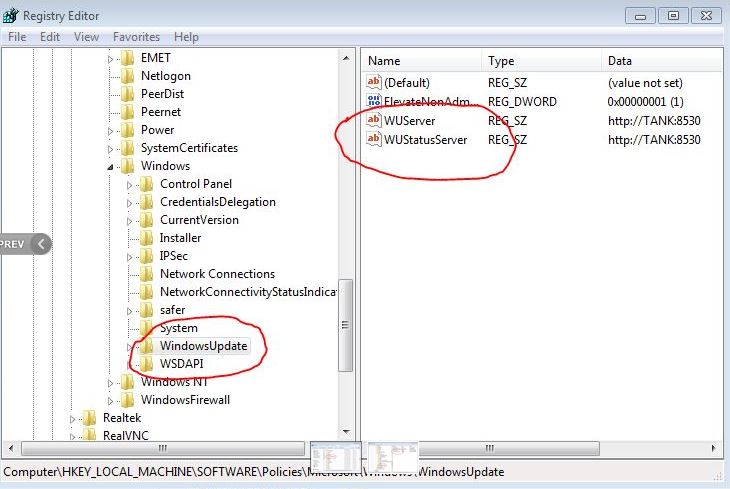
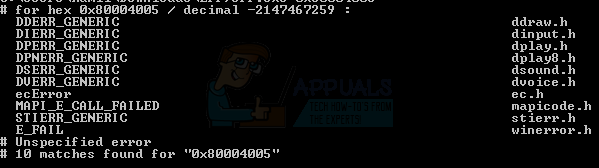
Error 0x80004005 is translated as an unspecified error and is usually seen when the user cannot access Shared Folders, Drives, Virtual Machines, Microsoft Account changes, and also when the Windows Updates fail to install. Troubleshooting this issue depends on where and how the error message is being originated from, and since the error does not specifically tell you what the actual problem is, even in the Microsoft Books it is defined as “Unspecified Error.”
2016-08-14_020735

Error 0x80004005: Causes and Solutions

1. Error 0x80004005 on a VirtualBox

It usually is the registry key that causes issues.

Hold the Windows Key and Press R. Type regedit and Click OK.

regedit1-1

Go to the following registry path:

HKEY_LOCAL_MACHINE\SOFTWARE\Microsoft\Windows NT\CurrentVersion\AppCompatFlags\Layers

"C:\Program Files\Oracle\VirtualBox\VirtualBox.exe"="DISABLEUSERCALLBACKEXCEPTION"

If this key exists, delete it and try again. If deleting the key does not help, try disabling your antivirus.

If it still doesn’t work, then:

– Uninstall your antivirus, test it, and then reinstall it.
– Replace your antivirus with another such as AVG or Security Essentials.

2. Error 0x80004005 when accessing a Shared Drive/Folder

We will use regedit to create a LocalAccountTokenFilterPolicy Value.

Hold the Windows Key and Press R.

regedit1-1

Type regedit and click OK.

Navigate to the following path in regedit:

HKLM\SOFTWARE\Microsoft\Windows\CurrentVersion\Policies\System

For a 32-bit system, create a new DWORD value called LocalAccountTokenFilterPolicy.

For a 64-bit system, make a QWORD (64-bit) called LocalAccountTokenFilterPolicy.

In either case, set the value to numeric 1 (meaning on), and remember to click OK.

Usually, the LocalAccountTokenFilterPolicy value gets created before you have a chance to set the data value; no problem, just double-click and modify the data from 0 to 1.

Once this is done, restart your computer and see if you can now access the shared drives or folders.

If the problem persists after following all of the steps above, then:

– Hold the Windows key and Press R, and type hdwwiz.cpl to open Device Manager.
– Select Network Adapters, and then click View from the menu and choose View Hidden Devices.
– Expand Network Adapters, and if you see Microsoft 6to4 Adapters, then delete them all by right-clicking and selecting Remove Device.

Once done, reboot your PC and then test.

3. Error 0x80004005 when Installing Windows 7 or Windows Server 2008 R2 SP1

Download and Run CheckSUR from here. After the System Update Readiness Tool has finished checking the components on the system, run an SFC Scan.

4. E_FAIL (0x80004005) When Setting Up VirtualBox on Ubuntu

If you are trying to allocate more than 3GB of RAM to the VM, then make sure that the host is a 64-bit system, and true hardware pass-through is allowed (VT-x).

4.1 Failed to open a session for the virtual machine

On certain sessions on a VM (VirtualBox), you may see the following error.
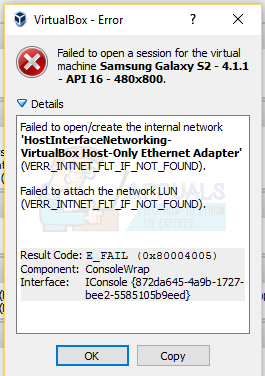
failed to open create the internal network E_FAIL 0x80004005

To fix the issue, Open Network Center and choose Change adapter settings. Right-click your VirtualBox host-only adapter and select Properties. Enable “VirtualBox NDIS6 Bridget Networking Driver” if it’s disabled, and test again. VirtualBox should start fine now. If not, Enable VirtualBox NDIS6 Bridget Networking Driver for every network adapter you have (Ethernet, WiFi…) and always uncheck the NDIS6 and test.

4.2 Uninstall Microsoft 6to4

To solve this issue, you should uninstall the Microsoft 6to4 devices from your task manager. Keep in mind that you might not see these devices because they are hidden by default. So, you will only see these once you turn on the Show hidden devices option.

Here are the steps for deleting these devices:

  1. Hold the Windows key and press R
  2. Type devmgmt.msc and press Enter

  1. Click View and select Show hidden devices

  1. Double-click Network Adapters
  2. Right-click the Microsoft 6to4 device and select Uninstall. Repeat this step for all the Microsoft 6to4 devices you see in the list.

Once you are done, restart your computer. Your issue should be solved once you log in to your Windows again.

5. Error 0x80004005 When Extracting Files

If you’re getting this error while trying to extract or open .zip or .rar files, you have a few potential fixes at your disposal.

5.1 Try a different extracting utility

First, make sure the file is not password protected and your extractor utility is not equipped to handle password-protected files. You can do this by downloading another utility like 7Zip and see if you are asked to provide a password when trying to open or extract the same .zip or .rar archive.

5.2 Method 2: Disable the real-time protection of your AV

Another possible cause is an overprotective third-party security suite. Under certain conditions, several third-party antivirus suites will block the extraction of zipped files. If you’re using an external third-party antivirus instead of the default security suite (Windows Defender), you can try temporarily disabling the real-time protection or shielding of your third-party AV and see if the issue is resolved.

In the event that you no longer encounter the 0x80004005 error, consider uninstalling your current third-party suite and opting for a different security suite. If you want to avoid other conflicts like this one, consider using the built-in security solution.

5.3 Re-registering jscript.dll and vbscript.dll

If the first two possible solutions have failed, let’s try a different approach. Some users have managed to get it fixed by re-registering a couple of DLL (dynamic link libraries) files in an elevated Command Prompt. To be more precise, this method will attempt to fix the issue by re-registering jscript.dll (a library used when running JScript) and vbscript.dll (a module containing API functions for VBScript). Here’s a quick guide on how to do this:

  1. Press Windows key + R to open up a Run box. Then, type “cmd“, press Ctrl + Shift + Enter, and click Yes at the UAC (User Account Control) prompt to open an elevated Command Prompt.
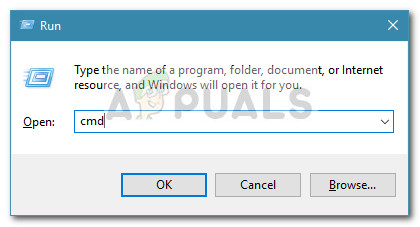
  2. In the elevated Command Prompt, type the following command and press Enter:
    regsvr32 jscript.dll
  3. In the same elevated Command Prompt, type the following command and hit Enter:
    regsvr32 vbscript.dll
  4. Restart your computer and see if you’re able to open or extract .zip or .rar files without receiving the 0x80004005 error.
ABOUT THE AUTHOR

Hamza Mohammad Anwar


Hamza Mohammad Anwar is an intermediate JavaScript web developer with a focus on developing high-performance applications using MERN technologies. His skill set includes expertise in ReactJS, MongoDB, Express NodeJS, and other related technologies. Hamza is also a Google IT Certified professional, which highlights his competence in IT support. As an avid problem-solver, he recreates errors on his computer to troubleshoot and find solutions to various technical issues.

Comments

62
    HA
    Haraap Jul 7, 2015

    This registry fixed the issue.

      SA
      Support AC Apr 12, 2018

      its not working …. till the same issue…

    NE
    nen Jul 9, 2015

    spotted

    IL
    Ilanh888 Sep 12, 2015

    I am still getting the Error 0x80005005 while trying \[server_name], using \[IP_address] can access the shared server but will disappear as I close Explorer

      KA
      K. Arrows Author Sep 12, 2015

      Enable NETBios and make sure the DNS is correct for your domain.

      Reply
    AS
    Andy Shum Nov 23, 2015

    Thanks this solved my problem. I have a new Dell XPS 13 with Windows 10 and after a system restore yesterday because of bluetooth issues it suddenly cannot locate or connect to my Seagate network drive. I followed your steps on sharefolders for 64 bit and after restart it’s back to normal. But my bluetooth woes still persists.

      KA
      K. Arrows Author Nov 24, 2015

      Please submit bluetooth issue as a new question on http://eQuestions.net/ask

    GE
    Geert Dec 3, 2015

    I have this problem when trying to access a shared disk on a Vista machine from a Windows 7 machine.
    Do I have to apply your fixes on the Vista machine (the one that is to be accessed) or on the Windows 7 machine (the one that is trying to access the other one)?

      KA
      K. Arrows Author Dec 3, 2015

      The source, where the folders are located.

        LM
        Lincoln Maurice Sep 24, 2016

        The source, in my case, is a debian-based NAS, not a Windows machine. :/

    AN
    Anthony May 22, 2016

    I’m not able to go past c:Program Files

      KA
      K. Arrows Author May 22, 2016

      Hold the Windows Key and Press E. You should see it there.

    VL
    Vlad Oct 17, 2016

    This error shows up when I try to burn a disk image to a cd. Any advice?

    LE
    Lena Jan 21, 2017

    I don’t have ‘Layers’

    MN
    Marko Naaber Apr 19, 2017

    this happens when i try to extract some files

    DW
    Dominik Wagner May 14, 2017

    Had a Problem when copying game files from a shared device to another folder in the same device, adding the FilterPolicy registry entry solved it, thanks for your guide!

      KA
      K. Arrows Author May 15, 2017

      welco.

    CS
    CS Jul 3, 2017

    This does not help me. I have tried to copy a Plug-in into the Audacity Plug-in folder, and none of these scenarios are the situation I’m in.

    MI
    mimiminite Aug 2, 2017

    Note: This error also comes up if you copied files and delete them before trying to paste the files to a new folder.

    Reply
    T#
    Temporary User #1242 Sep 28, 2017

    this does not match the scenario i’m in

    AL
    alienfromzog Jan 29, 2018

    Thanks so much for this. Was really struggling to solve this problem. Removing Microsoft 6to4 adaptor did it. Brilliant.

    VA
    VaguelyCanadian Feb 27, 2018

    This doesn’t help with my issue either, the clearing of files stored in multiple locations (In my case clearing all Discord files so I can properly reinstall), perhaps continue to update this post with more solutions as you find them?

      RC
      Ray Connor Mar 5, 2018

      Have you tried creating a new user account and then running discord?

    NO
    Nokocchii Jul 16, 2018

    i’m trying to extract files, what do i do? 🙁

    DP
    Debasis Patro Dec 25, 2018

    This happens when I used the below code to input some data in to a textbox in IE

    IE.Document.All.Item(“login_id”).value = “12345”

    But I am still not get an y solution for this

    KD
    Kevin Dondrea Jan 30, 2019

    Related to the error in VirtualBox. The key did not exist and the AntiVirus was disabled. It works fine in Windows 7 but not in Windows 10. I was curious if the Current User may be the key. It has entries there.

    Not there:
    HKEY_LOCAL_MACHINESOFTWAREMicrosoftWindows NTCurrentVersionAppCompatFlagsLayers
    “C:Program FilesOracleVirtualBoxVirtualBox.exe”=”DISABLEUSERCALLBACKEXCEPTION”

    Current User contains:
    “C:\Program Files\Oracle\VirtualBox\VirtualBox.exe”=”~ RUNASADMIN WIN7RTM”

    TU
    Tushar Apr 23, 2019

    Hey i face this error when updating my win 10 to newer version & while opting for Developer Mode

    SW
    Shane Warren Author Sep 14, 2019
    MS
    Mihai Schiopu Sep 19, 2019

    for me when I press “shift + delete” on some folders that I wanna delete

    SW
    Shane Warren Author Sep 20, 2019

    Right-click on the folder and go to properties and select “Security”. Under group names or the username there should be something abnormal, it means that there might be an abnormal entry such as “875-d$d” or something like that. If there is, click on “Edit” and click on the entry and remove it. Save your changes and try again.

    Reply
    SW
    Shane Warren Author Sep 21, 2019

    Update your windows, according to Microsoft it was an issue with the Adobe flash player in IE and was fixed in an update.

    BO
    benjamin otenyo Sep 29, 2019

    this has not helped so far

    SW
    Shane Warren Author Sep 29, 2019

    Tell me the exact scenario in which this error is triggered. If it is while deleting something try this:
    “Right-click on the folder and go to properties and select “Security”. Under group names or the username there should be something abnormal, it means that there might be an abnormal entry such as “875-d$d” or something like that. If there is, click on “Edit” and click on the entry and remove it. Save your changes and try again.”

    SW
    Shane Warren Author Sep 29, 2019

    Try this if it is occurring while deleting files:
    Right-click on the folder and go to properties and select “Security”. Under group names or the username there should be something abnormal, it means that there might be an abnormal entry such as “875-d$d” or something like that. If there is, click on “Edit” and click on the entry and remove it. Save your changes and try again

    HA
    Hussain alZain Oct 13, 2019

    this happens when i try to delete a specific folder.

      SW
      Shane Warren Author Oct 17, 2019

      Try this:
      “Right-click on the folder and go to properties and select “Security”. Under group names or the username there should be something abnormal, it means that there might be an abnormal entry such as “875-d$d” or something like that. If there is, click on “Edit” and click on the entry and remove it. Save your changes and try again”

        HA
        Hussain alZain Oct 18, 2019

        Under “Security” there is nothing. A massage appears that says: “The requested security information is either unavailable or can’t be displayed”.
        It’s like the folder is not there anymore, but somehow the icon is still there. I can create another folder in same location with the same name, then I can reach the same location by opening either of the two icons.

          SW
          Shane Warren Author Oct 19, 2019

          Try this:
          Open command prompt.
          Type in “cd (location of the folder)” and execute
          type in dir/x and execute
          Note the name of the folder displayed after the

          text
          Type in “rmdir /q /s “Name of the folder”
          Execute and the folder will be deleted

          HA
          Hussain alZain Oct 20, 2019

          This happens:
          “The system cannot find the file specified.”
          Actually the folder name is in Arabic, and the command prompt doesn’t support that. The letters looks like squares with question marks in them.

          SW
          Shane Warren Author Oct 22, 2019

          there should be 2 or 3 names shown in the command prompt. Try any one of them.

          HA
          Hussain alZain Oct 20, 2019

          I found a way to fix the Arabic issue by changing the font, but still:
          “The system cannot find the file specified.”

          SW
          Shane Warren Author Oct 22, 2019

          did you try the command prompt fix?

    LC
    Lauren Crozier Jan 16, 2020

    I’m getting it when trying to transfer a restored file from my server to another folder on the server.

      SW
      Shane Warren Author Jan 18, 2020

      Do u have enough permissions? are you the administrator on the server or is the other server authorized to accept files?

    GL
    Gloops Apr 23, 2020

    I am afraid this does not get me connected to my Vista machine from outside.

      SW
      Shane Warren Author Apr 25, 2020

      can u please elaborate?

    KA
    Kao May 20, 2020

    The error occurs when i try to restore my Documents……I was working on the cmd.exe I saw my document in the directories at the beginning then i was trying to locate a folder i saved when it didn’t come up i went to change the path which was to onedrive in the process i clicked on the my document and clicked move it. Now i can’t find Document on cmd.exe and when i try to restore it in properties i get the error message.

      SW
      Shane Warren Author May 22, 2020

      Clear the temp folder and check again. Furthermore, try to run the Windows Update.

    AS
    Ana Pavik Stefanova Jun 2, 2020

    I bought season 7 of blacklist on microsoft, its asking me to play with Films & TV, I get the error when I try to open and login to the films and TV (and download)… The error says: Sorry, we can’t take you there, and gives the same error code 0x80004005

      SW
      Shane Warren Author Jun 3, 2020

      Reset the Windows store completely and also make sure to try from a new admin account as it might get rid of some registry bugs.

    YE
    Yeah! Jun 6, 2020

    What am i supposed to do when it says the file is password protected?

      SW
      Shane Warren Author Jun 7, 2020

      Go to the site where you downloaded this file from and check if any password is listed for the file.

    DA
    DarkUnity11 Jul 20, 2020

    getting this when trying to instal net framework 3.5 https://uploads.disquscdn.c

      SW
      Shane Warren Author Jul 23, 2020

      Uninstall all versions of Microsoft Visual Redist C++ and then uninstall .NET Framework if there are older versions. After that reinstall them from the oldest to the newest versions and if you are on 64 bit windows, make sure to install both 32bit and 64 bit versions of the software.

      Reply
        DA
        DarkUnity11 Jul 25, 2020

        Im going to try that, thanks!

        DA
        DarkUnity11 Jul 25, 2020

        i uninstalled all versions of C++ and reinstall them again but i cant unistall _net framework because im using Win 10.
        i tried to unistall the update from windows update but i cant, there is no option avaliable to do that. Also tried to fix the inssue by using net framework repair tool and using CC cleaner .dll fix tool but that didnt work too, I will unistall windows and install it again… idk what else i can do. last stance I’ll gonna kill myself haha

          SW
          Shane Warren Author Jul 26, 2020

          Reinstalling should work. Hopefully 😉

    MR
    MrPuzzleBox Jun 12, 2021

    Who has time to deal with the MS-SH!T? I will dance a dance of J0Y on the day that Linux takes the final suffocating SH!T in the mouth of Microsoft’s OS & seals the casket closed before the cremation process begins. Considering that this error is often seen when trying to create an Operating System backup (quite fatal if unfixed), I think my sentiment is appropriate!

    MA
    Maksat Apr 23, 2022

    I used windows explorer to unzip and got the error.
    When I opened the zip file with 7zip, it asked for password (unlike te win explorer) and I didn’t have problem afterwards

    Reply
    Z✓
    Zeke Polaris ✓ᵛᵉʳᶦᶠᶦᵉᵈ Aug 9, 2022

    Umm, do we do this on the VM or on the host machine to fix the VM’s issue?

      MZ
      Muhammad Zubyan Author Aug 17, 2022

      On the VM

        Z✓
        Zeke Polaris ✓ᵛᵉʳᶦᶠᶦᵉᵈ Aug 21, 2022

        Thank you